Universal Extractor is a highly specialized, local desktop utility engineered to deconstruct and unpack data from virtually any type of container format, executable installer, or proprietary archive. While standard file compression tools are limited to everyday compressed folders, this application specifically targets executable installers, disk images, game data archives, and multimedia containers. It allows users to pull files out of an installation package without running the setup process, providing a secure way to inspect software contents or extract a portable variant of an application. By avoiding the standard execution path, users prevent installers from writing temporary files to the system drive or modifying the registry.
System administrators, malware analysts, and technical power users rely on this application as a universal bridge for file analysis. When encountering an obscure executable or legacy disk image, they use this tool to unpack its payload, investigate the internal directory structure, and retrieve individual assets like configuration files or embedded media. It acts as a sandbox alternative, removing the risk of infecting a host machine by strictly isolating extraction from execution. This provides visibility into an update package, allowing administrators to manually extract specific hardware drivers without running bloated manufacturer software suites.
The software solves the logistical headache of maintaining separate unpackers for formats like Nullsoft Scriptable Install System, Inno Setup, or Microsoft Installer packages. Users rely on a single graphical interface to manage extraction logic across hundreds of file signatures. This localized, offline workflow is superior to browser-based extractors. Cloud tools struggle with multi-gigabyte binaries, cannot process proprietary game engines legally, and present data privacy risks when uploading internal enterprise installers. By processing locally, the application ensures data confidentiality, zero latency, and the ability to function entirely offline in air-gapped environments.
Key Features
- Heuristic File Scanning and Identification: Rather than relying on easily spoofed file extensions, the application utilizes deep signature scanning to identify the exact compiler, packer, or compression algorithm. The dedicated Scan Only mode helps analysts determine the correct unpacking engine before any data is processed, handling files that have been maliciously disguised or accidentally renamed.
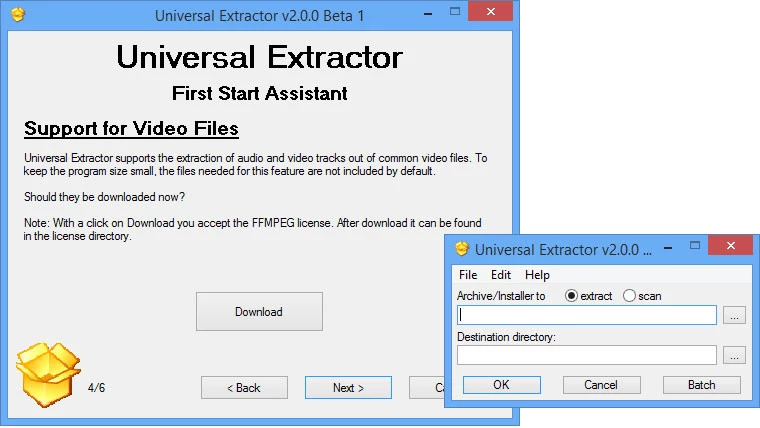
- Automated Batch Extraction: Users can queue installers, disk images, and multimedia files simultaneously through the batch mode interface. By feeding a master directory into the application, the system systematically unpacks every supported container into separate subfolders without requiring constant input, saving manual directory management during large-scale audits.
- Deep Context Menu Integration: The software embeds itself directly into the Windows graphical shell, offering configurable cascading right-click menus within File Explorer. Users can select commands like UniExtract to Subdir directly from their desktop, bypassing the main graphical interface for rapid unpacking of executable payloads.
- Multimedia Audio and Video Ripping: Moving beyond simple archives, the extraction engine includes specialized scripts to demux audio streams, video tracks, and graphical assets from proprietary multimedia containers. This allows users to retrieve raw media elements from packaged game engine archives without needing a dedicated video editing suite.
- Self-Contained Portable Operation: The application operates independently of native operating system libraries, housing necessary extraction binaries and configuration files within a single working directory. Users can place the entire utility on a removable flash drive, carrying a forensic unpacking toolkit that leaves no registry footprint on the host machine.
- Encrypted Archive Management: When dealing with password-protected containers, the utility supports automated password list feeding to streamline the decryption process. Users can supply a plain text document containing commonly used decryption keys, and the application will automatically cycle through the list to unlock the payload without tedious manual typing.
How to Install Universal Extractor on Windows
- Download the official Windows package from the developer's public repository or a trusted software distribution mirror, ensuring you select the appropriate architecture for your operating system.
- Extract the downloaded package into a dedicated directory on your local storage drive, or execute the setup file if you are utilizing the compiled installer package.
- Launch the main executable to trigger the initial configuration assistant, which sets up the global preferences and unpacker paths for the host machine.
- Review the system integration page to enable or disable File Explorer context menu shortcuts, noting that enabling these shell extensions will require administrative privileges to write the necessary registry keys.
- Define the default extraction behavior in the preferences menu, specifying whether unpacked files should be placed in the current directory, a dedicated subfolder, or a specific temporary processing path.
- Configure the status box preferences to determine how much technical output, debugging information, and progress logging is displayed during complex extraction routines.
- Confirm your settings and finalize the configuration assistant to open the main application window, readying the software for offline file analysis and immediate unpacking tasks.
Universal Extractor Free vs. Paid
Universal Extractor operates as a free, open-source project maintained by volunteer developers. Released under the GNU General Public License, the core application, interface, and extraction scripts remain freely available for both personal and commercial use. There are no paid tiers, premium licenses, or hidden subscriptions. Users access the complete suite of unpacking engines, batch processing tools, and forensic scanning modes immediately upon installation.
Because the project relies on open-source development, it does not employ trial periods, export limitations, or artificial watermarks. The business model is non-commercial, meaning developers do not sell support contracts or restrict the software behind paywalls. The tool bundles third-party command-line utilities, all governed by freeware licenses, ensuring the package can be deployed in corporate environments without software auditing compliance issues.
Users can support the project through code submissions on public repositories, by translating the interface, or submitting bug reports with detailed debug logs. This community-driven approach ensures extraction engines are continuously updated to handle new installer formats as they emerge, bypassing the financial overhead of commercial software.
Universal Extractor vs. 7-Zip vs. PeaZip
When dealing with standard compressed archives like ZIP, RAR, or TAR, 7-Zip provides a highly streamlined and efficient workflow that integrates tightly with the operating system. 7-Zip excels at creating archives and offers strong native encryption, making it the standard choice for users who need to compress files for storage or transmission. However, 7-Zip's ability to unpack executable installers is limited primarily to a few specific formats like certain Nullsoft or Inno Setup executables, and it frequently fails when confronted with complex, multi-layered installation routines, proprietary game engine packages, or obfuscated payloads that require heuristic analysis.
PeaZip offers a much more visually appealing and user-friendly interface for managing archives, acting as a complete file manager with extensive support for over two hundred file formats. It provides excellent tools for batch compression, secure file deletion, and archive conversion, making it a strong competitor for everyday desktop users who want a polished alternative to native Windows tools. Despite its extensive format support, PeaZip is still fundamentally an archiving utility; it lacks the specialized forensic decompilers, custom unpacking scripts, and dedicated installer bypass engines required to tear down software setup packages or retrieve raw assets from compiled multimedia containers.
Universal Extractor is the better fit when the primary goal is strict extraction and forensic analysis rather than file compression. While it cannot create archives, it far surpasses both 7-Zip and PeaZip in its ability to deconstruct executable files, disk images, and proprietary installers without executing them. Users should choose Universal Extractor when they need to inspect the internal components of a software update package, bypass a mandatory setup wizard, extract a localized portable format of an application, or retrieve embedded media from an unrecognized file container.
Common Issues and Fixes
- Antivirus false positives blocking execution. Because the application bundles dozens of specialized decompilers, heuristic scanners, and unpackers used to disassemble executable files, security software frequently flags the installation directory as suspicious. To fix this, manually add the application's root directory to your antivirus exclusion list or Windows Defender allowlist to prevent the extraction engines from being quarantined during operation.
- Context menu entries failing to appear in File Explorer. Shell integration can sometimes fail to register properly during initial setup, especially if the application was not launched with administrative privileges. To resolve this, open the main program, navigate to the preferences menu, uncheck the context menu options, apply the changes, and then re-enable them to force the software to rewrite the necessary Windows registry keys.
- Extraction failing due to long file paths. When unpacking deeply nested archives or complex installers, the resulting directory structure can exceed the maximum path length limit enforced by the Windows operating system, causing the process to abort. Move the target file to a shallow directory, such as the root of your primary storage drive, and extract the contents into a briefly named folder to avoid hitting the character limit.
- Format not supported errors on newly released software. Proprietary game engines and commercial installer creators frequently update their packing algorithms, which can temporarily break compatibility with the local extraction scripts. If an extraction fails, check the built-in updater to ensure you have the latest definitions, or use the Scan Only mode to identify the exact compiler and manually verify if the specific format revision is supported in the current software iteration.
Version 2.0.0 RC 4 — November 2025
- Added support for various new installer formats, including Smart Install Maker, BitRock InstallBuilder, and InstallForge.
- Added extraction capabilities for Unity packages (.unitypackage), Asar (Electron) archives, and split files (.001, .002, etc.).
- Added support for multiple disk image formats such as .cso, CloneCD (.gdi, .mds), ExFat images, and .chd files.
- Added handling for forensic file formats, Windows thumbnail caches, and encoded files (Base64, BinHex, MacBinary).
- Added option to disable the system tray icon and introduced support for High DPI displays.
- Improved support for Inno Setup installers and Ren'Py archives.
- Fixed a bug where Inno extraction would fail if the "Delete additional files" option was enabled.
- Fixed an issue causing DLL files to be incorrectly renamed to .exe when "Fix file extensions" was active.
- Fixed errors related to file extensions containing uppercase letters and "File not found" issues after file renaming.