qBittorrent operates as a dedicated desktop BitTorrent client designed to manage peer-to-peer file sharing and handle large data transfers across decentralized networks. Built upon the C++ Qt framework, the application processes magnet links, parses metadata, and executes protocol encryption directly on the local machine. Users rely on this utility to download heavy public domain datasets, distribute open-source media, and maintain exact seeding ratios across multiple trackers simultaneously. By keeping all transfer processes local, the software provides total control over active swarm connections, tracker communication, and local disk writes without requiring intermediary cloud servers or browser extensions.
Unlike simplified file-sharing tools or basic browser downloaders, a specialized desktop torrent manager provides granular control over network traffic and local storage allocation. Users can assign specific upload and download bandwidth limits to individual torrents, configure alternative rate limits for different times of the day, and force connections to route through specific network adapters. This level of technical configuration proves necessary for users operating under strict home network quotas, managing local storage constraints, or maintaining continuous background seeding activity. The client also supports advanced protocol features like Distributed Hash Table (DHT), Peer Exchange (PEX), and Local Peer Discovery, ensuring that file transfers can initiate and complete even if the centralized tracker server goes offline.
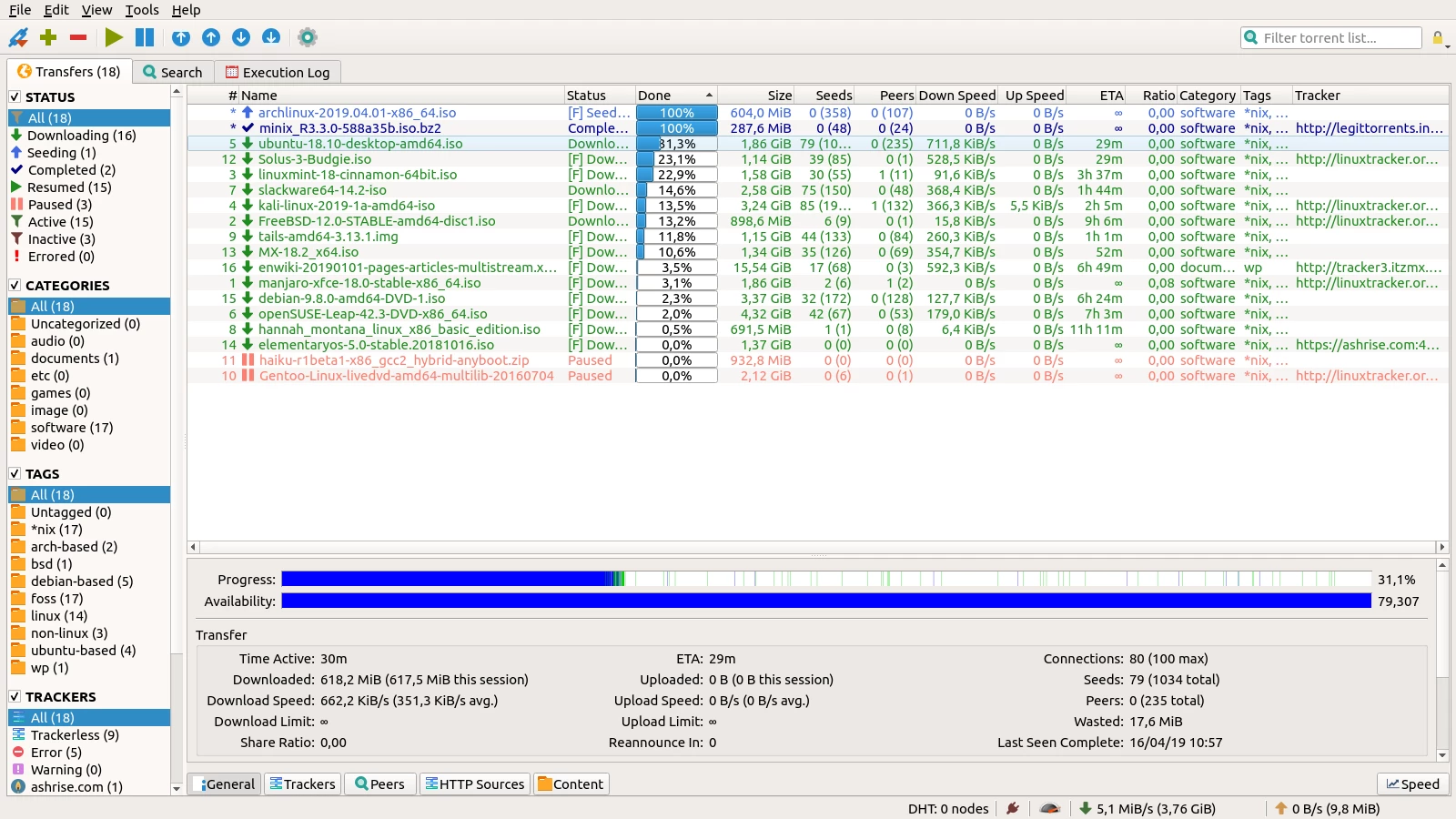
The interface design relies on a traditional, function-first layout that presents a detailed category tree alongside extensive swarm metrics. Users view real-time statistics regarding swarm health, individual peer connection speeds, dropped pieces, and active port status. By strictly avoiding bundled adware, sponsored search bars, and deceptive promotional prompts, the application maintains a highly efficient footprint on system memory and CPU cycles. All functional panels, from the active transfer queue to the execution log, are designed to give users immediate, unclouded visibility into exactly how their network bandwidth is being utilized.
Key Features
- Integrated Torrent Search: The application utilizes Python-based search plugins to query indexing sites directly from a dedicated tab in the user interface. Users enter search terms, apply category filters such as audio or video, and sort the aggregated results by active seeders or file size, eliminating the need to visit external tracking websites.
- Advanced RSS Reader and Downloader: A built-in RSS feed parser enables automated tracking of newly published files. Users input standard RSS feed URLs and configure automated downloading rules using Regular Expressions (Regex) so the client actively monitors the feed and automatically pulls new metadata files matching the defined rules.
- Sequential Downloading: Users can right-click any active transfer to enable sequential downloading, forcing the engine to request file pieces in strict numerical order rather than the standard random distribution method. An additional toggle prioritizes the first and last pieces of a file, allowing media players to preview files before the entire transfer completes.
- Bandwidth Scheduling: The network configuration menu includes a detailed time-based scheduler for managing bandwidth consumption. Users define a secondary set of alternative rate limits and highlight specific days and hours on a grid interface where these limits automatically apply, keeping the local network clear during active work periods.
- Network Interface Binding: A critical security setting allows users to bind all peer-to-peer traffic strictly to a specific physical or virtual network adapter. If a user selects their VPN network interface in the advanced settings menu, the application routes all packets through that adapter exclusively and halts transfers immediately if the connection drops.
- Categorization and File Management: The software provides a tag and category system that automatically dictates where completed files are saved on the local disk. When a magnet link is assigned to a specific category upon addition, the client downloads the data directly to the corresponding folder, preventing desktop clutter.
- Ajax-based Web User Interface: For remote management, the client hosts a built-in web server that replicates the desktop graphical user interface within any standard web browser. After defining a listening port and authentication credentials, users can log in remotely to monitor active queues, pause transfers, and adjust bandwidth limits from another device.
How to Install Qbittorrent on Windows
- Download the official Windows executable installer package directly to your local storage drive.
- Execute the downloaded file to launch the setup wizard, prompting you to select your preferred interface language from a dropdown menu.
- Review the GNU General Public License terms presented on the screen and click the agreement button to proceed with the installation.
- Select the specific components you wish to install, ensuring the checkboxes for associating the client with .torrent files and magnet URIs remain checked for proper browser integration.
- Choose the destination directory on your primary or secondary drive, or leave the default Program Files path unchanged, then click the install button to extract the core binaries.
- Wait for the extraction process to finish writing files and registering necessary system paths, then click finish to close the installer and launch the application.
- Upon the initial launch, review the legal disclaimer regarding file sharing responsibilities and click agree to access the main interface.
- Respond to the Windows Defender Firewall prompt that appears, ensuring you grant the application permission to communicate over both private and public networks so incoming peer connections function correctly.
Qbittorrent Free vs. Paid
qBittorrent is structured entirely as a free and open-source project distributed under the GNU General Public License. There are no commercial tiers, subscription plans, or premium unlock codes. Every user downloads the exact same executable file, which contains the complete, unrestricted feature set. Advanced capabilities such as the integrated search engine, network interface binding, and remote web management are available immediately without requiring account registration or payment.
Because the development is maintained by a decentralized group of volunteers and funded exclusively through community donations, the application operates without a profit motive. This business model directly impacts the user interface by keeping it completely devoid of display advertisements, sponsored software bundles, or pop-up prompts urging users to upgrade. The interface remains clean and focused solely on file transfer management.
Unlike several commercial alternatives that restrict file checking speeds, limit the number of active torrents, or hide protocol encryption settings behind a paywall, this open-source client enforces no artificial limitations. Users are constrained only by the physical capabilities of their local hardware, their storage drive write speeds, and the bandwidth provided by their Internet Service Provider.
Support and troubleshooting are handled through public channels rather than a dedicated commercial help desk. Users experiencing technical issues rely on official bug tracking repositories and community-driven forums for assistance. This ensures transparency in development, as all code changes, issue reports, and feature requests remain publicly visible and auditable by the user base.
Qbittorrent vs. uTorrent vs. Deluge
uTorrent operates as a commercially managed client that relies heavily on a freemium business model. Its standard free version displays banner advertisements and frequently prompts users to install bundled third-party applications during the setup process. While uTorrent offers a familiar interface and a lightweight background footprint, users must pay an annual subscription for its Pro tier to remove ads, gain access to integrated media playback, and utilize built-in malware scanning features.
Deluge is an open-source alternative that utilizes a daemon-client architecture, separating the core downloading engine from the graphical user interface. This structure makes Deluge highly adaptable for remote server setups and headless operations, but it relies heavily on external third-party plugins to achieve basic functionality like RSS support or advanced scheduling. While Deluge is highly customizable, it often requires more initial configuration and technical maintenance to achieve a complete desktop experience.
Users should choose qBittorrent when they require a feature-complete, ad-free desktop client that works right out of the box without requiring paid upgrades or extensive plugin management. It provides a superior workflow for individuals who want unified access to advanced tools like RSS automation, integrated search, and strict network interface binding in a single application window. It is the logical choice for users migrating away from commercial clients who refuse to compromise on core functionality or endure intrusive advertising.
Common Issues and Fixes
- Integrated search engine fails to load results. The built-in search functionality requires an active Python environment to run its background scraper scripts. Download the official Python installer for Windows, ensure the option to add Python to the system PATH is checked during installation, and restart the torrent client to activate the search plugins.
- Downloads remain stalled at zero percent. The client cannot establish connections to other peers due to a strict local firewall or router NAT configuration. Open the application preferences, navigate to the Connections menu, verify the assigned listening port, and configure port forwarding on your network router to allow incoming TCP and UDP traffic on that specific port.
- Web User Interface rejects remote connections. The built-in web server is configured by default to only accept connections originating from the local machine. Navigate to the Web UI settings tab, change the listening IP address from the local loopback to your machine's specific local IP or a wildcard, and verify the Windows Firewall is allowing traffic on the designated Web UI port.
- Network interface binding disconnects unexpectedly. Virtual Private Network adapters often change their internal hardware IDs during software updates, causing the torrent client to lose track of the assigned interface. Open the advanced settings, reselect the correct VPN adapter from the network interface dropdown list, and restart the application to re-establish the bound connection.
- High disk usage causes transfer speeds to drop. Downloading extremely large files at high internet speeds can overwhelm standard mechanical hard drives, causing a disk cache overload. Go to the advanced settings menu and manually increase the disk cache size limit to allow the application to hold more downloaded pieces in system memory before writing them to the physical drive.
Version Latest — 2026
- Added a new mechanism to back up resume data, safeguarding download states against corruption.
- Improved the status bar to display the current external IP address for easier monitoring.
- Added support for the "eXact Length" parameter when creating or handling Magnet URIs.
- Improved the WebUI by enabling customization of the default date and time format.
- Fixed multiple issues with tracker URL management and enhanced torrent content widget interactions.