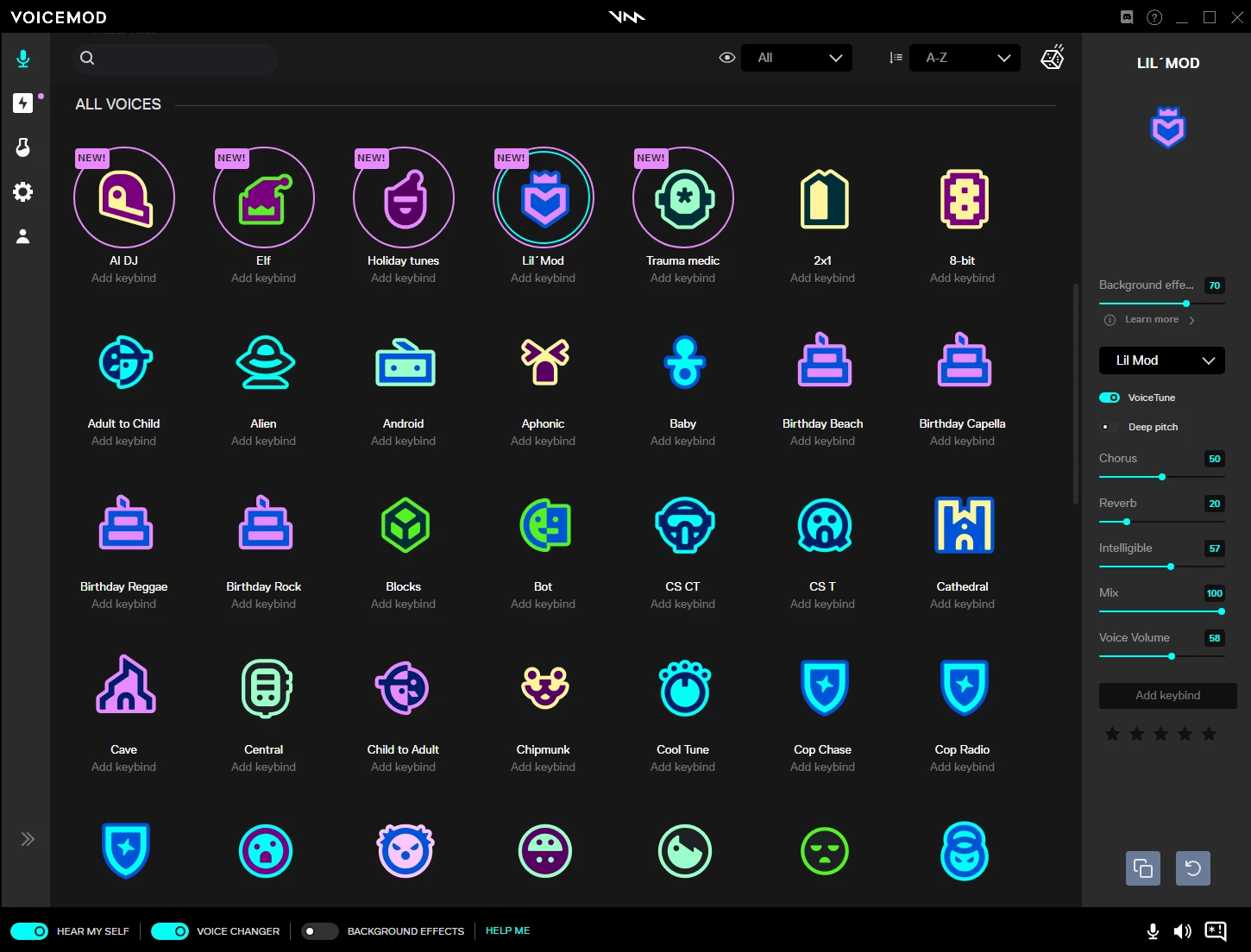
Voicemod Pro operates as a real-time audio processing environment, built to intercept standard microphone input and apply complex digital signal processing (DSP) before routing the audio to target applications. Instead of relying on post-production rendering or basic browser-level pitch shifting, this desktop application installs a dedicated virtual audio driver at the system level. This routing method allows the software to feed modified audio directly into desktop chat clients, multiplayer video games, and broadcasting software. By presenting itself to the operating system as a standard hardware microphone, it bypasses the need for complex internal routing tools or physical loopback cables.
The application serves livestreamers, tabletop roleplaying game masters, video producers, and casual gamers who require immediate, zero-latency audio manipulation. Unlike lightweight browser tools that process audio in the cloud and return a downloadable file, local desktop processing ensures that the delay between speaking and output remains imperceptible. This local rendering proves critical for live interactions in software like Discord, OBS Studio, TeamSpeak, and Zoom. Users rely on the application not just for voice masking, but as a centralized soundboard to trigger audio cues, background ambiances, and complex vocal chains during live broadcasts. Tabletop game masters utilize the environmental loops to set the mood during campaigns, mapping different locations to different audio profiles.
Upgrading to the premium tier entirely alters how the application operates. The free tier strictly restricts users to a small, constantly changing pool of presets. The unlocked desktop environment removes these artificial caps, providing direct access to the entire audio library, unrestricted soundboard slots, and the custom Voicelab interface. This transitions the application from a novelty voice changer into an active audio mixing desk, allowing users to build complex sonic identities from the ground up by combining pitch shifters, vocoders, and dynamic filters.
Key Features
- System-Level Audio Routing: The application relies on a proprietary virtual audio cable known as the Voicemod Virtual Audio Device. Because this driver operates at the Windows kernel level, any desktop application that accepts microphone input can receive the processed audio without additional plugin configurations or complicated audio routing matrices.
- Voicelab Custom Creator: Instead of relying entirely on factory presets, the Voicelab module provides an empty canvas for audio engineering. Users can chain together specific DSP blocks, including pitch shifters, delays, high-pass filters, vocoders, and stereo choruses. Each block features adjustable sliders for dry/wet mix and intensity, allowing for highly specific vocal outputs.
- Hardware Integration and Control: The interface connects directly to external macro pads, most notably Elgato Stream Deck. Users can assign specific voices, mute toggles, and soundboard clips to physical buttons, allowing them to trigger audio changes mid-broadcast without tabbing out of their current full-screen application.
- Advanced Soundboard Profiles: The application manages audio files in customizable profiles, accepting standard MP3 and WAV formats. Users can assign global keyboard hotkeys to specific audio clips, adjust the playback volume per track, and decide whether a clip stops immediately upon releasing the key or plays through to completion.
- AI-Driven Voice Models: Beyond standard pitch and frequency modulation, the software utilizes artificial intelligence to map the user's vocal cadence onto entirely different synthetic voices. This requires significantly more CPU overhead but results in highly realistic voice transformations that mimic specific speech patterns rather than just altering the pitch.
- Background Effects and Ambient Loops: Individual voice profiles can include assigned background audio that triggers automatically when the user speaks. This allows a user to apply a radio-filter effect to their voice while simultaneously broadcasting an ambient static or helicopter loop beneath their speech, creating a complete audio scene.
How to Install Voicemod Pro on Windows
- Download the official Windows installer from the vendor's website and launch the executable file with administrator privileges.
- Accept the End User License Agreement and specify the destination folder, which defaults to the standard Program Files directory on your primary Windows drive.
- Allow the installer to unpack the application files and configure the Voicemod Virtual Audio Device. Windows User Account Control may prompt you to approve this driver installation, as it requires system-level audio permissions.
- Restart your Windows machine if the installer requests it. Rebooting ensures the Windows audio spooler fully registers the new virtual hardware.
- Launch the application and complete the mandatory account login process using a Discord, Twitch, Google, or Apple account. The software requires this authentication step to retrieve your license status and synchronize custom profiles.
- Configure the initial audio setup within the application window by selecting your physical microphone as the input device and your primary headphones as the output device.
- Open your preferred communication software, navigate to its voice settings, and change the default microphone device to "Voicemod Virtual Audio Device (WDM)". Leave your output device set to your standard headphones to prevent audio feedback loops.
Voicemod Pro Free vs. Paid
The software operates on a freemium model that strictly divides casual users from dedicated broadcasters. The base tier does not cost money, but it heavily restricts the available toolset. Free users receive access to a small rotating selection of voice profiles that change daily. Furthermore, the free soundboard limits users to a handful of custom audio slots, and the Voicelab custom voice creation module is entirely locked. This tier serves primarily as a hardware test to ensure the virtual driver interacts correctly with your specific microphone and system setup.
Purchasing the Pro license removes all arbitrary software limits. The upgrade instantly unlocks the entire catalog of over one hundred voice filters, including the heavier AI-driven models. It also removes the soundboard slot restrictions, allowing users to build massive libraries of MP3 and WAV files categorized by specific profiles. More importantly, the paid tier grants full access to the Voicelab interface, enabling users to engineer their own voice filters from scratch using the internal DSP blocks.
The vendor offers the Pro tier through multiple billing structures. Users can subscribe on a monthly or quarterly basis, which requires recurring payments to maintain access to the unlocked features. Alternatively, the developer offers a one-time perpetual license, often marketed as a lifetime purchase. Because the license binds to the social or email account used during checkout rather than the physical hardware, users can retain their Pro status when building a new PC or reinstalling Windows, provided they log in with the original credentials.
Voicemod Pro vs. MorphVOX Pro vs. Clownfish Voice Changer
MorphVOX Pro focuses heavily on deep audio engineering and roleplay immersion rather than quick streamer aesthetics. It includes advanced background noise cancellation and highly tunable vocal tract modifications. Because MorphVOX Pro relies less on heavy machine learning models, it often runs better on older hardware or CPU-constrained setups. However, its interface feels significantly more dated, and it lacks the modern, grid-based soundboard layout and direct hardware macro integrations that broadcasters expect.
Clownfish Voice Changer takes a radically different approach to audio routing. Instead of installing a distinct virtual microphone, Clownfish installs itself directly over the existing audio driver of your physical microphone. This means it applies effects system-wide without requiring the user to change input devices in Discord or OBS. It is completely free and exceptionally lightweight. However, Clownfish offers only basic pitch shifting and rudimentary effects, lacking entirely the complex Voicelab tools, custom soundboards, and AI voice cloning found in premium alternatives.
Voicemod Pro remains the superior choice for users who need a highly interactive, modern mixing desk specifically built for live broadcasting and gaming. The inclusion of native Stream Deck support, a massive database of community-generated sounds, and the constantly updated AI voice models make it highly responsive for content creators. While Clownfish wins on simplicity and MorphVOX wins on low-overhead vocal tract tuning, Voicemod Pro provides the best workflow for managing complex audio cues on a live stream.
Common Issues and Fixes
- Problem description: The Voicemod Virtual Audio Device driver fails to install during setup. This often happens if Windows strictly enforces driver signature checks or an antivirus blocks the system-level modification. Open the Windows Device Manager, select Add Legacy Hardware, and manually browse to the application's installation directory to force the virtual audio cable driver to install.
- Problem description: Voice output sounds robotic, popping, or distorted. Audio artifacting usually points to a sample rate mismatch between your physical hardware and the virtual driver. Open the Windows Sound Control Panel, locate both your physical microphone and the virtual device, and ensure both are set to 48000Hz to prevent the audio spooler from struggling with live conversion.
- Problem description: Pro license features disappear and the application reverts to the free tier. The software relies on cloud synchronization to verify your purchase. If the token expires or desynchronizes, navigate to the settings menu, sign out completely, and sign back in using the exact Discord, Twitch, or Google account utilized during checkout.
- Problem description: Users hear a severe echo or delayed feedback loop while speaking. This occurs when you route the virtual microphone back into your own headset through Windows settings. Open the Windows sound properties for the virtual device, navigate to the Listen tab, and ensure the listen toggle is completely unchecked. Additionally, disable the internal hearing monitor toggle within the application's main interface.
- Problem description: Heavy CPU usage causes games to stutter when using AI voices. The AI models require significant processing overhead compared to traditional DSP pitch shifting. If your system struggles, switch to a standard non-AI voice filter, or isolate the application's processing by restricting it to specific CPU cores via the Windows Task Manager affinity settings.
Version Latest — 2026
- Community Sounds Expansion: Introduced a new hub for discovering, sharing, and remixing user-generated sounds directly within the app, giving Pro users unlimited creative possibilities.
- Enhanced Soundboard Integration: Voice messages and recorded clips have been migrated directly into the Soundboard section, streamlining the workflow for easier access and playback during streams.
- New Voice Content: Added a fresh batch of high-quality voice filters, including new K-Pop inspired effects and seasonal "Tank Commander" variations for immersive gaming.
- VMKey "Pro" Activation: Implemented a smoother method for unlocking Pro features using VMKey, allowing full access to premium voices and content without requiring immediate billing details.
- Performance & UI Polish: Optimized the V3 engine for lower CPU usage and fixed intermittent bugs affecting soundboard hotkey responsiveness.