When a computer starts behaving erratically, running unusually slow, or displaying unexpected network activity, standard operating system tools often fail to provide clear answers. The default Windows Task Manager is excellent for closing frozen applications, but it struggles to explain why multiple instances of generic host processes are consuming memory or what exactly a vaguely named background service is doing. Security Task Manager steps in to fill this visibility gap, offering a detailed, behavior-based view of every active process running on the machine. Rather than just listing file names and memory usage, it evaluates the actual actions of each program to determine if it poses a threat to user privacy or system stability.
For IT administrators, technicians, and everyday Windows users, identifying malicious files requires more than just checking a signature database. Many modern threats, including custom keyloggers, specialized spyware, and zero-day trojans, do not have recognized virus signatures when they first deploy. Because they disguise themselves as legitimate system files or hide entirely from standard monitors, they easily bypass basic security layers. Security Task Manager solves this exact job by tracking the underlying behavior of an application—such as unauthorized keyboard monitoring, hidden browser manipulation, or suspicious registry startup entries.
Managing these threats requires a dedicated local application rather than a cloud-based scanner or a lightweight browser add-on. A native desktop tool interacts directly with the system kernel, memory spaces, and local storage directories. This low-level access is necessary to detect invisible windows, intercept system calls, and map out exactly which files belong to which publisher. By combining deep local process monitoring with instant online database checks, the software provides concrete evidence about what is running, why it is running, and how to permanently remove it if it proves dangerous.
Key Features
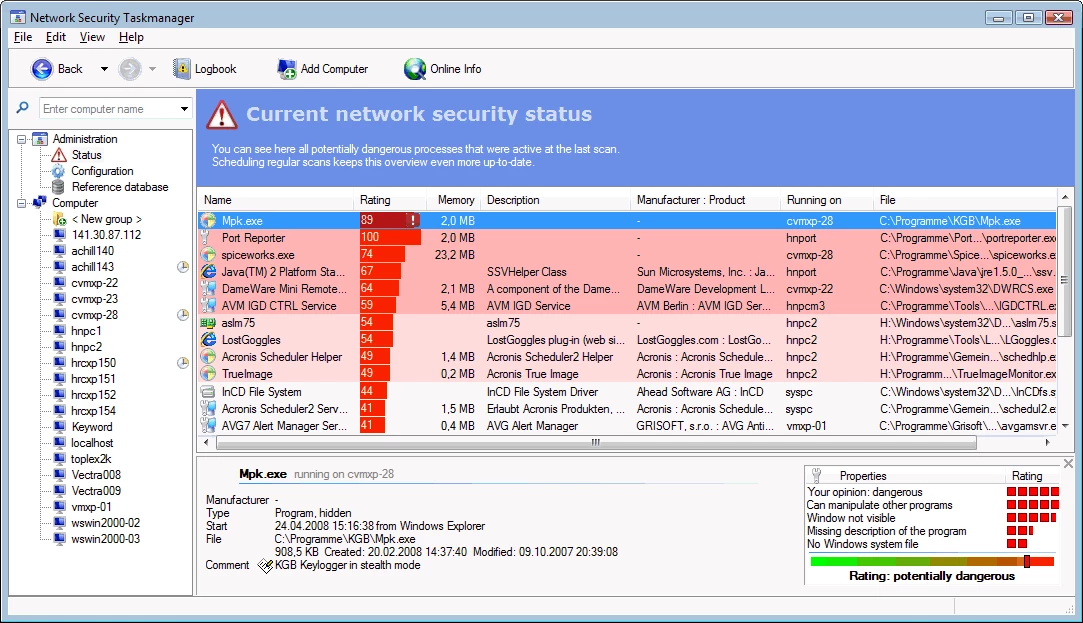
- Behavior-Based Risk Rating: The software assigns a specific numerical risk score to every active process. Instead of relying purely on static virus signatures, it analyzes the code structure and actual behavior of the file, evaluating whether it attempts to hide itself, monitor input, or modify system files.
- Hidden Process Detection: Standard system monitors often rely on standard API calls, which rootkits can manipulate to stay invisible. This tool bypasses those API hooks to reveal hidden systray programs, invisible background windows, and stealthy services that attempt to operate entirely out of sight.
- Integrated Multi-Engine Scanning: If a local file looks suspicious, users can right-click the entry and instantly verify it against major online antivirus databases. This sends the file hash to engines like Bitdefender, Kaspersky, and F-Secure for an immediate secondary verification without leaving the application window.
- Safe Quarantine Controls: Deleting a critical system file by mistake can cause immediate operating system crashes. To prevent this, the application includes a quarantine function that safely isolates the executable, preventing it from running while you test system stability before committing to permanent removal.
- Comprehensive Process Details: The interface expands standard process data by displaying the exact directory path on the local disk, the verified software publisher, the specific file type (such as an Internet Explorer plugin or a dynamic link library), and an active CPU usage graph for each item.
- SpyProtector Privacy Utility: The full paid version includes an additional privacy tool that actively monitors the system registry for unauthorized autostart additions. It also prevents third-party applications from intercepting mouse movements or recording keystrokes, blocking local espionage attempts.
- AI-Powered System Analysis: The latest iterations of the tool incorporate an intelligent local analysis engine that scans configurations and background tasks to identify specific performance bottlenecks, problematic software versions, and security vulnerabilities, outputting clear text recommendations for fixes.
How to Install Security Task Manager on Windows
- Download the official Windows installer executable from the developer website, ensuring you save the file to a standard location like your Downloads folder.
- Locate the downloaded setup file and double-click it to launch the installation wizard.
- If the Windows User Account Control prompt appears, click yes to grant the installer the necessary administrative privileges required to set up low-level system monitoring.
- Read and accept the end-user license agreement, then click next to proceed to the directory selection screen.
- Review the default destination path, which is typically set to your primary program files directory, and change it only if you require the application to run from a specific utility drive.
- Select whether you want to create a desktop shortcut and a Start menu folder for quick access, then click the install button to begin extracting the necessary executable files and monitoring drivers.
- Once the progress bar completes, leave the option to launch the application checked and click finish to close the setup wizard.
- On its first launch, the software will take a few moments to perform an initial deep scan of your active memory, populating the main interface with your currently running processes and their calculated risk ratings.
Security Task Manager Free vs. Paid
Security Task Manager operates on a shareware model, allowing users to evaluate the core functionality through a fully functional 30-day trial. During this trial window, users have full access to the process list, the behavior-based risk ratings, the detailed file path information, and the quarantine features. The trial version does display a periodic nag screen reminding users of the evaluation period, and it limits its analysis strictly to active applications and standard background processes.
To remove the trial limitations, users must purchase a perpetual full license, which is typically priced around $29 for a single computer. This is a one-time payment for the specific software tier, meaning there are no mandatory monthly subscriptions required to keep using the tool. Upgrading to the full version unlocks deep system analysis, allowing the software to scan low-level Windows drivers and core system services—areas frequently targeted by advanced rootkits and persistent malware.
The paid license also bundles the companion SpyProtector application at no additional cost. SpyProtector adds an active defense layer by locking down the Windows registry against unauthorized startup entries and blocking programs from intercepting keyboard and mouse inputs. For business environments, the developer offers network-specific licensing options that scale based on the number of monitored clients, such as $190 for a 10-client deployment, making it cost-effective for IT departments managing multiple workstations.
Security Task Manager vs. Process Explorer vs. System Explorer
Process Explorer, maintained by Microsoft Sysinternals, is a deeply technical, free utility designed primarily for system administrators and software developers. It excels at displaying complex technical data, such as loaded DLLs, active threads, and specific file handles, making it ideal for debugging software crashes or finding out which program has locked a specific file. However, Process Explorer leaves the security analysis entirely up to the user; it does not calculate a risk rating or explain what a process is actually doing, meaning you must have the technical knowledge to interpret the raw data yourself.
System Explorer is an older, alternative process monitor that gained popularity by offering an easy-to-read interface, system snapshots for tracking registry changes over time, and a database of known safe files. While its snapshot feature was highly useful for auditing system modifications, the software has not seen active development in years. As a result, its file database lookups and static analysis methods lag significantly behind modern security requirements, making it less effective against contemporary, continuously evolving malware strains.
Security Task Manager provides a much more direct and actionable approach for users focused specifically on system security and malware removal. Rather than overwhelming the user with thread counts or relying on outdated static databases, it proactively calculates an easy-to-understand risk score based on what the program is actively doing—such as hiding its window or logging keystrokes. When combined with its integrated online multi-engine scanning and safe quarantine features, Security Task Manager acts as a practical middle ground between a raw technical monitor and a dedicated antivirus cleaner.
Common Issues and Fixes
- High risk rating assigned to a known safe program. The behavior analysis engine flags actions like keyboard hooks and hidden windows, which legitimate macro software, gaming peripherals, or screen recorders often use. You can verify the safety of the file by right-clicking it and selecting the online scan option to check it against multiple antivirus engines before adding it to your safe list.
- Malicious processes reappear immediately after removal. Some aggressive malware includes a watchdog process that instantly recreates the executable if it detects deletion. Instead of using the delete function, move the suspicious file into the Quarantine section to block its execution, then restart the computer to clear it from active memory.
- The application fails to start or shows a missing taskman.exe error. Overly aggressive third-party antivirus software may falsely flag the monitoring executable due to its low-level memory access, moving it to the virus vault. Add the application's installation folder to your primary antivirus exclusion list, then reinstall the software to restore the missing files.
- Active threat closes the program upon launch. Certain trojans actively monitor the process list and will forcefully close any security tool that attempts to run. To bypass this defense, navigate to the installation folder, rename the main executable to a generic system name like explorer.exe or winword.exe, and then launch it again.
- Missing analysis for core system drivers. If you are evaluating the trial version, the interface will only display standard applications and user-level processes. Analyzing deep Windows drivers and core system services requires running the application with administrative privileges and activating the full paid license tier.
Version 3.2 — October 2025
- Added AI-powered detection capabilities to identify system performance bottlenecks.
- Improved the AI analysis engine for more accurate recognition of security risks and system errors.
- Fixed inaccuracies in the process risk evaluation algorithms through extensive code revision.