TaskbarX is a specialized desktop customization utility designed to alter the layout and visual behavior of the default Windows taskbar. By actively computing the exact center point of the screen and shifting pinned and running application icons into that space, it mimics the minimalist dock interface commonly found in modern operating systems. For users who rely on ultrawide monitors, dual-screen arrays, or high-resolution multi-display setups, keeping frequently used application shortcuts in the exact middle of the screen drastically reduces horizontal mouse travel distance. Instead of looking to the extreme far-left corner to switch between a web browser, a code editor, a media player, and a messaging client, individuals can maintain their visual focus directly ahead. This alignment directly impacts workflow efficiency, specifically for creative professionals who constantly switch between full-screen applications and need immediate visual confirmation of their active software states.
Beyond simple icon alignment, the utility directly addresses the visual inconsistencies of standard desktop environments by applying custom background rendering styles. A standard solid-color taskbar can feel visually heavy and cluttered, especially when paired with high-resolution minimalist wallpapers, complex desktop widgets, or custom theme environments. TaskbarX solves this rigidity by injecting transparency, acrylic, or blur effects directly into the taskbar background layer, effectively removing the visual barrier at the bottom of the screen. This makes it an essential utility for desktop modding enthusiasts, video tutorial screencasters, and corporate professionals who present their screens during digital meetings and want a clean, distraction-free environment without relying on complicated theme patching engines. It strips away the legacy corporate look of the operating system and replaces it with a flexible, user-defined aesthetic that feels tailored to the individual workspace.
Rather than acting as a heavyweight user interface replacement, the software operates as a lightweight, independent background process that hooks into existing operating system mechanics. Because it does not modify core system files, alter the registry permanently, or replace the native Windows Explorer shell, it provides a highly stable environment for daily computational tasks. Users actively avoid the memory overhead and CPU cycles typically associated with massive customization suites, ensuring that valuable hardware resources remain entirely dedicated to actual workloads like video rendering, compiling source code, managing large spreadsheets, or gaming. The result is a highly practical aesthetic modification that stays completely out of the way while actively maintaining the geometric layout structure as new applications open, close, or demand background attention.
Key Features
- Automated Icon Centering: The software constantly calculates the exact middle mathematical point of the taskbar area and dynamically shifts application icons as you open, close, or pin programs. This ensures the dock remains perfectly balanced at all times, preventing the off-center, lopsided look that occurs with manual or static layout adjustments. When a new instance of an application launches, the entire cluster smoothly adjusts its coordinates to accommodate the new icon width.
- Taskbar Styling: Users can apply distinct background rendering styles including Transparent, Blur, Opaque, Acrylic, or Transparent Gradient directly to the taskbar layer. These styles override the default solid colors dictated by the operating system, allowing a custom background wallpaper or running video desktop to remain fully visible underneath the system controls. The opacity slider provides granular control over exactly how much background bleeds through.
- Animation Control: The utility includes forty-two distinct animation types, such as elastic, bounce, ease-in, ease-out, or linear transitions, which trigger whenever icons adjust their screen positioning. Users can modify the exact millisecond duration of these transitions in the graphical configurator, ensuring the movement matches their visual preference, or disable them entirely for instant, immediate snapping.
- Custom Offset Positioning: For individuals with specific, non-standard layout needs, the configurator allows precise pixel offset adjustments based on the calculated center. This means you can intentionally shift the entire icon cluster slightly to the left or right to physically accommodate secondary desktop widgets, expanded system tray elements, or the physical bezels of a dual-monitor physical setup.
- Multi-Monitor Support: The background process automatically detects and applies your specific layout rules and styling across unlimited connected hardware displays. Whether you run a primary horizontal ultrawide and a secondary vertical monitor, the centered dock aesthetic remains perfectly consistent on every screen without requiring independent configuration files for each specific monitor.
- Start Button and Tray Hiding: The advanced settings panel includes direct toggles to visually hide the Start button, the right-aligned system tray, and the system clock from the primary viewing area. This creates a pure dock appearance that floats independently, though the underlying invisible areas remain fully clickable if you remember their exact screen coordinate locations for occasional access.
How to Install TaskbarX on Windows
- Navigate to the official developer repository and download the standard portable archive, taking care to select the specific hardware architecture variant that matches your operating system environment.
- Create a dedicated, permanent folder on your local storage drive, such as a custom directory inside your Documents folder, to house the utility files securely without risking accidental deletion.
- Extract all contents from the downloaded archive into your newly created permanent folder, confirming that no individual executable or configuration files are left trapped inside the temporary container.
- Locate and launch the primary executable file named
TaskbarX Configurator.exeto open the graphical settings interface and initiate the background positioning engine. - If the operating system displays a SmartScreen security warning due to the unassigned certificate, click the "More info" text link followed by the "Run anyway" button to explicitly allow the application to execute.
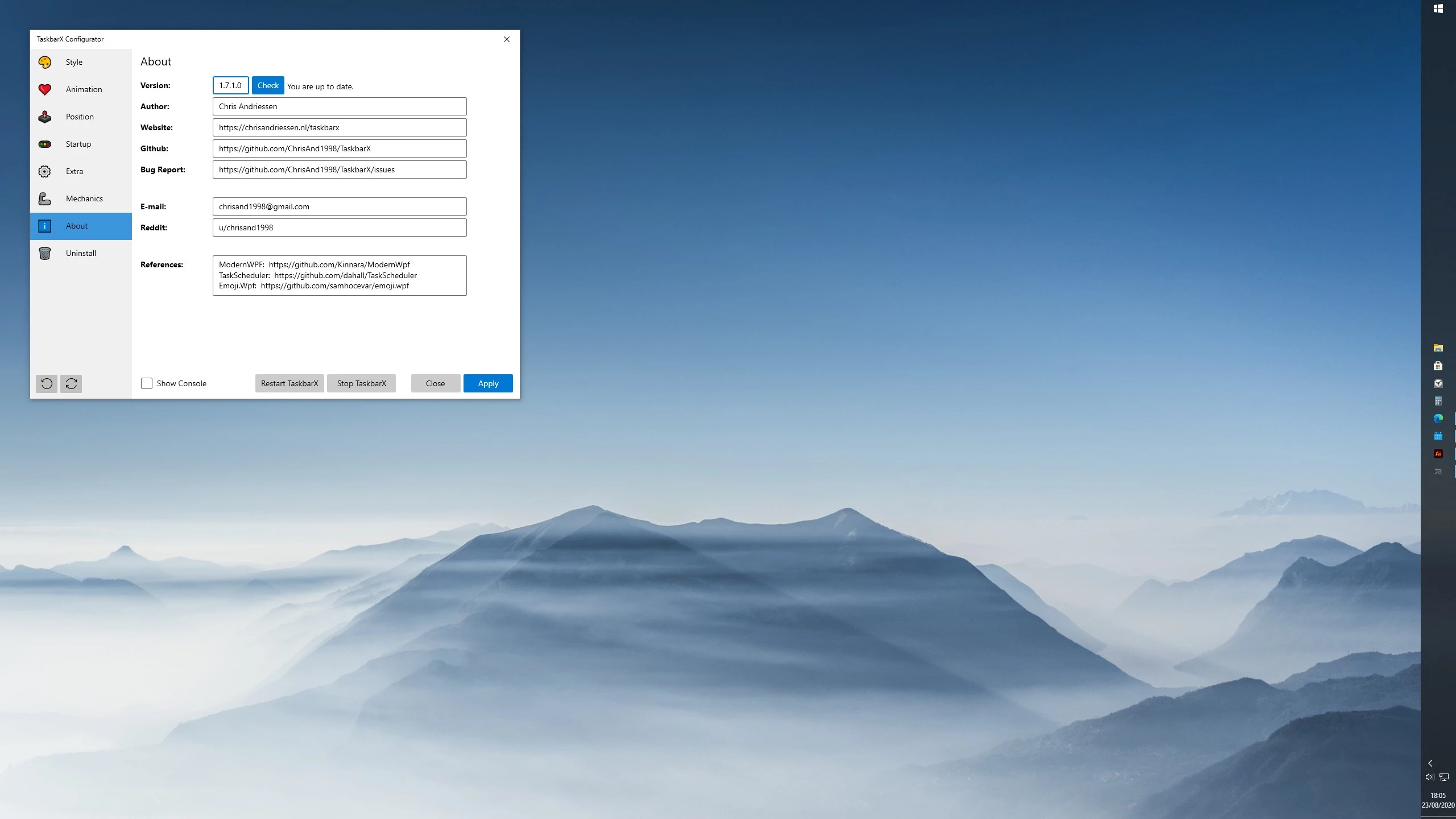
- Navigate through the left-hand menu categories in the Configurator interface to adjust your preferred background style, animation transition speeds, and specific centering offsets, then click "Apply" to push the changes live.
- To ensure the utility runs automatically when the computer boots up, navigate to the Startup tab within the Configurator interface and click the apply button to generate the required background task sequence in the system scheduler.
TaskbarX Free vs. Paid
The software is fundamentally free and open-source, independently developed and maintained by Chris Andriessen. Individuals can obtain the complete application package as a portable zip archive or a Rainmeter compatible skin directly from the developer’s GitHub repository at absolutely no cost. This free tier includes every single feature, animation sequence, and background rendering style available in the software. There are no restricted trial periods, no locked configuration menus, no visual export watermarks, and no mandatory recurring subscription fees required to access the full functionality. It operates entirely as a complete software product from the moment of extraction.
For users who prefer a more streamlined deployment experience, the utility is also available as a paid application on the official Microsoft Store. The Store edition typically costs around one to two dollars and functions primarily as an optional donation method to support ongoing development efforts and server costs. The technical advantage of purchasing the Store edition is that it handles the deployment phase automatically, registers the application directly with the operating system environment, and delivers background updates automatically without requiring the user to manually track, download, and extract new zip archives.
The feature set between the free portable repository package and the paid Store edition is strictly identical. Users who opt for the free download do not sacrifice multi-monitor rendering support, custom animation timing, or granular offset controls. Because the developer maintains strict parity across both distribution methods, the choice entirely depends on whether an individual wants to manage their own local folder extraction workflow or rely on the centralized store infrastructure for routine maintenance and automated background support.
TaskbarX vs. TranslucentTB vs. StartAllBack
TranslucentTB is a highly focused visual utility designed specifically to alter the background rendering engine of the taskbar, offering similar transparency, blur, and acrylic visual effects. However, it completely ignores icon placement geometry and animation logic, leaving the application shortcuts in their standard, default left-aligned position. Individuals should choose TranslucentTB if they are perfectly satisfied with the standard operating system layout and muscle memory but simply want to remove the solid background color constraint, whereas TaskbarX is strictly necessary for anyone who actively wants a dynamic, centered dock appearance that adjusts during daily use.
StartAllBack operates as a heavy, broad desktop replacement tool that actively rewrites the operational behavior of the taskbar, the Start menu structure, and the File Explorer interface to forcefully restore classic legacy layouts. It requires a paid license activation after a limited trial period and modifies core operating system graphical elements to achieve its drastic results. Users dealing with strict enterprise workflow environments or those looking for deep shell modifications will lean toward StartAllBack, as it provides a much wider array of interface alterations extending far beyond mere application icon alignment and centering rules.
TaskbarX remains the significantly better fit for individuals who strictly want an aesthetic, modern dock layout without touching the actual underlying mechanics of the Start menu or the File Explorer indexing system. It is notably lighter on system RAM and CPU resources than full shell replacement engines and remains completely free for those willing to utilize the portable repository download. By narrowly focusing on application icon calculation and visual background styling, it delivers a precise, isolated visual upgrade that systematically avoids the system instability and update compatibility risks frequently associated with deeper operating system layout modifications.
Common Issues and Fixes
- Windows 11 compatibility failures. Because recent operating system updates introduced a completely rewritten taskbar infrastructure based on modern UI frameworks, the core centering code no longer functions on newer system updates. Users running these newer updates must rely on the native centering options provided directly by the OS and use this utility strictly for background visual styling.
- Taskbar flashes or fails to update position. This occasionally happens if the user interface mechanics get temporarily stuck or a newly launched application opens in a suspended background state. Open the Configurator window and click the "Apply" button to force a geometric refresh, or restart the Windows Explorer process entirely via the system Task Manager to clear the interface rendering cache.
- Ghost startup errors after uninstalling the Store version. The Microsoft Store edition occasionally leaves its background scheduling task orphaned in the system after removal, causing recurring startup error dialogues. To fix this cleanly, open the native Windows Task Scheduler utility, locate the TaskbarX or FalconX entry in the left-hand library list, and delete it manually to halt the background launch attempts.
- Settings revert to default after a system reboot. This regression occurs when the background startup task is not created properly during the initial setup phase of the portable zip archive. Launch the Configurator executable, navigate specifically to the Startup category menu, and trigger the apply function to properly register the boot sequence with the operating system scheduler.
- Background blur or acrylic styles turn solid black. This rendering failure usually indicates a direct conflict with the native transparency settings of the operating system environment. Open your primary system settings window, navigate to the Personalization section, and ensure that native transparency effects are explicitly toggled on so the utility can hook into the rendering engine correctly.
Version 1.7.8.0 — October 2022
- Resolved a compatibility issue preventing dual screen support on Windows 11 22H2.
- Added functionality to include the Start button within Taskbar segments.
- Enabled support for the Notification area when using Taskbar segments.
- Fixed a bug where the notification area remained inaccessible or invisible in segment mode.
- Corrected an issue with the Task Scheduler startup task failing for Windows usernames containing spaces.
- Updated the internal TaskScheduler library to version 2.10.1 for better reliability.
- Temporarily disabled the system tray icon to resolve reported stability issues.