Gamers often discover that high-end hardware cannot overcome poor internet routing. When an internet service provider routes data to a game server, it typically prioritizes bandwidth and cost efficiency over speed. Because general web traffic relies on routing protocols designed to find the cheapest path rather than the fastest one, game data packets often take inefficient geographic detours. This infrastructure reality leads to high ping, sudden lag spikes, and dropped packets during critical multiplayer matches. ExitLag operates as a Gamer Private Network designed exclusively to solve this exact routing problem. By intercepting game-specific network traffic at the operating system level, it forces data through a proprietary global network of optimized servers, bypassing the local provider's default routing tables to secure the shortest possible geographic path to the game server.
Unlike generic virtual private networks that encrypt all web traffic and frequently increase latency due to heavy security overhead, this software targets only the connection between the user's desktop and the specific game process. It leaves general web browsing, background application downloads, and voice chat software on the standard internet connection unless manually configured otherwise. This split-tunneling approach dictates why a dedicated Windows desktop client is necessary; the application must hook directly into the local network adapter to map out UDP and TCP packets before they leave the physical machine. It currently supports an internal library of over a thousand online titles, ranging from tactical first-person shooters and battle royales to massive multiplayer online role-playing games.
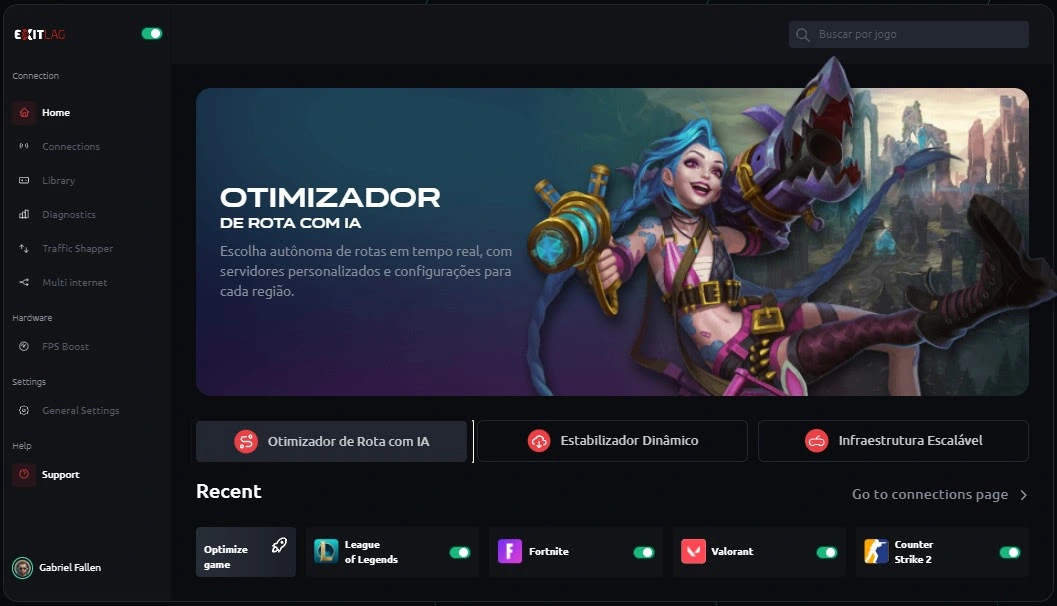
Beyond external network routing, the software functions as a local system utility to stabilize the user's gaming environment. Competitive players utilize it to shut down unnecessary background processes, shape local network traffic, and aggregate multiple internet connections to prevent sudden match disconnects. It caters specifically to users who need granular control over exactly how their machine communicates with remote servers, turning abstract network diagnostics into direct toggles and visual server region selections. Instead of guessing why a game feels unresponsive despite high framerates, players can monitor exact route behaviors and intervene to manually lock in stable connections.
Key Features
- Multipath Connection: Instead of sending game data through a single route, the software simultaneously transmits packets across multiple different network pathways to the target server. If one path experiences a sudden traffic jam or drops a packet, the identical packet traveling on an alternate route still arrives on time. This redundancy directly targets packet loss and minimizes the micro-stutters that ruin hit registration in competitive environments.
- FPS Boost Toolkit: Accessible via the "Tools" menu, this collection of operating system tweaks improves local hardware performance. Users can toggle settings to disable Windows Defender background scanning during gameplay, park inactive CPU cores, clean standby memory, and suspend non-essential Windows services. This ensures maximum processor and RAM availability for the game engine itself rather than background tasks.
- Traffic Shaper: This built-in quality of service function prevents background applications on your computer from choking your active game connection. By prioritizing the specific game executable above all other local network traffic, it ensures that a sudden background update or a browser downloading a file will not consume the bandwidth required to maintain a stable ping to the game server.
- Multi Internet Support: For users with access to more than one connection type—such as a primary wired Ethernet line and a secondary wireless connection—the software can utilize both simultaneously. If the primary connection completely drops or severely degrades, the application automatically shifts the game data to the secondary connection without disconnecting the user from the live match.
- Real-Time Network Analyzer: The dashboard provides immediate visual feedback on connection health, displaying latency graphs and active route diagnostics. Users can see exactly which global server nodes their data is bouncing through, measuring the exact millisecond ping of each hop. This data allows players to manually override the automatic routing and select specific server clusters to force a better connection.
How to Install ExitLag on Windows
- Download the official Windows executable installer from the vendor's website to your local storage drive.
- Launch the downloaded setup file to open the setup wizard and grant the required administrator permissions when prompted by Windows User Account Control.
- Select your preferred installation directory or leave the default path intact, then proceed to the next screen to choose whether to create a desktop shortcut for easy access.
- Click the install button and wait for the wizard to unpack the required network drivers and application files onto your system.
- Once the installation completes, check the box to launch the application immediately and click the finish button to close the setup wizard.
- On the initial launch screen, enter your registered account email and password to authenticate the client with the global server network.
- Use the search bar in the top-left corner of the interface to locate your specific game, choose a server region matching your matchmaking preferences, and click "Apply Routes" before opening the actual game launcher.
ExitLag Free vs. Paid
The software operates entirely on a premium subscription model, meaning there is no permanent free tier available for long-term use. However, new users can utilize a fully unrestricted three-day free trial on the desktop client without entering any credit card information. This trial period allows players to test the routing technology against their own internet provider and their specific game servers to verify if the latency reduction actually works for their geographic location before committing to a purchase.
Once the trial expires, access requires a recurring paid subscription. The standard Solo plan costs $9.99 per month when billed monthly, granting access to the entire suite of features including multipath routing, local system tweaks, and multiple connection support for a single user. The vendor incentivizes longer commitments, dropping the monthly equivalent price noticeably if users choose quarterly or annual billing cycles paid upfront.
For players with regular teammates or family members in the same household, the platform offers Duo and Squad tiers. The Duo plan covers the primary subscriber and one guest account, while the Squad plan covers the subscriber and up to four guests. These group plans reduce the per-person cost when split among friends, and each user maintains an independent account allowing them to connect from different physical locations using their own devices.
ExitLag vs. Mudfish vs. WTFast
Mudfish is a prominent alternative that operates on a pay-per-traffic business model rather than a flat monthly subscription. Users buy data credits in bulk, and bandwidth is only deducted when actively playing a routed game. Because gaming data packets are relatively small, a minimal investment can last a casual player several months, making Mudfish cheaper for users who only play a few hours a week. However, Mudfish features a steep learning curve with a complex interface, requires manual node selection, and lacks the system-level hardware optimization tools found in its competitors.
WTFast is an older routing tool that shares a similar monthly subscription model. It relies heavily on machine learning to automatically select the optimal route, removing the need for manual server node adjustments. While WTFast excels at raw routing for supported titles, its interface focuses strictly on the network layer. It does not include hardware optimization features, RAM cleaners, or local traffic shaping, and its subscription price is often perceived as high for a utility that solely manages ping.
ExitLag remains the stronger choice for players who want a dedicated, easy-to-use desktop utility that tackles both network routing and local system performance. Its interface is far more accessible than Mudfish, and the inclusion of the FPS Boost toolkit provides tangible hardware benefits that WTFast ignores. While it requires a flat monthly fee, the ability to manually override routing nodes, view detailed network diagnostics, and share costs via group plans makes it practical for dedicated competitive gamers who need maximum control.
Common Issues and Fixes
- Ping remains high after applying routes. This usually happens when the automatic server selection misjudges the best path or conflicts with the game's internal matchmaking. Open the game profile in the interface, change the Game Region from automatic to the specific geographic location where your game server is hosted, and click "Apply Routes" again.
- The software fails to detect the running game. Network security tools or Windows Defender can block the application from hooking into the game's executable. Add the main installation folder to the exclusion list in your antivirus software, and ensure you are launching the optimization tool with full administrator privileges before opening your game launcher.
- System stutter or crashes during gameplay. Some of the aggressive background process suspensions can interfere with specific drivers or streaming software. Navigate to the "Tools" tab and disable the options for "Maximum Priority" and "RAM Cleaner," leaving only the network-related features active to restore stability.
- Connection errors when using other networking apps. Running a traditional proxy, an alternative DNS service, or a secondary optimization tool simultaneously will cause routing conflicts that drop your connection entirely. Disable any other network masking tools, flush your DNS via the Windows command prompt, and restart the client to restore normal functionality.
Version 5.18.4 — December 2025
- Added a fully rebuilt Traffic Shaper designed to isolate gaming data from other system activities, ensuring smoother gameplay.
- Added five new intelligent priority classes (Optimized, Primary, Secondary, Custom, and Blocked) to grant granular control over how applications utilize bandwidth.
- Added support for the Arabic language (AR-SA) and introduced a comprehensive revision of Russian translations for better accessibility.
- Improved the user interface with a modernized layout that provides real-time visualization of network activity and bandwidth usage.
- Improved connection stability by automatically deprioritizing background apps like browsers or cloud sync tools during active gaming sessions.
- Fixed issues related to internal network congestion that previously caused unexpected jitter and lag spikes.