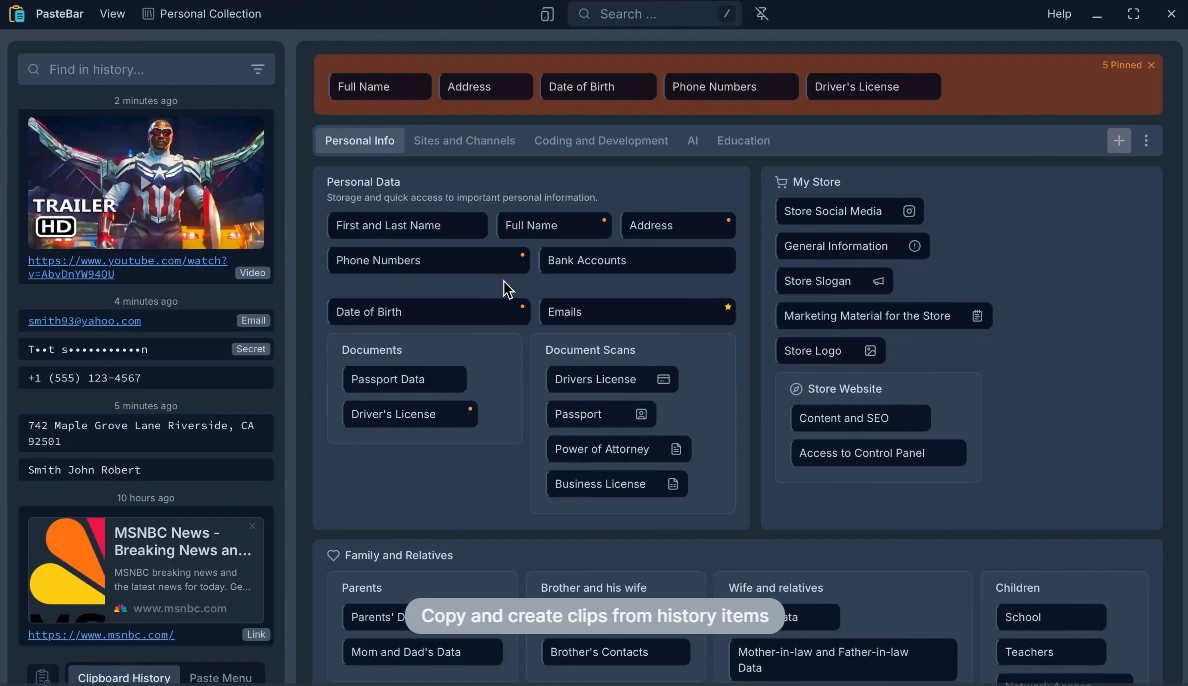
Managing a busy digital workspace often involves capturing and pasting the exact same text blocks, URLs, or code snippets multiple times throughout a single workday. PasteBar functions as a dedicated clipboard manager that automatically archives your entire copy history, ensuring you never accidentally overwrite or lose important information. Instead of relying on the default operating system clipboard, which typically holds only one recent item before permanently erasing it, this desktop utility runs quietly in the system taskbar. It actively intercepts text, images, web links, and rich formatting as you work, allowing you to retrieve any previously copied item through a quick-access menu or designated keyboard shortcut. By running as a background process built on the Tauri framework, it maintains a strictly low memory footprint while capturing system-wide copy commands instantly from any application.
The application is tailored specifically for professionals who handle large volumes of data, such as programmers writing logic, writers compiling research, and customer support agents answering repetitive questions. By organizing frequently used email responses, SQL queries, or template text into specific collections, visual tabs, and dedicated boards, users gain immediate access to their most critical resources without searching through text files. You can paste complex formatting or raw unformatted data directly into your preferred IDEs, word processors, or chat windows without breaking focus. The interface allows you to pin high-priority items, apply global templates to repetitive text blocks, and navigate your copying history using only the keyboard. Because it operates as a native desktop application, it functions globally across all installed software programs.
Rather than acting strictly as a passive memory bank, the software provides active organization tools and strict privacy safeguards. By keeping data processing strictly on your local machine, the application ensures that sensitive client information, authentication API keys, or personal notes remain entirely private. The local architecture guarantees the immediate retrieval speeds necessary for demanding professional environments, bypassing the network latency associated with cloud-based clipboard synchronization tools. Users maintain granular control over exactly where their internal database resides, offering a clear advantage for corporate environments with strict local storage policies.
Key Features
- Unlimited Clipboard History: The application archives every single piece of text, image file, and web link you copy without enforcing an arbitrary chronological limit or maximum item count. You can retrieve an item copied hours, days, or even weeks ago using the built-in global search bar located at the top of the interface. This search function actively filters out duplicate entries to keep the history uncluttered during intense research sessions, ensuring you do not have to scroll past identical URLs copied multiple times.
- Advanced Clip Organization: Instead of forcing you to navigate a single vertical list, you can structure your frequently used items into specific categorical collections, horizontal tabs, and visual boards. This hierarchical approach allows customer support agents to group their external email templates separately from a developer's internal code snippets. The quick-access menu therefore remains highly relevant to your current active task rather than displaying unrelated historical data from a different project.
- Developer-Focused Formatting: When capturing source code from a repository or text editor, the software automatically detects the specific programming language and applies the correct syntax highlighting directly within the visual interface. It also supports full Markdown rendering in custom notes and item descriptions. Developers can copy complex multi-line code blocks and retain their structural integrity, including indentations, when pasting them into a completely new coding environment.
- Privacy and Local Storage: All captured clipboard data is stored strictly on your local computer hardware rather than being pushed to an external cloud server for processing. For users handling sensitive financial data, medical records, or proprietary source code, the application includes an optional lock screen and numerical passcode protection feature. This local security measure ensures unauthorized users cannot browse the clipboard database if you step away from your physical desk.
- Custom Hotkeys and Triggers: You can bypass the computer mouse entirely by assigning custom keyboard shortcuts involving up to three-key combinations to various interface actions. Pressing your designated global hotkey instantly summons the paste menu directly at your current mouse cursor location or active text caret. This allows for rapid sequential insertion of archived materials without breaking your physical typing rhythm or moving your hands away from the home row.
- Backup and Custom Data Paths: Users who want to secure their digital workflow can export their entire operational database, including all captured background images and manually saved custom clips. Furthermore, you can define a specific custom storage path for this SQLite database within the main preferences menu. This makes it possible to keep your clipboard files safely on a secondary external drive or within a specific local backup folder rather than the default operating system application directory.
- Automatic Formatting Controls: To prevent messy unformatted text insertion into formal documents, you can configure the software to automatically trim excess spaces from the beginning and end of captured text using the dedicated Auto Trim Spaces option. You can also set hard text length limits or disable background image capturing entirely. These specific control options prevent the background monitoring process from consuming excessive local hard drive space over long periods of active use.
How to Install PasteBar on Windows
- Obtain the official Windows installer executable package from the primary distribution source or the verified open-source repository.
- Double-click the downloaded setup file to launch the main Windows installation wizard.
- Review the included open-source license agreement and select your preferred local installation directory, or simply accept the default application path on your primary system drive.
- Choose whether to create a visual desktop shortcut and whether the application should be allowed to automatically launch in the background when Windows boots up.
- Click the final install button and wait for the extraction wizard to unpack all required application files onto your computer system.
- Upon completion of the file extraction, check the prompt box to run the program immediately and exit the setup wizard interface.
- On the first launch, locate the application's visual icon hidden within your system tray or the lower-right taskbar area.
- Right-click the system tray icon to access the primary preferences menu, where you should immediately configure your primary keyboard shortcuts and verify your preferred custom database location.
PasteBar Free vs. Paid
PasteBar is completely free to obtain, install, use, and modify. The developers distribute the application strictly under an open-source model, specifically utilizing a Creative Commons Attribution-NonCommercial license with a limited commercial use exception. This specific licensing structure means that individual professionals, independent freelancers, and standard home users can install and operate the entire complete feature set without ever paying standard licensing fees, subscribing to a recurring monthly billing plan, or dealing with feature-locked paywalls that restrict usage.
There are no premium tiers, pro versions, or expensive enterprise upgrades required to unlock the core background capabilities. Features that competing commercial tools might typically restrict behind a paywall—such as unlimited history retention, custom database data pathing, and full graphical backup functionality—are included directly in the base default installation. The application also lacks visual advertisements, mandatory cloud account registrations, or artificial limits on exactly how many custom boards or tabs you can visually create for your daily workflow.
Because the software project relies heavily on active community support, user feedback, and open-source code contributions rather than a corporate monetization strategy, the developers focus their efforts on maintaining a clean, private utility. If you choose to install and use the tool, you will not encounter sudden trial expiration notices, artificially watermarked text insertions, or arbitrary timing delays designed specifically to push you toward a paid upgrade. The strict local-only data storage model also ensures there are no hidden remote server maintenance costs that must be passed on to the end user.
PasteBar vs. Ditto vs. CopyQ
Ditto has served as a staple Windows clipboard utility for many years, offering a highly utilitarian and functional approach to tracking copied text. It excels specifically in corporate environments where users need to synchronize their clipboard data across multiple separate computers on a local internal network, a specific feature it handles exceptionally well using its database structure. However, Ditto relies on an older interface design language that feels visually dated on modern displays, and it completely lacks the newer visual organization tools, such as colored visual boards and automatic markdown rendering, that modern programming workflows demand.
CopyQ provides a highly scriptable environment for technical power users who want to programmatically manipulate their clipboard data using custom written commands. If you need to apply complex custom regular expressions to text blocks automatically the moment they enter your system clipboard, CopyQ provides the underlying scripting backend to make that happen efficiently. The trade-off for this capability is a steep learning curve; properly configuring CopyQ requires significant technical patience, and its dense interface can feel overwhelming for standard users who just want to find a copied web link quickly without writing a custom text processing rule.
PasteBar strikes a practical daily balance between visual interface clarity and immediate functional utility. It deliberately avoids the visually dated interface of Ditto while offering far more immediate organizational tools—like automatic syntax highlighting and dedicated template boards—than the default unconfigured CopyQ setup provides. You should choose PasteBar if you want an active daily organization system that looks entirely modern, respects your local data privacy with offline storage, and handles complex code formatting intelligently straight out of the box, all without requiring custom scripts or configurations to get your daily workflow running smoothly.
Common Issues and Fixes
- Heavy background memory consumption. If the application appears to be using an excessive amount of system RAM in your task manager, it is likely because the main graphical window has been left open in the background. Close the primary window so the application minimizes directly to the system tray; the underlying background monitoring process requires significantly fewer local resources to monitor the clipboard than the active visual user interface does.
- Local storage drive filling up rapidly. Because the background software captures everything by default, frequently copying large high-resolution images or raw file data can quickly bloat the local database file. To fix this behavior, open the main preferences menu and disable the specific option for capturing and storing images, restricting the history logging solely to standard text, web URLs, and code snippets.
- Keyboard shortcuts failing to trigger. When a custom multi-key combination does not successfully open the quick-access graphical menu, it usually means another background application or the operating system itself is overriding the designated hotkey. Navigate to the internal hotkey configuration screen and carefully select a different two- or three-key combination that does not conflict with global system shortcuts.
- Messy text insertions with unwanted spacing. Users copying text from poorly formatted web pages often find extra blank indentations or empty line breaks in their saved clips. Access the main application settings and enable the Auto Trim Spaces option for the history capture function, which automatically removes all trailing and leading whitespace before the item is officially saved to the database.
- Lost passcode preventing access to clips. If you choose to enable the local lock screen and passcode protection feature but forget your specific numerical PIN, you will be permanently locked out of your clipboard history. Because the data is stored locally without any cloud account recovery mechanism, you cannot reset the password via an email link. You must locate the custom data folder manually and delete the database file to reset the application, which will result in a total unrecoverable loss of your saved clips.
Version 0.7.0 — June 2025
- Added full database and image backup and restore capabilities.
- Introduced custom storage locations, letting you save app data to any folder of your choice.
- Added PIN-protected collections to securely lock away sensitive clipboard items.
- Implemented advanced keyboard shortcuts with support for up to 3-key combinations to navigate without a mouse.
- Added a smart auto-search feature in the Quick Paste window that activates the moment you begin typing.
- Introduced over 30 specialized, context-aware copy and paste operations for diverse workflows.
- Added "Trim Spaces" and "Auto Trim Spaces" tools to automatically clean up captured text.
- Implemented new clipboard history filters based on character length limits.
- Added a long-press gesture on clips to instantly open organizational tools.
- Included a user preference to completely disable image capturing from the clipboard.
- Added persistent visual note icons to quickly distinguish clips that have attached descriptions.
- Fixed a bug where history items in the Quick Paste window wouldn't update properly after being deleted in the main view.
- Resolved a UI color glitch in the user preferences menu that occurred across certain languages.