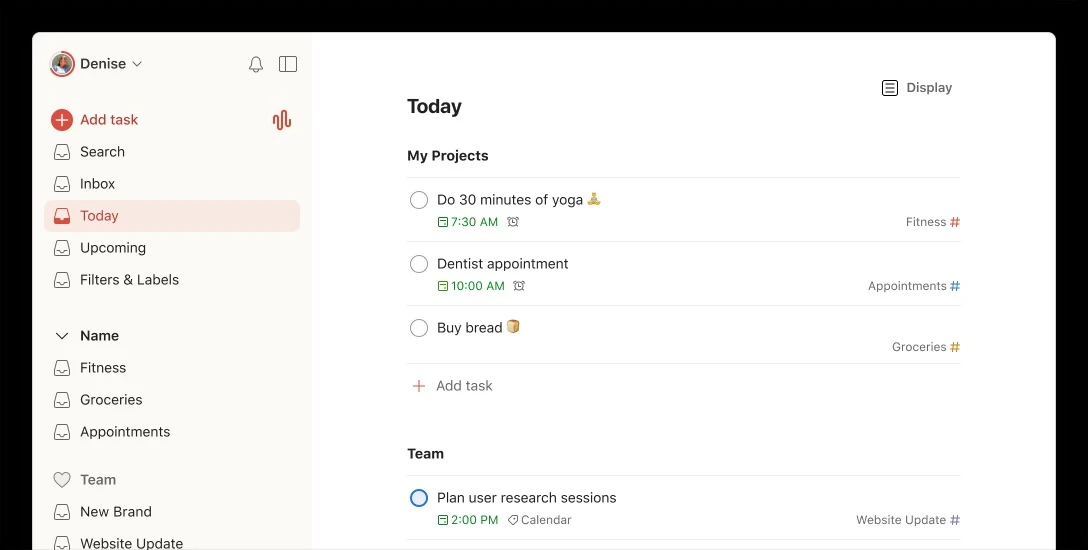
Todoist operates as a dedicated task manager designed to capture, organize, and track daily to-dos for individuals and collaborative teams. At its core, the software focuses on input speed and structured sorting, replacing scattered sticky notes and unorganized text files with a unified digital dashboard. Instead of functioning as a complex project management suite tailored for massive enterprise operations, it provides a lightweight, text-driven interface where users can quickly document assignments before they forget them. By moving pending obligations out of your immediate memory and into a strictly organized database, the tool reduces the cognitive load associated with managing complex daily routines.
Running the dedicated Windows desktop client provides distinct workflow advantages over keeping the service confined to a standard web browser tab. The local installation supports customizable global keyboard bindings, allowing you to trigger the task entry field instantly, regardless of which other applications are currently active on your screen. This system-tray integration means you can interrupt your current coding session, document writing, or video call to log a stray thought, and then dismiss the prompt in seconds. The desktop software operates persistently in the background, utilizing minimal system resources while maintaining a constant synchronization connection with the central cloud servers. This ensures that an idea typed into your Windows machine immediately appears on your mobile device.
The platform relies heavily on intelligent text parsing rather than forcing users to navigate through manual dropdown menus and calendar pickers. By reading the exact words you type, the interface automatically extracts dates, recurring schedules, and priority markers, sorting the entry into the correct folder in real time. This exact text recognition, combined with customizable filters and shared team spaces, makes it a highly practical utility for directing complex personal initiatives. Whether you are assigning subtasks to a contractor, tagging research materials for a thesis, or simply building a structured grocery list, the application molds to the specific depth of your workflow while keeping the primary interface uncluttered and immediately actionable.
Key Features
- Natural Language Parsing: The text input field automatically translates conversational typing into scheduled data. Typing a phrase like "email the client next Monday at 10am #sales p1" automatically sets the due date, assigns top priority (represented by a red flag), and moves the item into the designated "sales" project without requiring any mouse clicks. The engine understands complex recurring logic, such as "every other Tuesday starting Nov 1" or "every workday."
- Global Quick Add: The desktop application supports custom global keyboard shortcuts. Pressing your defined hotkey (such as Ctrl+Alt+A) opens a compact, floating entry box directly over your currently active Windows programs. This functionality lets you record a pending task, assign its relevant tags, and hit Enter to send it to your inbox while returning your focus to your primary application in under five seconds.
- Ramble Voice Capture: An AI-assisted voice dictation tool transcribes spoken thoughts directly into structured tasks, making it ideal for hands-free logging. The system listens to unstructured speech, extracts actionable items from the conversation, assigns relevant deadlines based on context, and provides a text preview. You can verbally correct the parser before committing the items to your list.
- Custom Filters and Labels: You can create personalized viewing panels by combining multiple search criteria into a single dashboard using specific query syntax. For example, typing "overdue | (today & @urgent)" generates a focused feed of immediate priorities, allowing users to cut through hundreds of logged tasks and view only what requires immediate attention across all active projects.
- Kanban Board Layouts: Any standard list of tasks can be toggled into a horizontal, multi-column board view with a single click. This visual layout lets you drag and drop individual task cards between custom-named sections, accommodating standard project progression phases like "Backlog," "In Progress," and "Done."
- Activity History and Karma: The application permanently tracks your completed items and visualizes your daily or weekly productivity trends through bar charts. The internal Karma system awards points for maintaining consecutive daily streaks and completing scheduled goals on time, providing a quantitative record of your historical output.
- Subtasks and Dependencies: Breaking down massive undertakings into manageable steps is handled through a nested subtask architecture. Users can indent tasks underneath a parent item using keyboard shortcuts, creating a clear visual hierarchy. Completing a parent task can automatically archive the nested items, ensuring complex projects remain clean and organized.
How to Install Todoist on Windows
- Download the official Windows executable installer package from the vendor's primary distribution page.
- Locate the downloaded file in your system directory and run the executable to initiate the automated setup process.
- The installer automatically unpacks and places the necessary application files directly into your local AppData directory; it does not prompt you to manually select a destination path or configure custom drive partitions.
- Once the extraction finishes, the application launches immediately and presents a clean login screen asking for your account credentials.
- Sign in using your existing email address, Google account, or Apple ID to initiate the first-run synchronization, which will pull your entire history of projects and tasks from the cloud database.
- Navigate to the user profile menu, open the Settings panel, and access the Advanced tab to assign a custom global keystroke combination for the Quick Add prompt.
- Right-click the newly created application icon in the Windows taskbar and select "Pin to taskbar," ensuring you have immediate, one-click access to your task lists upon system startup.
- Allow the application to run quietly in your Windows system tray, where it will automatically download and install future client updates in the background without disrupting your workflow.
Todoist Free vs. Paid
The Beginner tier is entirely free and targets individual users with standard daily organizational needs. This plan restricts users to a maximum of five active personal projects, permits up to five collaborators per project for basic sharing, provides three saved filter views, and retains only a one-week activity history. Crucially, the free tier does not include task reminders, meaning users relying on this baseline version must manually check their lists and dashboard views rather than depending on automated desktop push notifications or email alerts to prompt them about upcoming deadlines.
The Pro tier costs $5 per month when billed on an annual cycle, or $7 when paid on a strict month-to-month basis. Upgrading to this premium bracket expands the application's capacity, increasing the active project limit to 300 and expanding custom filter creation to 150 unique views. It introduces critical notification functionality, allowing users to configure custom time-based alerts and precise location-based reminders. The Pro plan also unlocks the monthly calendar layout view, allows for individual file uploads up to 100MB per attachment, provides an unlimited searchable activity history, and grants unrestricted usage of the Ramble voice dictation feature.
For corporate environments and structured team deployments, the Business tier costs $8 per user per month on an annual billing cycle, or $10 per user per month on a monthly schedule. This package includes every feature found in the Pro tier while adding a dedicated shared team workspace. It supports a capacity of 500 team projects and up to 1,000 members per project. Furthermore, the Business tier introduces strict administrative controls, precise member role management, dedicated team activity logs, and centralized billing settings.
Todoist vs. Microsoft To Do vs. TickTick
Microsoft To Do functions as a completely free alternative built directly into the broader Microsoft 365 productivity ecosystem. It synchronizes natively with Outlook flagged emails and Planner assignments, making it an obvious choice for corporate workers who spend their entire day inside Microsoft services. It features a unique "My Day" view that clears itself every night, forcing users to intentionally pick what they want to accomplish each morning. However, its natural language parsing is extremely rudimentary, and adding highly detailed tasks requires significantly more manual clicking and menu navigation than Todoist.
TickTick serves as a direct competitor that integrates several additional time-management utilities directly into its core interface. It includes a built-in Pomodoro timer for focus sessions and a structured habit tracker. Additionally, its premium tier provides a full native calendar view for a slightly lower annual subscription cost. While TickTick provides a broader variety of personal management tools, its interface can occasionally feel cluttered and overwhelming compared to the strict, minimalist, list-focused aesthetic maintained by its rivals.
Todoist remains the clearly superior fit for users who prioritize raw data entry speed, frictionless capture, and extensive third-party platform integrations. If your primary goal is documenting ideas the exact second they occur using advanced text recognition and global keyboard shortcuts, Todoist outperforms both Microsoft To Do and TickTick. It acts purely as a highly efficient, text-driven task database, excelling at structural organization and quick capture rather than attempting to serve as a bloated all-in-one life coach application.
Common Issues and Fixes
- Missing desktop notifications. Windows Focus Assist frequently blocks alert banners and reminder pop-ups by default to prevent user distraction. To correct this behavior, navigate to your primary Windows Settings, select the System menu, open the Focus Assist configuration, and manually add the task manager application to your authorized priority list.
- Tasks failing to sync across multiple devices. Corporate network firewalls, strict antivirus protocols, or custom VPN configurations often block the necessary domains required for cloud communication. Try disconnecting your VPN temporarily or adding the vendor's primary web domain to your network allowlist, then click your profile avatar and manually trigger a sync from the application menu.
- Interface lag or visual flickering during navigation. The desktop client can occasionally stutter, drag, or display visual artifacts depending on your specific graphics hardware and driver version. Open the application settings, navigate to the advanced section, completely disable the hardware acceleration toggle, and restart the software to force standard software rendering.
- Ramble audio transcription errors. The AI voice capture tool relies on specific operating system inputs and will fail to generate text if the wrong microphone is active. Open your Windows Sound settings, verify that the default input device exactly matches the physical microphone you are speaking into, and ensure the volume threshold is adequate.
- Application stuck in an infinite login loop. The desktop client can occasionally get trapped during the authentication process if local cache files become corrupted or outdated. To resolve this, log out of the application completely, right-click the icon in the system tray to quit the software, delete the local cache folder in your Windows AppData directory, and restart the client to force a fresh login prompt.
Version 9.26.3 — February 2026
- Added support for sections and context-awareness in Ramble, allowing you to route tasks to specific project sections using natural language while automatically inheriting dates or labels from your active view.
- Improved interface visibility on Windows by applying consistent coloring to scrollbars, making them much easier to see when using the dark theme.
- Fixed an issue on Linux where the system tray icon had unexpectedly vanished in a previous update.
- Fixed a syncing bug that delayed profile changes, ensuring that your account name updates are now applied and visible immediately.
- Fixed a keyboard shortcut glitch so that pressing Shift+R correctly brings up the assignee menu when you have multiple tasks selected at once.
- Fixed a calendar rendering glitch that caused recurring tasks to disappear from the monthly view while scrolling.
- Fixed a parsing error in the task editor where labels containing numbers were not detected properly if typed right before a date.
- Fixed an annoying loop that repeatedly prompted users to update their time zone even after they had already confirmed it.