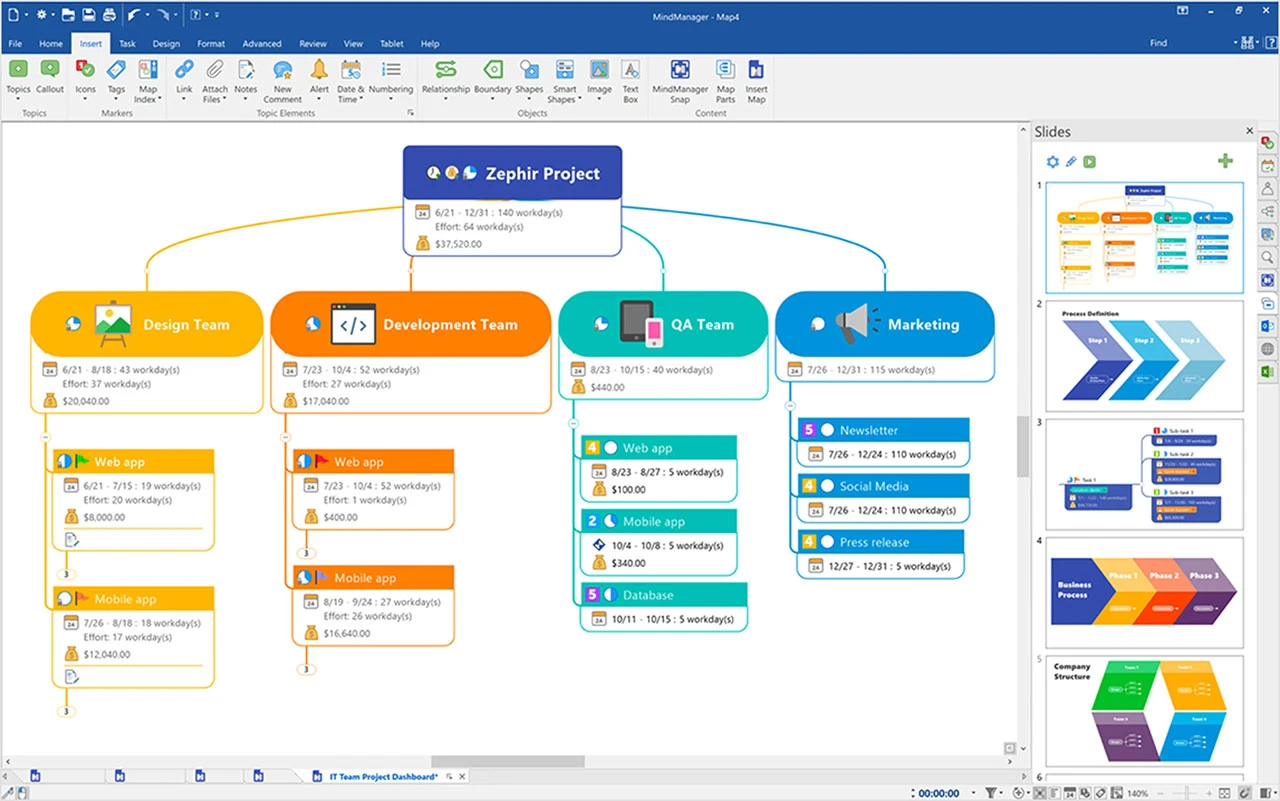
MindManager is a professional mind mapping and visual work management application designed to transform fragmented ideas, meeting notes, and complex project data into highly structured diagrams. Originally developed by Mindjet and now maintained within the Corel software portfolio, this desktop tool targets project managers, business analysts, and strategic planners who need to map out enterprise workflows. Instead of functioning as a basic brainstorming canvas, the application acts as a central command station for tracking business tasks, allocating resources, and designing intricate flowcharts that connect directly to external databases.
Users rely on this application to convert traditional text outlines, raw meeting notes, and dense spreadsheets into interactive maps that display task dependencies, deadlines, and project scope. Visual management shifts the focus from reading linear text to seeing relationships, helping teams spot workflow bottlenecks before they cause delays. While browser-based alternatives offer quick access, a dedicated Windows desktop client provides heavy rendering for massive diagrams and direct integration with local Microsoft Office installations. By keeping processing local, professionals can manage thousands of nodes and execute conditional formatting rules without hitting browser memory limits.
The software solves concrete administrative problems by serving as a bridge between abstract brainstorming and rigid project execution. When a planning session concludes, the resulting map becomes a living document where node properties change based on task completion. This capacity to turn a visual diagram into a functional tracking tool is why enterprise environments select it over lighter graphic tools. It adapts to the specific logic of the user, whether mapping out an IT infrastructure rollout, tracking software development, or organizing an extensive training manual.
Key Features
- SmartRules Conditional Formatting: Automate visual changes across your map by setting triggers based on task progress, resource allocation, or priority levels. When a node's deadline approaches, the software automatically changes the branch color, updates the icon, or alters the text style without manual intervention.
- Microsoft Office Data Integration: Connect directly to local Word, Excel, and Project applications to import datasets or export finished diagrams into structured, formatted documents. The Excel Data Manager allows users to map spreadsheet columns straight into mind map branches, preserving existing organizational logic and reducing manual data entry.
- Advanced Gantt and Kanban Views: Switch between traditional radial mind maps and linear project management layouts using the built-in interface toggle. This flexibility allows project managers to outline a strategy visually in a freeform manner, then immediately assign dates and track progress on a standard timeline or agile board.
- Context-Sensitive Floating Toolbar: Modify node properties, attach external links, or change branch shapes directly from the canvas using a popup menu that appears when an element is clicked. This design reduces cursor travel to the main top ribbon and speeds up the rapid brainstorming phase significantly.
- Workbook Linking and Separation: Split massive projects across multiple connected maps instead of forcing all data into a single, overwhelming view that strains system memory. Users can build a primary map for daily task tracking and secondary maps for deep background research, toggling between them via the view menu.
- Task Filtering and Roll-Up Dashboards: Isolate specific information using advanced metadata filters based on author, tag, completion status, or overdue deadlines. The map roll-up function gathers decentralized tasks from various linked sub-maps and displays them in a single dashboard for daily review across an entire department.
- Multi-Format Information Export: Export your completed maps into interactive HTML5 files, PDF documents, or image formats to share with stakeholders who do not have the software installed. The HTML5 export retains the ability to expand and collapse branches, ensuring viewers can navigate the logic tree properly.
How to Install MindManager on Windows
- Download the official Windows setup package from the vendor's distribution page, selecting the installer architecture that matches your Windows 10 or Windows 11 system.
- Launch the executable file to open the initial setup wizard, which will unpack the core MSI installer file into a temporary directory and present the end-user license agreement.
- Select your preferred setup type by choosing either a standard installation in the default system drive path, or a custom setup to specify a different local drive directory.
- Review the list of optional Microsoft Office add-ins presented during the custom setup phase, checking the boxes for Word, Excel, and Project integration if needed.
- Click the final install button and allow the wizard to copy the necessary program files, deploy the visual templates, and finalize the system registry entries.
- Once the primary file transfer finishes, close the installer and launch the application from your newly created desktop shortcut or the Windows start menu.
- Wait for the initial loading screen to initialize, then create a new account or sign in with your existing Corel credentials when prompted by the activation screen.
- Follow the brief first-run tutorial prompts to configure your default map theme and interface layout before creating your first project node.
MindManager Free vs. Paid
MindManager operates strictly as a premium commercial application and does not offer a permanent free tier. Users testing the software can access a full-featured free trial, typically lasting 30 days, which requires an account registration to initiate. During this evaluation period, all premium diagramming tools, external export formats, project management views, and Office integrations remain fully unlocked. This unrestricted trial approach allows enterprise teams to build real-world diagrams and evaluate the software against their daily workflows without hitting artificial save limits.
Once the trial period concludes, the software interface locks, and users must choose between a subscription model or a perpetual license. The Essentials tier provides a lower-cost annual subscription tailored strictly for individual users who need core mind mapping tools but do not require complex enterprise server integrations. For business environments, the Professional tier subscription introduces advanced project planning tools, cross-map roll-ups, Gantt charts, and direct Microsoft Teams integration.
Corel also maintains a one-time purchase option for users who strictly prefer to avoid recurring subscription fees. This perpetual license costs significantly more upfront and locks the user into the current software edition, meaning that future major version updates or cloud collaboration features will require a paid upgrade. Organizations deploying the software across large corporate departments usually opt for the Enterprise tier, which provides custom volume pricing and centralized administrative controls.
MindManager vs. Miro vs. XMind
Miro is a cloud-native digital whiteboard built heavily around real-time, unstructured collaboration for remote teams. While it excels at letting dozens of users stick virtual post-it notes on a shared canvas simultaneously, it relies entirely on a continuous web connection and browser performance to function. Because it operates as an infinite, freeform whiteboard rather than a strict database, it lacks the rigid structural logic, deep metadata tagging, and heavy-data calculation tools required for formal project execution.
XMind focuses strictly on traditional mind mapping with a highly refined, minimalist interface designed specifically for speed, keyboard navigation, and aesthetic output. It offers a straightforward perpetual license or a lower-cost subscription, making it highly accessible for personal brainstorming or structuring simple presentations. However, XMind does not include heavy-duty project management features like interactive Gantt charting, macro-level conditional formatting, or direct integration with local enterprise databases and Microsoft Office suites.
MindManager is the better choice for dedicated project managers, enterprise teams, and data analysts who need their visual maps to function as actual project dashboards rather than just static drawings. If the goal is rapid, unstructured team brainstorming, Miro provides a more accessible environment; if the goal is simple, beautiful map creation, XMind is the logical pick. MindManager wins when a user must connect thousands of nodes to local Excel spreadsheets, format branches based on overdue task deadlines, and handle complex project roll-ups on a local Windows desktop.
Common Issues and Fixes
- Word export fails or hangs during document generation. This usually happens if the target Microsoft Word application is currently running a background process, if a dialog box is open in Word, or if the two programs have mismatched bit architectures. Ensure that Word is fully closed and verify that both applications are installed as either 64-bit or 32-bit packages on your system, as mixing them breaks the COM integration.
- Network error appears when attempting to sign into the application. This login block frequently occurs when aggressive local firewalls, corporate proxy servers, or antivirus web shields intercept the software's outbound authentication request. Add the application's main executable file to your Windows Defender firewall whitelist or ask your corporate network administrator to bypass proxy restrictions for the vendor's primary authentication domain.
- Performance stutters when editing massive project maps. Rendering thousands of individual nodes containing attached files and custom icons can consume significant system memory and slow down interface panning. To restore UI responsiveness, break the single large map into several smaller, connected maps using the built-in Workbook link feature, which unloads background nodes from memory until they are explicitly clicked.
- Microsoft Office integration buttons do not appear in the top ribbon. The software relies on specific COM add-ins to send data back and forth with Excel or Word, which Windows occasionally disables automatically if it detects a slow startup time. Open your respective Office application, navigate to the Add-ins section within the Trust Center options menu, and manually re-enable the Mindjet or Corel integration module.
Version 25.1.154 — December 2025
- Added seamless Microsoft Planner and Microsoft To Do integrations, enabling users to import, generate, and synchronize tasks directly within their mind maps.
- Added advanced trigger capabilities to SmartRules for more dynamic and automated map workflows.
- Improved overall accessibility by optimizing color contrast, refining screen reader support, and updating keyboard shortcuts.
- Improved the application's visual layout, introducing a modernized interface theme and a freshly reorganized template library on the start screen.
- Improved the stability and handling of connected SharePoint links for better collaborative workflows.
- Fixed language availability by officially restoring the Dutch language interface.