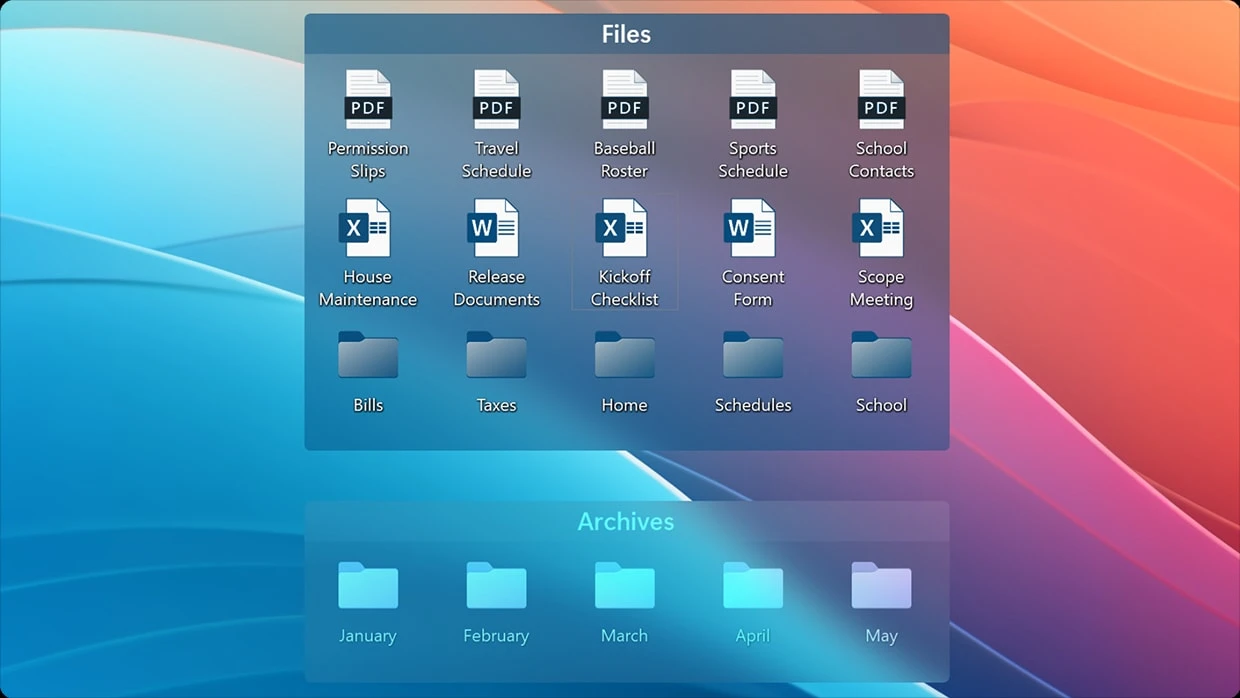
Stardock Fences serves as an advanced desktop organizer that transforms chaotic computer screens into highly structured workspaces by automatically grouping individual icons, system files, and program shortcuts into distinct, shaded containers. This utility addresses the persistent problem of monitor clutter for professionals, creatives, and administrators who manage massive volumes of local files, daily downloads, and application shortcuts. Instead of treating the computer monitor as a passive, disorganized landing zone, this software modifies the operating system interface to establish a predictable, zone-based filing system. By replacing the default grid behavior with customizable layout areas, it ensures that users can locate specific documents and execute shortcuts instantly, reducing the friction of daily computer navigation.
The decision to utilize a dedicated desktop application over web-based file managers or simple visual wallpaper dividers comes down to system-level execution and workflow efficiency. Because the utility integrates directly into the Windows Explorer shell, it intercepts file saving and icon creation processes in real time. When a user downloads a heavy video file or exports a graphic from a photo editor directly to their desktop, the application can read the file extension and automatically route that item into a pre-assigned, designated container. This local processing means there are no network delays, no cloud synchronization waits, and no secondary windows to open. The organization happens precisely at the moment of file creation, keeping the central workspace entirely clear for active projects while ensuring every newly saved asset is cataloged correctly.
In practical application, this interface modification provides significant utility across varied hardware setups. For enterprise administrators deploying shared resources, the software can display a live network directory on the desktops of an entire department, ensuring all staff members have immediate visual access to updated company handbooks without navigating corporate intranets. For digital artists or programmers operating across multiple high-resolution displays, the utility memorizes the exact coordinates of every container based on the active monitor configuration. This prevents the frequent operating system error where disconnecting a laptop from a multi-monitor docking station causes all carefully arranged shortcuts to collapse into a single, overlapping pile on the primary screen. The tool is engineered to maintain structural consistency regardless of the display hardware in use.
Key Features
- Shaded Icon Containers: Users can define specific zones on their monitor by dragging their mouse cursor over an empty background area to generate a resizable, shaded box. Application shortcuts, text files, and system folders can be dragged directly into these enclosed areas, allowing users to move massive groups of related files simultaneously across the screen. These containers operate independently of the standard desktop grid and feature adjustable transparency, color tinting, and customized title labels.
- Live Folder Portals: Rather than opening a File Explorer window to browse the local hard drive, users can create a direct mirror of any local or network directory right on the desktop layout. This portal acts as an active, scrollable view into the target folder, enabling users to drag, drop, delete, and execute files from that directory without ever leaving the main monitor screen. It embeds a fully functional file browser directly into the workspace background.
- Container Roll-up Interface: To conserve visual real estate on smaller monitors, any created container can be configured to collapse upward until only its title bar remains visible on the wallpaper. When the user hovers their mouse cursor over the collapsed title bar, the container automatically expands downward to display its full contents. Once the cursor moves away to another application, the box rolls back up, hiding the icons and minimizing visual distractions.
- Overlay Peek Functionality: By pressing the Windows Key and Spacebar simultaneously, users can force all their desktop containers to appear in the absolute foreground, hovering over any currently active applications. This specific keyboard shortcut grants immediate access to desktop files and application shortcuts without requiring the user to minimize their web browser, text editor, or video rendering software. Pressing the shortcut a second time returns the workspace to its previous state.
- Automated File Routing Rules: The software includes a configuration engine that allows users to establish strict organizational logic based on file extensions, keywords, or naming conventions. Users can instruct the utility to automatically capture any newly created .JPG, .PNG, or .PDF file and send it directly into a designated graphics container. This background sorting prevents new downloads and saved exports from cluttering the primary viewing area.
- Multi-page Desktop Swiping: Borrowing interface logic from mobile operating systems, the utility permits the creation of multiple distinct desktop screens that users can navigate by clicking and dragging the edge of their display. This enables entirely separate workspaces on a single monitor, such as dedicating the first page to business applications and communication tools, while the second page stores PC gaming shortcuts and personal media files.
- Tabbed Group Consolidation: For highly dense environments where screen space is severely limited, multiple individual containers can be merged into a single integrated box equipped with a tabbed navigation header. Clicking the different text tabs at the top of the container switches the visible internal contents instantly, allowing users to store hundreds of organized items in a very compact, easily navigable footprint.
How to Install Stardock Fences on Windows
- Download the executable Windows installer package directly from the official vendor website or via the centralized Object Desktop management portal if utilizing the software suite.
- Locate the downloaded installation file in your local directory and launch the setup, granting the necessary administrative privileges when the User Account Control security prompt appears on screen.
- Review the End User License Agreement terms and select the primary destination directory on your local drive, keeping in mind that the application must run on the primary startup disk to integrate properly with the shell.
- Proceed through the configuration prompts and allow the installation progress bar to complete as the setup application registers the required background services and graphical extensions.
- Wait for the installer to automatically restart the Windows Explorer process at the end of the installation; your taskbar and desktop background will briefly flash and reload as the new interface hooks apply to the system.
- Upon the first initialization, review the welcome dialog box, which will offer to automatically sort your existing desktop clutter into pre-made categories or allow you to start with a completely empty custom layout.
- Complete the setup by entering your purchased product key into the activation window, or log in with your vendor account credentials to validate the license and begin drawing your first layout area.
Stardock Fences Free vs. Paid
This desktop organization utility operates entirely as a premium, paid application and does not offer a permanent free tier. Users interested in evaluating the interface modifications can download a 30-day free trial directly from the vendor. During this trial window, the software runs without any graphical watermarks, restricted menus, or artificial save limits, allowing prospective buyers to fully test the multi-monitor alignment memory and automated file routing capabilities in their actual daily environment. Once the 30-day evaluation period expires, the application requires a valid license activation to continue organizing the monitor layout.
For users who prefer one-time purchases, the vendor offers a traditional permanent license model for a single computer. This permanent license grants lifetime access to the specific major release purchased, meaning the user can run that iteration indefinitely without paying monthly fees. Because households and independent professionals often utilize multiple machines, multi-device licenses are also available at a higher initial cost. These multi-device plans typically cover up to five concurrent active installations, making it highly practical for a user who needs to synchronize their desktop structure across a primary workstation, a travel laptop, and a secondary home office computer.
Alternatively, the application is included as a core component of the Object Desktop subscription suite. This annual membership model bundles the desktop organizer with over a dozen additional graphical modification tools and interface utilities developed by the vendor. Subscribing to this suite guarantees continuous access to all minor updates, major version releases, and priority technical support during the active membership period. While the subscription requires recurring payments, it is often chosen by users who want the complete ecosystem of customization software, whereas the standalone permanent license is favored by those who strictly need local file organization.
Stardock Fences vs. Nimi Places vs. iTop Easy Desktop
Nimi Places provides a free, lightweight approach to desktop organization by relying on customizable widgets rather than deep operating system shell modifications. It excels at displaying media thumbnails and allows users to create visual frames for specific directories without requiring a paid license or system-level administrative installation. However, because it operates similarly to a floating application overlay rather than a native Windows extension, Nimi Places lacks the advanced edge-snapping alignment, multi-monitor configuration memory, and background file routing automation found in more deeply integrated software.
iTop Easy Desktop functions by offering quickly generated, categorized boxes for application shortcuts and documents, focusing heavily on a straightforward, one-click auto-arrangement experience. It is designed for casual computer users who want to instantly clear an overlapping grid of shortcuts without spending time manually configuring complex layout rules or networking parameters. While iTop Easy Desktop manages basic visual grouping effectively and includes convenient quick-hide toggles, it does not support highly interactive workflow elements like tabbed container merging, live network drive mirroring, or the specialized keyboard shortcuts needed to summon files over active applications.
Stardock Fences remains the better fit for enterprise professionals, digital artists, and power users who require precise, persistent control over their operating system environment. While it mandates a paid license, its deep integration with the Windows Explorer process prevents graphical stuttering during heavy use, and its ability to remember exact layout coordinates across multiple display configurations makes it essential for laptop users who frequently dock and undock from external monitors. The inclusion of live Folder Portals and the ability to deploy shared network layouts via IT scripting elevate it from a cosmetic visual utility to a practical file management asset.
Common Issues and Fixes
- Problem description: Desktop layout containers disappear entirely after a system reboot or OS update. The background shell modification occasionally fails to load if the operating system starts too quickly or the initialization service is disabled. To resolve this, open the Windows Task Manager, navigate to the Startup Apps tab, verify the application executable is enabled, and then manually restart the Windows Explorer process.
- Problem description: Icons located inside a mirrored directory flash continuously or repeatedly refresh. This visual looping behavior usually stems from a corrupted local icon cache in the operating system attempting to constantly redraw the application thumbnails. Correct this by opening the Command Prompt as an administrator, terminating the Explorer task, and deleting the hidden local application data files starting with the name iconcache.
- Problem description: Container positions swap to the wrong monitor when waking the computer from sleep mode. Display identification changes during the hardware sleep state can confuse the layout memory system and shift shortcuts to secondary screens. Open the application configuration menu, navigate to the layout settings, and enable the specific option to track group positions on a per-monitor-configuration basis to lock the coordinates.
- Problem description: The right-click context menu fails to display the layout customization options. Third-party context menu managers or aggressive security software can block the application's shell extension from registering properly with the operating system. Reinstalling the utility with full administrative privileges typically restores the necessary registry entries, allowing users to configure or lock their layouts directly from the desktop background.
Version 6.2.0.1 — December 2025
- Introduced new settings allowing users to expand Rollup Fences by either clicking or hovering over them.
- Added a new sorting rule to organize items when the icon name perfectly matches a specified string.
- Implemented smarter detection of multiple keyboard layouts to ensure the Fences Peek shortcut (Win + Space) no longer overrides the default Windows language toggle.
- Added automated background detection to quickly recognize and adapt to any changes made within the desktop directory.
- Enhanced edge-snapping mechanics to provide smoother alignment when positioning groups near monitor borders with fixed spacing.
- Upgraded Folder Portals so that right-clicking and selecting "Open" forces a brand-new File Explorer window to launch, even if in-portal navigation is turned on.
- Resolved a bug that caused the Fences context menu to occasionally trigger actions in the wrong window.
- Fixed navigation glitches that would break the horizontal scrollbars inside horizontal-list Folder Portals.
- Fixed a conflict that could disable the Windows "Personalization" desktop menu option after interacting with the "More options..." menu.
- Addressed various display and configuration issues that occurred when swapping between certain multi-monitor setups.