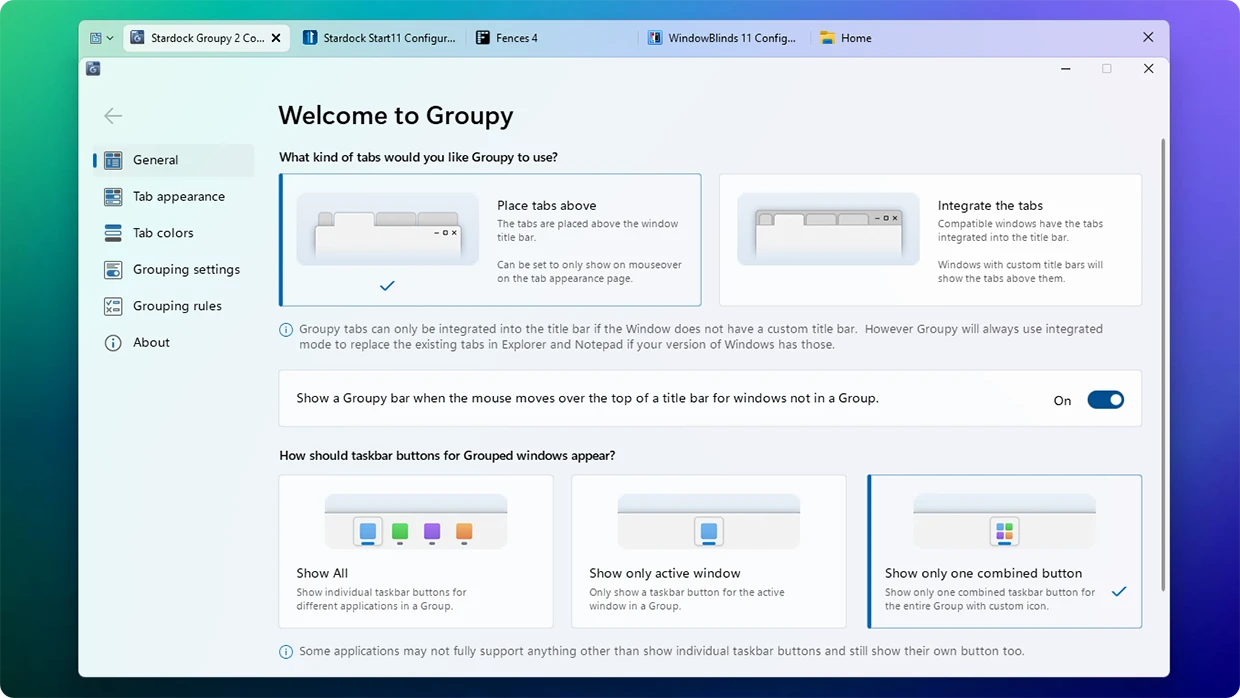
Stardock Groupy changes how professionals interact with their desktop environments by introducing a universal tabbed interface to standard desktop applications. Rather than juggling dozens of floating windows spread across multiple monitors, users can merge completely unrelated programs into a single, cohesive frame that mimics the behavior of a modern web browser. This tool targets researchers, office workers, and multitaskers who rely heavily on project-specific layouts, allowing them to consolidate their digital workspace into logical, manageable blocks. Instead of alt-tabbing frantically between a plain text editor, a complex macro-heavy spreadsheet, and a local network directory, a user can drag all three windows together into one organized stack. This approach effectively brings the organizational clarity of web browsing to the chaotic environment of local desktop computing.
This desktop app matters because traditional operating system interfaces still treat every application as an isolated container, leading to inevitable screen clutter. While native file explorers are gradually adopting their own tabs, they artificially limit that functionality to file management alone. Stardock Groupy transcends application boundaries, meaning a video editor can attach their daily script document directly to the rendering software's main window, or an accountant can snap their calculator, spreadsheet, and email client into one continuous workflow container. By drastically reducing visual clutter on the desktop, it minimizes the persistent distraction of constantly minimizing, maximizing, or hunting for hidden windows during a busy workday. It keeps the active project centered and visible, hiding unrelated background tasks behind neat, clickable headers.
Choosing this utility over relying on built-in taskbar grouping changes the actual physical geometry of the screen layout. Instead of reading tiny text labels on a crowded taskbar, users interact with large, visible tabs positioned directly above their active work area. The application integrates deeply into the window management system, feeling less like an intrusive overlay and more like a native operating system behavior that should have been there by default. It successfully bridges the gap between web-based work, where tabs have been the standard for decades, and heavy local processing, where traditional window management has historically forced a disorganized, overlapping layout.
Key Features
- Universal Application Tabbing: The core mechanic allows users to drag any active application window by its title bar and drop it onto another to merge them instantly. This mechanism works across completely different software types, meaning a user can combine a dedicated desktop email client, a heavy PDF reader, and a presentation creator into a single active frame, keeping related project files visually bound together.
- Saved Taskbar Groups: Users can capture their exact multi-tab layout and save it as a dedicated shortcut for future use. Pinning this grouped layout directly to the taskbar enables a single-click launch that opens all the associated applications simultaneously, pre-arranged in their respective tabs, saving significant time during morning startup routines.
- Color-Coded Accents: To improve visual navigation and speed up task switching, the interface supports assigning distinct color accents to individual tabs. This specific feature helps visually categorize complex tasks, allowing users to designate bright green tabs for financial spreadsheets and muted blue tabs for communication tools within the exact same parent window.
- Cross-Tab File Dragging: Moving data between nested windows feels intuitive through intelligent tab hovering mechanics. A user can pick up a file in one local directory tab, drag it over the tab of a different application or network folder, pause for a second to let the target window come to the front, and confidently drop the file inside the newly focused workspace.
- Automatic Instance Grouping: The advanced settings panel includes customizable rules to force multiple instances of the exact same program to cluster together immediately upon launch. If a user opens four separate text documents throughout the morning, the software automatically stacks them into one unified window rather than scattering them haphazardly across the screen.
- Visual Tab Previews: Hovering the mouse cursor over any background tab generates a live, high-resolution visual thumbnail of its current contents. This capability allows users to check the exact status of a background rendering job or monitor an active chat application without actually switching focus away from their primary working document.
- Mica Interface Styling: The customized window borders and tab backgrounds utilize advanced desktop rendering effects to match modern operating system aesthetics perfectly. The generated tabs adopt translucent, frosted-glass textures that blend cleanly with the underlying desktop wallpaper, avoiding the jarring or outdated appearance common to older interface modification utilities.
How to Install Stardock Groupy on Windows
- Download the official Windows installer executable directly from the vendor's primary distribution server to your local storage drive, ensuring you avoid unofficial mirrors.
- Launch the setup package and grant administrative privileges when prompted by the User Account Control dialogue, which is required to allow the necessary system-level interface modifications.
- Accept the end-user license agreement and carefully review the default installation directory, modifying the destination folder path only if your specific physical storage configuration strictly requires it.
- Proceed through the automated installation wizard to unpack the core executable files and allow the background window management service to initialize on the system architecture.
- Restart your computer completely when the wizard finishes, as a full system reboot is necessary for the application hooks to inject correctly into the native window drawing processes without causing graphical glitches.
- Open the installed software from the Start menu to trigger the initial welcome screen, where you will be prompted to enter your vendor account details to activate the license or initiate a timed trial period.
- Configure your immediate grouping preferences during the first run setup, specifically choosing whether to enable delayed grouping, a feature designed to prevent accidental tab merging when moving windows quickly across the monitor.
Stardock Groupy Free vs. Paid
Stardock Groupy operates on a strict commercial model and does not offer a permanently free tier for extended use. Users can download a time-limited trial from the official site to test the window management capabilities on their own hardware. Once the trial period concludes, the software requires the purchase of a perpetual license to keep the tabbed interface functional. If the trial expires without activation, the application will simply cease grouping windows and revert the desktop to its standard, un-tabbed behavior. This trial structure ensures users can verify compatibility with their most-used applications before spending money.
The standalone perpetual license costs $9.99 for an individual user. This standard tier is quite flexible, as the vendor permits the license to be installed on up to five personal computers owned by the primary user. This eliminates the need to buy separate copies for a dedicated desktop workstation, a travel laptop, and a home media machine. The purchase includes minor updates and maintenance patches for the current software generation, keeping the tool operational as the operating system receives its own background updates.
For users interested in broader system customization, the vendor also includes this tool in the larger Object Desktop suite, which costs $39.99. This bundle provides access to several other interface modification programs—such as specialized start menu replacements and desktop icon organizers—alongside the window grouping utility. Additionally, a dedicated Business edition exists for enterprise environments, providing centralized license management and mass deployment capabilities for IT administrators tasked with rolling out the software across large corporate networks without requiring individual user accounts.
Stardock Groupy vs. TidyTabs vs. QTTabBar
TidyTabs is a direct competitor that also brings web-style tabs to standard desktop applications, utilizing a structured freemium pricing model. It allows users to group up to three windows together for free, making it highly attractive for casual users who only need basic window management without paying for a commercial license. However, unlocking unlimited window grouping, multi-monitor support, and advanced tab reordering behavior requires purchasing a Pro license, making the paid tiers functionally similar in price. Users who prefer a minimalist, floating tab aesthetic or want a free tool for light multitasking should choose TidyTabs, while those managing heavy enterprise workflows with dozens of nested applications will find Stardock Groupy offers stronger saved-group management and better automatic instance clustering.
QTTabBar focuses exclusively on overhauling the native File Explorer by adding a highly customizable tabbed interface and extra functional directory plugins. Because it is completely open-source and free of charge, it is an excellent choice for users whose primary frustration is managing deep local files and complex network directories. It adds deep automated scripting capabilities, custom keyboard shortcuts, and extra file viewing panels that cater directly to system administrators and power users managing complex folder structures. However, QTTabBar cannot group different types of executable software together; users who need to combine a web browser, a code editor, and a command prompt into a single active window must bypass it and choose Stardock Groupy instead.
Stardock Groupy remains the significantly better fit for professionals who want a polished, system-wide utility that fundamentally alters how entirely different software types interact on the screen. Its specific ability to save multi-application layouts as single-click taskbar groups makes it substantially more effective for project-based multitasking than localized Explorer-only modifications. The deep graphical integration with modern operating system aesthetics, combined with the predictable commercial support model, ensures a stable visual environment for users who rely on heavy daily productivity and cannot afford unexpected UI crashes or incompatible window borders.
Common Issues and Fixes
- The background service fails to start or crashes. If tabs suddenly disappear and windows refuse to stack, the underlying management process has likely stopped. Open the Windows Services manager by typing
services.mscinto the Start menu, locate the Stardock Groupy service, right-click it, and select Start or Restart to restore functionality instantly without requiring a full system reboot. - Mouse input freezes in specific full-screen games. The interface hooks can occasionally interfere with intensive 3D applications, causing stuttering or frozen mouse tracking when the cursor moves. To fix this, open the application's settings panel and manually add the specific game executable to the exclusion list, ensuring the software ignores the game window entirely and stops trying to attach a tab header to it.
- Saved groups refuse to load or auto-group automatically. This usually happens if the registry permissions become corrupted or an overly aggressive antivirus program blocks background file writes during an update. The most reliable fix is to purge the software using the vendor's official batch uninstaller tool, reboot the system, and reinstall the application with full administrator privileges to cleanly rebuild the required registry keys.
- Custom title bars break tab placement. Certain desktop applications with heavily customized, non-standard title bars may force tabs to display improperly at the very top of the screen or obscure native menu buttons. Users can adjust the tab placement settings to force an alternative layout just below the title bar, or disable grouping completely for that specific problematic application to maintain visual usability.
Version 2.31 — January 2026
- Introduced an option to restore legacy rule behavior, allowing users to create a universal rule that matches all applications.
- Fixed a bug where spaces were incorrectly deleted while typing within the Excel VBA editor.
- Corrected a visual rendering glitch affecting tabs when using the standard tab style without the extended tab bar height.