Raycast for Windows functions as a centralized command bar that replaces traditional start menus and sluggish file search mechanisms with a fast, keyboard-driven interface. Operating as an all-in-one productivity application, it allows individuals to launch programs, execute system commands, calculate currencies, and modify settings without ever needing to move their hands to a mouse. Officially built for Windows 10 and Windows 11, this desktop application streamlines daily computer interactions and actively reduces the minutes wasted digging through nested desktop folders or disorganized taskbars. Instead of relying on multiple isolated utilities for math, clipboard management, and system navigation, users gain a single overlay that handles all these actions through simple text inputs.
The core philosophy of this desktop application relies on keeping the user entirely focused on their active workspace. When a professional needs to convert euros to dollars, find a specific project document, or force-quit an unresponsive background process, they simply press a global hotkey, type a few characters, and hit the enter key. The overlay appears instantly over the current window, executes the requested command, and disappears just as quickly. This localized approach is fundamentally different from relying on web-based portals or generic category tools. By hooking directly into the operating system APIs, the utility performs local file indexing, interfaces with native window rendering protocols, and manipulates the system clipboard directly. This deep system access ensures that the overlay responds in milliseconds rather than requiring a browser tab to load or a cloud server to process basic navigational commands.
Beyond basic file discovery and application launching, the tool operates as an extensible software ecosystem. It effectively functions as a host for hundreds of specialized plugins that connect external services directly to the desktop environment. Instead of maintaining open tabs for project management boards, version control systems, and communication platforms, individuals execute specific tasks directly from the main input field. This architectural choice prevents the excessive context switching that typically derails focus during complex work sessions. The resulting workflow ensures that developers, writers, and administrative professionals spend less time navigating graphical user interfaces and more time actually generating output.
Key Features
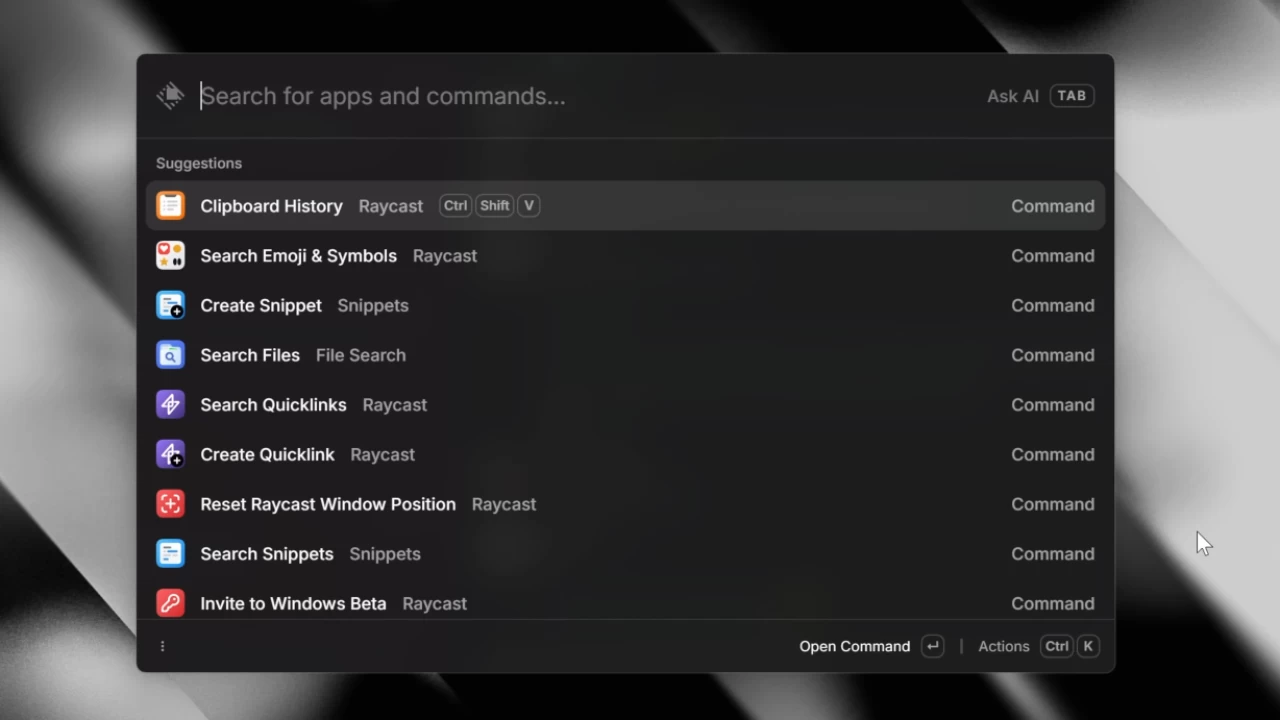
- Command Palette and App Launcher: The central search field acts as a specialized replacement for the default system run dialog. By typing partial application names, control panel applets, or specific system commands like shutting down the machine or emptying the recycle bin, users bypass traditional graphical menus entirely. The interface includes a strict most-recently-used history queue, meaning that frequently executed tasks automatically surface to the top of the suggestion list after just one or two keystrokes.
- Quick AI Integration: Hitting the tab key within the main search bar immediately transitions the interface into an artificial intelligence chat environment. Users can submit natural language questions, request specific code block generations, or ask for text summarization without launching a dedicated web browser. The chat interface fully supports syntax highlighting for programming languages and provides inline formatting, keeping research and generative tasks strictly confined to the immediate desktop overlay.
- Custom File Search Engine: Because default operating system indexers often struggle with speed and accuracy, this application deploys a custom-built background scanning engine optimized for instant retrieval. Users can locate deeply nested documents, image files, or configuration scripts by typing partial filenames. Once a file is highlighted, an integrated action panel provides secondary commands such as opening the containing directory, copying the exact file path to the clipboard, or launching the document in an alternative editor.
- Clipboard History Manager: The software continuously monitors the system clipboard and archives all copied text strings, URLs, hex color codes, and image files into a searchable database. When a user needs to retrieve a link they copied hours earlier, they simply pull up the history view and type a related keyword to filter the archived items. The manager displays rich previews for images and retains the original formatting for code blocks, preventing accidental data loss during heavy multitasking sessions.
- Snippet Auto-Expansion: To eliminate repetitive typing, individuals can define custom text blocks and assign them short, memorable keyword triggers. When a user types a specific trigger into any text field across the entire operating system, the utility instantly replaces the short code with the full preconfigured text. This functionality proves especially useful for deploying standard email signatures, frequently used shell commands, or repetitive customer support responses without requiring manual copying and pasting.
- Keyboard-Driven Window Management: The application includes native controls for rearranging open application windows accurately across the monitor grid. Users can assign custom keyboard combinations to snap active windows to the left half of the screen, maximize them, or center them without dragging title bars with a cursor. This system hooks directly into the desktop manager, providing instantaneous layout shifts that help maintain an organized workspace during complex, multi-monitor workflows.
- Extension Store Ecosystem: A built-in plugin marketplace allows individuals to install hundreds of community-developed integrations written in standard web technologies. These extensions allow the main search bar to interface directly with external platforms, meaning a user can control media playback, search active database workspaces, or review code repositories strictly through text commands. The store features direct installation and automatic background updates for all installed plugins.
How to Install Raycast for Windows on Windows
- Download the official Windows installer package directly from the vendor website, or alternatively, locate the application within the Microsoft Store on a compatible machine.
- Launch the downloaded executable file or click the install button within the storefront interface to initialize the standard setup wizard.
- Allow the installer to extract the core application files and write the necessary background services to your primary system drive.
- Open the newly installed application to trigger the initial setup sequence, which will prompt you to configure your primary global hotkey.
- Select a key combination that does not interfere with your existing daily workflow, such as Alt and Space, to ensure the overlay can be summoned instantly from any screen.
- Review the initial onboarding screens and adjust your basic telemetry preferences, ensuring you understand what diagnostic data is shared with the developer.
- Navigate to the internal settings menu to manually enable and configure the clipboard history module, as it requires explicit permission to begin monitoring your copied data.
- Invoke the command bar with your chosen hotkey for the first time, type the word "Store" into the field, and begin browsing the available extensions to customize your local installation.
Raycast for Windows Free vs. Paid
The core application is entirely free for individual users, providing unrestricted access to the primary command palette, local file search, window management tools, snippet expansion, and the vast extension ecosystem. This base tier is intentionally designed to serve as a complete, fully functional launcher without restricting standard workflow automation behind a paywall. During the initial development phases, the standard Quick AI functionality is also accessible without an active subscription, allowing non-paying individuals to test natural language queries and code generation features.
For individuals requiring heavier localized processing limits and more sophisticated tools, the Pro tier is available for a monthly fee of $8 when billed annually. This paid subscription grants access to premium artificial intelligence models that handle complex reasoning tasks, deeper coding questions, and higher daily prompt volumes. Furthermore, the Pro tier removes the time restrictions placed on the clipboard history manager, allowing users to retain their archived text and images for unlimited durations rather than adhering to the standard expiration windows.
The vendor is also actively developing additional subscription features for collaborative environments, positioning the tool for corporate deployment. While the core individual experience remains highly capable under the free model, teams have the option to purchase dedicated organizational plans. These higher tiers focus entirely on shared assets, enabling colleagues to distribute custom internal extensions, synchronize standardized company snippet libraries, and maintain uniform command structures across multiple workstations.
Raycast for Windows vs. Flow Launcher vs. Microsoft PowerToys
Flow Launcher operates as an open-source search utility that caters to users who prioritize community-driven development and strict local execution. Because it relies heavily on a decentralized ecosystem of Python and C-Sharp plugins, it offers a highly customizable experience for technical users who want granular control over their search indexing and aesthetic themes. However, Flow Launcher lacks a standardized, corporate-backed extension marketplace, meaning that finding, installing, and updating plugins often requires more manual intervention and technical troubleshooting than a unified commercial platform.
Microsoft PowerToys, specifically its embedded PowerToys Run module, delivers a fast, integrated search bar built directly by the operating system developers. It natively understands default system registry paths, deeply integrated Windows services, and standard control panel applets without requiring any third-party installation. While PowerToys Run is an excellent, entirely free utility for basic application launching and math calculations, it strictly operates as a search field rather than a workstation hub; it does not offer built-in clipboard management, snippet auto-expansion, or a dedicated artificial intelligence interface.
Raycast for Windows provides a more structured environment for professionals who want to replace multiple background utilities with a single, highly extensible interface. By bundling file search, window management, and a large library of easily installable third-party integrations into one application, it measurably reduces the number of disparate tools a user must maintain. Individuals who value a unified design language, immediate access to modern generative tools, and a frictionless extension installation process will find this centralized command bar far more practical than piecing together separate open-source modules.
Common Issues and Fixes
- High background CPU usage while idle. The custom file indexer occasionally gets stuck scanning exceptionally large directories, causing the application to consume significant system resources even when closed. To resolve this, navigate to the search settings and add specific exclusion rules for large cache folders, external backup drives, and dense development directories to prevent endless scanning loops.
- File search fails to locate deep nested paths. Users working with complex project structures may notice that files with directory paths exceeding 260 characters do not appear in the standard search results. Updating the application to the most recent release branch resolves this path length limitation, and manually rebuilding the file index from the advanced settings menu forces the engine to recognize the previously hidden files.
- Application crashes immediately upon startup. Launching the application without an active network connection during certain early builds causes a fatal error that immediately terminates the process. Ensure your machine maintains a stable internet connection during the initial boot sequence, and verify you have applied the latest patches which specifically address offline initialization stability.
- Global hotkey fails to trigger the command bar. If pressing your configured keyboard shortcut does nothing, another background utility or default system function is likely intercepting the keystroke before it reaches the launcher. Open the application directly from the system tray icon, navigate to the preferences tab, and remap the primary launcher combination to an alternative pattern such as Shift plus Space to avoid further conflicts.
Version 0.47.1.0 Beta — February 2026
- Improved startup behavior and stability in common desktop scenarios.
- Updated workflow components for better performance during extended sessions.
- Resolved minor compatibility and usability issues reported by users.