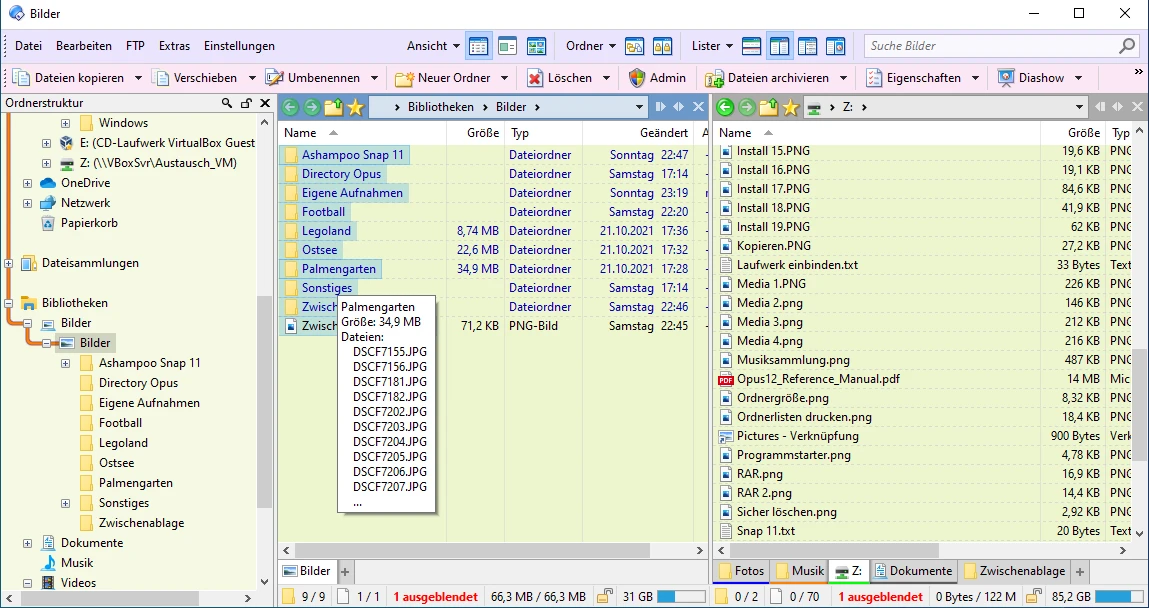
For PC owners managing thousands of files, standard operating system folders often become a bottleneck. Moving nested directories, comparing backup drives, and renaming batches of photos usually requires opening multiple overlapping windows, writing custom batch files, or relying on specialized third-party scripts. Directory Opus is an advanced file manager for Windows that completely replaces the default operating system file browser. It intercepts standard commands—such as the Windows+E keyboard shortcut or double-clicking a folder on the desktop—and routes them into a highly organized, multi-threaded workspace designed for heavy daily usage.
The software targets system administrators, digital archivists, photographers, and desktop users who need exact control over local drives, network attached storage, and FTP servers. This desktop-first approach guarantees hardware-level performance when copying terabytes of data, calculating folder sizes in real time, or reading EXIF metadata from raw image files. This local approach avoids the latency and bandwidth requirements of cloud-based file organizers.
Working within this environment allows users to execute complex tasks visually. You can open two directory trees side by side, load ten tabs in each pane, and queue massive file transfers to prevent hard drive thrashing. The application includes native tools to synchronize backup folders, identify duplicate files by comparing their exact MD5 checksums, and convert high-resolution image formats on the fly. Because it hooks deeply into the Windows shell, the transition is immediate; users gain advanced filtering, coloring, and tagging capabilities without changing how they launch folders from the taskbar. For professionals who lose hours every week simply hunting for misplaced documents or waiting for poorly optimized copy dialogs to finish, upgrading the core file browser removes a massive source of daily friction.
Key Features
- Explorer Replacement Mode: The application intercepts operating system calls so that opening a folder from the desktop or pressing Windows+E launches the custom interface instead of the default browser. This system-wide hook ensures you never have to manually launch the manager to get your customized layouts. Even when you click 'Open File Location' inside a completely different application, Directory Opus catches the command and opens the target path.
- Dual-Pane and Tabbed Navigation: The main window divides into two independent directory trees, each capable of holding multiple folder tabs. You can drag files from a local solid-state drive in the left pane directly into an FTP server tab in the right pane without losing your place in either directory. Users can also save specific tab groups, allowing them to load a complete multi-folder workspace with a single click.
- Advanced Batch Renaming: Users can rename hundreds of files simultaneously using regular expressions, sequential numbering, and metadata macros. For example, you can select fifty raw images, open the Rename dialog, and apply a macro that automatically renames them based on their EXIF capture date, camera model, and a custom text string.
- Queued File Operations: When transferring large amounts of data across multiple drives, standard operating systems try to execute all copies simultaneously, causing severe disk thrashing and slowing down the entire machine. This software automatically queues copy and move operations sequentially, maintaining maximum read and write speeds while providing a single progress window that handles pauses and errors cleanly.
- Built-in Archive Handling: The software mounts ZIP, 7Zip, and RAR archives as if they were standard system folders. You can double-click an archive, browse its internal directory structure, and extract specific text documents or images without unpacking the entire compressed file. You can even drag and drop new files directly into the archive window to compress them instantly.
- Flat View Mode: This toggle collapses complex folder hierarchies into a single list. If you need to find all PDF files buried inside dozens of subfolders across a massive backup drive, activating Flat View displays every file in one unified pane. You can sort this giant list by size or date, allowing you to select, copy, or delete specific items without navigating the individual directories manually.
How to Install Directory Opus on Windows
- Download the executable installer package from the official GPSoftware website, ensuring you select the correct architecture to match your desktop hardware.
- Double-click the downloaded setup file to initialize the standard InstallShield wizard. If prompted by User Account Control, grant the installer permission to modify your system.
- Accept the end-user license agreement and confirm the destination folder path on your local primary drive. The tool uses standard Microsoft-defined locations for storing its configuration data.
- Click through the final confirmation screen to extract the core application files. Once the progress bar finishes, close the installer and launch Directory Opus for the first time from the new desktop shortcut.
- Launching the application triggers the Initialisation Wizard, which runs only on the first startup. Here, you will select your interface language and choose whether to evaluate the Pro or Light edition during the initial trial period.
- The wizard will ask if you want to enable the Launch On Startup option. Enabling this keeps the program resident in memory, ensuring that opening a new window via a hotkey is instantaneous.
- Finally, choose to enable the Explorer Replacement option. This critical setting tells the software to intercept system folder clicks and keyboard shortcuts, fully replacing the default Windows file browser for everyday operations.
Directory Opus Free vs. Paid
Directory Opus is a commercial software product developed by GPSoftware. New users can download the application and begin a fully functional 30-day trial immediately. If you need more time to test the advanced scripting commands or FTP tools, the vendor allows you to request an extended 60-day evaluation certificate directly through their official website. During the trial phase, the built-in License Manager lets you switch freely between the Pro and Light editions, giving you a chance to determine exactly which tier fits your daily tasks.
The software is divided into two permanent license tiers: Light and Pro. The Light edition costs significantly less and targets home users who simply want dual panes, folder tabs, flat view capabilities, and better filtering without complex scripting features. The Pro edition includes the full suite of advanced tools, adding native FTP support, a dedicated duplicate file finder, system-wide hotkeys, floating toolbars, and extensive metadata editing panels. Prices fluctuate based on regional currency and taxes, but historically, the Light edition is priced around $30 to $40 AUD, while the Pro edition sits near $80 to $90 AUD.
Licenses are sold as perpetual purchases for the specific major version you buy, meaning you can use that version indefinitely without paying a recurring monthly subscription. Purchasing a standard Pro license entitles you to install the software on one main desktop computer and includes a free personal laptop license for remote work. Minor patches and bug fixes within your version are provided at no extra cost. When GPSoftware releases a completely new major version, existing users can purchase a discounted upgrade license, though upgrading is never mandatory to keep your current build functioning.
Directory Opus vs. Total Commander vs. XYplorer
Total Commander is a legendary dual-pane file manager famous for its ultra-lightweight footprint, extreme speed, and keyboard-centric design. System administrators often prefer Total Commander because it relies heavily on traditional text-based lists, fast keyboard shortcuts, and an enormous ecosystem of third-party plugins that handle everything from obscure archive formats to cloud protocol connections. However, Directory Opus provides a highly modern, graphically rich interface that supports high-resolution displays, color-coded file tags, complex image processing, and deep native Windows shell integration right out of the box without requiring manual plugin configuration.
XYplorer is another highly capable tabbed file manager that distinguishes itself by operating as a fully portable application. Users frequently choose XYplorer because it can run entirely from a USB flash drive without writing keys to the host operating system's registry, making it ideal for IT technicians moving between multiple client machines. In contrast, Directory Opus relies on deep system hooks to completely replace the default Windows file browser, intercepting taskbar clicks, system shortcuts, and third-party application requests. This deep integration makes it a much better fit for a permanent desktop workstation rather than a portable toolkit.
If you require ultimate portability on external storage drives, XYplorer is the superior tool. If you want a minimalist, retro interface built strictly for rapid keyboard navigation on older hardware, Total Commander remains a staple. Directory Opus is the correct choice when you want to permanently upgrade your daily desktop environment with a highly visual, deeply integrated manager that handles complex macros, automated file queues, and standard folder replacement natively.
Common Issues and Fixes
- Sluggish performance when browsing network or cloud drives. The application attempts to read file metadata and generate visual thumbnails automatically. While this is fast on local drives, it can cause severe hanging and delayed folder loading on connections like Google Drive or remote NAS devices. To fix this, open Preferences, navigate to Folders, then Folder Formats, and disable metadata retrieval and thumbnail generation for those specific network paths.
- Inability to drag-select files using an empty margin. Unlike the default operating system browser, some layout views list files edge-to-edge, removing the empty space needed to draw a selection box with your mouse. Fix this by going to Preferences, opening File Display Modes, selecting Details, and changing the 'File selection / highlighting style' to 'Full width of the Name column.' This restores an empty clickable area on the right side of the list.
- Error 32 or File in Use warning when renaming items. Pressing F2 to rename a file will occasionally fail if the built-in viewer pane or the background metadata extractor is actively scanning the item for details. To resolve this, temporarily close the visual preview pane, or wait a few seconds for the background extraction to complete before attempting to rename the file. Alternatively, disable the background metadata scanner entirely in the settings.
- Double-clicking desktop folders opens the default system browser. A major operating system update or a conflicting third-party shell extension can occasionally override the Explorer Replacement settings, causing Windows to revert to its default behavior. Fix this by opening Preferences, navigating to Launching Opus, selecting Explorer Replacement, and ensuring the 'Replace Explorer for all folders' box is checked.
Version 13.21 — February 2026
- Introduced a new visual style for drive labels, allowing them to be displayed without surrounding brackets (for instance, "C: Local Drive").
- Brought new audio feedback settings, including customizable sounds for clicking toolbar buttons and for dropping files onto them.
- Implemented advanced folder expansion behaviors: holding Alt while clicking the expand button opens deeper sub-folder levels recursively, while Shift+Alt+click collapses the deepest expanded tier.
- Added a preference to maintain the expansion state of file groups whenever the lister is refreshed.
- Enhanced popup auto-complete suggestions for internal commands to clearly show argument types (such as /S or /K).
- Provided a new toggle to hide or show the histogram within the standalone image viewer's information overlay.
- Added a graphical enhancement option to display drop shadows behind images when viewing in thumbnails mode.
- Expanded paired folders functionality with new rules to automatically trigger dual-display mode or read directly into an active dual pane.
- Gave users the option to silently cancel NavLock without triggering an "out-of-sync" warning when navigating outside the paired base directory.
- Updated music metadata columns so that Disc and Track numbers can now be displayed without zero-padding or totals.
- Added an advanced behavior setting to restore standard alphabetical sorting for library member folders, rather than sorting by the order they were added.
- Introduced an advanced toggle to allow file collections to be expanded directly at the root level.