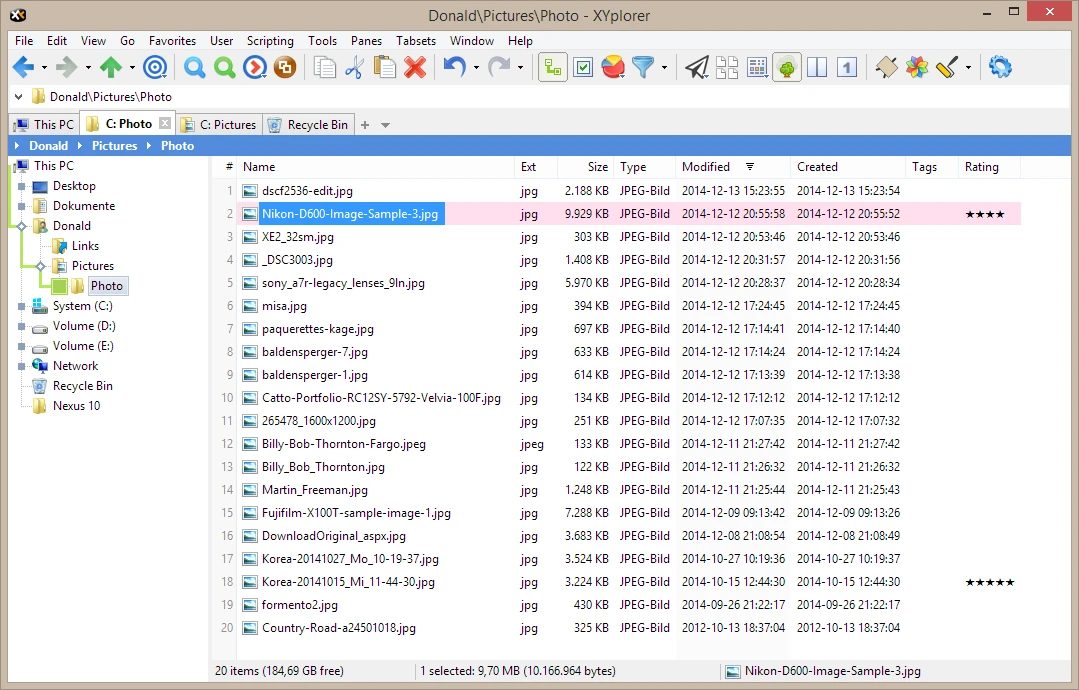
XYplorer is an advanced file manager for Windows designed to replace the default system explorer with a multi-tabbed application. By shifting away from standard directory navigation, this tool provides professionals with high-speed file search, detailed metadata viewing, and extensive automation capabilities to save hours of manual sorting and archiving. For users working with thousands of files across deep folder trees, standard system navigation quickly becomes a bottleneck. Opening multiple windows clutters the desktop, copying paths takes extra clicks, and basic search tools often fail to locate files based on complex criteria like metadata tags or exact byte sizes. This desktop application addresses these friction points by introducing a highly customizable interface built around dotted tabs, dual-pane layouts, and strict local processing.
Unlike browser-based organizers or cloud-reliant document managers, this utility operates entirely as a local desktop program. All file indexing, thumbnail generation, and batch renaming tasks happen directly on the local hardware, ensuring speed and data privacy. It indexes local storage and external drives without uploading directory structures to an external server. Furthermore, the application relies on a fundamentally portable architecture. All configuration settings, visual layout preferences, and custom scripts are stored within the application's own installation folder, writing zero configuration data to the Windows registry unless explicitly instructed to handle system context menus. This allows system administrators, photographers, and developers to manage data across local storage and external drives from a single workspace.
Navigating complex server structures requires more than just double-clicking folders. The interface focuses on eliminating redundant clicks through features like the "Mini Tree," which trims the folder hierarchy to display only the paths currently in active use. By minimizing visual clutter, users can drag and drop items between directories with greater accuracy. Whether copying gigabytes of raw video files across mapped network drives or using plain text scripts to execute conditional file renaming rules, the application prioritizes keyboard-centric operation and strict adherence to individual workflow requirements over generic visual simplicity.
Key Features
- Dual-Pane and Tabbed Browsing: Instead of launching separate window instances to drag files between folders, the interface utilizes a dual-pane view paired with browser-style tabs. Users can open multiple directories side-by-side, lock specific tabs to prevent accidental closure, or save customized tab sets to instantly reopen a specific project environment across different sessions.
- Mini Tree Navigation: The traditional folder tree often requires excessive scrolling past irrelevant directories to reach a target destination. The Mini Tree mode simplifies navigation by exclusively rendering the paths and folders the user has actively opened during the current session, significantly reducing visual clutter when traversing deep subfolders.
- Advanced File Search Engine: The built-in search tool processes Boolean logic (AND/OR/NOT), regular expressions, and specific metadata filters directly from the Info Panel. Users can locate duplicate files by checking MD5 hashes, filter search results by exact byte sizes or EXIF camera data, and search inside text documents without relying on the default background indexing service.
- Action Scripting: To automate repetitive file management tasks, the application includes a proprietary scripting engine that requires no external plugins or runtimes. Users can write plain text scripts to execute complex file operations, such as renaming batches of images based on their creation dates, moving files into specific subfolders automatically based on extension, or generating custom text logs of directory contents.
- Color Filters and Tagging: Visual organization extends beyond standard folder icons. Users can apply custom Color Filters to highlight specific file types, ages, or sizes with distinct background colors in the list view. Additionally, the software supports multi-user tagging, allowing teams to append custom labels, star ratings, and text comments to files without modifying the actual file content.
- Portable Application Architecture: The entire program functions independently of the host operating system installation. By storing all configuration files, scripts, and customized toolbar icons in a single data folder, users can run the executable directly from a USB flash drive, leaving no traces in the registry and making it ideal for moving between different workstations.
- Batch Rename Interface: Renaming hundreds of files individually consumes valuable time. The built-in batch rename utility allows users to append sequential numbers, insert specific text strings, replace characters, and modify file extensions using wildcard patterns. A preview window displays the exact output strings before applying the changes, preventing accidental file name destruction.
How to Install XYplorer Pro on Windows
- Download the official Windows installer package from the developer's website.
- Launch the executable setup file and grant administrator privileges if prompted by the User Account Control dialogue.
- Review and accept the end-user license agreement within the installation wizard.
- Select the destination directory for the application. The setup usually defaults to a standard Program Files directory, but you can choose a different local drive or an external USB drive.
- Choose whether to create a desktop shortcut, pin a quick launch icon to the taskbar, and register the application in the Windows folder context menu.
- Click "Install" to unpack the executable files, local documentation, and default configuration files to the chosen directory.
- Finish the setup wizard and launch the program to initialize the default dual-pane layout.
- Upon first launch, navigate to Tools > Configuration to adjust tab layouts, toggle dark mode, or input a purchased registration name and license key to remove the trial limitations.
XYplorer Pro Free vs. Paid
XYplorer operates on a strict trialware model rather than offering a permanent free tier. The developer discontinued the limited freeware version several years ago. Today, new users can evaluate the full application via a 30-day trial period. During this evaluation phase, all program features remain active, allowing individuals to fully test the scripting engine, dual-pane navigation, custom color coding, and advanced search filters. Once the 30-day period expires, the software requires the purchase of a commercial license to continue functioning legally.
The pricing structure is divided into Standard and Lifetime licenses. A Standard License Professional costs approximately $34.95 per user. This license applies to all of a single user's computers and never expires, but it only includes free software updates for one year. After that year, the user can continue running the last installed version indefinitely or pay a discounted rate to renew the upgrade period. The Lifetime License Professional costs $69.95 but guarantees perpetual access to all future updates without any recurring subscription fees. Both licenses unlock the exact same feature set for individual users.
For educational users, the developer offers an Academic discount that reduces the price of both license tiers by 50% for students, teachers, and retirees. For corporate environments, an Enterprise Edition is available. The Enterprise tier unlocks specific network-oriented features, such as Access Control and Multi-User Tagging, which allow teams to share file metadata and restrict certain application behaviors across a company network. Volume discounts apply automatically when purchasing multiple seats for business deployment.
XYplorer Pro vs. Directory Opus vs. Total Commander
Directory Opus functions as a heavily integrated system replacement designed for users who want total control over every visual and functional element of their desktop environment. Users choose Directory Opus when they need deep operating system integration, complex multi-panel layouts, native FTP support, and built-in image conversion tools directly within the primary interface. However, its high configuration depth often requires a steep learning curve, and its base pricing is generally higher than alternative file managers.
Total Commander represents the traditional orthodox file manager, strictly adhering to the classic dual-pane layout popularized by early command-line utilities. It is highly regarded for its keyboard-centric navigation, a large library of community-developed plugins, and advanced archive handling capabilities. Users choose Total Commander when they prefer a strictly utilitarian approach, relying heavily on internal tools for FTP connections, file splitting, and archive extraction without needing a modern visual design or smooth tabbed browsing.
XYplorer Pro is the better fit when speed, a modern tabbed interface, and strict portability are the primary concerns. It avoids writing to the Windows registry by default, making it ideal for running off external drives across multiple machines. Its proprietary scripting engine allows for deep automation without requiring third-party plugins, and its visual configuration is generally easier to navigate than the dense option menus found in Directory Opus. It strikes a practical balance between highly advanced file operations and an accessible, modern interface.
Common Issues and Fixes
- Thumbnail generation causes the application to freeze. When navigating folders containing thousands of high-resolution images or large video files, the software may become unresponsive while trying to render every preview simultaneously. Fix this by opening the settings menu, navigating to the thumbnails section, and unchecking the "Create all thumbnails at once" option to render previews only as you scroll.
- Blurry text and icons on high-DPI monitors. Moving the application window between screens with different scaling percentages (such as 100% and 150%) can result in blurry interface elements. To correct this, right-click the executable file, open Properties, navigate to the Compatibility tab, check "Override high DPI scaling behavior," and set the scaling to be performed by the "System".
- Missing items in the right-click shell context menu. Some older context menu extensions only register as 64-bit shell handlers, which the 32-bit executable cannot display. Fix this by navigating to the installation folder and running the 64-bit version of the executable, which natively supports 64-bit shell context menus, IFilters, and preview handlers.
- Network drive searches are excessively slow. Conducting a search across mapped network drives can cause long delays if the software attempts to query unindexed file contents over a slow connection. Fix this by modifying the search parameters to rely strictly on filename matching rather than content indexing, or use the Quick Search syntax to narrow down specific extensions before executing the query.
Version 28.20.0300 — February 2026
- Added support for a "Zoom to Cursor" feature in the image previewer, letting users zoom precisely on targeted areas using the mouse wheel.
- Improved background performance and integrated general maintenance enhancements to streamline operations.
- Fixed various minor bugs to guarantee a smoother and more stable file management workflow.