AOMEI Backupper Technician operates as an enterprise-grade data protection and disaster recovery toolkit engineered specifically for IT administrators, managed service providers (MSPs), and repair technicians. Instead of requiring companies to purchase individual licenses for every single computer, this software is built around a centralized deployment model. A single technician license allows administrators to manage, back up, and restore an unlimited number of Windows workstations within a single company or across a fragmented client base. It handles the heavy lifting of full disk cloning, bare-metal recovery, and system migration, making it a critical utility for teams that manage large fleets of client hardware.
The software addresses concrete administrative bottlenecks, such as rolling out a standardized operating system image to dozens of machines simultaneously or recovering a corrupted workstation when it will no longer boot. Because it deals directly with the Master Boot Record (MBR), GUID Partition Table (GPT), and the Volume Shadow Copy Service (VSS) built into Windows, it requires a dedicated desktop application environment. Browser-based tools or lightweight file sync utilities cannot lock the file system, copy hidden recovery partitions, or create bootable Windows Preinstallation Environment (WinPE) media. Working at the block level allows the program to read the raw data on the disk, completely bypassing the file system abstractions that often restrict basic copying methods.
Technicians rely on this specific tier because of its portability and network deployment capabilities. Field engineers frequently use the toolkit from a removable USB drive, moving from desk to desk to perform offline hardware cloning or emergency data extraction without leaving local software traces behind on the client computer. Whether the task involves upgrading aging mechanical hard drives to modern solid-state drives, mitigating a ransomware attack by reverting an entire office to an isolated backup image, or migrating user profiles to entirely new hardware, the application provides the exact controls necessary to manipulate the raw disk data directly. This avoids the tedious process of reinstalling Windows from scratch and manually reconfiguring local group policies for each affected machine.
Key Features
- Feature Name: Unlimited PC Registration: The primary structural advantage of this tier is the licensing model, which permits technicians to install and use the software on an infinite number of Windows workstations. This allows IT consultancies to provide billable backup and recovery services to external clients without triggering secondary activation limits or requiring per-seat purchases. The license terms explicitly cover commercial usage for client support workflows.
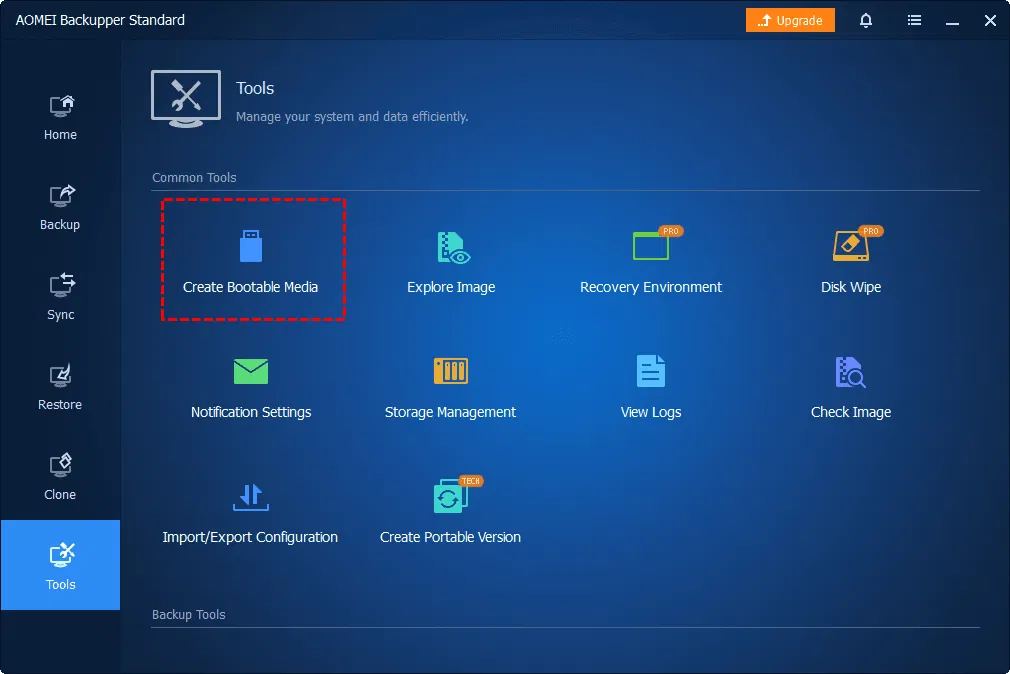
- Feature Name: Portable Tool Creation: Using the "Create Portable Version" tool found under the "Tools" menu, administrators can copy the entire functional application to a USB flash drive. This allows field technicians to plug the drive into a target machine, execute the program directly from the removable media, and perform disk cloning or imaging operations without running a local installer or modifying the client's registry.
- Feature Name: AOMEI Image Deploy: This built-in network utility allows administrators to push a customized, standardized Windows image to multiple client computers simultaneously over a Local Area Network (LAN). It reduces the time required to provision a new office environment, as technicians can format and image dozens of PCs concurrently rather than configuring each one manually using physical installation media.
- Feature Name: Universal Restore Environment: When a motherboard fails and exact replacement parts are unavailable, the Universal Restore function allows technicians to apply an existing system backup to entirely dissimilar hardware. The software strips out hardware-specific drivers during the restoration process, preventing the blue screen errors that typically occur when a storage controller or chipset changes abruptly between the source image and the target chassis.
- Feature Name: PXE Boot Tool: Rather than physically walking a bootable CD or USB drive to every corrupted machine in an office, technicians can use the PXE Boot Tool to start multiple client computers directly from a central network server. This initiates a customized recovery environment over the network, allowing remote troubleshooting and bare-metal image application on empty drives directly through the BIOS network stack.
- Feature Name: Real-Time File Synchronization: For priority data that cannot wait for a nightly scheduled backup, the software monitors designated directories for changes and instantly mirrors them to a secondary location. Administrators can configure this tool to sync files to a local partition, a mapped network drive, or network-attached storage (NAS), ensuring that critical working files are constantly duplicated without user intervention.
- Feature Name: Volume Shadow Copy Service (VSS) Integration: The application interfaces directly with Microsoft's VSS framework to take snapshot backups of the system drive while the computer is actively in use. This means office workers can continue editing documents and running local applications while the software quietly builds a complete system image in the background, without requiring a system reboot or locking the current user session.
How to Install AOMEI Backupper Technician on Windows
- Download the official Windows installer package from the vendor's distribution portal, ensuring you have the specific setup file corresponding to the Technician tier.
- Launch the executable file with standard administrator privileges, as the program must install low-level storage drivers capable of intercepting disk writes and managing partition tables during operations.
- Review the end-user agreement, select your preferred local installation directory, and choose whether to participate in the customer experience improvement program before clicking the install button.
- Allow the installer to extract the core application files and configure the necessary registry entries; this process usually takes under a minute on modern solid-state drives.
- Open the software from the desktop shortcut to trigger the initial launch sequence, which will prompt you to input your license code to unlock the unlimited registration and deployment features.
- Navigate to the "Tools" menu on the left sidebar to locate the "Create Portable Version" wizard if you intend to prepare a USB drive for field work on client computers.
- Select your connected removable media, and let the software write the portable directory structure to the drive, completely separating your field tools from the local host installation.
- Configure your first automated backup plan or network deployment task by selecting the appropriate disk mapping options, adjusting compression levels, and assigning a destination path with sufficient storage capacity.
AOMEI Backupper Technician Free vs. Paid
There is no free tier available for the Technician edition. AOMEI operates a freemium model for home users through its Standard edition, but the Technician tier is strictly a paid, commercial product intended for IT service providers, managed service providers (MSPs), and corporate network administrators. The specific value of this edition lies in its licensing structure, which bypasses the standard single-machine restriction to allow deployment across entire company networks.
The standard Technician license is priced at $499 per year. This subscription model covers an unlimited number of PCs within a single company and explicitly permits the license holder to use the software to provide billable technical support to external clients. This makes it an operational expense for IT consultancies rather than a per-device capital expenditure. A higher tier, known as Technician Plus, costs $699 annually or $999 for a perpetual lifetime license, adding specific compatibility for enterprise server environments and SQL databases.
Trial limits apply if testing the software before purchase. The trial permits users to navigate the interface, build backup jobs, and verify hardware compatibility, but critical execution steps—such as completing a system clone, building a portable USB drive, or finalizing a network image deployment—require active payment credentials. The software operates entirely offline once installed and registered, meaning administrators do not need to maintain a constant cloud connection to perform local bare-metal restorations or offline disk cloning.
AOMEI Backupper Technician vs. Macrium Reflect vs. Veeam Agent
Macrium Reflect is often favored in environments where strictly conservative, verified imaging is the absolute priority. IT professionals rely on Macrium when they need exact data verification logs, granular control over backup retention schemes, and a detailed rescue environment. However, Macrium Reflect lacks the built-in network deployment tools and the specific portable USB application generation that AOMEI offers natively. AOMEI provides a more cohesive workflow when an administrator needs to clone a drive, back up a system, and deploy an image over a LAN from a single centralized interface.
Veeam Agent is typically chosen when an organization is building a broader centralized backup ecosystem that spans across multiple operating systems, virtual machines, and cloud environments. Veeam excels at orchestrating backups from a central management console and tying local workstation data into enterprise-wide disaster recovery plans. While Veeam is capable of deep integration, it requires complex infrastructure planning and backend configuration. AOMEI bypasses this complexity, offering a direct, localized toolkit that field technicians can carry on a flash drive and execute without communicating with a master deployment server.
AOMEI Backupper Technician is the superior choice for independent IT contractors, small-to-medium business administrators, and repair shops that require a portable, straightforward utility. Its "unlimited PC" licensing model is aggressive compared to traditional per-seat pricing, and its combination of offline cloning, Universal Restore, and LAN deployment provides practical value for hands-on desktop support tasks. Users should choose AOMEI when the job requires immediate, tactical imaging and deployment rather than enterprise-wide, multi-platform orchestration.
Common Issues and Fixes
- Problem description. The disk cloning or backup process gets stuck at 0% or 99%. This malfunction is typically caused by unmapped bad sectors on the source disk, file system corruption, or unstable USB-to-SATA adapter connections. Cancel the operation, run the `chkdsk /f /r` command in the Windows terminal to repair disk errors, and ensure the target drive is connected directly to a stable motherboard port if possible.
- Problem description. The software fails to recognize the target destination drive. AOMEI requires standard sector sizing to perform direct cloning operations and will not support copying directly to drives formatted with 4096 bytes per sector natively. You can verify the target drive's sector size using the `msinfo32` tool in Windows; if it uses 4096-byte sectors, you must capture the source as an image file first, rather than attempting a direct sector-by-sector clone.
- Problem description. A Blue Screen of Death (BSOD) occurs when backing up to external USB enclosures. Certain hardware combinations utilizing the USB Attached SCSI Protocol (UASP) can conflict with the low-level `ambakdrv.sys` driver during heavy read/write operations. If this occurs, try connecting the external drive to a standard USB 2.0 port to force a different protocol, or temporarily remove the driver and rely on the Windows native VSS service for the snapshot.
- Problem description. The network deployment tool fails to locate client computers. The AOMEI Image Deploy utility relies on specific network broadcasting to find target machines. Ensure that the master server and all target computers are physically connected to the same Local Area Network (LAN) segment, and verify that the target machines have PXE network boot enabled in their BIOS/UEFI settings.
- Problem description. The portable application fails to launch on a client machine. The portable application still requires appropriate administrative rights to load its temporary storage drivers into the host memory. Ensure you are launching the portable executable file by right-clicking and selecting "Run as administrator," and verify that aggressive third-party antivirus software is not blocking the temporary driver execution from the removable drive.
Version 8.1.0 — December 2025
- Added capabilities to back up, restore, clone, and explore partitions featuring sector sizes larger than 512 bytes.
- Added operational support for highly fragmented NTFS partitions, as well as NTFS partitions containing file records over 1024 bytes.
- Added the Korean language to the available user interface options.
- Improved performance of the "Incremental Backup" feature for NTFS drives, delivering faster execution times and optimized storage consumption.
- Fixed issue with data corruption occasionally occurring when cloning or restoring FAT32 and exFAT partitions.
- Fixed issue with system backups, disk clones, and partition operations randomly triggering system freezes, program crashes, or blue screens.
- Fixed issue with Hotmail and Outlook email notifications and backup authorizations occasionally failing.
- Fixed issue with file backups getting interrupted due to excessively long file paths.
- Fixed issue with differential backup cleanup strategies ("By quantity") failing to trigger necessary full backups.
- Fixed issue with dynamic volume restorations and GPT to MBR disk clone conversions failing to apply correctly in certain environments.
- Fixed issue with running backup tasks not properly preventing the computer from entering sleep mode.