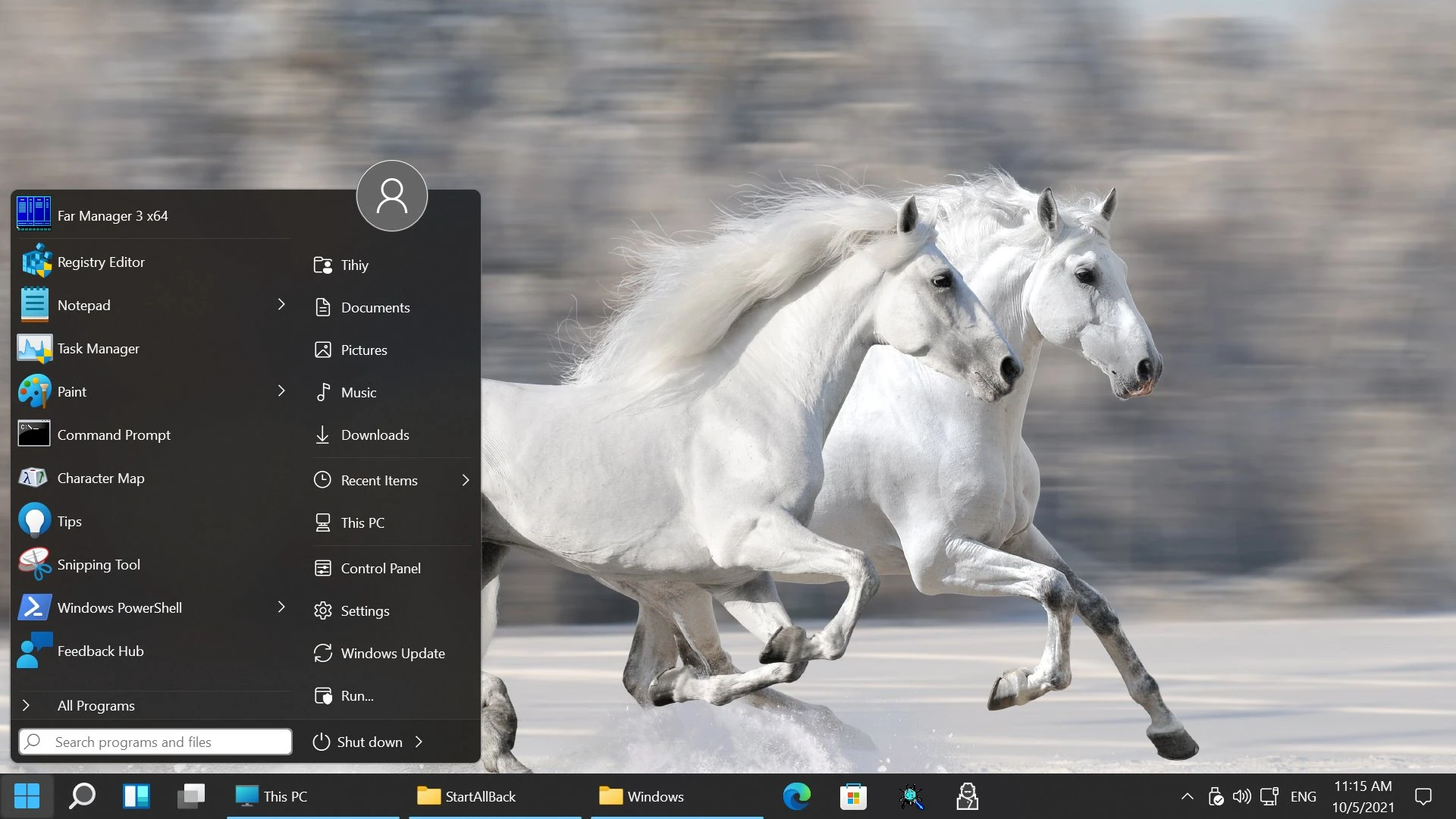
StartAllBack is a desktop user interface modification utility specifically built to replace the default Windows 11 centered taskbar, Start menu, and file management layouts with familiar, classic alternatives. Microsoft’s recent operating system updates introduced a highly simplified, centered desktop approach that removed long-standing behaviors, heavily impacting how professionals interact with their machines. Features such as taskbar icon ungrouping, direct context menu actions, and drag-and-drop file support to the taskbar were initially stripped away or hidden behind extra clicks. This application injects itself directly into the Windows desktop shell to revert those changes, restoring the deeply functional workflows from Windows 7 and Windows 10 without requiring users to perform complicated registry edits or rely on unstable workarounds.
The software heavily targets desktop power users, multi-monitor operators, and anyone whose daily muscle memory relies on older interface designs. Instead of settling for a minimal application launcher or dealing with the modern right-click barrier, you get immediate access to your installed programs, uncombined application labels, and the traditional File Explorer command ribbon. The utility directly addresses the friction caused by the modern interface, ensuring that users who keep dozens of browser tabs, word documents, and spreadsheets open can identify their active windows at a single glance.
By loading its own shell modifications natively in C++, the application manages to execute these layout changes while maintaining high system performance. It avoids running heavy background services or relying on external scripting frameworks. It also ensures that the restored older interfaces do not look out of place; it actively applies modern visual treatments, such as native Mica and Acrylic transparency effects, rounded corners, and accurate dark mode colors, to the older Windows 7 and Windows 10 menu structures. The result is a hybrid desktop experience that behaves like legacy software but visually matches the current generation of displays and system themes.
Key Features
- Classic Taskbar Restoration: This utility ungroups running application icons and restores visible text labels directly to the taskbar, exactly as they functioned in previous operating systems. You can identify multiple open document windows or browser sessions at a glance rather than hovering your mouse over stacked, identical icons.
- Familiar Start Menu Layouts: Replaces the modern pinned-grid layout with traditional Windows 7 or Windows 10 Start menu interfaces, complete with standard jump lists, nested folders, and the scrolling all-programs list. You can heavily customize the appearance of this menu, assigning different visual styles, adjusting the size of the icons, and choosing which system folders are pinned.
- Dynamic Segmented Taskbar: Applies dynamic transparency to the taskbar interface, making the background completely invisible except where system tray icons, running applications, and the Start button are located. This creates a floating dock visual effect while retaining strict taskbar functionality, blending the aesthetic of modern dock launchers with traditional desktop management.
- Unrestricted Context Menus: Bypasses the shortened right-click menu, directly displaying the full list of actions, file extractors, and third-party shortcuts immediately upon a single right-click on the desktop or within File Explorer. This permanently eliminates the need to hold the Shift key or click the repetitive "Show more options" text just to unpack an archive.
- File Explorer Ribbon Recovery: Swaps the simplified modern command bar in File Explorer for the denser Windows 10 ribbon or the Windows 7 command bar, returning one-click access to advanced folder properties, layout views, and file extension toggles. It also optimizes the internal search box to behave as it did in earlier builds, ensuring faster query typing.
- System Interface Dark Mode Integration: Forces traditional control panel dialogs, copy-and-paste file transfer windows, and older property sheets to render with correct dark mode background colors and fonts. This fixes the jarring visual inconsistencies left behind by default system settings, ensuring a uniform visual presentation whether you are looking at a modern settings page or a legacy device manager window.
How to Install StartAllBack on Windows
- Download the official executable installer package directly from the vendor's website to your local storage drive.
- Run the downloaded setup executable and approve the standard User Account Control (UAC) prompt to allow the application to write to your local program files.
- Choose your preferred installation scope when the initial window appears, selecting either "Install for everyone" to modify the shell for all machine accounts or "Install for me only" to restrict changes to your active profile.
- Allow the setup process to execute; the installer will automatically terminate and restart the Windows Explorer process in the background.
- Wait a few seconds as your screens flash and the taskbar reloads with the newly applied left-aligned layout and uncombined application icons.
- Open the configuration window that automatically appears on your desktop immediately after the graphical shell restart completes.
- Select your preferred baseline visual theme from the initial configuration tab, choosing between "Proper 11", "Kinda 10", or "Remastered 7" styles to establish your primary desktop interface.
StartAllBack Free vs. Paid
StartAllBack operates strictly as commercial software with a perpetual license model, though it provides a highly functional, unrestricted trial period for initial testing. When you install the software for the first time, you enter a generous evaluation phase where you have access to all taskbar ungrouping toggles, menu generation styles, and File Explorer tweaks. During this trial, the developers do not impose visual watermarks, artificial feature locks, or functional restrictions, allowing you to thoroughly verify that the utility stabilizes your daily workflow.
Once the initial trial period expires, the software requires the purchase of a one-time license key to maintain its visual integrity. A standard single-computer lifetime license costs approximately $5, making it an accessible utility for individual desktop users. The vendor also offers targeted volume discounts for individuals who need to activate the software on two or three personal machines. Additionally, individuals who previously purchased a license for the older StartIsBack application on older operating systems can typically claim an upgrade discount to transition to the modern utility.
If you choose not to activate the software after the evaluation period concludes, the utility does not force a system reboot or lock you out of your computer. Instead, it begins to restrict access to the advanced configuration interface and displays a noticeable watermark directly over the Start button. The core shell modifications still load in the background, but the visual penalty encourages regular users to purchase a license. For large-scale business deployments, the developer offers massive volume licensing packages, scaling up to 2,000 machines for enterprise environments seeking standardized office layouts.
StartAllBack vs. ExplorerPatcher vs. Stardock Start11
ExplorerPatcher is an open-source, non-commercial utility that restores classic interface elements by physically hooking into the dormant Windows 10 code still buried inside the operating system. You should choose ExplorerPatcher if you want an exact, literal replica of the older layout without spending money and are comfortable managing configuration files. However, StartAllBack offers a stronger workflow for users who prefer a more stable interface, as ExplorerPatcher frequently breaks or causes blank screens during major feature updates when Microsoft actively removes the legacy shell code.
Stardock Start11 is a heavier, premium desktop enhancement application that focuses extensively on creating entirely new menu designs rather than strictly restoring old ones. You should select Start11 if you want to build highly customized grids, tabbed program groups, and visually distinct layouts backed by a large commercial support team. StartAllBack, by contrast, has a stronger workflow for users who want to avoid heavy resource consumption, providing a faster, lighter approach strictly focused on returning familiar legacy controls rather than reinventing the desktop layout.
Ultimately, StartAllBack is the better fit for individuals who want the classic taskbar and uncombined icons to appear immediately, complete with polished transparency effects and dark mode integration, without paying a premium price. It successfully avoids the severe stability risks of open-source utilities that rely on deprecated code, while side-stepping the higher cost and heavier system footprint associated with comprehensive thematic desktop replacements.
Common Issues and Fixes
- The screen goes completely blank after a major system update. This occurs when Microsoft fundamentally changes the internal Explorer code during a major feature update, causing the shell modification hook to fail on startup. You can fix this by pressing Ctrl+Shift+Esc to open Task Manager, running a new task to launch your web browser directly, downloading the latest utility update from the vendor, and installing it over your existing setup to apply the patched code.
- The taskbar disappears entirely after uninstalling the software. Sometimes the uninstaller fails to correctly restore the default system taskbar configurations if the application's background processes are still actively running. To prevent or fix this, open the application's configuration window and manually disable the custom taskbar setting before running the Windows uninstaller, or simply restart the computer immediately after removal to force the shell to rebuild.
- The Start menu fails to open the All Programs list. Users occasionally find that clicking the programs list does nothing, often caused by conflicting registry entries left over from previously uninstalled customization tools. To resolve this, open the configuration interface, reset the menu layout to default settings, and ensure that no other shell replacement utilities are running simultaneously on the same user profile.
- Antivirus software blocks the installation or flags the executable. Because the software injects its operational code directly into the Windows Explorer process to modify the desktop environment, security tools frequently mistake this behavior for unauthorized tampering. You can resolve this by temporarily pausing your active security monitoring during setup and manually adding the application's installation directory to your antivirus software's permanent exclusions list.
- The Windows Insider or Beta channel displays an unsupported error. The developers block the utility from running on experimental operating system builds because Microsoft's continuous background changes lead to constant, unavoidable application crashes. You must remain on stable, public release channels to ensure the software runs without artificial lockouts, as the developer cannot guarantee stability on rapidly shifting preview builds.
Version 3.9.21 — January 2026
- Added full compatibility for the Windows 11 ge_prereleaseserver branch to support recent Insider preview builds.
- Improved the general behavior and responsiveness of the taskbar and File Explorer user interfaces.
- Fixed various minor bugs and included under-the-hood enhancements to ensure greater overall software stability.