For users navigating expansive multi-display setups, standard operating system controls often fall short of providing a truly organized workspace. DisplayFusion Pro operates as a dedicated desktop environment manager that takes over where default window handling ends. Instead of manually dragging applications across bezels or losing track of minimized tools on a secondary screen, professionals use this utility to create strict boundaries and automated behaviors for every connected monitor. It specifically targets the friction points of multi-screen management, such as navigating mismatched resolutions, managing different aspect ratios, and preventing applications from spanning across monitor gaps.
The desktop client integrates directly into the Windows shell to provide dedicated taskbars for each physical or virtual monitor, ensuring that background applications stay exactly where they belong. Financial analysts dealing with massive spreadsheets, video editors utilizing dedicated timeline monitors, and software developers referencing documentation across vertical displays rely on the software to maintain interface consistency. By relying on a local desktop application rather than lightweight browser extensions or basic system toggles, users gain access to deep hooks into the window management subsystem. This allows the program to intercept native window drawing commands and apply custom positioning rules before an application even fully renders on the screen.
Beyond basic layout adjustments, the software introduces programmable triggers and advanced scripting capabilities for complex workspace orchestration. Users can map specific keyboard combinations to instantly shift a window to a neighboring display, resize it to a precise pixel dimension, or snap it into a predefined grid zone. The utility also addresses aesthetic consistency by handling high-resolution background scaling across complex monitor topologies, bypassing the stretching and cropping artifacts common in default display settings. The result is a deliberate digital workspace that requires significantly fewer mouse movements to maintain.
Key Features
- Multi-Monitor Taskbars: Creates a fully independent taskbar for every connected display instead of relying on the primary screen. Users can configure these taskbars to show only the applications actively running on that specific monitor, utilizing native-looking Start buttons, system tray clocks, and custom pinned shortcuts.
- Monitor Splitting: Divides large ultra-wide monitors or large format displays into multiple virtual screens with their own dedicated taskbars and boundary constraints. This allows maximized windows to fill only a specific section of the physical monitor rather than spanning the entire width, which is especially useful for users running Nvidia Surround or AMD Eyefinity setups.
- Customizable HotKeys and TitleBar Buttons: Adds custom actionable buttons directly to the native Windows title bar next to the minimize and maximize controls. Users can click these buttons or press custom keyboard shortcuts to instantly move windows between monitors, center applications, or span a single window across all available screens.
- Trigger Rules: Automates window positioning and application behavior based on specific system events such as application launch, monitor connection, or desktop unlock. For example, a user can create a trigger that automatically moves a specific web browser to the left monitor and maximizes it the moment the executable launches.
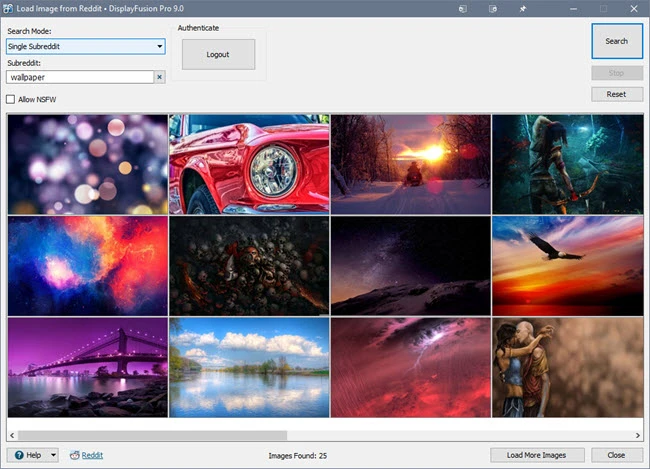
- Advanced Wallpaper Management: Bypasses default background limitations by allowing users to span a single high-resolution image smoothly across monitors of different sizes and resolutions. The interface supports loading images from local directories or pulling dynamic feeds from external image sources, applying custom color adjustments and bezel compensation to each screen.
- Custom Scripted Functions: Provides a built-in code editor for writing custom C# or VB.net scripts to handle exact window management tasks. Technical users can execute these macros to script complex behaviors, such as resizing a batch of active windows to specific coordinates or automatically muting audio when a specific monitor configuration is loaded.
- Window Snapping: Upgrades the default dragging behavior by forcing windows to magnetically align with monitor edges or other application borders. This prevents overlapping interfaces and ensures that users can accurately tile their desktop layout without needing to aim their cursor exactly at the pixel boundaries.
How to Install DisplayFusion Pro on Windows
- Download the official Windows installer executable from the vendor distribution server to your local drive.
- Launch the setup executable and approve the User Account Control prompt to grant the installer the necessary privileges to hook into the desktop shell.
- Review the end-user license agreement and select the destination directory for the application files, typically leaving the default path in the Program Files directory.
- Choose whether to install the application for all users on the machine or only for the current local account, depending on your workstation environment.
- Select the option to add a desktop shortcut and confirm whether the application should automatically launch during the system startup sequence.
- Click the install button and wait for the setup wizard to unpack the core binaries, background services, and interface resources to the local disk.
- Finish the installation process and allow the utility to run its initial configuration wizard, which will immediately prompt you to set up your first multi-monitor taskbar.
- Open the main settings interface from the new system tray icon to enter your license and begin configuring your monitor profiles and window management rules.
DisplayFusion Pro Free vs. Paid
DisplayFusion Pro operates on a freemium model with distinct tiers designed for personal and commercial use. The core Free version provides basic multi-monitor wallpaper management and simple window snapping, but it strictly omits the advanced functionality that makes the software a professional workspace tool. Users relying on the free tier cannot access multi-monitor taskbars, custom title bar buttons, trigger rules, or advanced scripting, making it suitable only for casual users who just want better background spanning across two screens.
For users requiring the complete feature set, the Pro Standard license offers a perpetual, lifetime activation for a single machine at approximately $34. This tier unlocks every advanced tool, including monitor splitting, multi-monitor screen savers, and custom hotkeys, without requiring a recurring subscription. For individuals who operate multiple workstations, the Pro Personal license costs around $49 and covers all computers within a single household, provided the machines are strictly for personal use or limited to one designated remote-work computer.
Business and enterprise deployments require different licensing structures to maintain compliance. A Pro Site license, priced near $899, covers an unlimited number of computers at a single physical location, eliminating the need to manage individual licenses or deploy dedicated license servers. For larger organizations operating across multiple facilities, the Pro Enterprise tier costs approximately $3,899 and grants unlimited deployment rights across an unlimited number of global sites, providing an enterprise-wide solution for standardizing multi-monitor workstations. All Pro licenses include a standard 30-day trial period upon initial installation, allowing users to validate their hardware compatibility and configure their workflows before committing to a purchase.
DisplayFusion Pro vs. Actual Multiple Monitors vs. Microsoft PowerToys
Actual Multiple Monitors provides a very similar feature set to DisplayFusion Pro, focusing heavily on replicating exact native Windows interface elements across secondary screens. Users should choose Actual Multiple Monitors if their absolute priority is having cloned taskbars that exactly mimic the system's native start menu behavior and system tray overflow, down to the exact pixel rendering of legacy Windows interfaces. However, it lacks the modern trigger rules and deep C# scripting capabilities found in its rival, making it less adaptable for power users who want to program custom automated reactions to system events.
Microsoft PowerToys, specifically its FancyZones module, is a free, first-party utility that excels at basic window layout management and grid snapping. Users should rely on PowerToys if they only need to divide a single large monitor into static grid zones for snapping windows, as it requires fewer system resources and integrates with native operating system shortcuts. Despite its excellent grid management, PowerToys does not offer secondary taskbars, multi-monitor wallpaper customization, or title bar button integration, meaning it solves only window positioning rather than complete multi-screen environment control.
DisplayFusion Pro remains the stronger choice for users who need a complete control panel that addresses every aspect of a multi-display setup simultaneously. While FancyZones handles basic snapping and Actual Multiple Monitors handles taskbar cloning, DisplayFusion Pro combines multi-monitor taskbars, complex scripting, custom title bar buttons, and wallpaper management into a single centralized configuration interface. It is the necessary tool for professionals who use three or more monitors and need strict authority over where applications launch, how they scale, and how they behave across mismatched monitor resolutions.
Common Issues and Fixes
- Problem description. The secondary taskbars overlap the bottom of maximized applications. This usually occurs when the operating system misreports the display scaling percentage to the utility. To resolve this, open the native display settings, ensure the scaling layout is uniform across monitors if possible, and restart the utility background service so it can recalculate the correct taskbar boundaries.
- Problem description. The application causes high CPU usage during normal desktop operation. Continuous high resource consumption is often tied to the multi-monitor taskbar hooking into applications that constantly redraw their interface, such as hardware monitoring tools. Navigate to the utility settings, locate the taskbar exclusions list, and add the executable of the problematic background application to prevent the utility from constantly polling its interface status.
- Problem description. Full-screen games minimize unexpectedly when clicking on a secondary monitor. By default, the Windows shell forces a full-screen application to minimize when it loses focus. You can fix this by assigning a custom hotkey to the "Prevent Window Deactivation" function in the utility settings, which intercepts the focus loss command and keeps the game rendered in the foreground while you interact with a web browser on another screen.
- Problem description. Application windows open on the wrong monitor despite having assigned trigger rules. This happens when native shell memory overrides the utility custom positioning commands. Open the troubleshooting tab in the settings menu, enable detailed logging, and ensure that your trigger rule is set to act on "Window Created" rather than "Application Started," which forces the window to move only after the operating system has fully drawn the interface.
Version 12.0.2 — February 2026
- Added a new advanced preference to bypass the full-screen check when maximizing windows to split monitors.
- Introduced an advanced setting allowing DisplayFusion to detect gadget, widget, and sidebar windows.
- Included the system's CPU model within the troubleshooting information tab.
- Provided a new option in the Alt+Tab settings to hide the close buttons on preview windows.
- Fixed a bug where desktop backgrounds failed to apply correctly on certain computers.
- Addressed multiple bugs related to the multi-monitor taskbar buttons.
- Resolved a problem where the monitor order would unexpectedly shuffle after disabling a display.
- Eliminated compatibility conflicts involving DisplayFusion, web browsers, and ESET security software.
- Corrected the font sizing for taskbar button hover previews when using display scaling.
- Polished the user interface by fixing various graphical rendering and scaling glitches.
- Prevented unwanted application windows from erroneously appearing on the Windows taskbar.
- Modified the "TitleBar Button Offset" behavior so changes apply immediately without needing a software restart.
- Enhanced the overall reliability and functionality of the Alt+Tab handler.
- Fixed an issue with taskbar text sizes when Windows text scaling is active.