Zoom operates as a dedicated virtual workspace client that connects distributed teams through high-definition video conferencing, continuous team chat, and collaborative digital whiteboards. Designed to bridge the gap between traditional office environments and remote workers, this desktop application provides the necessary infrastructure for synchronous communication. Professionals use it to host client presentations, conduct internal stand-up meetings, record training webinars, and share their screens during troubleshooting sessions, keeping real-time interactions centralized in a single interface.
While many communication tools have moved entirely to the browser, the standalone desktop application offers distinct performance advantages. Running as a native client allows it to utilize hardware acceleration for video decoding, which significantly reduces the processing burden when displaying large participant galleries. It also grants the application deeper access to operating system resources, enabling advanced noise cancellation, virtual background rendering without a physical green screen, and precise keyboard shortcut bindings that operate globally even when the software is minimized. This system integration ensures stability during corporate calls where browser memory limits might otherwise cause crashed tabs.
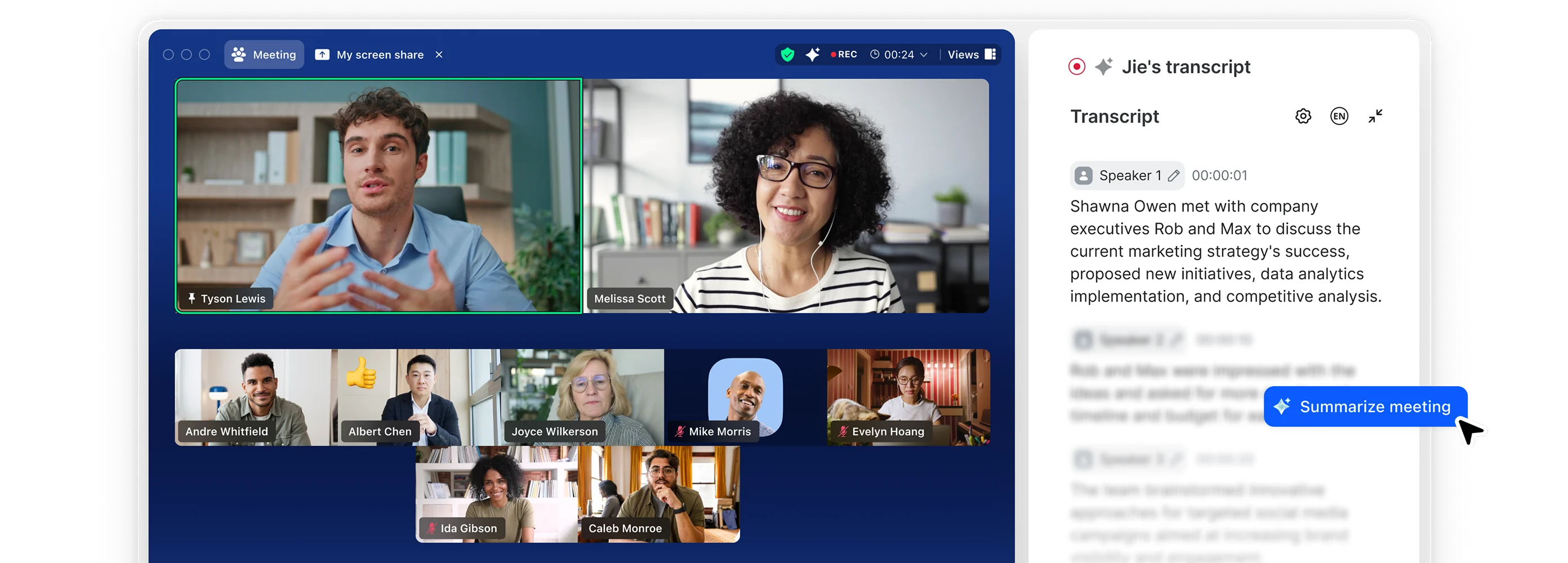
Beyond standard video and audio feeds, the interface consolidates post-meeting notes, ongoing chat channels, and integrated calendar scheduling into a persistent side navigation panel. Users can begin a text conversation, escalate it into a live video call, drop a file into the chat window, and generate a post-call summary using automated transcription tools without leaving the application. By centralizing these tasks, the client serves as a functional hub for both spontaneous discussions and highly structured, moderated panel events.
Key Features
- Hardware-Accelerated Video Decoding: The desktop client offloads video processing to your system's graphics processing unit, maintaining high frame rates even when rendering up to 49 simultaneous video feeds in the Gallery View. This hardware integration prevents the CPU throttling and overheating commonly associated with browser-based video calls. Users can manually toggle this setting in the Video menu under the Advanced tab to optimize performance for their specific hardware configuration.
- Global Keyboard Shortcuts: Deep operating system integration allows you to bind specific keystrokes that function even when the application is minimized or hidden behind other windows. The most frequently used control is the spacebar push-to-talk function, which temporarily unmutes the microphone while pressed. Other customizable shortcuts include combinations for starting screen shares, pausing video feeds, and switching between active speaker and gallery layouts.
- Advanced Screen Sharing and Co-Annotation: Presenters can share their entire desktop, specific application windows, or designated portions of the screen to maintain privacy during live demonstrations. The multi-share function allows several participants to broadcast their displays simultaneously, while the co-annotation toolbar lets viewers draw, highlight, and type directly over the shared content. These visual markups can be saved instantly as image files for later reference.
- Local and Cloud Meeting Recording: The application captures active calls and exports them directly to your local storage drive in standard MP4 format for video and M4A for standalone audio. Paid accounts can route these recordings directly to cloud servers, bypassing local disk space limitations. The recording interface includes options to capture separate audio tracks for each participant, making post-production editing significantly easier for podcast hosts and webinar producers.
- Dynamic Virtual Backgrounds and Noise Suppression: Utilizing edge processing, the software separates subjects from their physical environment without requiring a physical green screen, allowing users to project custom image or video backgrounds. The companion audio engine actively filters out disruptive background frequencies, such as keyboard typing, barking dogs, or fan noise. Users can adjust the aggressiveness of this noise suppression through a dedicated drop-down menu in the Audio settings panel.
- Integrated Breakout Rooms: Meeting hosts can divide a large primary call into as many as 50 separate, isolated sessions for focused group discussions. The host retains the ability to broadcast text messages to all active rooms, set automated countdown timers for forced returns, and physically move between the distinct rooms to monitor progress. Participants can also use a request help button to notify the host that their specific group requires assistance.
How to Install Zoom on Windows
- Download the official Windows installer package, typically named ZoomInstaller.exe, from the vendor's secure download center. Verify that you are downloading the correct architecture for your operating system, choosing the 64-bit installer for modern machines to ensure optimal memory allocation during large calls.
- Locate the executable file in your default Downloads directory and double-click it to initiate the setup sequence. When the Windows User Account Control prompt appears, click Yes to grant the installer the necessary permissions to write files to your local application data folders.
- The installer will unpack the core application files without requiring you to navigate through complex configuration menus or select a specific installation directory. The process is fully automated and typically completes within a few seconds, placing the executable in your AppData or Program Files directory depending on your administrative rights.
- Once the automated extraction finishes, the desktop client will launch immediately and present a welcome screen with two primary options: Join a Meeting and Sign In. If you only need to attend a single call, you can click Join a Meeting and manually input a Meeting ID and passcode without creating a user profile.
- To host your own sessions and save persistent settings, click Sign In and authenticate your credentials. You can use a standard email and password combination, or utilize the Single Sign-On button if your corporate IT department manages your application access through a dedicated domain gateway.
- After authenticating, navigate to your profile picture in the top right corner and open the Settings menu to configure your default hardware. Test your microphone input levels, select your preferred webcam source, and verify that your system audio routing is functioning correctly before joining a live session.
Zoom Free vs. Paid
The core video conferencing software costs nothing to download and install, featuring a highly capable Basic tier that supports the communication needs of casual users and small independent groups. This tier allows users to host calls with up to 100 participants, utilize local MP4 recording, share screens, and access up to three collaborative digital whiteboards. However, the most significant restriction on the Basic tier is the strict 40-minute time limit enforced on all group meetings. When the timer expires, the session automatically disconnects, requiring the host to generate a new meeting link if the conversation needs to continue.
For professional environments and freelance workers who require uninterrupted communication, the Pro tier removes the meeting time limit, extending maximum session durations to 30 hours. Costing approximately $15.99 per month per user, the Pro subscription maintains the 100-participant cap but introduces 5GB of cloud recording storage, eliminating the need to process heavy video files on local hardware. This tier also unlocks the AI Companion, an automated assistant that generates post-meeting summaries, highlights action items, and drafts chat responses based on the context of the conversation.
Larger organizations typically bypass the Pro tier in favor of the Business plan, which starts at around $21.99 per month per user and requires a minimum license count. This enterprise-focused tier expands the room capacity to 300 simultaneous participants and provides unlimited digital whiteboards for continuous collaborative projects. The Business plan also integrates critical corporate infrastructure tools, including managed Single Sign-On authentication, customizable company branding for external waiting rooms, and an administrative portal for mass deployment and granular user permission management.
Zoom vs. Microsoft Teams vs. Google Meet
Microsoft Teams functions as a broad internal communication network deeply embedded within the Office 365 ecosystem, making it a natural default for enterprises already paying for Microsoft infrastructure. Unlike a dedicated video client, Teams combines persistent channel-based chat, SharePoint file hosting, and video conferencing into a single, heavily integrated application. While this centralization serves well for internal document collaboration and asynchronous messaging, the Teams desktop client runs heavy on system resources and proves cumbersome for external guests who simply want to click a link and join a video call without navigating corporate tenant permissions.
Google Meet takes the opposite approach, operating almost entirely as a browser-native application tied directly to Google Workspace accounts. Because it does not require a heavy local installation, Meet creates very little friction for spontaneous calls and stays secure for locked-down corporate hardware environments. However, by relying on the browser to process video and audio, Meet lacks the deep hardware access required for the most advanced noise suppression, custom global keyboard shortcuts, and complex multi-camera layouts that dedicated desktop software can provide.
Zoom remains the superior choice when external communication, stable large-scale webinars, and granular hardware control act as the primary objectives. Because it focuses entirely on the synchronous video experience rather than trying to serve as a catch-all document management system, the client launches quickly, allows outside clients to join with minimal steps, and handles low-bandwidth connections efficiently. Users who need to record multi-track audio for podcasts, manage complex breakout room assignments, or control their microphone via global hotkeys while working in other applications will find this standalone client far more capable than its browser-bound or office-suite competitors.
Common Issues and Fixes
- Camera blocked by Windows privacy settings. If your screen is blank or displays a crossed-out camera icon despite the webcam being plugged in, the operating system is likely restricting access. Open your Windows Settings, navigate to the Privacy menu, select Camera, and ensure the toggle for allowing desktop apps to access your camera is explicitly enabled for the client.
- Other applications lose sound during active calls. The software sometimes takes exclusive control over your audio interface, muting background music or system alerts. To prevent this, open the Windows Sound Control Panel, right-click your active headset or speakers, open Properties, navigate to the Advanced tab, and uncheck the box that allows applications to take exclusive control of the device.
- Video feeds lag or freeze unexpectedly. Stuttering video usually occurs when the hardware struggles to process high-definition streams or complex virtual backgrounds. Open the client's Video settings and disable the touch up appearance filter and the high definition video toggle, which will instantly reduce the bandwidth overhead and lower the CPU processing burden.
- Microphone input fails despite correct device selection. If the correct hardware is selected but no sound is registering, the internal audio processing might be conflicting with your sound card. Open the Audio settings, scroll down to the Advanced section, and change the signal processing option for Windows audio device drivers to Off, forcing the client to handle the audio routing natively.
Version 6.7.5 — February 2026
- Added a new browser shortcut allowing users to instantly launch a meeting by typing
zoom.newdirectly into their address bar. - Introduced AI-generated summaries for webinars to automatically capture high-level notes during live and recorded sessions for easy distribution.
- Added an Enhanced Media add-on that supports 60fps high-frame-rate video and increased bit rates for sharper, more professional visual quality.
- Improved breakout room controls so hosts can route participants directly from the waiting room into specific breakout sessions and lock the rooms.
- Redesigned the Meeting Coach interface, moving it to a dedicated tab on the post-meeting calendar card and introducing new participant engagement analytics.
- Updated the cryptographic key pair used for verifying Linux desktop installation packages.
- Announced the end of updates for macOS 10.13 and 10.14, as well as several legacy Linux distributions, making this their final supported release.
- Updated system requirements for the Zoom for Intune app, which now requires iOS 16 or newer.
- Expanded Developer SDK functionalities to support custom 3D and human avatars, public app authentication, and enhanced meeting bot behaviors.
- Fixed a severe performance bug that caused application freezes and abnormally high CPU usage on macOS 15 (Sequoia).