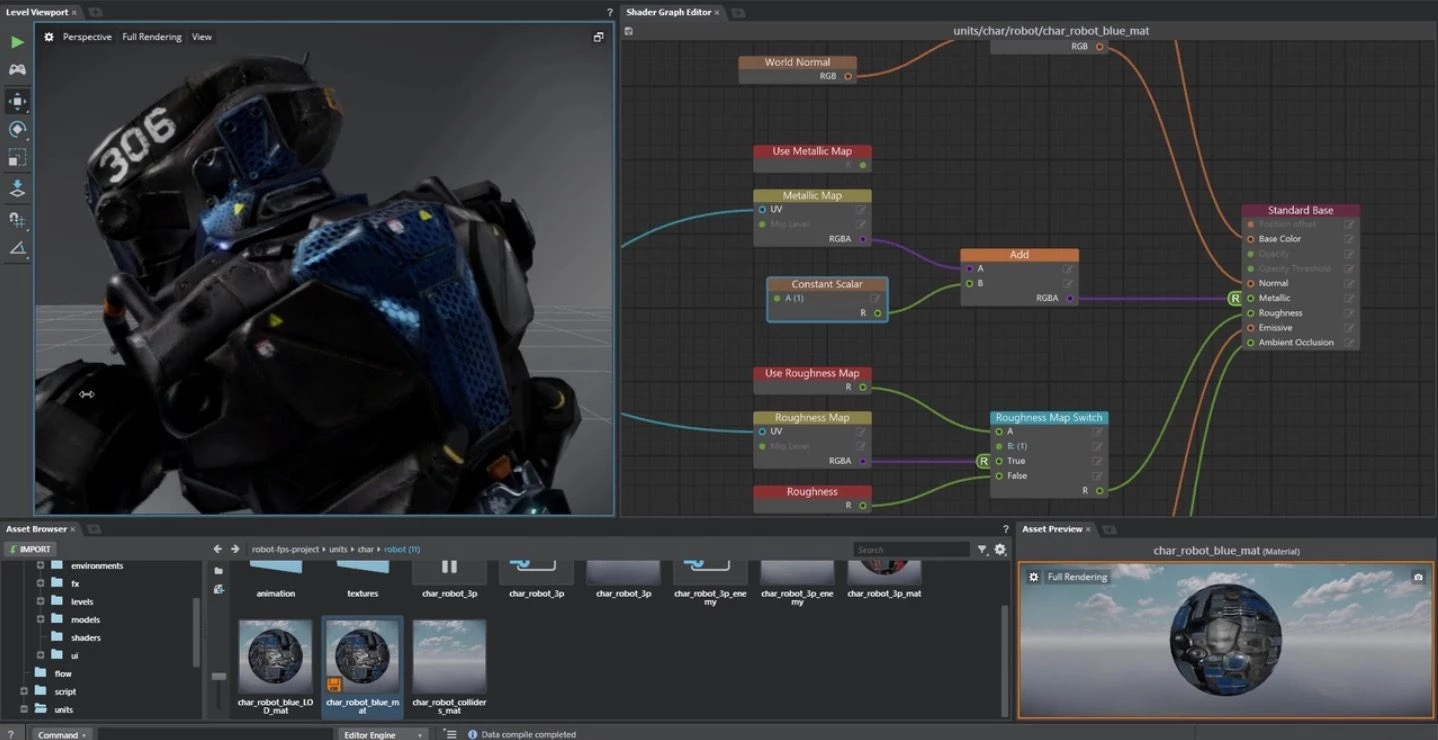
Autodesk Stingray is a professional 3D game engine and real-time visualization tool designed to bridge the gap between complex 3D modeling software and interactive digital environments. Built upon the data-driven architecture of the Bitsquid engine, it provides a dedicated environment for rendering high-fidelity graphics, managing game logic, and constructing virtual reality experiences. Game developers and architectural visualization specialists use this engine to assemble assets, configure physically based lighting, and test interactive behaviors in real time. Rather than relying on pre-rendered video outputs to showcase 3D designs, creators use this engine to output playable, explorable applications.
A desktop application is essential for this level of 3D processing. Browser-based renderers struggle with the memory management and GPU hardware acceleration required to calculate global illumination, high-resolution textures, and complex inverse kinematics on the fly. By running locally, the engine takes full advantage of dedicated graphics hardware and large pools of system RAM. This local hardware access is particularly critical when managing large-scale architectural building information models or vast game levels, where thousands of individual assets must be loaded and rendered without latency. The desktop environment also permits direct file-system connections to other content creation software, allowing artists to bypass tedious export-and-import cycles.
The engine was utilized to build major action titles like Helldivers 2 and Warhammer: Vermintide 2, demonstrating its capacity to handle intense multiplayer networking logic and advanced particle effects under high processing loads. While its target audience spans both independent game developers and enterprise architectural firms, its defining characteristic is its structural integration with the broader 3D design ecosystem. Artists do not just use the software as an isolated destination; they use it as the interactive endpoint of a pipeline that starts in dedicated modeling programs. By importing static geometry and rigging data, artists bring environments to life through node-based scripting and dynamic physics simulations. The engine processes these inputs and compiles them into standalone executable files that run natively on target hardware.
Key Features
- Flow Visual Scripting: The engine includes a node-based visual scripting system called Flow, which operates using Lua under the hood. Game designers and level artists can drag and drop logic blocks, wire them together, and control environmental triggers, audio cues, or gameplay events without writing raw code.
- Direct Live Linking: Developers can connect the editor directly to target testing devices—including Windows PCs and testing consoles—over a local Wi-Fi network. When an artist modifies a texture or moves an object in the editor, the changes instantly propagate to the connected device without requiring a full project compilation.
- One-Click Interoperability: The software features a dedicated command integrated with external 3D modeling programs. Artists can push geometry, materials, and complex rigging directly into the engine, and any subsequent layout adjustments made in the modeling tool are automatically updated within the engine's viewport.
- Integrated Middleware Tools: The installation bundles several specialized development subsystems, avoiding the need to purchase separate third-party plugins. This includes Beast for baking global illumination lightmaps, HumanIK for calculating inverse kinematics in character animations, and Scaleform Studio for designing interactive user interfaces.
- Physically Based Rendering: The core rendering pipeline utilizes a physically based shading system designed for high-end graphics. Creators have access to a high-performance reflection system, advanced particle effects for smoke and fire, and post-processing tools that simulate real-world camera behaviors like depth of field and lens flare.
- Virtual Reality Templates: The editor provides native support for building immersive hardware experiences, including specific visual scripting nodes tailored for headset tracking and motion controllers. The included VR templates allow architects and level designers to rapidly deploy a scene and walk through it using connected headset hardware.
How to Install Autodesk Stingray on Windows
- Navigate to your authorized account portal and download the official Windows installer executable for the engine.
- Launch the downloaded executable to initiate the extraction process, which unpacks the setup files to a temporary directory on your primary drive.
- Click through the welcome screen on the setup wizard and accept the end-user license agreement to proceed with the configuration.
- Select your desired installation directory, or leave it at the default path provided by the installer to avoid breaking internal file references.
- Review the list of components and ensure that the core editor, the local asset server, and any required software development kits are checked for installation.
- Click the install button and allow the wizard to copy the files, register the executable, and configure the local asset server for background processing.
- Once the process completes, launch the editor from the Start menu and log in with your authorized credentials to validate the license and access the project dashboard.
- To enable the direct pipeline with your 3D modeling software, locate the extras folder inside the installation directory, run the included DCC Link installer, and follow the prompts to add the necessary interoperability plugins to your external modeling applications.
Autodesk Stingray Free vs. Paid
Historically, the engine operated on a commercial subscription model, priced at around $30 per month for standalone access. This paid tier granted full access to the core editor, the integrated middleware suite, and the visual scripting system. For development teams requiring deeper engine modifications, access to the underlying C++ source code was available as a separate, negotiated enterprise purchase. This structure allowed smaller teams to access the compiled tools cost-effectively while offering large studios the ability to rewrite core rendering functions.
As part of its commercial strategy, the vendor also bundled the engine at no additional cost for users holding active subscriptions to specific 3D animation and modeling applications. Independent game developers and artists utilizing the lighter commercial variations of these modeling tools received the engine as a built-in benefit. This bundle approach lowered the financial barrier to entry for small studios attempting to build complete 3D pipelines without licensing a separate third-party interactive engine.
The vendor officially discontinued the standalone software in January 2018. It is no longer possible to purchase new standalone subscriptions or renew expired contracts. While the underlying technology was temporarily rebranded and integrated into other enterprise visualization tools, the engine as a distinct, purchasable product has reached its end of life. Existing users with archived installers and valid legacy license entitlements can still run the application, but it operates entirely without official updates, new feature additions, or dedicated technical support. Teams requiring current security patches or modern rendering features must migrate their logic and assets to active alternatives.
Autodesk Stingray vs. Unity vs. Unreal Engine
Unity is a versatile game development environment favored by independent developers and mobile studios. It relies on C# for scripting and features an enormous marketplace of third-party assets, plugins, and pre-built logic systems. Users typically choose Unity when they want a highly documented, actively updated engine capable of targeting dozens of different platforms, from handheld devices to web browsers, with a massive community for troubleshooting. Unity excels in rapid prototyping across various screen sizes, whereas Autodesk Stingray was strictly focused on 3D environments and heavy pipeline integrations.
Unreal Engine, developed by Epic Games, focuses on maximum graphical fidelity and high-end processing, utilizing C++ and the Blueprint visual scripting system. It is the dominant choice for major studio productions, offering advanced dynamic lighting systems, micro-polygon geometry pipelines, and extensive multiplayer networking frameworks. Creators select Unreal Engine when building photorealistic environments or visually demanding action games that require absolute peak hardware utilization. Unreal Engine offers more advanced rendering capabilities and a massive ecosystem compared to the older Bitsquid architecture.
Autodesk Stingray is the better fit only for legacy development pipelines or architectural firms specifically maintaining older Bitsquid-based projects. Because it is discontinued, it cannot compete with Unity or Unreal Engine in terms of modern feature updates or community support. However, for teams specifically mandated to maintain existing games built on this exact architecture—or for users who rely entirely on the native interoperability connections to legacy 3D animation software—this specific engine provides the exact environment required to open, edit, and compile those specific project files.
Common Issues and Fixes
- Live Link menu missing in modeling software. To fix this, you must manually activate the interoperability plugin. Open the plugin manager within your 3D modeling application, locate the file named stingray link, and check the boxes to load it and automatically load it on startup. Restart the modeling application to verify the menu appears.
- Engine crashes during heavy asset compilation. The data-driven architecture can exhaust memory resources when processing massive textures or dense geometry. Increase your Windows system page file, ensure no background applications are consuming your RAM, and clear the local project data cache folder before attempting to recompile the project.
- Exported standalone game fails to launch. This usually indicates missing dependencies on the testing computer. Verify that the target machine has the correct Visual C++ Redistributables installed and confirm that you selected the appropriate deployment platform and architecture in the engine deployer panel.
- Virtual reality test mode displays a black screen. The engine requires the VR runtime environment to be active before initialization. Ensure that your headset software is actively running and detecting the hardware before you click the VR testing button within the editor interface. You may also need to update your graphics card drivers to ensure compatibility with the stereoscopic rendering process.
Version 1.9.1494.0 — August 2017
- Added physically based light entities with new controls for color temperature and IES light profile support, allowing for more realistic scene lighting.
- Introduced a Favorites feature in the Asset Browser, enabling users to mark and quickly access frequently used assets.
- Improved workflow with a new live-sync capability that automatically updates assets in all connected engines as they are modified in the editor.
- Added support for debugging project Lua code directly from the Visual Studio Code editor.
- Updated the Capture Frames plug-in with a new extensibility interface to support additional video codecs.
- Included experimental support for Microsoft HoloLens, including a new project template and a raycast option for double-sided mesh detection.
- Enhanced interoperability with updated DCC Link plug-ins for Maya 2018 and Maya LT 2018.
- Fixed navigation generation issues by allowing specific physics actors to be excluded from the navmesh.