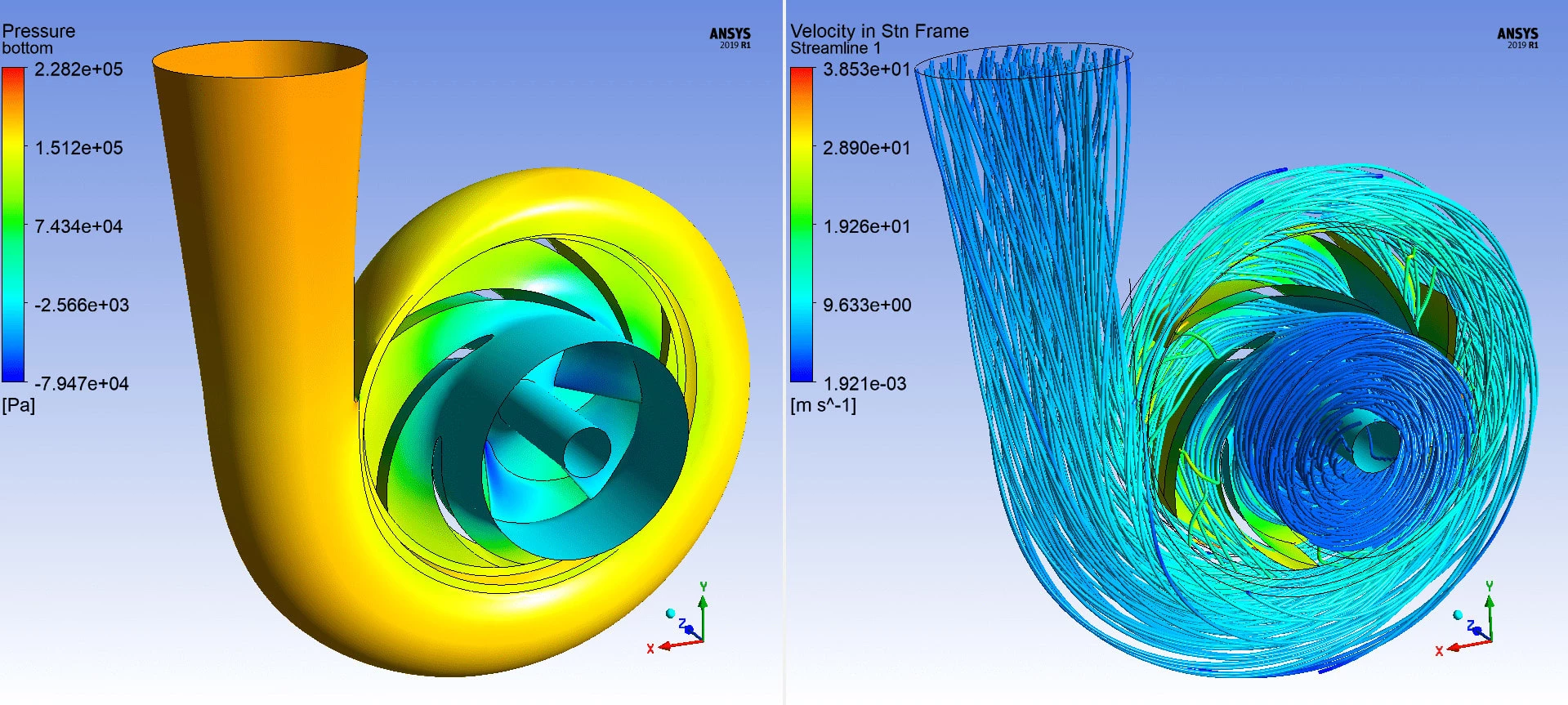
Ansys Fluent is a professional computational fluid dynamics (CFD) simulation software used by engineers to model fluid flow, turbulence, heat transfer, and chemical reactions for industrial applications. By numerically solving the Navier-Stokes equations across millions of discrete control volumes, this software allows hardware teams to predict the aerodynamic drag of vehicles, the thermal dissipation of battery packs, or the mixing efficiency of chemical reactors without relying on physical prototypes. It functions as a complete fluid simulation environment, containing dedicated interfaces for surface wrapping, volume meshing, physics setup, and post-processing visualization.
The workflow inside the application is strictly structured around task-based procedures, separating the initial geometry preparation from the actual mathematical solver. Engineers typically import solid CAD files into the meshing environment, extract the fluid domain, and apply boundary layers before passing the grid into the main solver interface. From there, users define material properties, select turbulence models, set boundary conditions like velocity inlets or pressure outlets, and initialize the flow field. The software calculates the pressure and velocity fields iteratively, outputting detailed contour plots, vector fields, and force reports upon convergence.
While cloud-based simulation platforms exist, professional CFD engineers rely on the local desktop installation to handle massive datasets and eliminate the latency of transferring gigabyte-sized result files over the internet. Running the application locally on Windows 10 or Windows 11 hardware allows direct access to system RAM and localized High-Performance Computing clusters. This local execution is strictly required when compiling custom User-Defined Functions written in C, managing sensitive proprietary geometry files, or hooking the solver directly into internal design optimization scripts.
Key Features
- Watertight Geometry Workflow: This task-based meshing interface guides users through a strict step-by-step process from CAD import to volume meshing. Engineers use this toolset to extract internal flow volumes or define outer bounding boxes for external aerodynamics without performing manual Boolean operations in their CAD package. The workflow auto-assigns boundary types based on naming conventions, such as recognizing "inlet" in a part name and applying a velocity-inlet condition.
- Mosaic Poly-Hexcore Meshing: This proprietary meshing method connects standard hexahedral elements in the bulk flow region with poly-prism boundary layers near the wall boundaries. The transition is handled by a layer of polyhedral cells, which reduces the total element count while maintaining strict orthogonality and skewness standards. Users enable this by selecting the Poly-Hexcore option in the Create Volume Mesh panel.
- Advanced Turbulence Modeling: The software includes an extensive library of industrial turbulence models selected via the Viscous Model dialog. Engineers can choose industry-standard Reynolds-Averaged Navier-Stokes (RANS) models such as k-epsilon and k-omega SST for steady-state flows, or utilize Large Eddy Simulation (LES) to accurately capture transient, chaotic flow structures in detailed aerodynamic studies.
- Dynamic Mesh Controls: For simulations involving moving parts, the software allows boundaries to deform or translate relative to one another. Engineers configure sliding interfaces for rotating machinery like fans and pumps, or use deforming meshes for engine piston strokes. Motion is dictated by assigning motion profiles in the boundary conditions panel or linking compiled User-Defined Functions (UDFs).
- Fault-Tolerant Meshing: When dealing with dirty CAD geometry, such as 3D scans with missing faces or overlapping surfaces, engineers use the fault-tolerant workflow to wrap the exterior. This process essentially shrink-wraps the geometry to seal leaks and gaps, bypassing the need for manual CAD cleanup before generating a usable surface mesh for the fluid domain.
- HPC Parallel Processing: To accelerate matrix calculations, the software distributes the computational load across multiple CPU cores or discrete GPUs. Users define the parallel processing count in the Fluent Launcher before opening the interface. The solver partitions the mesh into domains using methods like Metis, allowing distinct hardware nodes to calculate separate physical regions simultaneously.
How to Install Ansys Fluent on Windows
- Download the unified Ansys installation package from the official customer portal and extract the multiple ISO or ZIP archives into a single local directory, avoiding temporary system folders to prevent file access errors.
- Right-click the setup executable inside the extracted folder and select "Run as administrator" to launch the Ansys Installation Manager interface.
- Click the "Install Ansys Products" option from the main menu, review the end-user license agreement, and click the confirmation button to proceed to the directory selection screen.
- Choose the installation path, leaving the default Program Files directory unless a secondary drive is required for space, and click next to load the product selection tree.
- Check the box next to "Fluent" under the Fluid Dynamics section, along with any necessary CAD geometry import modules you require, and uncheck modules you do not hold a license for.
- When prompted for licensing information, enter the hostname or IP address of your organization's FlexNet License Manager server, and define the default port.
- Click next to begin the file transfer and wait for the installer to write all components. The process can take significant time depending on the selected modules and storage drive speed.
- Launch the application by opening the Start menu and selecting the Fluent shortcut, which will open the launcher window where you can define your working directory and allocate solver processing cores.
Ansys Fluent Free vs. Paid
Commercial licensing for Ansys Fluent operates on a high-tier enterprise model, relying on a combination of base seat licenses and High-Performance Computing (HPC) tokens. A standard base license permits a single user to open the graphical interface, set up the physics, and run the solver on a restricted number of CPU cores (typically up to four). For industrial applications requiring large meshes, engineers must check out additional HPC packs or individual tokens from their company's server to scale the job across cluster nodes or enterprise GPUs. The exact financial cost scales strictly with concurrency and core count, requiring direct negotiation with the vendor.
For educational and personal learning purposes, the vendor provides the Ansys Student package at no cost. This tier includes the main CFD solver but imposes strict computational limits on the model size. Currently, the student edition caps fluid simulations at approximately one million cells or nodes. If a mesh exceeds this limit, the solver will refuse to initialize or run iterations. The student version also requires users to download a time-limited license file that must be renewed annually, and the generated files contain a watermark preventing them from being used for commercial consulting or production engineering.
Universities and research laboratories typically operate under an Academic Multiphysics Campus Solution. This tier bypasses the strict cell count limits of the student version and provides a set pool of shared HPC tokens for the entire campus. Researchers connect to a central license server using the FlexNet license manager, allowing them to run large-scale jobs on university supercomputers. However, the terms of use strictly prohibit utilizing the academic license for any paid consulting, direct commercial product development, or industrial contract work.
Ansys Fluent vs. Siemens Simcenter STAR-CCM+ vs. OpenFOAM
Siemens Simcenter STAR-CCM+ operates as the primary commercial alternative to Ansys Fluent, offering a heavily integrated, single-window environment. In STAR-CCM+, CAD preparation, surface wrapping, volume meshing, physics setup, and post-processing happen inside one continuous simulation tree, whereas Ansys historically separated these tasks into distinct modules before introducing its newer watertight workflows. STAR-CCM+ is widely preferred by teams that require aggressive automated design exploration, as its flexible Power Session licensing allows unlimited core scaling for a fixed token cost. Engineers dealing with complex multi-phase flows or macro-driven batch execution often favor the Siemens ecosystem.
OpenFOAM provides a fundamentally different approach as a strictly command-line, open-source CFD toolbox written in C++. Because it has no licensing fees or core-count restrictions, it is the standard choice for researchers, startups, and high-performance computing centers scaling across thousands of cores without paying commercial HPC token fees. However, OpenFOAM lacks a native graphical user interface, requiring users to rely on text-based dictionaries for setup and external tools like ParaView for post-processing. The learning curve is exceptionally steep, and it lacks the automated fault-tolerant meshing features found in commercial tools.
Ansys Fluent remains the better fit for engineering teams that require industry-standard validation, an extensive library of verified physical models, and deep integration with a wider structural and electromagnetic simulation stack. Its Mosaic poly-hexcore meshing technology and task-based interfaces significantly reduce the pre-processing time for complex CAD models compared to open-source alternatives. For users who need to reach a converged, reliable solution quickly without writing command-line code or building a bespoke toolchain, Ansys Fluent provides a more predictable and supported engineering workflow.
Common Issues and Fixes
- Floating Point Exception error. This critical error indicates a numerical failure, most commonly caused by division by zero or an overflow due to bad mesh quality. To fix this, inspect the mesh statistics for highly skewed elements, reduce the time step size in transient simulations, or lower the under-relaxation factors in the Solution Controls panel to stabilize the calculation.
- Divergence Detected in AMG Solver. The algebraic multigrid solver stops the simulation when the residual values grow exponentially instead of converging toward zero. Resolve this by switching the spatial discretization scheme to First Order Upwind for the initial fifty iterations to stabilize the flow field, then switch back to Second Order Upwind once the basic flow pattern develops.
- Update-Dynamic-Mesh failed with negative cell volume. This stops the run because a moving or deforming mesh twisted so drastically that a cell inverted, creating a physically impossible negative volume. Address this by reducing the time step size so the mesh deforms less per iteration, or by tightening the spring-based smoothing and remeshing parameters in the Dynamic Mesh task page.
- Failed to check out license. The application refuses to open, displaying a FlexNet error regarding an inability to connect to the license server. Verify that your campus or corporate VPN is active, ensure the Windows Firewall allows inbound and outbound traffic on TCP port 1055, and confirm the server hostname is correctly defined in the Client License Settings utility.
Version 2025 R2 (25.2) — July 2025
- Integrated AI Assistant: Introduced the "Ansys Engineering Copilot," an AI-powered virtual assistant embedded directly within the Fluent interface to provide real-time support, documentation, and workflow guidance using AnsysGPT technology.
- GPU Solver Enhancements: Expanded GPU capabilities to include support for Electric Potential and Joule Heating, as well as enabling Conjugate Heat Transfer (CHT) compatibility for the Flamelet Generated Manifold (FGM) combustion model.
- Faster Radiation Modeling: Improved the performance of the Surface-to-Surface (S2S) radiation model on GPUs, achieving speed increases of 2x to 2.5x, and added new support for sliding mesh configurations in radiative heat exchange simulations.
- Advanced Multiphase on GPU: Upgraded the Volume of Fluid (VOF) GPU solver to support sliding meshes, multiple reference frames, non-Newtonian flows, and a new beta capability for coupled VOF and species transport.
- Battery Safety Modeling: Added a flexible Battery Thermal Abuse framework to simulate safety failure modes and thermal runaway scenarios with greater control.
- Expression Management: Fixed workflow bottlenecks by allowing users to rename expressions across the solver and UI with automatic dependency updates, eliminating the need to recreate links manually.