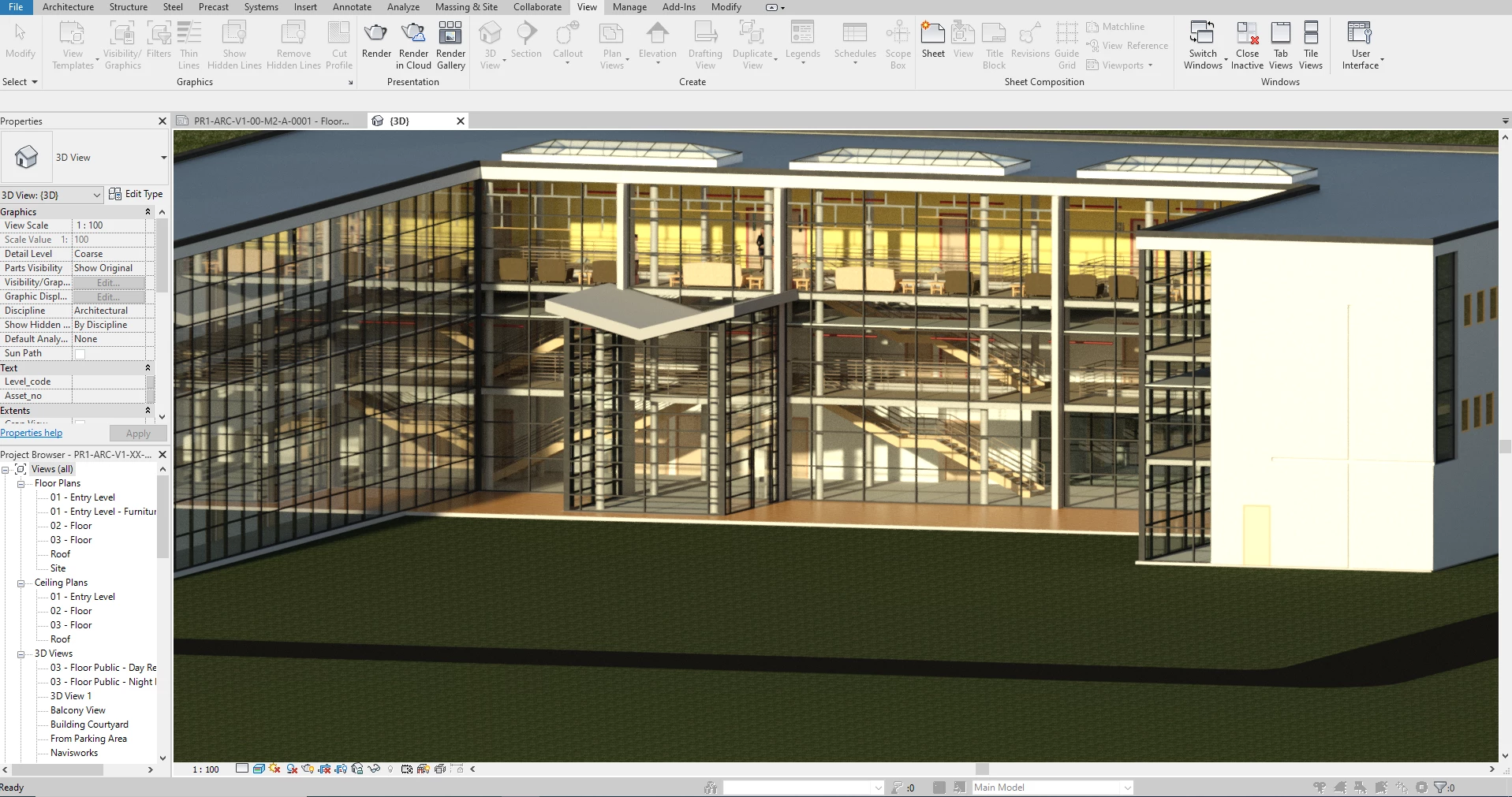
Building Information Modeling (BIM) replaces disconnected line-drawing methods with a highly structured, data-rich digital environment. For solo architects, residential designers, and small draft studios, transitioning to this methodology often requires software tailored specifically for single-user workflows. This application provides a direct entry point into architectural modeling, allowing professionals to construct a central 3D model using realistic building components. Instead of manually drawing individual floor plans, building elevations, and cross-sections, users build one digital structure from which all 2D construction documents are automatically derived.
The primary job of this software is to eliminate the severe coordination errors that plague standard drafting routines. When a designer modifies the footprint of a room or shifts a structural wall, every linked drawing, dimension string, and material schedule updates immediately to reflect the new geometry. This exact synchronization ensures that window counts match the floor plans and that elevation views align perfectly with the foundation layout. By handling these repetitive coordination tasks mathematically, the software allows single practitioners to handle complex residential and commercial documentation that would typically require a larger drafting team.
While the broader design industry increasingly experiments with browser-based drafting environments, handling serious architectural geometry requires dedicated local processing. The desktop application utilizes local CPU and memory resources to manage complex spatial calculations and heavy project files without interface lag. It handles the core drafting, family component generation, and mathematical scheduling locally, keeping cloud connectivity strictly for tasks that benefit from remote server farms. For example, rendering photorealistic exterior images is offloaded to remote servers, preventing the local machine from locking up during high-resolution graphical processing.
Key Features
- Parametric Architectural Modeling: Building elements behave according to real-world physical rules rather than acting as simple geometric shapes. When you place a door into the digital environment, it automatically cuts a hole in the host wall and anchors itself to that structure. If you move the wall, the door travels with it, maintaining its exact offset and orientation.
- Automated Material Scheduling: The software constantly reads the physical properties of the 3D model to generate accurate data tables. You can extract exact room areas, wall volumes, and complete window schedules directly from the active geometry. If a window is deleted in an elevation view, the associated schedule instantly removes that item, ensuring material counts remain perfectly accurate for ordering.
- Coordinated 2D Documentation: Users extract floor plans, ceiling plans, sections, and elevation drawings straight from the central 3D model rather than drawing them manually. The application includes specific annotation tools like material tags, dimension lines, and detailing components to finalize the construction documents. These views are then arranged onto digital sheets with title blocks for final PDF export or printing.
- Industry Format Interoperability: Working with external engineering consultants requires strict file compatibility across different drafting disciplines. The software allows you to import and export industry-standard formats, including DWG for sending 2D background layouts to structural engineers. It also supports IFC4 for open BIM standards and SKP for importing specific 3D furniture assets from external libraries.
- Cloud-Based Visualization: Creating photorealistic architectural presentations usually requires expensive local graphics hardware and hours of processing time. This application bypasses local hardware limits by sending lighting and material data to remote vendor servers. The remote servers process the complex ray-tracing calculations and return a finished high-resolution image, freeing up your local computer for continued drafting work.
- Global Parameter Controls: Design rules can be embedded across the entire project file using designated numerical variables. This system allows a user to link the heights of multiple different window families to a single mathematical parameter. If the client requests a higher window line, the designer simply changes the master parameter value in the properties menu, and every linked window shifts simultaneously across the entire building.
How to Install Autodesk Revit LT on Windows
- Navigate to your Autodesk account portal or the official product trial page to download the initial web installer package.
- Locate the downloaded executable file, typically named Setup.exe, and launch it from your local storage drive.
- Grant administrator privileges when prompted by the Windows User Account Control dialog to allow the installer to modify system directories.
- Review and accept the software license agreement, then proceed to the configuration screen to verify the default installation path, which is usually located on the primary system drive.
- Click the install button and allow the setup wizard to download the remaining application files, core program executable, and essential material libraries over your active internet connection.
- Wait for the background installation of necessary system dependencies, such as specific C++ redistributables and local licensing managers, to finish without interruption.
- Once the final confirmation screen appears, launch the application from the new desktop shortcut or Start menu entry.
- On the first run, the software will display a sign-in prompt; enter your official account credentials to verify your active subscription or begin the evaluation period.
Autodesk Revit LT Free vs. Paid
The software operates entirely on a paid subscription model and does not offer a free tier for commercial work. Users must purchase a license on a monthly, annual, or three-year basis to access the tool. An annual subscription typically costs around $540 USD, while a flexible monthly plan runs closer to $70 USD, though exact prices fluctuate based on regional taxes and specific vendor promotions. There are no perpetual licenses available, meaning access to the application and your ability to edit project files ceases if the subscription lapses.
For evaluation purposes, the vendor provides a fully functional 30-day trial. This trial period does not impose artificial restrictions such as saving limits, disabled export options, or forced graphical watermarks. It allows professionals to test actual project files, generate full construction document sets, and verify DWG export compatibility with external consultants before committing to a contract. Once the trial expires, the software locks the save and export functions until a paid account is linked.
Many users also acquire the software through a bundled package known as the AutoCAD Revit LT Suite. This specific bundle pairs the BIM application with a traditional 2D drafting application for a slightly higher annual fee, usually around $610 USD. This path allows firms to maintain their legacy 2D drawing archives while slowly transitioning active projects into a 3D environment.
Students and educators can access a specialized educational license at no cost, provided they verify their academic status through a third-party portal. However, the educational edition permanently embeds a plot watermark onto every exported PDF and printed sheet. Furthermore, any family component or 3D asset created in the educational edition will instantly infect commercial project files with the same watermark if imported, strictly isolating academic work from professional production.
Autodesk Revit LT vs. AutoCAD LT vs. SketchUp
AutoCAD LT operates strictly as a two-dimensional vector drafting tool, relying on manual lines, arcs, and text to represent building elements. You should choose this alternative when your firm handles specific detail drafting, schematic floor plans, or electrical layouts that do not require a 3D model. It excels at fast, precise 2D drawing generation without the heavy processing overhead of managing parametric data, making it ideal for teams that simply need digital tracing paper rather than a database-driven model.
SketchUp Pro focuses on rapid 3D conceptual modeling, utilizing a highly flexible geometry engine based on unconstrained faces and edges. You should choose this alternative for early schematic design, rapid site massing, or interior design presentations where you need to push and pull shapes without worrying about strict architectural rules. It allows designers to test visual ideas extremely quickly, whereas formal BIM software forces the user to define exact wall thicknesses, levels, and structural constraints from the very first click.
Autodesk Revit LT is the superior choice when your primary goal is to generate accurate, coordinated construction documents directly from a 3D model. While it lacks the fluid conceptual modeling of SketchUp and the sheer 2D drafting speed of AutoCAD LT, its ability to automatically update schedules, elevations, and sections whenever the 3D model changes prevents costly construction errors. It bridges the gap between manual drafting and highly complex enterprise engineering tools, offering single practitioners an affordable path to deliver strict, parameter-driven architectural sets.
Common Issues and Fixes
- Missing Localized Content Libraries. After completing the initial setup, users often open the application only to find that standard doors, windows, and template files are missing. To fix this, open the Windows Control Panel, select the application from the programs list, click "Change/Modify," and check the boxes to download and install the specific regional content libraries.
- Cloud rendering queue delays. Renderings submitted to the remote processing service sometimes take hours to complete or get stuck entirely in a pending state. To resolve this, cancel the stalled job in the online gallery, reduce the output resolution or material complexity in the local file, verify your internet connection, and resubmit the task.
- Educational watermark contamination. A commercial project file suddenly displays a "Produced by an Autodesk Educational Product" watermark on all printed sheets. This occurs when a user imports a family component downloaded from a student license; the only fix is to delete the offending component and restore the project file from a backup saved prior to the import.
- Inability to collaborate simultaneously. Users often hit a wall when attempting to open a shared model file directly from a server for simultaneous multi-user editing. Because this specific configuration lacks worksharing capabilities, you cannot edit the same file as another user simultaneously. You must ask the project lead to provide a detached, standalone RVT file, or link their file into your local workspace as a read-only background.
- Missing structural or MEP tools. Users migrating from enterprise BIM environments often search for ductwork routing, electrical panel scheduling, or heavy rebar reinforcement tools and cannot find them in the ribbon. These disciplines are deliberately excluded from this specific toolset. You must rely on standard 2D detail lines and text notes to indicate mechanical systems, or link an external consultant's full model for visual reference.
Version 2026.4 — November 2025
- Flexible Datasmith Export: Added the ability to generate Datasmith (.udatasmith) files directly for visualization workflows without requiring a local Twinmotion installation or active GPU resources.
- Twinmotion Version Selection: Introduced a new option allowing users to specify which installed version of Twinmotion should launch from the ribbon, ensuring better alignment with office standards.
- Manage Links Dialog Enhancements: Improved the usability and user experience within the Manage Links dialog to streamline the handling of external references.
- Graphics Performance Improvements: Addressed display issues in Accelerated Graphics views, specifically fixing bugs where highlighted link instances failed to appear and surface patterns did not update immediately when moving elements.
- Design Option Fixes: Resolved multiple issues within Design Options, enabling the alignment and offsetting of detail lines and correcting wall type previews while editing a design option.
- View-Specific Family Visibility: Fixed a defect that prevented view-specific family instances from being visible when added to a view not set to the active design option.