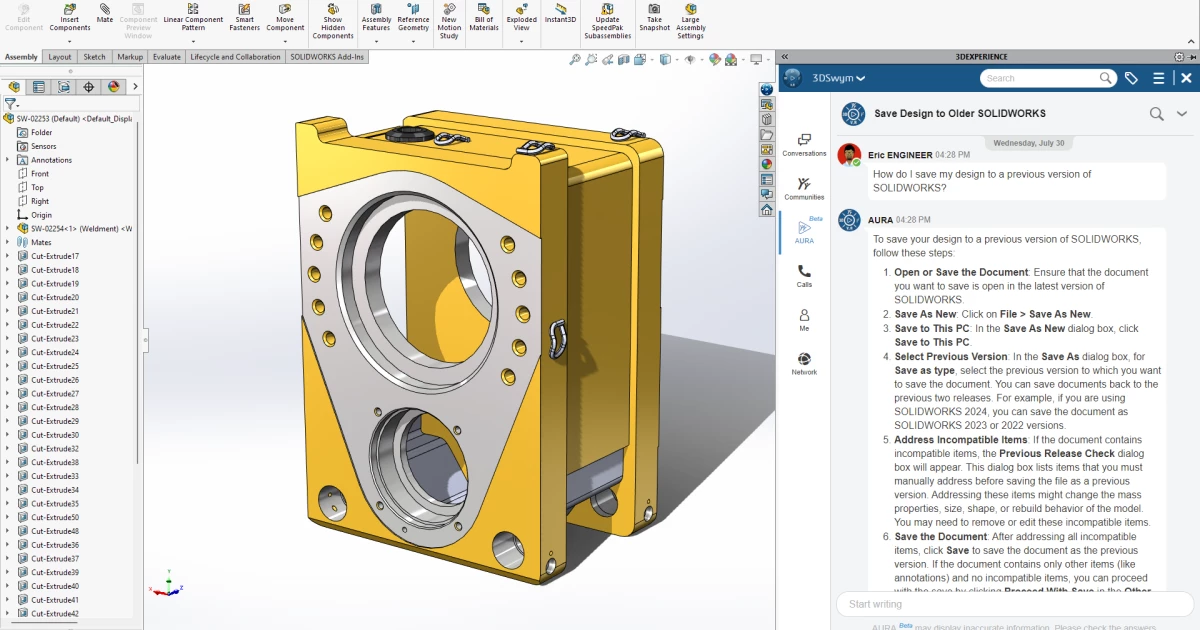
SolidWorks operates as a parametric 3D computer-aided design system tailored specifically for mechanical engineers, industrial designers, and manufacturing professionals. It translates conceptual sketches into exact, manufacturable 3D models using a highly structured, feature-based modeling approach. Rather than relying on direct modeling where geometry is manually pushed and pulled, this software builds parts through a historical sequence of 2D sketches, extrusions, cuts, and fillets. This systematic methodology dictates that if an engineer needs to change a core dimension late in the design cycle, the entire model automatically updates to reflect that single numerical adjustment, maintaining the logical relationships between every mechanical feature.
Operating as a heavy desktop application, this modeling environment utilizes local workstation hardware to calculate complex geometry, execute finite element analysis, and generate dense 2D manufacturing documentation. While browser-based drafting tools handle lightweight concepts, this local architecture is built to manage massive assemblies containing thousands of individual washers, bolts, gears, and structural frames without relying on a constant internet connection. Local processing ensures engineering teams maintain complete, isolated control over proprietary intellectual property and strictly regulated aerospace designs. Professionals utilize this drafting workspace to define exact material properties, test physical stress loads, and verify precise tolerances before allocating budgets for physical prototyping or automated CNC machining.
Key Features
- Parametric Assembly Modeling: Use top-down or bottom-up design methodologies to connect individual parts into complete mechanical systems. Engineers apply mechanical mates—such as concentric, coincident, or gear relations—to simulate realistic physical movement and detect interference before manufacturing begins.
- Advanced Sheet Metal Design: Convert standard 3D parts into unfoldable sheet metal patterns. The core engine calculates bend allowances, K-factors, and tear reliefs automatically, allowing users to export precise DXF flat patterns directly to laser cutters or press brakes.
- Integrated Finite Element Analysis (FEA): Test structural integrity directly within the design interface by activating the Simulation add-in. Users apply force or torque parameters, define local contact conditions, and execute linear static or thermal studies to identify potential failure points without exporting files to external solvers.
- Automated 2D Manufacturing Drawings: Generate industry-standard 2D documentation from 3D models with associative updates. By enabling Detailing Mode, users can open massive drawing sets instantly, add dimensions, and edit annotations without loading the entire 3D solid body into active system memory.
- Weldment and Frame Design: Construct complex structural frames using standard structural profiles like tubing, angle iron, and channels. The software handles corner treatments, trims, and gussets natively, generating an accurate cut list for fabrication facilities.
- Routing and Piping Systems: Route custom pipes, tubes, and electrical cables through tight mechanical enclosures. The routing workspace calculates exact bend radii and pipe lengths, integrating these exact material metrics directly into the automated Bill of Materials.
How to Install SolidWorks on Windows
- Navigate to the official vendor download portal and authenticate your session using your active 3DEXPERIENCE ID or customer entitlement credentials.
- Download the localized Windows installation package, which initially saves a small executable file named setup.exe to your local drive rather than the entire multi-gigabyte application payload.
- Launch the downloaded setup executable with local administrator privileges to open the Installation Manager, then select the option to install on this computer to begin a standalone deployment.
- Input your 24-digit commercial or academic license number into the designated entitlement field so the manager can query the server and verify which specific add-ins your account is authorized to install.
- Review the customized product selection screen to include or exclude specific components like Simulation, CAM, or Electrical tools, and verify that your primary local storage drive has sufficient disk space.
- Accept the end-user agreement and click the installation button, allowing the background downloader to automatically fetch and deploy required system prerequisites like the Chromium Embedded Framework and Visual Basic modules.
- Reboot the workstation once the manager completes the file extraction, then launch the primary desktop shortcut to initialize the software, complete the final local entitlement check, and configure your default drafting templates.
SolidWorks Free vs. Paid
SolidWorks does not offer a permanently free tier for commercial engineering use, operating instead on a strictly paid, tiered licensing model designed for professional enterprise environments. The software is distributed primarily through a specialized network of value-added resellers, and commercial buyers must choose between the Standard, Professional, and Premium packages. The Standard tier provides the core 3D modeling, sheet metal, and weldment capabilities required for basic mechanical design. Moving up to Professional or Premium introduces highly specialized engineering tools, including frequency analysis routines, complex routing for piping and wiring, and advanced rendering utilities for marketing materials.
Organizations can purchase access through either short-term rental agreements or traditional perpetual ownership. A commercial term license offers temporary access, starting around $846 USD for a three-month period, which helps independent contractors manage overhead during short client projects. Conversely, established engineering firms typically invest in perpetual licenses, which demand an upfront capital expenditure often exceeding $4,100 USD per seat, followed by a mandatory annual maintenance subscription to receive technical support, bug fixes, and access to vendor cloud services. This dual-track approach allows businesses to scale their engineering software overhead according to their immediate cash flow and project duration.
For individuals learning the mechanical trade or fabricating personal hardware projects at home, Dassault Systèmes provides heavily discounted non-commercial editions. The Maker edition costs approximately $48 USD annually, granting access to a cloud-connected desktop environment that strictly prohibits commercial use for projects generating more than $2,000 USD in annual revenue. Similarly, verified university students can purchase an academic license for around $60 USD annually. This educational tier provides full access to premium modeling and simulation tools but embeds a permanent, non-removable watermark on all exported 2D drawings and 3D files to ensure the software is not utilized for unauthorized commercial manufacturing.
SolidWorks vs. Autodesk Inventor vs. Fusion 360
Autodesk Inventor operates as a direct desktop competitor focused heavily on mechanical engineering, machinery design, and complex assembly management. Organizations heavily invested in the broader Autodesk ecosystem—particularly those utilizing Vault for strict product data management or AutoCAD for maintaining legacy 2D floor plans—often choose Inventor for its native file interoperability and specialized factory design utilities. Inventor also offers a highly structured frame generator and tube routing environment that appeals to engineers designing heavy industrial equipment, automation lines, and custom structural supports.
Fusion 360 operates on a fundamentally different software architecture, prioritizing cloud-based data storage, remote processing, and cross-platform accessibility over local desktop isolation. Independent hardware contractors, boutique design agencies, and small startups frequently adopt Fusion 360 due to its tightly integrated CAM environment, lower entry pricing, and native remote collaboration tools. Because Fusion 360 pushes file management and rendering tasks to remote servers, it eliminates the need for a dedicated local server infrastructure, making it highly attractive for distributed teams working on consumer electronics or lighter mechanical components.
SolidWorks maintains a distinct advantage when an engineering department must manage massive local assemblies containing thousands of individual fasteners, gears, and structural components without experiencing interface lag. Professional engineering firms with strict data security requirements prefer this environment because it keeps proprietary intellectual property completely offline and secure during the entire design phase. Furthermore, its dominance in the mechanical engineering sector means that organizations can easily hire graduates who already know how to navigate its specific sketch relations, feature trees, and simulation workflows without requiring extensive software retraining.
Common Issues and Fixes
- RealView Graphics remains disabled or grayed out. This interface limitation occurs when the system relies on a consumer-grade gaming GPU rather than a certified enterprise workstation graphics card. To resolve this hardware conflict, you must install a certified Nvidia RTX or AMD Radeon Pro GPU, and ensure you are running the specific enterprise driver validated on the vendor's hardware certification page.
- Drawings take an exceptionally long time to save or load. Large assembly files generate massive amounts of background data that clog system memory, especially when generating multi-sheet 2D documentation. You can significantly accelerate save and load times by navigating to the Options menu, opening Document Properties, and disabling the Save model data setting, or by opening the complex document strictly in Detailing Mode.
- Missing file references when opening a transferred assembly. The core modeling engine relies on exact local folder paths to locate and load individual parts within a master assembly structure. When sharing project files with another engineer, always use the Pack and Go tool located in the File menu to automatically bundle all referenced parts, sub-assemblies, and 2D drawings into a single contained folder or archive.
- The application interface scales incorrectly on high-resolution displays. Windows display scaling on 4K monitors can cause the command manager icons to appear distorted, or the feature tree text to become illegible. To correct this visual formatting error, right-click the primary application shortcut, navigate to Properties, select the Compatibility tab, and override the high DPI scaling behavior by forcing it to be performed by the application itself.
Version 2026 — November 2025
- Added AI-powered automatic drawing generation that instantly creates sheets, views, and dimensions from 3D models.
- Introduced intelligent fastener recognition to automatically identify and mate custom nuts, bolts, and washers without manual references.
- Implemented background processing for importing neutral file formats (STEP, IGES), allowing continued work during large file loads.
- Improved assembly performance by enabling a "cosmetic rebuild" option, preventing unnecessary rebuilds for non-geometric changes like appearances.
- Added new start conditions for Sheet Metal Base Flanges, allowing creation directly from vertices, surfaces, or offsets.
- Enhanced Structure Systems with a graphical interface for selecting and previewing complex corner treatments.
- Fixed workflow interruptions with a new automatic offline mode that maintains productivity during connectivity drops.
- Updated the user interface to allow hiding unused Manager Pane tabs and saving tree display settings per user.