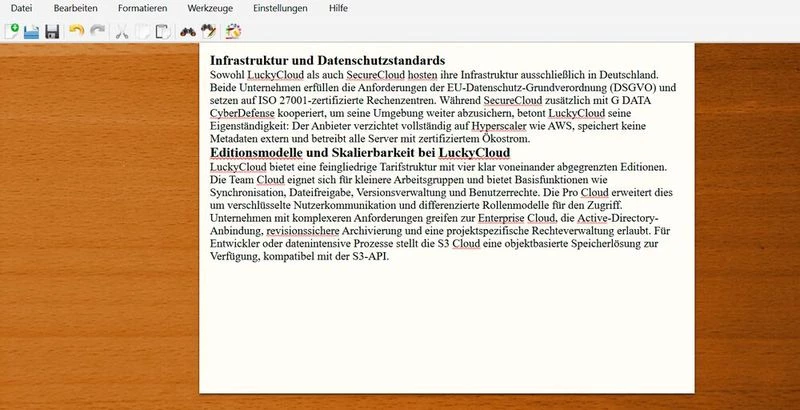
FocusWriter operates as a strictly distraction-free text editor tailored for drafting sessions where concentration is the primary goal. Unlike standard office software that surrounds the page with complex ribbons, formatting sidebars, and status panels, this application intentionally hides the entire operating system interface. Upon launching, it immediately takes over the Windows desktop, concealing the taskbar, system clock, and application menus behind a customized full-screen background. This layout forces the writer’s attention entirely onto the active sentence, removing the visual cues that often prompt users to check web browsers, manage emails, or adjust page margins during a raw writing session.
The application serves a very specific phase of the writing process: the initial draft. Novelists, academic writers, and long-form bloggers use it to generate high word counts without worrying about layout mechanics. Traditional word processors mix the drafting and editing phases by keeping tools for pagination, tables, and heading structures permanently visible. By contrast, FocusWriter strips away complex layout controls and relies on basic rich text drafting. The resulting environment mimics sitting at a typewriter, solving the concrete problem of interface-driven procrastination.
Writers typically rely on this application when they need to hit strict daily word counts or complete timed writing sprints. The software provides structural guardrails, such as invisible timers and progress tracking, that only appear when the user actively seeks them out. By confining the text to a central column against a static background, it limits peripheral screen movement and visual fatigue. Once the text generation phase is complete, the standard document files can be opened in a more conventional office suite for final formatting, pagination, and publication preparation.
Because the application operates entirely offline, it eliminates the temptation to open browser tabs or synchronize files to a cloud server during a writing sprint. Writers who struggle with internet-induced procrastination benefit heavily from this localized approach. The software relies entirely on the local file system, ensuring that manuscript data remains private and securely stored on the user’s hard drive. By keeping the technical footprint small and the interface invisible, the software allows content creators to enter a state of flow much faster than they would in a standard, multi-purpose document editor.
Key Features
- Feature Name: Hideaway Interface: All navigation menus, formatting toolbars, and document tabs remain completely hidden from view during active typing. The controls only slide into the screen when the user deliberately moves the mouse cursor to the extreme top, bottom, or side edges of the monitor, ensuring the primary field of vision contains nothing but the manuscript.
- Feature Name: Daily Goal Tracking: Writers can establish specific daily targets based on either total word count or total time spent typing. A discreet progress bar at the bottom of the screen tracks this daily output, and the application maintains a continuous streak counter for consecutive days the user successfully meets their defined writing quota.
- Feature Name: Theme Customization: The visual writing environment allows for extensive personalization through a dedicated Themes menu. Users can import their own background photographs, adjust the width and position of the text column, and modify the opacity of the paper area to ensure high contrast and reduce eye strain during extended drafting sessions.
- Feature Name: Focused Text Highlighting: To prevent writers from constantly rereading and editing previous paragraphs, the software includes an optional focus mode. This setting grays out the bulk of the document, leaving only the active sentence, the active paragraph, or the active three lines fully opaque, forcing the user to continuously move forward.
- Feature Name: Immersive Typewriter Audio: The application includes an optional sound design feature that plays mechanical typewriter noises with every keystroke. This provides immediate auditory feedback that many writers use to establish a rhythmic drafting pace, mimicking the physical sensation of an older mechanical keyboard without requiring the actual hardware.
- Feature Name: Tabbed Multi-Document Support: Despite the minimalist layout, the application supports opening several files simultaneously. A hidden tab bar at the bottom edge of the screen allows users to quickly switch between the main manuscript, a separate text file for character notes, and an outline document, keeping all reference materials contained within the same full-screen environment.
- Feature Name: Standard File Format Compatibility: The software natively reads and saves standard text formats, including plain TXT, basic RTF, ODT, and DOCX files. This ensures that any draft generated in the application can be directly opened in traditional office software like Microsoft Word or LibreOffice for final layout adjustments without running file conversion utilities.
How to Install FocusWriter on Windows
- Download the official Windows installer package for FocusWriter directly from the developer's website.
- Open your Windows Downloads folder and double-click the setup executable file to initiate the installation wizard.
- Review the GNU General Public License agreement presented on the first screen and click the button to accept the terms.
- Select the destination folder for the application files; the installer defaults to the standard Program Files directory on your main Windows drive.
- Choose your preferred shortcut options by checking the boxes for a Start menu folder and a desktop icon.
- Click the install button to allow the setup wizard to extract the necessary program files and dictionaries to your local drive.
- Once the progress bar completes, leave the run option checked and close the installer to launch the application directly into its full-screen writing mode.
FocusWriter Free vs. Paid
FocusWriter is completely free, open-source software licensed under the GNU General Public License. There are no commercial pricing tiers, no restricted trial versions, and no premium features locked behind a paywall. Every user who installs the application receives immediate access to the full suite of drafting tools, including DOCX support, infinite custom themes, and unlimited goal tracking.
The developer maintains the project using a donationware model. When downloading the software directly from the official website, users are presented with an option to leave a monetary tip to support ongoing maintenance and updates. However, this payment is strictly optional. Users can bypass the tip jar and download the exact same installer without entering any payment information or registering a user account.
Because there is no enterprise or professional version of the application, there are no hidden restrictions on the output. The software does not place watermarks on exported text files, it does not limit the number of documents you can save, and it never requires a subscription to function. The application operates entirely offline, storing all files, dictionaries, and theme settings locally on the Windows machine.
FocusWriter vs. WriteMonkey vs. OmmWriter
WriteMonkey serves as a heavily keyboard-centric alternative designed primarily around Markdown syntax rather than standard rich text. While both applications utilize a full-screen, distraction-free layout, WriteMonkey caters to users who prefer to format their text using symbols and keyboard shortcuts rather than interacting with graphical menus or custom background images. Writers who rely on complex Markdown structures or coding-style text entry often prefer WriteMonkey, but it lacks the visual warmth and extensive theme customization offered by FocusWriter's graphical interface.
OmmWriter takes a highly curated, atmospheric approach to distraction-free drafting by bundling the software with specific ambient music tracks, keystroke audio, and minimalist visual backgrounds. It operates as a paid application that heavily emphasizes creating a specific relaxing mood for the user. However, OmmWriter provides far fewer file export options and restricts users to its pre-selected aesthetic choices, making it less adaptable for writers who want full control over their drafting environment.
FocusWriter remains the better fit for writers who want a completely free, highly customizable graphical environment without needing to learn Markdown syntax. It strikes a practical balance by offering standard DOCX and ODT file support, unlimited visual customization, and basic rich text formatting accessible through a hidden mouse-driven menu. This makes it an ideal drafting utility for standard fiction and non-fiction authors who want to isolate their writing process without abandoning standard office file formats.
Common Issues and Fixes
- Problem description. The interface and menus are completely hidden upon launching. FocusWriter defaults to a strict full-screen mode with no visible toolbars. To access the main menu, save options, or preferences, move your mouse cursor entirely to the top edge of your monitor to make the main toolbar drop down.
- Problem description. The spell checker highlights every word or fails to work. This issue occurs when the application does not have the correct language dictionary selected. Move your mouse to the top edge, click the settings menu, open the preferences window, navigate to the spell checking tab, and ensure the correct language dictionary is chosen from the dropdown list.
- Problem description. Complex layout formatting disappears after opening an existing DOCX file. The application is designed strictly for text drafting and does not support advanced word processing features like tables, multiple columns, or page headers. To prevent formatting loss, only use the application for writing raw text drafts, and apply complex layout formatting later in a dedicated office suite.
- Problem description. The background image makes the text difficult to read. High-contrast background photographs can cause eye strain if the text layer sits directly on top of them. To fix this, open the themes menu, edit your current active theme, and increase the opacity of the foreground paper area to create a solid, readable backdrop behind your text.
- Problem description. The daily writing goal tracker fails to reset at midnight. The software relies on the system clock but can sometimes require a manual parameter adjustment if the daily goal time is offset. Check the daily goal tab in the preferences menu to ensure the internal reset time aligns correctly with your actual timezone and daily writing schedule.
Version 1.8.13 — August 2025
Fixed:
- Crash when dragging justified text within the editor.
- Conflict when creating default symbol shortcuts.
- Columns in the symbols dialog displaying too wide.
- Compile error regarding QString::arg overload for char32_t.
- Various minor bug fixes and stability improvements.