For Windows users who process dense digital paperwork daily, relying on browser-based document readers or basic built-in viewing utilities often leads to workflow bottlenecks. PDF XChange Editor Plus acts as a dedicated, locally installed desktop application designed to modify, annotate, and construct complex document formats without relying on external servers or ongoing subscriptions. Instead of merely rendering text and images, this application allows individuals to dive directly into the file structure to manipulate page layouts, extract specific content, and apply optical character recognition (OCR) algorithms to scanned imagery. Because it runs completely on the local hardware, it guarantees immediate responsiveness when scrolling through files containing thousands of pages or high-resolution architectural schematics, bypassing the upload limits and latency associated with cloud-only alternatives.
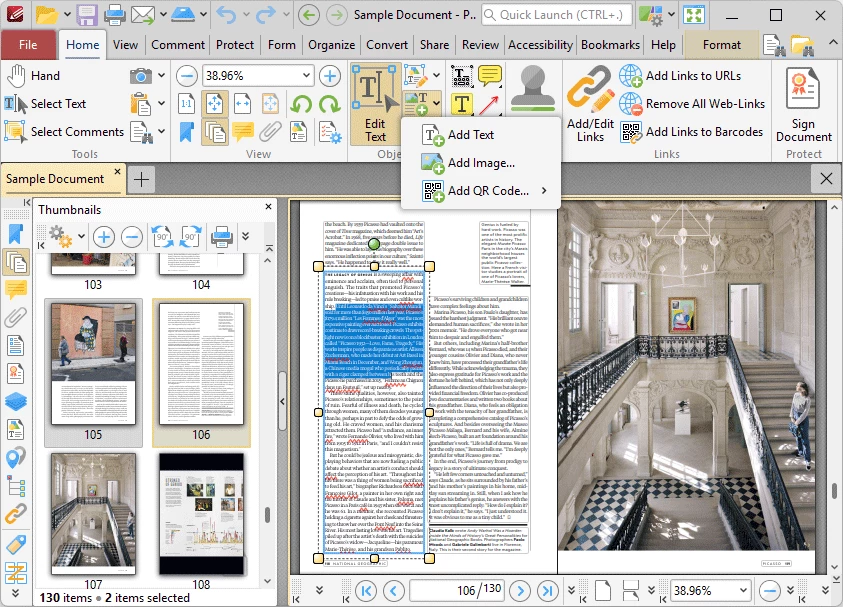
The primary audience for this utility includes legal professionals, academic researchers, and administrative personnel who need precise control over document security, form generation, and metadata management. Operating offline ensures that sensitive corporate contracts or confidential client records never traverse third-party web portals for processing. Users choose this software to escape the heavy memory footprint and constant background update services typical of mainstream document management suites. The desktop application provides a configurable workspace where individuals can switch between a modern ribbon interface and classic toolbars, pinning only the specific markup, measurement, and export tools required for their daily tasks.
In practice, the software solves the specific job of standardizing erratic file submissions into clean, searchable, and interactive archives. Whether a user needs to combine multiple scattered invoice images into a single paginated file, generate a fillable tax form from scratch, or redact confidential paragraphs before public distribution, the application executes these actions through direct interface controls. It targets those who demand permanent ownership of their desktop utilities and prefer handling all rendering, encryption, and text modification locally on their Windows environment.
Key Features
- Enhanced OCR Engine: The Plus tier includes a more accurate optical character recognition module compared to the standard edition. This engine scans image-based files and photographs of physical paper, identifying distinct characters to generate a hidden, searchable text layer. Users can configure the engine to recognize multiple languages simultaneously and correct minor deskewing errors during the conversion process, ensuring that the resulting text can be copied to the clipboard or indexed by Windows search.
- Fillable Form Creation: Users can design interactive digital forms from completely blank pages or existing static templates. The form properties panel provides direct access to place text fields, radio buttons, interactive checkboxes, and drop-down list boxes. Administrators can define specific validation rules, character limits, and visual formatting for each field, ensuring data consistency when the form is distributed to external clients for completion.
- Dynamic Stamp Configuration: The application supports the insertion of custom stamps that execute embedded JavaScript actions upon placement. Instead of placing a static graphic, users can configure a dynamic stamp that automatically pulls the current system date, time, and active user login name, embedding this data directly into the stamp graphic. This provides an accurate, automated audit trail for document review cycles.
- Document Comparison: This utility analyzes two distinct PDF files side-by-side to highlight exact differences in text content, font styling, or visual page layout. By overlaying the revisions and flagging alterations with distinct color codes, it accelerates the proofreading process for legal contracts, manuscript drafts, and architectural revisions. Users can quickly generate a summary report of all detected changes rather than manually reading both documents line by line.
- Advanced Document Correction: When dealing with poorly digitized physical media, the software provides tools to automatically detect and correct scanning distortions. The engine identifies the physical edges of the paper within the image, crops out unnecessary background margins, and applies perspective correction to flatten skewed or warped pages. This eliminates the need to export the pages to an external image editor before assembling the final document.
- Batch Linking: This function automates the generation of hyperlinks across large volumes of files simultaneously. Users configure specific text strings or index patterns, and the application scans multiple documents to create clickable links pointing to specific target pages or external web destinations. This is heavily utilized when building interconnected legal bundles, technical manuals, or vast reference libraries where manual link placement would take hours.
How to Install PDF XChange Editor Plus on Windows
- Download the correct Windows installer package for your specific hardware architecture, choosing between the standard MSI installer or the zipped executable, directly from the vendor's official directory.
- Launch the downloaded setup file and approve the standard Windows User Account Control (UAC) prompt to grant the administrative privileges required for a system-wide installation.
- Review and accept the End-User License Agreement, then proceed to the directory selection screen, which defaults to the standard Program Files folder on your primary local drive.
- Select the installation type by choosing either a Complete setup or choosing Custom to manually include or exclude specific components, such as the PDF-XChange Lite virtual printer, shell extensions, or optional language localization packs.
- Decide on the default application behaviors when prompted; you can set the software as the default system handler for opening PDF files and enable the browser extension for inline document previews.
- Click the install button to begin unpacking and writing the core executable files, OCR dictionaries, and required system registry keys to the local storage disk.
- Finish the setup process and launch the application to reach the main interface, where you can customize your toolbar layout or navigate to the license menu to input a purchased license code and remove trial restrictions.
PDF XChange Editor Plus Free vs. Paid
The developer provides a permissive trial environment where over 70 percent of the application's basic viewing, annotation, and document management tools remain completely unrestricted and free to use indefinitely. Users can download the software without supplying a credit card or registering an account, utilizing the core functions for personal or commercial tasks. However, the remaining premium functions, such as the Enhanced OCR engine, the fillable form creator, and the document comparison tool, are strictly governed by the licensing system. If a user executes one of these premium actions without a valid license, the software permanently stamps a trial watermark across the top corners of all saved pages.
To remove the watermark restrictions and unlock the advanced toolset, the developer utilizes a strict one-time payment model. Unlike competing platforms that mandate monthly or annual subscriptions to keep the software active, this application relies on perpetual, lifetime licenses. A single-user license for the standard Editor tier costs $62, while the Editor Plus tier, which includes the advanced form building and enhanced optical character recognition, requires a single payment of $79.
Purchasing a license grants permanent offline access to the specific version available at the time of purchase, along with a defined period of free maintenance updates. Once the maintenance window expires, the software continues to function normally without demanding further payment, though users will need to pay an optional upgrade fee if they wish to access future major version releases. This straightforward pricing approach makes it appealing to organizations aiming to control their software expenditures tightly.
PDF XChange Editor Plus vs. Adobe Acrobat Pro vs. Foxit PDF Editor
Adobe Acrobat Pro serves as the long-standing industry standard, deeply integrated into the Adobe Creative Cloud ecosystem and Microsoft 365 environments. It handles complex pre-press color separations, cloud-based signature routing, and real-time collaborative document reviews better than most alternatives. This makes Adobe Acrobat Pro the necessary choice for creative agencies, major publishing houses, and enterprise teams that rely on centralized, online document synchronization. However, access to these tools requires a mandatory, ongoing monthly subscription that can strain budgets for individual users or smaller offices.
Foxit PDF Editor occupies a middle ground by providing a familiar interface that closely mirrors the Microsoft Office ribbon, minimizing the learning curve for new administrative staff. It offers strong enterprise deployment packages and integrated cloud collaboration utilities, appealing to corporate environments looking to transition away from Adobe while maintaining similar network administration controls. While Foxit does offer perpetual licensing options alongside its subscriptions, adding advanced modules for heavy editing or high-volume processing can push the total cost closer to the premium alternatives.
PDF XChange Editor Plus proves to be the better fit for technical professionals, IT administrators, and small business users who prioritize application speed, deep interface customization, and a strict one-time payment structure. By omitting heavy cloud synchronization services and mandatory account logins, it maintains a low system resource footprint, launching large technical manuals or architectural drafts instantly. Its advanced local tools, including the high-accuracy offline OCR and JavaScript-enabled dynamic stamps, make it the optimal choice for users who process heavy, confidential workloads entirely offline and want absolute control over their software licensing.
Common Issues and Fixes
- Application crashes immediately upon opening the print dialog. This crash typically occurs when the host Windows operating system utilizes outdated, legacy 32-bit printer drivers within a 64-bit environment. The fix involves completely uninstalling the current printer device and downloading the native, updated 64-bit drivers directly from the hardware manufacturer's official support website.
- Editing functions and form creation tools are completely grayed out. This indicates that the active document contains author-applied password encryption or a strict digital signature that restricts modifications. To resolve this and restore functionality, navigate to the File menu, select Document Properties, open the Security tab, and input the correct owner password to strip the restrictions from the file.
- Unable to select text positioned underneath a colored highlight. The software's default behavior prioritizes clicking on existing annotations over the empty space or text layer beneath them. Users can bypass this by holding down the Shift key while clicking to ignore the top-level highlight, or by toggling Exclusive Mode in the Format tab to force the cursor to only interact with text.
- Searches fail to locate words within a scanned physical document. This happens because the file is merely a flat image lacking a hidden, machine-readable text layer. To solve this, users must execute the Enhanced OCR function from the ribbon, which will analyze the pixels, identify the letters, and generate a searchable text overlay across all the scanned pages.
Version 10.7.6.404 — November 2025
Fixed:
- Fixed an issue with saving PDF files from the Editor when embedded in MS Edge (IE-mode)
- Resolved a rare issue with detecting underline and strikeout styles during text editing
- Fixed slow opening and rendering performance for certain complex PDF files
- Corrected UI inconsistencies in the 'Pages Numbering' dialog box
- Fixed issues with generating self-signed certificates stored in PFX files
- Resolved a crash that occurred after closing a document where the Pencil tool was used
- Fixed user preference saving for text shortening in document tabs
Security:
- Addressed issues with special symbols in file names within the SharePoint plugin