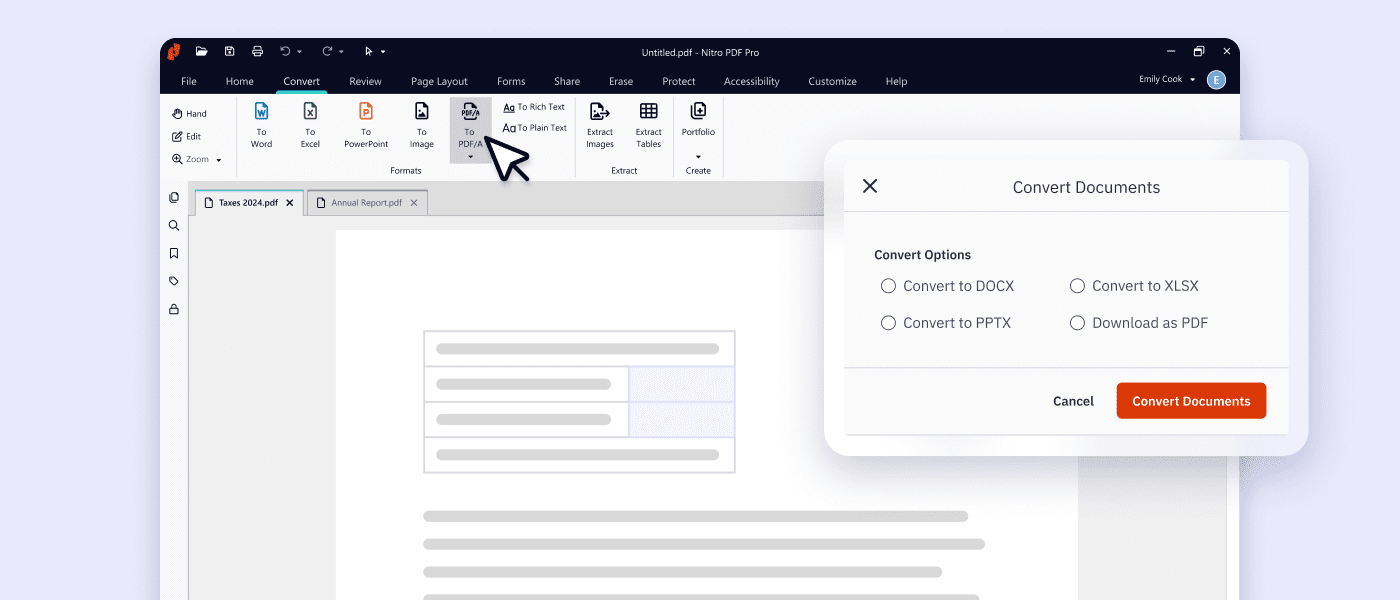
Nitro PDF Pro serves as a direct alternative to Adobe Acrobat for users who need to manage digital documents without navigating a steep learning curve. The application mirrors the familiar Microsoft Office ribbon interface, allowing anyone accustomed to Word or Excel to immediately start editing, converting, and organizing PDF files. It handles direct text modification, format conversion, and electronic signatures entirely on the desktop. This design targets office workers, administrative staff, and individuals who want to modify text, sign contracts, and merge files without spending hours learning a new workspace. Administrative professionals frequently handle documents that require minor text corrections, page reordering, or confidential redactions. Relying on basic reader applications prevents users from making these necessary adjustments, forcing them to recreate documents from scratch.
Handling sensitive invoices, legal contracts, or confidential client records requires a dependable local environment rather than a web-only converter. Operating directly on the desktop keeps file processing fast and ensures offline availability when modifying text or removing pages. The application excels at converting documents directly back into editable Microsoft Word or Excel formats while retaining the original layout, tables, and image structures. This local processing ensures that large technical manuals or scanned paper stacks do not need to be uploaded to an external server just to add page numbers or extract a single chapter. Beyond text manipulation, securing digital signatures remains a primary reason organizations seek out dedicated document management. Printing, physically signing, and rescanning contracts degrades document quality and wastes time.
Because the tool relies on standard top-menu navigation and categorized tabs, the interface feels immediately familiar. Users can open the application and quickly locate the specific tools needed for adding Bates numbering, running optical character recognition on scanned receipts, or building fillable digital forms. Instead of digging through nested properties menus, actions like highlighting text, inserting custom signature stamps, and setting password encryption are placed on the primary toolbar. The application handles digital signatures natively, allowing users to apply stamps, fill out interactive fields, and lock the document against further alterations. This practical layout prioritizes daily administrative tasks over niche prepress printing options, making document management an accessible routine rather than a frustrating chore.
Key Features
- Direct Text Editing: Click directly on paragraph blocks to modify text, adjust fonts, and fix line spacing exactly as you would in a standard word processor. The application automatically matches the existing font and reflows the paragraph when you type new sentences. You can also change text color, adjust alignment, and utilize the built-in spell checker to catch typographical errors before distributing the final document.
- Format Conversion: Export PDF files directly into editable Microsoft Word, Excel, and PowerPoint documents. The conversion engine retains original tables, image placements, and layout structures to prevent manual reformatting. Conversely, the application installs a virtual printer on your system, allowing you to generate a standardized PDF from virtually any Windows application that supports printing.
- Optical Character Recognition (OCR): Scan physical paper documents and transform them into searchable, selectable text layers. This allows you to extract text from old contracts or archive receipts for keyword searching. The OCR module offers multiple language recognition options and can process large batches of scanned images in the background while you work on other tasks.
- Document Comparison: Open two similar files side-by-side to automatically highlight text modifications. This visual comparison helps legal and administrative users spot contract revisions or spot deleted clauses instantly. The tool generates a summary report detailing every insertion, deletion, and formatting change, ensuring no unauthorized modifications slip past the review process.
- Electronic Signatures: Apply quick digital signatures locally or route documents through the Nitro Sign integration to collect verified signatures from external clients. You can drag and drop signature fields directly onto the page before sending. The software also supports digital certificate application, ensuring the mathematical integrity of the document is verified and trusted by corporate IT policies.
- Redaction and Security: Permanently black out sensitive information such as social security numbers, medical records, or financial data to ensure it cannot be recovered. After redacting, you can apply 256-bit password encryption to restrict who can open, edit, or print the file. You can also set granular permissions, such as allowing form filling but preventing text extraction.
- Form Creation: Build fillable digital forms by adding text fields, checkboxes, dropdown menus, and radio buttons onto any standard page. Clients can then type their data directly into the fields without needing to print the document. You can customize field properties to format data automatically, such as ensuring phone numbers or dates follow a specific structural pattern.
How to Install Nitro PDF Pro on Windows
- Navigate to the official vendor download page and download the standard Windows installer executable file to your local drive.
- Double-click the downloaded setup package and grant the necessary administrative permissions when prompted by the Windows User Account Control dialogue.
- Accept the End User License Agreement on the welcome screen to proceed to the main configuration options.
- Choose your primary destination folder and decide whether to set the application as the default handler for opening all PDF documents on your system.
- Review the optional integration prompts, which may ask if you want to install add-ins for Microsoft Word, Excel, and Outlook to enable one-click document conversion directly from Office.
- Wait for the setup wizard to extract the necessary application files, register the system components, and install the virtual print drivers required for document generation.
- Launch the application from the Start menu or the newly created desktop shortcut.
- On the first run, enter a valid account email to start the 14-day trial, or input your purchased license code via the Help menu to activate the software for permanent use.
Nitro PDF Pro Free vs. Paid
Nitro PDF Pro operates as a commercial product and does not offer a permanent free tier. Instead, new users can access a 14-day unrestricted trial. During this trial period, the software provides full access to text editing, optical character recognition, format conversion, and electronic signature tools directly on the desktop. The trial does not impose watermarks on exported files, allowing users to evaluate the software in real-world professional environments.
Once the 14-day trial expires, the software locks its premium editing and conversion functions. Users can still open, read, and view files, but modifying text, extracting pages, saving new form data, or exporting to Microsoft Word requires purchasing a paid license. This transition ensures that users who only need a basic reader can still access their documents, but active content creation requires a financial commitment.
The paid version is available through two primary pricing models designed to accommodate different purchasing preferences. The subscription tier costs roughly $15 per user monthly and includes cloud collaboration features, e-signature routing via Nitro Sign, and continuous feature updates. This model is favored by organizations that prefer operating expenses and require cloud-based web access. Alternatively, the option branded as Nitro PDF Classic provides a desktop license for a fixed term, typically three years, for a single upfront payment around $180. This desktop-bound license is ideal for offline workstations that do not need cloud integration, though it is limited strictly to the Windows operating system.
Nitro PDF Pro vs. Adobe Acrobat Pro vs. Foxit PDF Editor
Adobe Acrobat Pro remains the industry standard, offering deep integration with Adobe Creative Cloud and advanced prepress tools for print professionals. It handles complex color separations and interactive multimedia elements better than any alternative. However, it relies entirely on a recurring subscription business model and carries a steep learning curve. The interface often feels cluttered for standard office tasks, making it better suited for design professionals or large organizations already embedded in the Adobe ecosystem rather than a small business needing simple contract edits.
Foxit PDF Editor provides a fast, responsive alternative that renders large technical drawings and architectural blueprints very quickly. It also utilizes an Office-style ribbon, but its interface focuses tightly on technical documentation, engineering workflows, and strict enterprise deployment tools. While Foxit is an excellent tool for IT administrators and technical writers, individual users and administrative staff might find Foxit's extensive configuration menus overly complex for simple tasks like combining invoices or applying a digital signature.
Nitro PDF Pro is the most practical choice for business administrators, legal clerks, and office workers who want Adobe-level text manipulation and Word conversion without the Adobe price tag or the complexity of Foxit. Its exact replication of the Microsoft Office ribbon makes it the best option for users who want to jump straight into editing contracts or managing paperwork without spending hours learning new menu structures. The availability of a one-time desktop license also makes it an appealing option for users avoiding ongoing subscriptions.
Common Issues and Fixes
- License transfer failures on dead computers. Users often struggle to activate a desktop license on a new computer after a sudden hardware failure. To fix this, you must deactivate the license on the old machine first via the Help menu; if the machine is inaccessible, you must submit a support ticket via the vendor website to have the license seat manually reset by a support agent.
- Markup rotation after merging scanned files. Combining multiple scanned PDFs with different default page orientations can sometimes cause text annotations and custom stamps to rotate 90 degrees unexpectedly. Fix this by standardizing all page orientations using the Page Layout rotation tools, saving the document, and then inserting the new pages or applying the final markups.
- Incorrect font substitutions during text editing. When editing text in a document that uses a custom font not installed on your system, the application may substitute a generic font, altering the document layout and breaking line spacing. Resolve this by identifying the missing font in the document properties and installing the TrueType or OpenType font file on your local Windows machine before modifying the text.
- Overlapping text after exporting to Word. Exporting a heavily formatted document into Microsoft Word might result in overlapping text boxes or misaligned data tables. To improve the output, ensure you select the "Highly Editable (with layout)" option in the conversion settings. If the document relies heavily on vector graphics, you may need to manually crop and convert problematic visual pages as flat images.
- Slow performance on massive architectural files. Opening documents that contain hundreds of high-resolution CAD exports or unoptimized scanned images can cause the application to lag during scrolling. Improve performance by running the built-in "Optimize PDF" tool to downsample images and remove hidden metadata before attempting to edit the document structure.
Version 14.41.1.4 — November 2025
Added:
- Support for checking required system dependencies during installation
Improved:
- File combining reliability by resolving hang issues
- Compatibility with PRO HLCAPI and CrawfordTech PDFs for correct content display
- Loading performance by handling service calls in the background
- Security when viewing signed versions of documents
- Disk usage optimization by no longer saving installers to user AppData
Fixed:
- Crash in Auto Form Create when working with OneDrive documents
- PDF/A-2b conversion issues regarding font embedding
- Nitro PDF Creator rendering issues for images and 3D content
- Issue where documents lost bookmarks after using 'Save As'
- Crash occurring with certain display scaling compatibility settings
- Shift-select functionality to correctly select intended page ranges
- Page tree duplication issues preventing document saving