PDF Architect breaks the mold of traditional document processing by offering a highly modular approach to file management. Instead of forcing consumers to purchase an expensive, heavy suite containing dozens of tools they will never use, this application allows individuals to build a customized toolkit tailored precisely to their daily administrative needs. From basic viewing and printing to advanced text manipulation and electronic signing, the software adapts to the exact requirements of a specific workspace. The core philosophy of the application is to treat digital document editing as a series of standalone functions rather than an inescapable bundled package.
For office workers, legal professionals, and students handling daily digital paperwork, the desktop application provides concrete tools for practical tasks. Office environments frequently require workers to combine separate vendor invoices, correct typographical errors in finalized contracts, or extract specific pages from massive quarterly reports. By installing a local desktop editor rather than relying solely on browser-based converters, users maintain strict control over large file processing. Local processing eliminates slow web upload times, avoids file size restrictions, and mitigates the privacy risks associated with transmitting sensitive corporate data to third-party cloud conversion servers. This is particularly vital for medical or financial sectors handling protected client information.
The program operates entirely on a distinct module system that separates features into logical groups. A user who only needs to convert text documents into fixed layouts and merge a few pages can stick to the basic components, keeping the interface uncluttered. Conversely, a legal department can add optical character recognition to digitize old case files and implement digital signature tracking for client approvals. This compartmentalized structure prevents interface bloat, limits system resource consumption, and ensures that the workspace remains highly practical for routine digital archiving.
Key Features
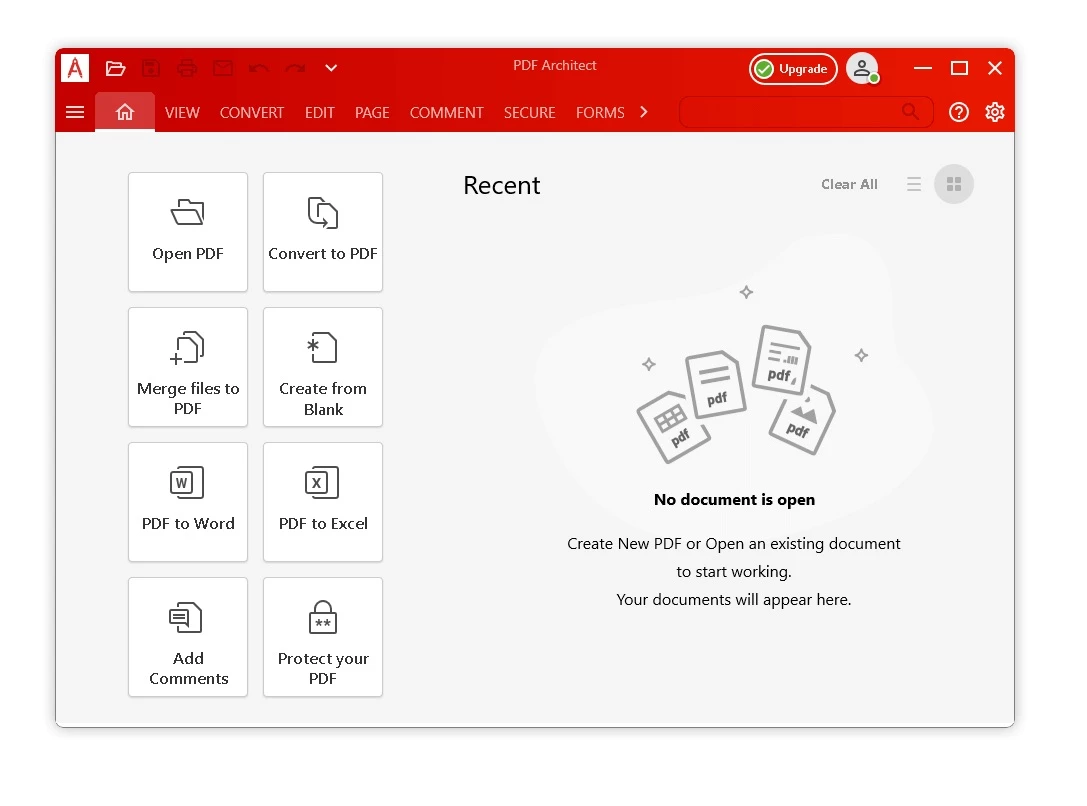
- Create and Convert: The application installs a virtual printer that generates a standardized document from over 300 printable file formats. Users can convert text files, spreadsheets, presentations, and images directly into a fixed layout, or export existing documents back into Word, Excel, HTML, RTF, and image formats like PNG and JPEG. This ensures visual consistency when sharing files across different departments.
- Direct Content Editing: Instead of exporting a file to external software to fix an error, users can modify existing text, change fonts, and adjust formatting directly on the page. The object selection tool allows for resizing, moving, and deleting embedded images or graphics exactly as one would in a standard word processor.
- Page Management: The software provides dedicated controls to extract specific pages, insert blank sheets, or merge multiple separate files into a single unified archive. Users can apply custom headers, footers, bates numbering, and background watermarks to standardize corporate reports or legal portfolios.
- Review and Commenting: Teams can collaborate on drafts using a dedicated set of markup tools. The interface includes options to add sticky notes, apply text highlights, draw freehand shapes, and use strikeout or underline markers to indicate required revisions before a document reaches final approval.
- Form Creation: Administrators can build interactive, fillable digital forms from a blank page. The toolset includes options to insert text fields, radio buttons, checkboxes, drop-down combo boxes, and submit buttons, standardizing the way data is collected from clients or internal staff.
- Optical Character Recognition (OCR): The highest tier includes an engine that transforms flat image scans into searchable, editable text. The OCR module recognizes multiple language dictionaries and allows users to copy text directly from physical paperwork that has been scanned into the computer.
- E-Sign and Security: The security module applies 256-bit AES encryption and permission passwords to restrict unauthorized printing, copying, or altering of the file. The e-sign tools allow users to apply legally binding electronic signatures and track the document's signing progress through an integrated digital manifest.
How to Install PDF Architect on Windows
- Download the executable installer package from the official source and locate it in your local Windows Downloads directory. Ensure you have administrative privileges on your computer before beginning the process.
- Launch the setup executable and approve the standard User Account Control security prompt to grant the installer permission to apply system changes.
- Review the initial setup screen, choose your preferred default application settings, and click Next to initiate the download of the core components.
- Monitor the progress bar in the lower corner of the screen as the installer fetches the necessary module data to your local storage drive.
- Wait for the primary viewing module to initialize; the software will open in a restricted viewing mode, allowing you to read documents while the remaining editing modules finish installing in the background.
- Close the setup window once all background module installations complete and the interface unlocks the requested toolset. The desktop shortcut will appear automatically on your main screen for quick access.
- Navigate to the account menu within the application interface to sign in or create a new user profile, which activates your purchased license and enables cloud-reliant services.
PDF Architect Free vs. Paid
The free tier provides highly restricted, basic file handling capabilities. It focuses strictly on viewing documents, creating files from printable formats like Word and Excel, and performing simple page manipulation tasks such as moving or deleting pages. This entry-level option works well for users who only need a reliable viewer or a virtual printer to generate standard layouts without requiring any advanced modification tools. It serves as a testing ground for the interface before committing to paid modules.
For users needing direct text control, the software utilizes a modular upgrade path separated into Standard, Professional, and Pro + OCR tiers. Paid plans start at approximately $69 per year. The Standard package unlocks the Edit and Page modules, allowing direct text modification, image replacement, and document merging. The Professional tier targets business environments by adding the commenting markup tools, security encryption, and interactive form creation capabilities.
The highest tier, Pro + OCR, includes the advanced optical character recognition engine necessary to transform scanned physical paperwork into searchable and editable text. Additionally, the electronic signature module acts as an optional add-on that requires a registered account. Users can either purchase signatures in bulk packs for occasional use or subscribe to a yearly plan for high-volume contract processing.
PDF Architect vs. Adobe Acrobat vs. Foxit PDF Editor
Adobe Acrobat remains the industry standard for print production professionals and teams heavily invested in the Adobe ecosystem. It offers deep color management, preflight tools for commercial printing, and extensive compatibility for users working outside of the Windows ecosystem. However, its mandatory subscription model and heavy system resource footprint make it highly expensive and bloated for home users or small offices that only need basic text editing capabilities.
Foxit PDF Editor focuses heavily on enterprise-scale deployment and fast processing speeds. It offers a lightweight footprint and, in specific distribution channels, perpetual licensing options that appeal to IT departments attempting to avoid recurring software subscriptions. Foxit is highly capable but presents a traditional all-in-one software package, meaning customers still pay for the entire feature set regardless of which tools they actually use on a daily basis.
PDF Architect is the better fit for Windows users who prefer strict cost control and a modular pricing approach. By allowing customers to start with a free base and selectively add only the specific editing, OCR, or signature modules they require, it eliminates the bloat of traditional document suites. This targeted design keeps both the interface clean and the total financial cost leaner for individuals and small businesses managing routine daily paperwork.
Common Issues and Fixes
- Desktop notifications appearing constantly. The application utilizes a background manager service that periodically displays upgrade prompts or promotional messages. To silence these alerts, press the Windows key, type "services.msc" to open the Windows Services manager, and disable the "PDF Architect Manager" entry. Alternatively, navigate to the general section of the program's internal options menu and switch off the desktop notifications setting.
- Application freezes when opening or editing files. Hardware acceleration conflicts with specific local display drivers can cause the software to lock up randomly during document processing, forcing users to terminate the task. To resolve this instability, open the Graphics section of the application's options menu and disable the GPU accelerated graphics toggle.
- Cannot edit a signed document. Digital signatures intentionally apply a cryptographic lock to a document to prevent unauthorized post-signing tampering. To make modifications to the underlying text or layout, you must right-click the signature field while in View Mode, select "Clear Signature," and completely remove all signature elements before the editing tools will unlock.
- Electronic signature features remain inaccessible. The signature module relies on an active network connection to validate the signature manifest and ensure legal compliance. Ensure that you are successfully logged into your account profile within the application and verify that your local network firewall is not blocking the software from reaching the vendor's authentication servers. Restarting the application after confirming internet access often resolves temporary synchronization drops.
- Optical Character Recognition fails to select text. If the OCR engine cannot process a scanned document, the source image resolution may be too low or the page might be heavily skewed. Ensure the original physical document is scanned at a minimum of 300 DPI, use the software's alignment tools to straighten the page, and verify that the correct language dictionary is selected in the OCR settings before reprocessing the file.
Version 9.1.74 — September 2025
Added:
- Support for viewing documents created in MasterControl.
- Option to overwrite original files during Batch Compress operations.
- New cursor designs to clearly distinguish between 'View' and 'Edit' modes.
Improved:
- Spell-check is now enabled by default for all text editing.
- Enhanced resolution for signatures in the Fill & Sign module.
- Optimized 'Convert to PDF' speed by using local Office converters when available.
Fixed:
- Resolved issues with saving documents directly to OneNote.
- Fixed errors that prevented printing after applying a digital signature.
- Corrected image rotation glitches following document recognition.
- Resolved display issues when hovering over the 'Verify Signature' dialog.