ESET Online Scanner operates as a lightweight, on-demand security tool for users who suspect their computer is infected but do not want to replace their primary antivirus. Since it runs directly from a standalone executable file, it avoids the lengthy setup processes, active kernel drivers, and system modifications typical of full-scale security suites. Users rely on it as a second-opinion scanner to catch threats that their background protection might have missed, ensuring that their daily workflow remains uninterrupted by conflicting security software. By operating entirely outside the standard installation framework, it provides a clean, isolated environment to evaluate system health.
The utility is specifically built to find and remove persistent malware, including hidden rootkits, registry-based infections, aggressive spyware, and potentially unwanted applications. Because it utilizes the same ThreatSense scanning engine as ESET's primary desktop software, it applies the exact same signature databases, memory scanning techniques, and heuristic analysis to localized files without requiring continuous background monitoring. This makes it an effective diagnostic utility for IT technicians and everyday users trying to clean a severely compromised system. Instead of blocking threats as they attempt to enter the machine, the scanner focuses entirely on analyzing executable files, scripts, and libraries that already exist on the local storage drive.
Running a secondary desktop application is particularly useful when browser-based security checks or built-in OS defenses fail to resolve unusual system behavior, such as sudden CPU spikes, unauthorized network traffic, or unexpected application crashes. The application downloads the most recent threat definitions into a temporary local folder, scans the selected directories, and then allows the user to clear out the temporary files once the job is finished. Once the scan is complete, users can review the localized log files, inspect the exact file paths of flagged items, and permanently delete or quarantine the offending elements before closing the application entirely.
Key Features
- Targeted Scan Types: Users can choose between a Full Scan, a Quick Scan, or a Custom Scan depending on their immediate diagnostic needs. The Full Scan examines all local disks, memory partitions, and autostart locations, while the Quick Scan focuses strictly on areas where malware typically hides. The Custom Scan allows you to manually select specific local drives, network folders, or individual directories using a standard folder tree interface.
- PUA Detection Controls: The software includes dedicated toggles to enable or disable the detection of Potentially Unwanted Applications. This allows you to hunt down intrusive browser toolbars, hidden cryptocurrency miners, or aggressive adware that might not be strictly classified as destructive malware but still negatively impacts system performance.
- Registry and Boot Sector Check: Instead of only inspecting standard file directories, the engine scans system autostart locations, master boot records, and the Windows Registry. This helps identify persistent threats that manipulate registry keys to recreate themselves after a standard deletion, ensuring that malicious startup entries are completely neutralized.
- Anti-Stealth Technology: The utility incorporates dedicated rootkit detection methods designed to bypass camouflage techniques used by advanced malware. It forces hidden executable files, deeply injected processes, and deceptive driver files into the open for analysis against the threat database, comparing active memory behavior against known clean states.
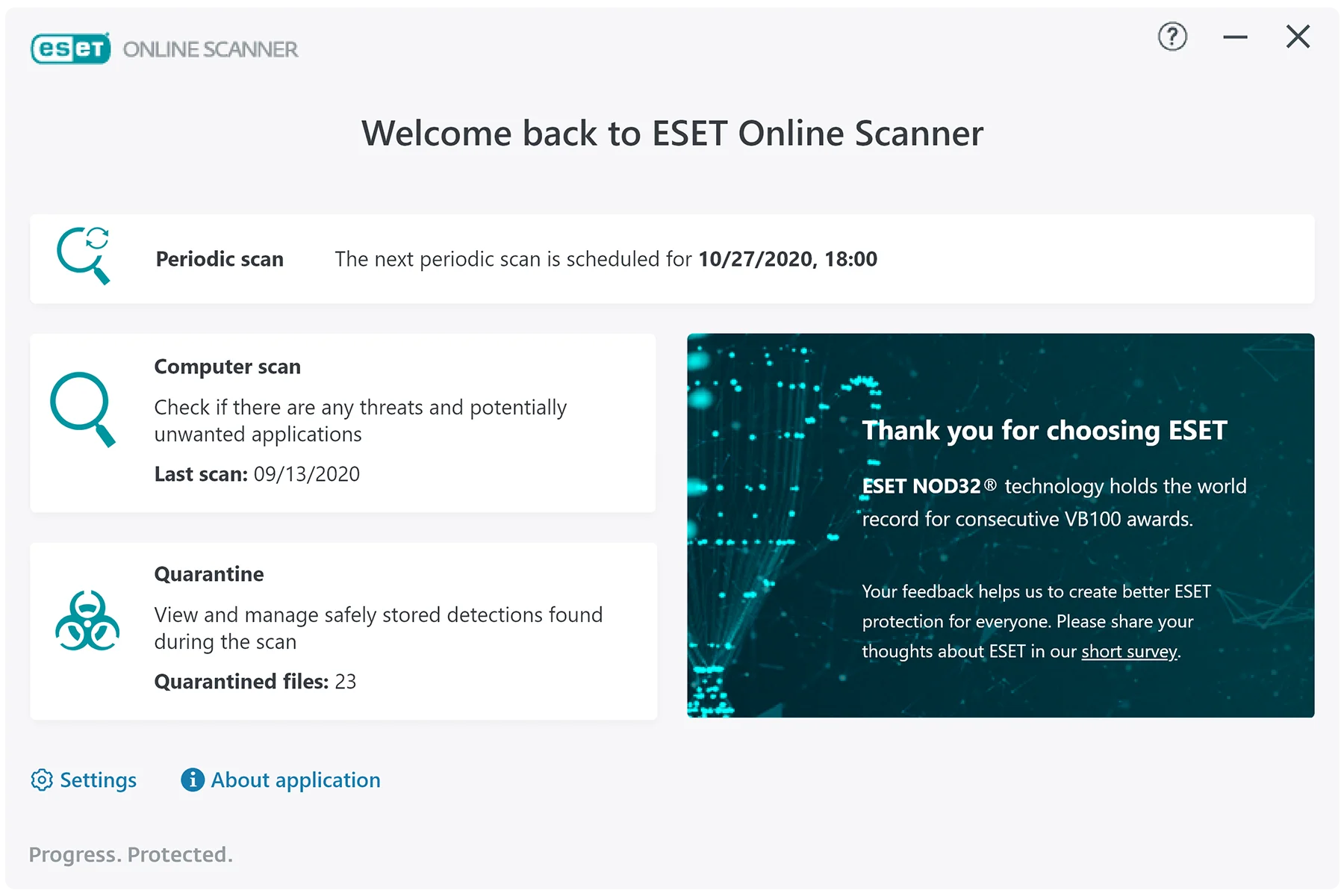
- Automatic Quarantine Management: Any detected threats are automatically isolated in a secure quarantine folder rather than immediately deleted, preventing accidental system damage to crucial files. Users can review the quarantined items log, check the exact threat classification name, and manually decide whether to restore false positives or permanently erase the files from the disk.
- Periodic Scanning: While it does not offer real-time background protection or active traffic filtering, the tool includes a setting to schedule automatic monthly check-ups. If enabled, this option quietly executes a background scan once every 30 days using the built-in system task scheduler, ensuring the local disk remains clean without requiring manual intervention.
- Feedback and Log Generation: After finishing an operation, the application generates a detailed text-based log file detailing exactly which directories were scanned, how many objects were analyzed, and the specific names of any identified threats. These logs can be exported directly from the interface, making it easy to share diagnostic data with IT support professionals or online help forums.
How to Install ESET Online Scanner on Windows
- Navigate to the official ESET website and locate the standalone executable package for the online scanner utility.
- Save the application package to your desktop or an easily accessible local directory, such as the default Downloads folder, ensuring you have enough local storage space for the temporary signature files.
- Double-click the downloaded executable to launch the setup interface, which requires administrative privileges to interact with system-level directories and memory processes.
- Review and accept the end-user license agreement when prompted on the initial welcome screen to proceed to the configuration menu.
- Select your preferred participation level regarding the Customer Experience Improvement Program and decide whether you want to enable the threat data telemetry sharing options.
- Choose your desired scan type from the main interface—selecting Full, Quick, or Custom—and toggle your preference for detecting potentially unwanted applications before moving forward.
- Click the primary scan button to allow the utility to connect to the external update servers and download the latest threat signature database into a temporary directory.
- Wait for the application to analyze your local drives; once finished, review the quarantine log, take action on flagged items, and choose whether to delete the temporary application data upon closing the window.
ESET Online Scanner Free vs. Paid
The ESET Online Scanner is distributed entirely without cost. Users can download the executable, update the threat signatures, and remove localized malware without hitting a paywall, encountering trial expirations, or being forced to navigate a mandatory subscription screen. There are no export limits on the diagnostic scan logs, and the quarantine management features remain fully unlocked for all users regardless of how often they run the utility.
Because the utility is designed strictly as an on-demand, second-opinion diagnostic tool, it deliberately lacks the active defense mechanisms found in premium security suites. The free utility does not include real-time background monitoring, network firewall management, web-traffic filtering, or anti-phishing browser integration. ESET uses this standalone application as a functional demonstration of their core detection engine, providing immediate value while recommending their paid subscription tiers for users who want active prevention rather than reactive cleanup.
Upgrading to a paid solution, such as ESET HOME Security Premium, introduces continuous system monitoring, ransomware shields, password management, and secure banking browser modes. However, if you choose to stick with the free scanner, you simply manually run the standalone executable whenever you suspect a system issue. You are not required to input credit card information, create an online portal account, or register an email address to utilize the threat removal features.
ESET Online Scanner vs. Malwarebytes Free vs. Kaspersky Virus Removal Tool
Malwarebytes Free is highly effective for targeting browser hijackers, aggressive adware, and registry modifications, but it requires a traditional installation process that places folders in your Program Files directory. While Malwarebytes excels at isolating potentially unwanted programs that flood a browser with ads and altering search engine defaults, ESET Online Scanner operates as a single executable without leaving permanent background services behind. This makes the ESET utility slightly more portable for quick IT diagnostics on machines where you do not want to run a standard software installer.
Kaspersky Virus Removal Tool is another popular portable executable that focuses heavily on deep system infections and aggressive rootkits. Kaspersky tends to offer a highly granular manual scan configuration that experienced IT technicians appreciate, allowing strict control over exactly which memory sectors are checked, but its technical interface can be intimidating for casual users. ESET provides a cleaner wizard-driven approach that guides standard users through the update, scan, and quarantine steps without demanding deep technical knowledge of file systems.
ESET Online Scanner is the better fit when you want a straightforward, highly accurate second opinion that uses a premium scanning engine without forcing you to install a permanent application. It strikes a practical balance between the deep rootkit hunting capabilities of Kaspersky and the consumer-friendly adware targeting of Malwarebytes. By providing a clean interface that downloads fresh signatures and cleans the system in one temporary session, it delivers professional-grade malware removal in an accessible format.
Common Issues and Fixes
- The application fails to update the threat signature database upon launch. This usually occurs if an aggressive network firewall, an active VPN connection, or a primary antivirus program blocks the executable from reaching the external ESET update servers. Temporarily pause your active firewall, disconnect the VPN, or add the specific executable file to your primary security software's exclusion list, then restart the application.
- The scan stalls or freezes at a specific file directory for hours. Heavy archive files, massive ISO disk images, or corrupted system drives can cause the scanning engine to hang indefinitely as it attempts to unpack the data. Cancel the current operation, restart the utility, and use the Custom Scan option to exclude the problematic folder, or uncheck the advanced option to scan inside archives.
- Legitimate applications are flagged and moved to quarantine. Strict heuristic analysis occasionally misidentifies custom batch scripts, specialized IT network utilities, or older game modifications as potentially unsafe applications. Open the quarantine menu before closing the application entirely, select the falsely flagged files, and click the restore button to return them to their original location.
- The executable refuses to launch from a mapped network drive. The utility is designed to run locally and may encounter severe permission errors or timeout failures if executed over a standard network protocol. Move the executable file directly to your local desktop or the primary system storage drive before double-clicking it to ensure it has the correct administrative access.
- Leftover temporary files consume local disk space after closing the program. If the application crashes or is closed abruptly via the Task Manager, it may fail to delete its temporary signature databases and module files. Navigate to your local AppData directory, locate the ESET folder, and manually delete the OnlineScanner subfolder to reclaim the lost storage space.
Version 3.7.9.0 — March 2025
- Resolved an issue where the Periodic Scan feature occasionally failed to initiate or run as scheduled.
- Improved application stability through minor internal bug fixes and optimizations.
- Updated the detection engine and virus signature database to ensure the latest protection against emerging threats.