System Mechanic Pro functions as a dedicated desktop optimization utility and security suite designed to maintain system health, manage hardware resources, and protect against malware infections. It targets system administrators, remote workers, PC gamers, and power users who need active background resource management rather than just an occasional manual temporary file deletion tool. By handling persistent background maintenance tasks, deep registry repair, and real-time threat detection within a single unified dashboard, it reduces the need to run separate diagnostic utilities and standalone security programs. When an operating system accumulates broken shortcuts, fragmented registry entries, and unnecessary startup applications, the resulting bottleneck slows down boot times and application responsiveness. This application specifically addresses these bottlenecks by systematically cataloging and resolving registry errors, clearing orphaned cache files, and disabling unneeded startup services.
Operating as a native desktop application, this software taps directly into core system processes to reallocate memory and processing power on the fly. Browser-based interfaces or lightweight portable cleaners simply cannot interface with the hardware scheduler or kernel-level security protocols required to block incoming malware or reorganize fragmented disk sectors. Installing the full desktop client ensures the background service can monitor active memory loads, manage startup items before they load into the system tray, and apply low-level networking tweaks directly to the active network adapter configurations. A native installation also allows the integrated malware scanner to monitor file systems in real-time, instantly quarantining suspicious downloads before they can execute payloads in the local environment.
Key Features
- ActiveCare Background Maintenance: Operates silently when the machine remains idle to clear out junk files, repair broken registry entries, and optimize startup configurations. Users can navigate to the Settings menu to toggle specific cleaning categories on or off, ensuring the tool never deletes necessary temporary project files or specific browser caches required for active web sessions.
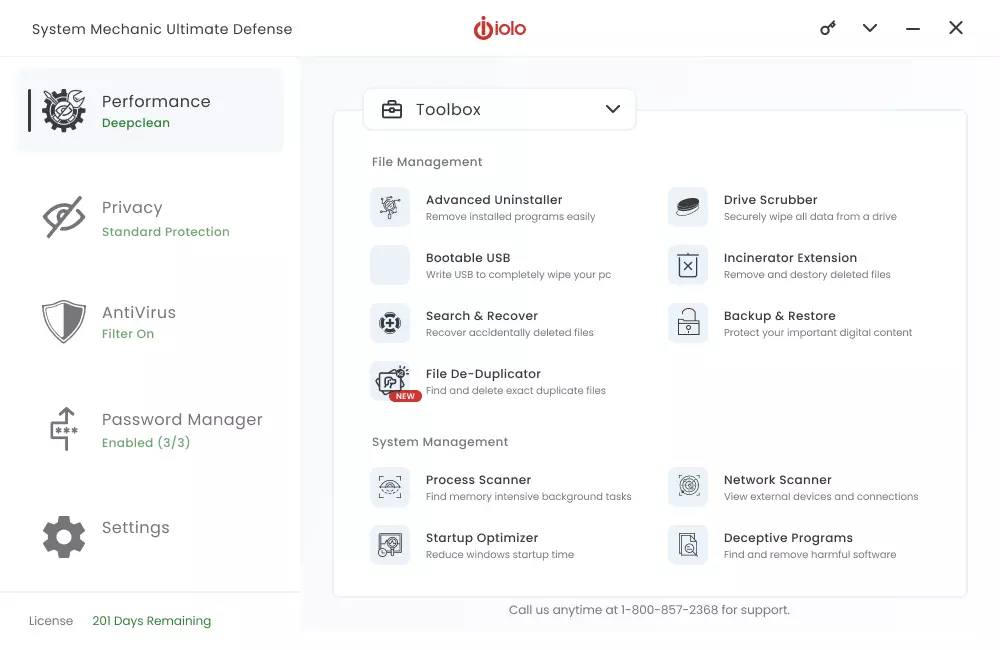
- Deepclean Diagnostic Engine: Groups multiple targeted cleanup tasks under a single interface, specifically scanning for network, browser, operating system, and memory bottlenecks. Executing this diagnostic scan produces a detailed list of redundant files and security vulnerabilities, allowing users to review the findings and uncheck specific items they wish to keep before execution.
- LiveBoost Resource Allocation: Intercepts system demands in real-time to adjust processor scheduling and memory priorities for foreground applications. The dashboard displays a live visual graph of currently optimized programs, which proves practical when running demanding video editing software, compiling large codebases, or executing resource-heavy PC games.
- System Shield Real-Time Protection: Scans active file transfers, web downloads, and running background processes for known malware signatures and heuristic anomalies. It acts as a primary security replacement, complete with an exclusion list in the security settings where administrators can whitelist trusted local executables and specific developer directories to prevent false positives.
- NetBooster Network Optimization: Modifies hidden Windows TCP/IP settings, adjusting packet sizes and buffer limits to reduce streaming buffering and improve connection latency for online applications. If the automated tweaks cause unexpected drops on certain ISP configurations, the Toolbox menu includes a quick restore option to instantly revert the network adapter to factory default configurations.
- Desktop File Incinerator: Bypasses the standard recycle bin to permanently wipe deleted data using military-grade overwriting algorithms, preventing data recovery tools from salvaging sensitive information. A custom widget icon sits directly on the desktop, allowing users to drag and drop sensitive financial documents or private records for immediate, unrecoverable erasure.
- Startup Optimizer: Analyzes the list of applications attempting to launch during the system boot sequence, categorizing them by necessity and community consensus. Users can review this list within the dashboard to delay non-essential background updaters or completely disable unnecessary background services, significantly reducing the time it takes to reach a usable desktop environment.
How to Install System Mechanic Pro on Windows
- Download the official download manager executable from the vendor's primary website to a local drive, ensuring you save the file to a known location like the Downloads folder or the Windows desktop.
- Launch the downloaded setup file by double-clicking it, and grant administrator permission when the Windows User Account Control prompt appears on the screen.
- Review the end-user license agreement presented in the initial setup screen, then click the Install button in the primary wizard window to begin extracting the core application files.
- Allow the installer to copy the necessary files to the default program directory on your primary system drive; do not interrupt the process while the progress bar fills.
- Wait for the automated extraction and background service registration to complete; the main dashboard will launch automatically upon a successful setup.
- Enter the email address associated with your purchase into the mandatory activation prompt and click the button to begin the registration process.
- Input your purchased product code into the registration field, ensuring you include any dashes, or select the trial option to proceed with limited functionality without immediate payment.
- Click the completion button to finalize setup, allowing the software to perform its initial baseline system analysis and download the latest threat definition updates.
System Mechanic Pro Free vs. Paid
System Mechanic Free provides basic manual cleanup tools, allowing users to scan for junk files, clear browser caches, and fix superficial registry errors without any financial commitment. This free tier acts as a practical introduction to the interface and basic engine capabilities but strictly lacks the automated background maintenance, real-time resource tuning, and integrated malware protection required for hands-off system management. Users must manually initiate scans, making it better suited for occasional maintenance rather than continuous optimization.
For active, ongoing management, the developer offers several paid subscription tiers billed annually. The standard System Mechanic tier costs approximately $39.95 per year and introduces ActiveCare for silent background tuning, along with the Deepclean engine for thorough system checks. Upgrading to System Mechanic Pro, which typically retails between $54.95 and $69.95 depending on seasonal promotional cycles, adds the System Shield anti-virus component, the Malware Killer on-demand scanner, and the permanent data wiping utilities. This specific tier targets users who want to consolidate their tune-up utility and anti-virus software into a single subscription.
At the top of the product stack, System Mechanic Ultimate Defense generally costs up to $79.95 annually. This enterprise-grade tier includes every feature found in the Pro edition while adding the ByePass password manager and Privacy Guardian, a tool specifically designed to block online trackers and digital fingerprinting attempts. The vendor processes payments via standard credit card or PayPal options and provides a strict 30-day money-back guarantee for new subscribers who wish to test the premium features on their local hardware before committing to the full annual cycle.
System Mechanic Pro vs. CCleaner Professional Plus vs. Advanced SystemCare Pro
CCleaner Professional Plus excels at quickly recovering hard drive space by aggressively targeting temporary files, browser caches, leftover installation debris, and tracking cookies. It operates with a minimal system footprint, making it ideal for older machines where users simply want a fast, manual disk cleanup without running persistent, heavy background agents. However, while it includes a software updater and driver scanner, it completely lacks the real-time processor reallocation and the integrated anti-virus scanning engine found in more intensive utility suites. Users looking for quick storage recovery will prefer CCleaner, while those needing active memory management will find it insufficient.
Advanced SystemCare Pro relies heavily on a visually dense, widget-heavy interface and includes over 30 specific troubleshooters designed for deep registry cleaning, internet acceleration, and startup optimization. It features an AI-driven scan mode that attempts to learn user habits to automate cleanup tasks based on daily usage patterns. While effective for optimizing system boot times and visually displaying system metrics, its interface can feel cluttered with constant notifications, and it requires the installation of a separate module or a different product tier to achieve full-scale, real-time anti-malware defense.
System Mechanic Pro proves to be the better choice for users who want to consolidate their deep optimization tools and active security protocols into one streamlined application. By combining the LiveBoost memory management subsystem with the System Shield anti-virus engine, it actively manages hardware resources while concurrently blocking digital threats. This dual-purpose architecture makes it effective for heavy multitaskers, software developers, and gamers who need their foreground applications prioritized for maximum performance without sacrificing local system security or running conflicting background agents.
Common Issues and Fixes
- Product code shows as already in use. This error occurs if the assigned license has reached its maximum hardware installation limit. Log into the official iolo web portal, navigate to the device management section, and manually revoke the license from an old or inactive machine before attempting to apply it to the new computer.
- ActiveCare background scans fail to execute on schedule. The Windows Defender Controlled Folder Access feature sometimes flags and blocks the optimization background service from modifying system files. Open the Windows Security dashboard, navigate to the ransomware protection settings, and add the main application executable to the allowed applications whitelist.
- Internet speed drops after running network optimization. The NetBooster tool automatically adjusts TCP/IP settings that may occasionally conflict with specific ISP router configurations. Open the software's Toolbox menu, navigate to the Internet configuration settings, and click "Restore Internet Settings" to immediately revert the network adapter to its original, unoptimized state.
- Application hangs during the initial system analysis. Conflicting third-party security software might isolate or sandbox the diagnostic engine during its initial deep system scan. Temporarily pause any other active anti-virus shields, restart the computer, and run the baseline system analysis again before re-enabling the external security software.
- LiveBoost fails to prioritize foreground applications. The real-time resource allocator might not recognize certain custom or newly released executables. Open the LiveBoost configuration panel and manually add the specific application executable to the priority list to ensure it receives maximum processor and memory allocation during execution.
Version 26.0.0.10 — December 2025
- Added "AppPrioritizer" feature to dynamically allocate CPU resources to high-demand applications for smoother performance.
- Improved SmartScan technology to now detect and clean hidden clutter from the Opera browser and additional storage paths.
- Enhanced Smart ActiveCare with AI-driven scheduling that adapts to usage patterns and performs maintenance only when the PC is idle.
- Integrated iolo SafeWeb protections to block malicious trackers, phishing attempts, and other browser-based threats.
- Optimized deep scanning algorithms to free up more disk space and accelerate system boot times.
- Fixed minor bugs related to resource usage diagnostics and reporting.