HitmanPro functions as a specialized second-opinion scanner designed to catch malicious threats that primary security suites frequently overlook. Traditional security tools rely heavily on localized signature databases and system hooks to intercept malware before it executes. Over time, sophisticated threats have evolved to bypass these traditional intercept methods, burying themselves inside system memory or masking their behavior with legitimate operating system processes. Instead of fighting for the same real-time interception points, this utility operates strictly on-demand, scanning active memory, startup locations, and critical disk sectors to identify anomalies that slipped past the initial line of defense. Because it does not run continuous background services or install complex system drivers during normal operation, it completely avoids conflicts with existing security software.
The engine relies on a lightweight, cloud-assisted architecture rather than requiring users to maintain massive local definition files. When the executable launches, it maps the local file system and evaluates active processes using behavioral forensics. If it encounters a file demonstrating suspicious characteristics—such as heavily encrypted code structures, absent digital signatures, or strange origination paths—it generates a lightweight digital fingerprint. The application then queries external cloud servers maintained by Sophos, cross-referencing this fingerprint against a global threat intelligence database. This method ensures the software can evaluate zero-day threats and polymorphic viruses within minutes. Users deploying this tool typically face a specific scenario: their computer exhibits symptoms of infection, such as strange pop-up windows, browser redirects, or sluggish performance, but their primary security suite reports a completely clean system.
System administrators, IT technicians, and general desktop users rely on this targeted utility to provide a definitive answer regarding system integrity. Its small footprint allows it to operate directly from a USB flash drive or a temporary downloads directory, making it highly effective for remediating heavily compromised machines where malware actively prevents the installation of new security products. Beyond basic viruses, the engine specifically targets rootkits, tracking cookies, spyware, and potentially unwanted applications (PUAs) that bundle themselves with legitimate downloads. By isolating these persistent infections and replacing infected system files during the boot process, the software provides a concrete mechanism for returning an infected machine to a usable state without requiring a complete operating system format.
Key Features
- Cloud-Assisted Threat Verification: When encountering unknown or modified files, the application generates a cryptographic hash and queries remote Sophos security servers. This requires an active internet connection but entirely removes the need for gigabytes of local signature downloads, allowing the entire executable to remain under twenty megabytes while still identifying newly discovered ransomware variants.
- Direct Disk Access Architecture: To uncover rootkits that hide from standard system queries, the scanner bypasses standard operating system application programming interfaces. By reading the hard drive structure directly at the sector level, the engine locates malicious files that intentionally mask their presence from the Windows Explorer interface and standard security sweeps.
- Portable Deployment Mode: Users can execute the scanner directly from a removable USB flash drive, a network share, or a local directory without initiating a permanent installation sequence. This zero-install approach prevents malware from detecting and blocking a traditional setup wizard, ensuring the scanner can launch on compromised systems where other installers fail completely.
- Early Warning Scoring System: Instead of strictly relying on known threat lists, the engine applies forensic profiling to unverified files. It examines code entropy, unexpected system triggers, missing vendor certificates, and unusual file paths to assign a numerical threat score, flagging potentially dangerous custom scripts or modified system drivers for user review before they cause damage.
- Pre-Boot Remediation Sequence: For threats deeply embedded in the operating system, the application schedules a specialized removal process that occurs before the system interface fully loads. By replacing infected boot files and registry keys during the early restart phase, it prevents the malware from initiating its self-defense mechanisms or locking the system drive.
- Kickstart USB Creation: The built-in settings menu allows users to format a standard USB drive and install a specialized bootable recovery environment. Technicians use this specific tool to bypass ransomware lock screens, booting the infected machine directly into the scanner interface without loading the compromised local operating system.
How to Install HitmanPro on Windows
- Obtain the Windows executable file from a trusted source and save it directly to your local drive, external hard drive, or removable USB flash media.
- Double-click the downloaded executable to immediately launch the initial setup window and review the required End User License Agreement.
- On the setup screen, select "Yes, create a copy of HitmanPro so I can regularly scan this computer" if you want a permanent shortcut and scheduled scans, or select "No, I only want to perform a one-time scan" to keep the application portable.
- If selecting the permanent configuration, enter an email address to receive alert notifications and configure the automatic daily scanning schedule from the dropdown menus.
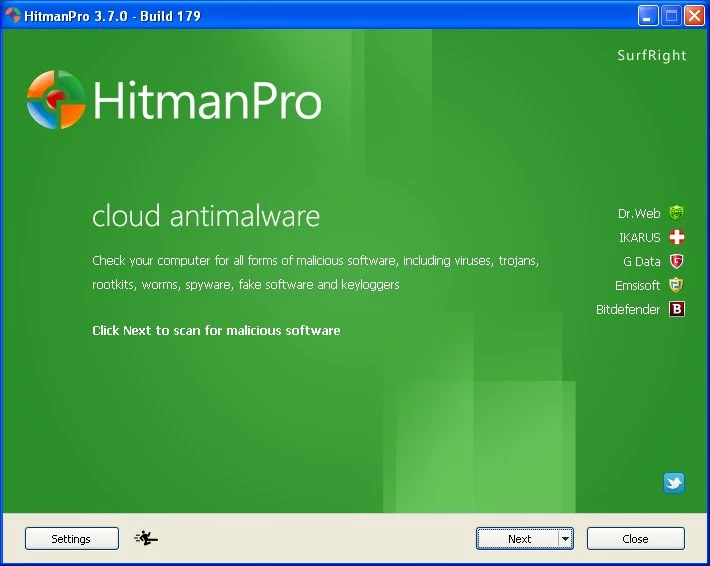
- Navigate to the Settings button on the lower navigation bar to configure proxy server details, specify direct disk access preferences, and toggle the Early Warning Scoring System before proceeding.
- Click Next to initiate the first system scan, which will map active processes and upload suspicious file hashes to the cloud infrastructure for verification.
- Once the scan finishes, review the list of detected anomalies, select the appropriate quarantine or deletion action from the dropdown next to each file, and activate the 30-day removal trial using your email address if prompted.
- Reboot the machine if the application indicates that pre-boot remediation is required to fully clear locked rootkits or persistent registry modifications.
HitmanPro Free vs. Paid
The software employs a split-tier model based strictly on functionality: system scanning is permanently free, while threat removal requires a commercial license. Users can execute the application, identify hidden malware, and verify system integrity as many times as they want without ever paying or creating an account. This makes it a highly valuable diagnostic tool for verifying whether a primary antivirus suite is missing active infections on a suspect machine.
To quarantine, delete, or replace infected files, users must utilize an active license. New users receive a complimentary 30-day trial that unlocks the full removal engine. This trial activates precisely when you attempt to clean a detected threat for the first time, requiring a valid email address to authenticate. Once this 30-day period expires, the application reverts to a scan-only diagnostic tool until a paid subscription is applied to the hardware profile.
The standard paid tier costs approximately $24.95 for a single computer on a one-year billing cycle, granting unrestricted access to the removal engine and scheduled scanning features. Multi-device licenses are available for households or small offices needing coverage across multiple machines. The developer also offers a higher-tier product called HitmanPro.Alert, which costs more and introduces continuous real-time protection, active ransomware encryption blocking, and keystroke privacy features that are absent in the standard on-demand application.
HitmanPro vs. Malwarebytes vs. Emsisoft Emergency Kit
Malwarebytes has gradually shifted away from its origins as a targeted secondary tool, evolving into a primary security suite that requires a permanent installation and active background services. It offers real-time web filtering, scheduled active scans, and continuous system monitoring, making it the right choice for users who need a single, all-in-one replacement for standard Windows security layers. Because of these active components, Malwarebytes consumes significantly more system memory and disk space, and it may conflict with other installed security suites if exclusions are not properly configured.
Emsisoft Emergency Kit takes a completely different approach by focusing strictly on massive offline localized definitions rather than cloud infrastructure. It operates as a portable application but requires downloading a package that frequently exceeds several hundred megabytes to accommodate its dual-engine signature database. Technicians managing isolated networks, air-gapped systems, or extremely unstable internet connections should select Emsisoft, as it requires absolutely no cloud connectivity to successfully identify and neutralize complex threats.
HitmanPro remains the optimal choice for rapid, online diagnostics where storage space and speed are critical constraints. Because its executable is tiny and relies on cloud server processing, it maps and scans a connected machine significantly faster than Emsisoft while avoiding the heavy background service footprint of Malwarebytes. When a user simply wants a fast second opinion without uninstalling their current antivirus or downloading massive update packages, this utility provides the most direct and conflict-free workflow.
Common Issues and Fixes
- Cloud connection errors halt the scan progress. Because the behavioral engine queries external databases, restrictive firewalls or specialized malware will block the outbound connection. To fix this, navigate to the application's Settings menu, click the Advanced tab, and ensure the proxy settings are configured properly, or restart the machine in Safe Mode with Networking to bypass the local software firewall.
- False positives on custom batch scripts. The forensic engine frequently flags internal IT deployment scripts or modified open-source executables because they exhibit unknown behaviors and lack digital signatures. Users must carefully review the scan results list, click the dropdown menu next to the flagged script, and select "Ignore" to whitelist the file before clicking the final removal button.
- Ransomware lock screens prevent application launch. Certain persistent threats lock the entire desktop interface, preventing users from opening the executable entirely. Users must download the application on an uninfected machine, plug in a blank flash drive, and use the built-in Kickstart USB creator to build a recovery drive that boots prior to the locked operating system.
- Trial activation fails with hardware registration errors. The 30-day removal trial is bound to the specific motherboard and hardware identification profile of the machine. If a user previously activated a trial on that exact computer months or years ago, the server will reject new trial requests; the only fix is to purchase a commercial license to unlock the removal capabilities.
- Scan engine freezes during Master Boot Record analysis. The direct disk access architecture occasionally hangs at 99 percent when attempting to read heavily encrypted or non-standard boot partitions. Rebooting the machine, closing all active disk management utilities, and launching the executable specifically as an Administrator usually forces the engine to bypass the locked partition conflict.
Version Latest — 2025
- Added a new configuration option allowing users to exclude the Windows hosts file from scan targets.
- Improved detection and removal capabilities for tracking cookies in the latest versions of Microsoft Edge.
- Fixed an issue where legitimate files digitally signed by Microsoft were incorrectly flagged as suspicious.
- Fixed false positive alerts specifically related to "Backdoor.Behaviour" heuristic detections.