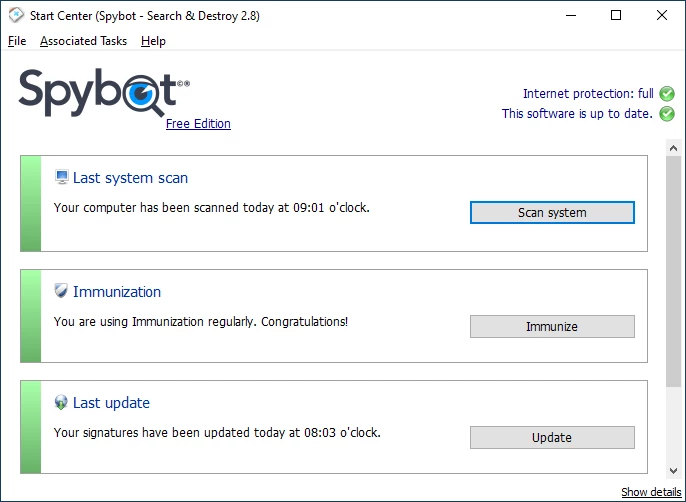
Spybot Search & Destroy operates as a dedicated anti-spyware utility designed to detect and remove aggressive tracking software, hidden adware, rootkits, and privacy-invading data miners that slip past standard antivirus shields. While standard security suites focus primarily on destructive malware like ransomware or file infectors, this desktop application targets the gray area of digital annoyances. It actively hunts down the tracking cookies, registry modifications, and browser hijackers that silently record user habits and manipulate web traffic. The program works by scanning both system memory and the local hard drive, isolating suspicious elements before they compromise personal data or degrade computer performance.
Many desktop environments rely on built-in security tools that apply broad, generalized protection. However, a specialized desktop application provides direct access to system-level directories, the Windows registry, and startup processes that browser-only extensions cannot reach. By utilizing local databases and deep system access, the application ensures that persistent background processes, stealthy browser helper objects (BHOs), and deeply embedded rootkits are physically removed from the machine. For users managing multiple machines or dealing with heavily infected systems, the application provides an offline-capable scanning engine and manual control over quarantine operations. It avoids hiding its operations behind overly simplified interfaces, giving technically minded users direct access to startup entries, network socket configurations, and hosts file modifications. The program solves the concrete task of restoring system performance after a browser hijacking and actively fortifies local browsers against future tracking attempts through its localized immunization methods.
The desktop client provides a straightforward path to managing local privacy settings, stopping unwanted background telemetry, and ensuring that temporary files do not harbor hidden trackers. Rather than acting as a lightweight background scanner, it is typically deployed as a targeted intervention tool. Network administrators and advanced home users utilize its deep scanning parameters to uncover modifications to the local hosts file, unauthorized changes to the Winsock settings, and alterations to the Windows startup sequence. This specialized focus on privacy and system configuration integrity ensures that the software continues to address vulnerabilities that mainstream security packages frequently ignore.
Key Features
- Feature Name: System Immunization. This tool actively blocks the installation of tracking software and spyware before it reaches the hard drive. It works by modifying the local Windows hosts file and applying direct restrictions to installed web browsers, preventing them from accessing known malicious domains. The interface allows users to apply or remove these restrictions with a single click, providing an immediate defensive layer against tracking cookies and malicious browser plugins without requiring active background scanning.
- Feature Name: Advanced System Scan. The primary scanning engine combs through the local storage, system memory, and the Windows registry to locate adware, keyloggers, and trojans. Users can configure the scan depth, choosing between a rapid memory check or a thorough hard drive inspection. The results window displays a detailed list of detected threats, including the specific registry keys and file paths involved, allowing administrators to manually verify each item before sending it to the quarantine vault.
- Feature Name: Rootkit Detection (RootAlyzer). Rootkits deliberately hide their presence from standard operating system functions and conventional security software. The integrated RootAlyzer module bypasses standard Windows APIs to inspect the file system and registry directly at a lower level. By comparing the visible file lists against the raw data on the disk, it identifies discrepancies that indicate an active rootkit infection, allowing the user to isolate and remove the hidden files.
- Feature Name: Startup Tools Management. Unwanted software often embeds itself in the system startup sequence to ensure it runs every time the computer boots. The Startup Tools menu exposes a detailed, tabbed interface showing every application, service, and scheduled task configured to launch automatically. Users can disable suspicious entries, investigate unfamiliar executables, and delete orphaned registry keys left behind by uninstalled software, directly restoring system boot performance.
- Feature Name: Secure File Shredder. Deleting a file through the standard Windows interface only removes the file index, leaving the raw data recoverable on the hard drive. The Secure File Shredder overwrites the physical disk space occupied by the deleted file multiple times, ensuring the data cannot be reconstructed by recovery software. This utility is accessed through the main interface and provides several overwrite algorithms, guaranteeing the permanent destruction of sensitive documents or quarantined malware remnants.
- Feature Name: Anti-Beacon Telemetry Control. Modern operating systems and office suites frequently send usage data and telemetry back to their developers. The Anti-Beacon module, accessible in the paid tiers, explicitly blocks these outbound communication channels by altering system policies and firewall rules. It presents a list of known telemetry endpoints for Windows and popular applications, allowing users to toggle the blocking rules and prevent unauthorized background data transmission.
- Feature Name: Protected Repair Environment. Severe malware infections often actively defend themselves by crashing security software or preventing the removal of their core files. The Protected Repair Environment opens a secondary desktop interface that operates independently of the standard Windows Explorer shell. This isolated workspace prevents the malware from hooking into the active interface, giving the scanning engine the unobstructed access required to delete persistent threats safely.
How to Install Spybot Search & Destroy on Windows
- Obtain the official Windows installation executable from the developer website or an authorized download mirror.
- Launch the downloaded setup file, granting the necessary User Account Control permissions when prompted by the operating system.
- Read and accept the end-user license agreement, then choose whether to install the application for the current user or all users on the machine.
- Select the installation components from the custom setup menu, deciding whether to include the Security Center integration and the background update service.
- Specify the destination folder on the local storage drive, or leave the default path pointing to the standard Program Files directory.
- Wait for the setup wizard to extract the application files, register the necessary system components, and create the requested start menu shortcuts.
- Upon completing the installation, launch the application and navigate to the update menu to download the latest threat signature databases.
- Open the Immunization tab to apply the initial browser protections, then initiate a full system scan to establish a clean baseline for the newly installed software.
Spybot Search & Destroy Free vs. Paid
The developer offers a layered pricing model that separates manual scanning utilities from active background protection. The Free Edition operates entirely without cost for personal, non-commercial use. This tier includes the core manual scanning engine, the system immunization tools, the rootkit scanner, and basic startup management. It does not include active, real-time background scanning, meaning users must manually initiate scans and manually download signature updates to stay protected against new threats. This makes the free tier suitable as a secondary, on-demand scanner rather than a primary defense system.
For users requiring active defense, the Home Edition is available for roughly $18.99 or 14.99 Euros per year. This tier introduces a licensed Bitdefender antivirus engine, combining anti-spyware tools with traditional virus protection. The Home Edition also enables Live Protection, which actively monitors newly created files and running processes, blocking threats before they execute. Additionally, it automates the signature update process, downloading new definitions multiple times a day without requiring manual user intervention.
The Professional Edition, priced around $27.99 per year, expands upon the Home Edition by adding advanced system administration utilities. This tier unlocks the Anti-Beacon telemetry blocking tool, the secure file shredder, registry repair modules, and a boot CD creator for offline system recovery. It also provides command-line execution capabilities, allowing system administrators to script and schedule automated scans across multiple workstations without interacting with the graphical interface. Corporate and technician editions are also available for enterprise deployments, requiring direct licensing negotiations based on the number of managed endpoints.
Spybot Search & Destroy vs. Malwarebytes vs. SUPERAntiSpyware
Malwarebytes focuses heavily on behavior-based detection and zero-day threat blocking, offering a strictly automated approach to modern malware. It utilizes a streamlined interface designed for users who want a hands-off, active security layer that functions identically to a traditional antivirus suite. Malwarebytes excels at identifying advanced ransomware and rapidly mutating executable threats, making it the preferred choice for a primary, active system defense, whereas Spybot requires more manual interaction and focuses on static system configuration analysis.
SUPERAntiSpyware targets similar adware, tracking cookies, and registry modifications, offering a lightweight scanning engine designed specifically for older hardware. It prioritizes rapid scan times and minimal system impact, avoiding the deep registry and rootkit analysis methods that can consume processor resources. SUPERAntiSpyware is often selected when a quick, superficial sweep for tracking cookies is needed, but it lacks the deep administrative utilities, such as the startup manager and the telemetry blocking modules, found in the alternative.
Spybot Search & Destroy remains the better fit for users who prioritize deep system control and explicit privacy management over automated background scanning. Its inclusion of the Immunization tool, the RootAlyzer, and the detailed Startup Tools provides a level of manual troubleshooting capacity that automated scanners obscure. Administrators dealing with complex browser hijackers or extensive registry damage will benefit from its exposed interface, allowing for precise, surgical removal of persistent privacy threats rather than relying on a black-box deletion algorithm.
Common Issues and Fixes
- Problem description. Large hosts file slowing down browser performance. The Immunization feature works by adding thousands of malicious domains to the Windows hosts file, which can occasionally cause older web browsers to stall during DNS resolution. To resolve this, open the application, navigate to the Immunization tab, and undo the immunization process. Alternatively, users can manually edit the hosts file located in the Windows system directory to remove the appended entries.
- Problem description. Conflicts with Microsoft Defender or other primary antivirus software. Installing the paid versions with the active antivirus engine can trigger a resource conflict if another active scanner is currently running, leading to system freezes or severely degraded file access. Users must either disable the active protection module in the settings menu or add mutual exclusion rules in both security programs to prevent them from simultaneously scanning the same directories.
- Problem description. Excessive false positives on standard tracking cookies. The deep scan often flags routine login cookies and basic site preferences as privacy threats, requiring users to log back into websites frequently. To fix this, navigate to the scan settings and exclude specific browser cookie directories from the scanning process, or manually uncheck familiar domains in the results list before confirming the quarantine action.
- Problem description. Signature updates failing to download automatically. Network firewalls or outdated local proxy settings can block the application from connecting to the update servers, resulting in an outdated threat database. Check the built-in update configuration tab to ensure no incorrect proxy addresses are defined, and manually select a different download mirror from the provided drop-down list to bypass localized routing failures.
- Problem description. Slow full system scan times. A full scan inspecting every archived file and deep registry key can take several hours on larger hard drives, particularly on older mechanical storage disks. To speed up the process, open the scan configuration menu and restrict the scan parameters to only examine system memory, active startup folders, and common installation directories rather than scanning non-executable media files.
Version 2.9.85.5 — February 2023
- Implemented enhanced compatibility support for Windows 11 systems.
- Updated detection algorithms to cover the latest versions of major and niche web browsers.
- Optimized system scanning performance and addressed minor stability issues.