ESET Internet Security functions as a desktop-level security application designed to monitor local hardware and network connections for unauthorized access and malicious code. Rather than relying solely on periodic static file scans, the software runs continuously as a background service, intercepting file executions, inspecting inbound and outbound data packets, and analyzing process behavior in system memory. By evaluating these activities against both a local signature database and a cloud-based reputation system, the application identifies and isolates suspicious activity before it can execute harmful payloads or alter critical system directories.
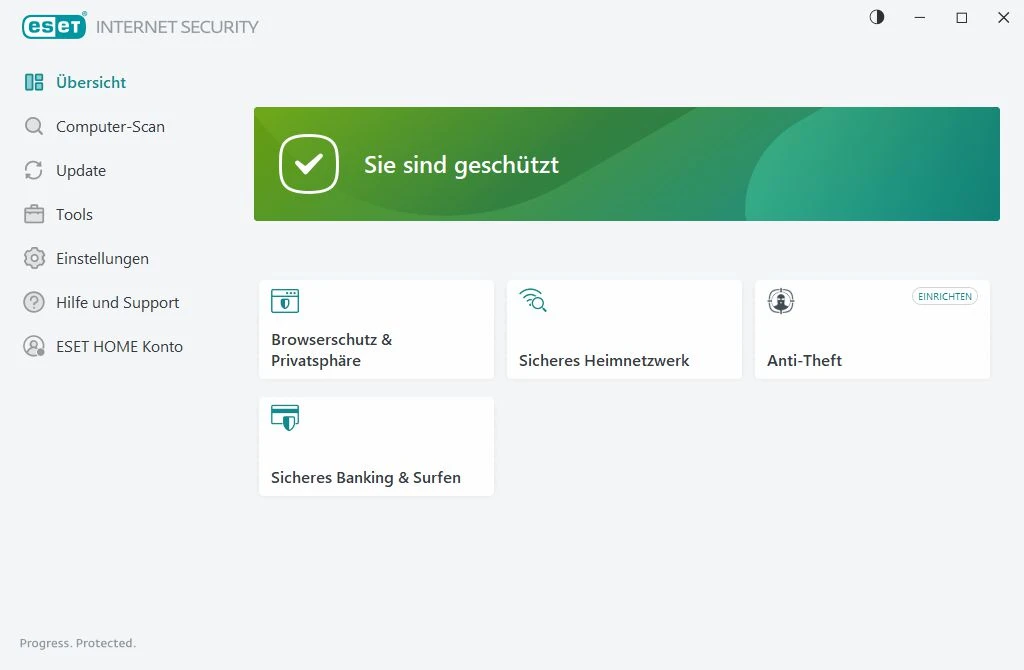
The application targets system administrators, PC gamers, and technical users who require strict control over their machine's active processes without suffering heavy performance penalties. ESET Internet Security prioritizes a low system footprint, consuming minimal random access memory and CPU cycles during idle operation. The interface provides a clear left-hand navigation menu—featuring options like Overview, Computer scan, Update, Tools, and Setup. The primary window on the right displays the active module, while a toggle in the top corner allows users to switch between Light and Dark color schemes. Technical users can press the F5 key at any time to open a deep Advanced Setup tree, where they can configure specific folder exclusions, dictate exact firewall behaviors, and write custom intrusion prevention rules.
Choosing a dedicated desktop application over lighter browser extensions or default operating system protections provides deeper system hooks necessary for complex threat mitigation. Browser add-ons cannot detect unauthorized modifications to the Windows registry or scan the UEFI firmware before the operating system boots. ESET Internet Security bridges this gap by sitting at the core of the system, offering a localized two-way firewall, direct webcam access restrictions, and secure isolation for financial transactions that extend well beyond the confines of a web browser.
Key Features
- Advanced Memory Scanner: This module targets heavily obfuscated malware that uses encryption to hide its true purpose from static storage scans. The scanner monitors the behavior of suspicious processes and analyzes the code in real-time as it unpacks itself directly in system RAM.
- Safe Banking and Browsing: When navigating to a recognized financial website, the software launches a hardened instance of Chrome, Edge, or Firefox. This isolated browser features a glowing border to indicate it is active, and it encrypts the communication path between the physical keyboard and the browser to block background keyloggers.
- Network Inspector: This diagnostic tool scans the local Wi-Fi router for vulnerabilities, such as outdated firmware or insecure default administration passwords. It also generates a categorized, visual list of all devices currently connected to the local subnet, making it easy to spot unauthorized smartphones or IoT hardware.
- Host-Based Intrusion Prevention System (HIPS): Designed for advanced users, this module monitors system activity and uses a pre-defined set of rules to recognize suspicious behavior. Users can enter the Advanced Setup menu to manually define exact rules governing which applications are allowed to modify the system registry or inject code into other running processes.
- Anti-Theft Tracking: If a laptop is stolen, the owner can log into the vendor's web dashboard and mark the device as missing. The software then reboots the machine into a restricted phantom account that hides local user data, while silently capturing webcam snapshots and gathering Wi-Fi network data to triangulate the hardware's physical location.
- Webcam Protection: The application monitors all active processes and intercepts requests made to the computer's camera hardware. If an unknown background script or unrecognized application attempts to initialize the video feed, the software blocks the request and triggers a desktop alert asking the user for permission.
- Gamer Mode: To prevent performance drops during intensive tasks, this feature detects when a Direct3D application initializes in full-screen mode. It immediately suspends scheduled hard drive scans, pauses database updates, and mutes notification pop-ups, ensuring that hardware resources are directly allocated to the running application.
How to Install ESET Internet Security on Windows
- Download the official Windows installer executable from the vendor's website.
- Launch the setup file and approve the User Account Control (UAC) prompt to grant the installation wizard the necessary administrative permissions to write files to the system drive.
- Review the End User License Agreement and select your preference regarding the ESET LiveGrid feedback system, which controls whether the software sends unknown suspicious file samples to the vendor's cloud servers for automated analysis.
- Choose your scanning stance on Potentially Unwanted Applications (PUAs); enabling this option allows the engine to flag software that is not strictly malicious but may negatively impact system performance or user privacy.
- Provide activation details when prompted by entering a purchased license code or supplying a valid email address to initialize a 30-day trial period.
- Click the final confirmation button to write the application files to the default program directory; the software will immediately bind its services to the operating system without requiring an immediate reboot.
- Open the main interface after installation to allow the initial database update to complete, and follow the on-screen prompt to perform a baseline scan of your local storage drives.
ESET Internet Security Free vs. Paid
ESET Internet Security operates strictly on a paid subscription model and does not offer a permanent free tier. Users can download the application and register with an email address to activate a 30-day trial. During this trial period, all premium modules—including the two-way firewall, network inspector, and anti-theft tracking—function without restriction. Once the trial expires, the software halts virus database updates and disables active protection modules until the user applies a valid license code.
The standard paid tier requires an annual subscription, which typically costs around $49.99 for a single desktop installation. The vendor scales pricing based on the number of protected devices and the duration of the commitment, offering reduced per-device rates for multi-year or multi-device plans. The license grants access to continuous engine updates, new application builds, and technical support access.
Users comparing the internal product lineup will find this application positioned as the middle tier. Those who only need a bare-bones file scanner without the firewall or secure browser can step down to ESET NOD32 Antivirus at a lower cost. Conversely, users who require a built-in password manager and local data encryption tools must upgrade to the more expensive ESET Smart Security Premium package.
ESET Internet Security vs. Kaspersky Standard vs. Bitdefender Internet Security
Kaspersky Standard frequently achieves high marks in independent laboratory testing for malware detection and includes secondary utilities like a limited daily VPN allowance. It features a modern interface geared toward consumers who prefer highly visual dashboards. However, Kaspersky generally consumes more system RAM during active scans, and it operates under strict regional bans in certain commercial and government sectors, forcing users in those jurisdictions to look for alternative tools.
Bitdefender Internet Security takes a heavily automated approach, using its Autopilot feature to make security decisions in the background without prompting the user. This design suits individuals who want hands-off protection without configuring rules. The trade-off is higher background CPU utilization; Bitdefender's active scanning and update routines demand more hardware resources, which can induce noticeable slowdowns on older desktop computers or low-specification laptops.
ESET Internet Security is the better choice for system administrators, PC gamers, and technical users who value system performance and manual control over automated assumptions. Its idle footprint is notably small, and the F5 Advanced Setup menu offers precise configuration over the Host-Based Intrusion Prevention System (HIPS) and firewall rules. When hardware resources need to be directly allocated to rendering software or games, ESET provides the least intrusive operating environment among the three.
Common Issues and Fixes
- Safe Banking shortcut constantly reappears on the desktop. This known interface bug occurs when users delete the specific banking browser shortcut without disabling the feature. To fix it permanently, update the application to the latest build, delete the icon, and restart the computer. Alternatively, open Setup, navigate to Security Tools, uncheck Safe Banking & Browsing, delete the shortcut, and re-enable the module.
- Keyboard inputs become scrambled in web browsers. The secure keyboard protection module sometimes conflicts with other drivers, turning intended keystrokes into random characters. Resolve this by pressing F5 to open Advanced setup, navigating to Protections, selecting Browser Protection, and disabling the Keyboard protection toggle.
- Legitimate websites are blocked with a certificate error. The software's SSL/TLS protocol filtering occasionally intercepts and blocks trusted certificates, such as those from Let's Encrypt. Fix this by opening the Advanced setup menu, locating the Web and Email protection section, and adding the specific domain to the SSL/TLS filtering exclusions list.
- "ESET LiveGrid servers cannot be reached" popup appears repeatedly. This warning triggers when the local installation cannot communicate with the vendor's cloud reputation servers. Verify your local internet connection and DNS settings; if the local network is functioning correctly, the issue is likely a temporary vendor server outage that will resolve on its own once their network stabilizes.
Version 19.0.14.0 — November 2025
- Introduced VPN capabilities for users on the Smart Security Premium tier.
- Added a new monthly frequency setting to the task scheduler for improved automation flexibility.
- Improved the tracking and logging details generated while Gamer Mode is active.
- Enhanced on-demand scanning by enabling users to switch scan profiles directly from the graphical interface.
- Discontinued compatibility and software support for 32-bit operating systems.
- Fixed various minor bugs and applied general under-the-hood performance optimizations.