Avast SecureLine VPN is a dedicated virtual private network application designed to encrypt incoming and outgoing desktop internet traffic, hide local IP addresses, and secure network connections on untrusted public Wi-Fi networks. Developed by the global security firm Gen Digital, this software shifts the focus from complex manual network configuration to an accessible, automated toggle system. The application intercepts all web requests at the operating system level, routing them through a secure, encrypted tunnel using AES-256 standards. This cryptographic barrier prevents internet service providers, local network administrators, corporate firewalls, and potential malicious actors from monitoring browsing habits, logging unencrypted communications, or intercepting sensitive banking details.
Unlike lightweight browser extensions that only secure web traffic within a single browser tab, Avast SecureLine VPN functions as a system-wide desktop client. This critical distinction means it protects data packets from every active application on the Windows machine. Background updaters, standalone email clients, proprietary chat software, and raw file transfers all benefit from the same encrypted tunnel. Real users rely on this system-wide coverage to safely access region-locked home streaming services while traveling abroad, bypass restrictive local network filters in corporate offices or university campuses, and maintain strict privacy during peer-to-peer file sharing and torrenting.
By integrating closely with the Windows operating system network stack, the software offers a specialized Smart VPN mode that automatically triggers protection based on environmental conditions. When the system detects a connection to an open, password-free coffee shop Wi-Fi, the VPN engages immediately without requiring any manual user input. This hands-off approach makes it a practical and reliable choice for mobile professionals and casual users who want constant, uncompromising security without having to monitor connection states, read log files, or tweak advanced protocol settings on a daily basis.
Key Features
- System-Wide AES-256 Encryption: Routes all outgoing and incoming Windows traffic through a secure AES-256 encrypted tunnel. This military-grade standard prevents external monitoring of browsing sessions, background application updates, and raw data transfers across the entire operating system, ensuring no traffic leaks outside the encrypted pathway.
- Smart VPN Automation: Automatically connects the VPN tunnel when specific triggers are met, such as joining an unsecured public Wi-Fi network or navigating to known banking and financial websites. This automated logic removes the need to manually launch the application and toggle the connection every time the computer wakes from sleep or changes physical locations.
- Integrated Network Kill Switch: Instantly severs all internet access if the active VPN connection drops unexpectedly due to server timeouts or local network instability. This strict failsafe mechanism ensures that true IP addresses and unencrypted data packets are never exposed during momentary network interruptions or while the client is switching between global servers.
- Advanced Protocol Selection: Allows users to switch between multiple connection protocols directly from the settings menu, including standard IPSec, OpenVPN, and Avast's proprietary Mimic protocol. The Mimic protocol is specifically engineered to obfuscate VPN traffic, helping to bypass strict network firewalls and regional internet blocks that detect and throttle standard VPN signatures.
- Local Network Bypass Options: Permits direct connections to local devices like wireless printers, smart home hubs, and local attached storage drives even while the main external internet connection remains encrypted. Users do not have to temporarily disable the VPN to print a physical document or pull a file from a local network share.
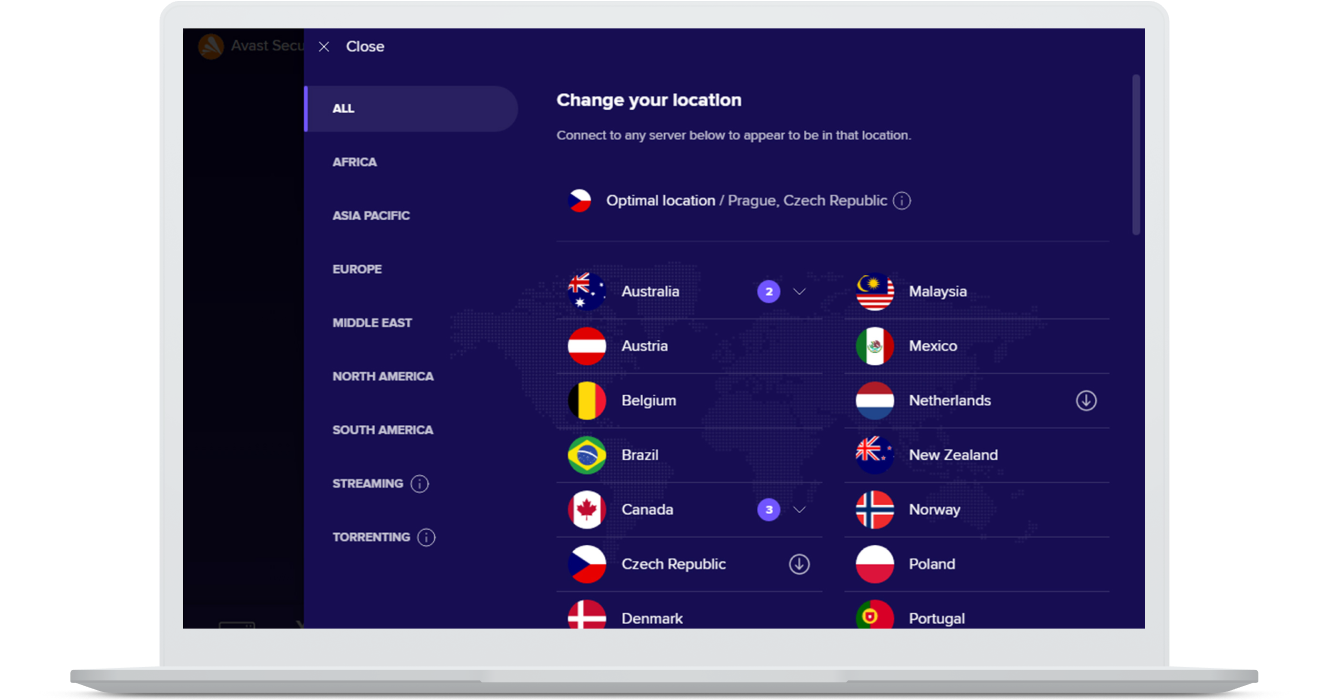
- Specialized Streaming and P2P Servers: Provides a global network of specialized servers dedicated strictly to specific high-bandwidth tasks, such as high-definition video streaming and peer-to-peer file sharing. These optimized servers handle continuous bandwidth loads efficiently and are regularly updated to avoid strict IP blacklists enforced by major digital content platforms.
How to Install Avast SecureLine VPN on Windows
- Download the official Windows installer package for Avast SecureLine VPN directly from the vendor's primary website to ensure you receive the most recent application build.
- Locate the downloaded executable file in your default downloads folder and launch it to initialize the setup wizard.
- When prompted by the initial setup screen, select your preferred interface language from the available dropdown menu and carefully review the End User License Agreement.
- Check the default installation path displayed by the wizard. The setup typically defaults to the standard Windows Program Files directory, but you can assign a different storage drive via the custom installation menu if required.
- Click "Install" to begin the extraction process. Wait for the installer to unpack the core application files, register background services, and install the necessary virtual network adapters required for Windows traffic routing.
- Once the progress bar completes and the success screen appears, click "Finish" to close the installation wizard and launch the VPN client for the first time.
- Upon first launch, the software will prompt you to either begin a 60-day free trial immediately or sign in using your existing Avast account credentials to apply a previously purchased paid subscription.
Avast SecureLine VPN Free vs. Paid
Avast SecureLine VPN operates entirely on a premium paid subscription model, but it provides new users with a generous 60-day free trial. This extended trial period grants full, unrestricted access to the entire global server network, all connection protocols, and every advanced security feature without capping bandwidth or artificially limiting download speeds. Users can download the trial installer directly from the vendor and activate the testing period from within the application interface. However, maintaining the service past this two-month window requires purchasing a paid plan.
The paid subscription tiers are strictly structured around long-term billing commitments rather than flexible month-to-month payments. Users must commit to purchasing a one-year, two-year, or three-year subscription upfront. For example, a standard one-year plan typically costs around $55.08, which averages out to $4.59 per month. Selecting the longer two-year or three-year plans slightly reduces the monthly average to $4.39, but requires a higher initial payment. Regardless of the chosen length, all subscription tiers support simultaneous active connections on up to 10 distinct devices, allowing a single account license to cover a household's desktop machines, laptops, and mobile hardware.
There is no permanent free tier with restricted data limits available, unlike some competing consumer privacy tools. If a user chooses not to purchase a subscription after the initial 60-day free trial completely expires, the client application will lock its features and actively refuse all external connection attempts until a valid license or a paid Avast account is authenticated.
Avast SecureLine VPN vs. ProtonVPN vs. Surfshark
ProtonVPN is a compelling alternative for users who prioritize extreme privacy policies and require access to a permanent free tier. Operating under strict Swiss data privacy laws, ProtonVPN provides a rigid no-logs policy that has been audited by third parties, open-source client applications, and a fully free edition that offers unlimited data restricted to a small handful of server locations. If you are looking for an indefinitely free VPN for secure basic web browsing, or if you need advanced privacy features like Secure Core multi-hop routing to defend against sophisticated network surveillance, ProtonVPN is the technically superior choice.
Surfshark targets cost-conscious users who need to secure many different hardware devices simultaneously without breaking the budget. It allows completely unlimited simultaneous device connections on a single paid subscription and frequently offers multi-year plans at a lower overall cost than Avast. Surfshark also bundles additional network-level tools directly into the client, such as built-in ad-blocking and anti-malware DNS filtering. For large households or tech enthusiasts who need to connect dozens of devices simultaneously without hitting an artificial connection cap, Surfshark offers stronger overall value.
Avast SecureLine VPN is the better fit for users who desire frictionless simplicity and automated protection, particularly if they are already integrated into the broader Avast security ecosystem. Its proprietary Smart VPN mode excels at managing encrypted connections automatically based on the current network type, requiring zero technical knowledge or manual intervention once initially configured. If your primary goal is to install a reliable tool that quietly protects your hardware on untrusted public Wi-Fi without forcing you to interact with complex configuration screens, Avast SecureLine delivers a straightforward, dependable user experience.
Common Issues and Fixes
- Connection fails to establish initially. This frequently happens if the default automatic protocol is being actively blocked by a restrictive local network firewall. Open the application Settings, navigate to the VPN Protocols menu, and switch from the default "Automatic" or "IPSec" options to the "Mimic" or "OpenVPN" protocol to successfully bypass the network block.
- Cannot access local network printers or shared drives. By default, the VPN actively isolates your computer from the surrounding local network to prevent data leaks. To resolve this, open the Network Security settings and explicitly enable the "Local device access" or "Access Local Devices with Kill Switch" toggle to restore visibility to local printers and storage.
- Application displays a "SecureLine has encountered a technical issue" error. This typically indicates a low-level problem with the underlying Windows virtual network adapters failing to initialize. Restarting the Windows PC usually resolves the immediate adapter conflict. If the error persists, uninstalling and cleanly reinstalling the application will completely reset the network drivers.
- Complete loss of internet access due to software conflicts. Running multiple VPN clients simultaneously can severely scramble Windows routing tables, leading to a complete loss of internet connectivity. Ensure any other installed VPN services (including dedicated corporate work VPNs) are fully disconnected and closed via the system tray before attempting to connect Avast SecureLine.
Version 25.8.11847 — August 2025
Added:
- Support for WireGuard protocol on Windows for faster and more secure connections.
- New server locations added to the network for improved global coverage.
Improved:
- Smart VPN Mode now better detects banking sites and public Wi-Fi triggers.
- Enhanced connection stability and reduced reconnection times.
- Optimized server selection algorithm for streaming services.
Fixed:
- Resolved an issue where the VPN would not auto-connect on system startup.
- Fixed minor UI bugs in the settings menu.
Security:
- Updated OpenSSL libraries to the latest stable versions.
- Security patches for potential local privilege escalation vulnerabilities.