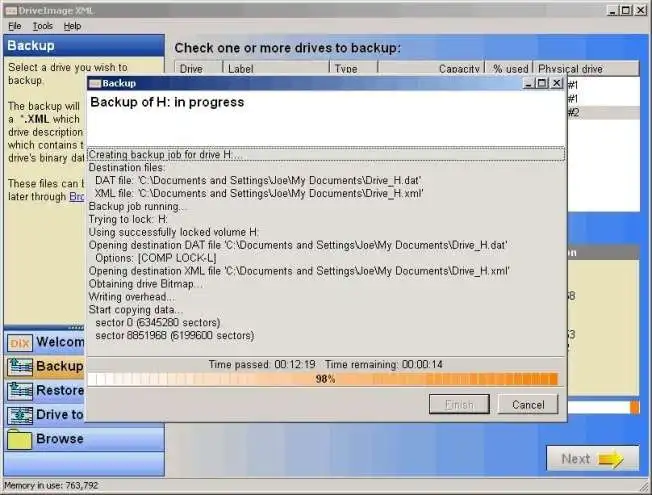
DriveImage XML takes a strictly utilitarian approach to disk imaging and system backup. Rather than bundling heavy background services, mandatory cloud accounts, or complicated proprietary storage formats, this application captures logical drives and partitions using native Windows infrastructure. It serves administrators and technical users who want a straightforward method to secure their entire system or specific data volumes without wrestling with an intrusive graphical interface. The tool operates at the sector level, creating exact replicas of drives formatted with FAT or NTFS file systems, ensuring that everything from the boot records to the hidden system files is captured accurately.
The core of the application relies on an open structural design. By saving the backup definition in an Extensible Markup Language file alongside the raw data chunks, the software ensures your archives are never permanently locked behind a single vendor's closed ecosystem. If you ever need to process, verify, or extract the data using third-party utilities, the open text-based specifications make that possible. The XML file contains the vital header information, partition layout, and cluster map, acting as a clear blueprint for the accompanying binary data files.
For system administrators and technical home users, the desktop footprint matters immensely. At roughly two megabytes, the program avoids installing unnecessary monitoring agents, constant updater services, or resource-heavy telemetry modules. You execute the application when you need a snapshot, schedule it via standard Windows administrative tools if you require automation, and close it when the job finishes. It operates completely offline, requiring no account registration, activation checks, or internet connectivity to perform its primary backup and restoration tasks.
Key Features
- Feature Name: Hot Imaging with VSS. The software leverages Microsoft's Volume Shadow Services to capture system snapshots while the operating system remains active. This mechanism momentarily freezes the file system state to ensure consistency, allowing you to continue working on documents, modifying databases, or browsing the web while the imaging process runs safely in the background.
- Feature Name: Open XML File Architecture. Instead of hiding data inside a closed, proprietary container file, the utility stores drive configuration and header information in standard text-based files. This approach guarantees that you can read the backup metadata with basic text editors and process the raw image files with third-party extraction tools, providing an extra layer of disaster recovery insurance.
- Feature Name: Image Browsing and Extraction. You do not need to perform a full system restore just to recover a single deleted document. The built-in image explorer presents a familiar, folder-based tree view that lets you mount and navigate through your created archives, allowing you to extract individual files or entire directories directly to your active local drive.
- Feature Name: Drive-to-Drive Cloning. For hardware migrations, the program includes a direct copy function that transfers data from your current disk to a new disk without creating an intermediary image file. This direct sector-by-sector cloning is practical when moving an aging mechanical hard drive to a fresh solid-state drive of equal or greater capacity.
- Feature Name: Task Scheduler Integration. Rather than running a proprietary background agent that consumes system memory, the tool integrates directly with the native Windows Task Scheduler. You can configure automated, unattended backup routines by passing specific command-line parameters to the executable, dictating the source drive, destination path, and compression levels.
- Feature Name: Image Splitting and Compression. To accommodate smaller storage targets like FAT32 formatted flash drives or network shares with strict file size limits, the backup wizard can automatically split the final image into manageable chunks. It also provides two distinct levels of compression, allowing you to prioritize either backup speed or reduced disk space consumption.
- Feature Name: Live CD Recovery Support. For bare-metal restorations where the primary operating system will not boot, the software can be integrated into bootable recovery environments. By building a customized WinPE or BartPE bootable CD or USB drive containing the application plugin, you can access the interface outside of the main Windows installation to restore a dead system.
How to Install DriveImage XML on Windows
- Download the standard Windows installer package directly from the official Runtime Software website to ensure you receive the unmodified application.
- Launch the downloaded executable file to initiate the setup wizard. The system will prompt you with a User Account Control warning; click "Yes" to grant the necessary permissions.
- Review and accept the End User License Agreement on the first screen to proceed with the installation.
- Select the destination directory for the application files. The installer defaults to the standard Program Files folder, which is recommended for proper permission handling.
- Choose your preferred Start Menu folder name and decide whether you want the installer to generate a desktop shortcut for quick access.
- Click "Install" to write the lightweight files to your local drive. The process typically completes in a few seconds due to the small footprint.
- Finish the setup wizard and launch the application. For the Volume Shadow Copy service to function correctly and capture locked system files, always right-click the shortcut and select "Run as administrator" when launching the program.
DriveImage XML Free vs. Paid
Runtime Software divides the application into two distinct licensing tiers: a Private Edition and a Commercial Edition. The Private Edition is completely free of charge for home users operating the software on their personal computers. This free tier is fully functional; it does not insert watermarks, restrict export sizes, limit backup frequency, or force trial expirations, making it a highly capable tool for individual desktop backups. However, it does not include official technical support from the developers.
For business environments, companies must purchase the Commercial Edition. Pricing begins at $100 for a five-user license, which is the minimum tier for professional use. The pricing model scales up depending on the size of the organization, with options extending to $500 for a 100-user license. Organizations cannot legally use the Private Edition for commercial hardware deployments, client system recovery, or office workstation backups.
Purchasing a commercial license grants the organization the legal right to utilize the tool in a professional capacity. It also includes one year of free software updates and direct customer support from Runtime Software. The underlying backup technology, the visual interface, and the command-line capabilities remain identical across both versions; the division is strictly a legal licensing requirement rather than a feature restriction.
DriveImage XML vs. Macrium Reflect vs. AOMEI Backupper
Macrium Reflect targets users who require advanced backup management and highly optimized imaging engines. It offers complex features like incremental and differential backup chains, which save storage space by only recording changes made since the last snapshot. Macrium also includes built-in ransomware protection for its backup files and an automated tool for generating WinPE bootable rescue media. You should choose Macrium Reflect when you need a highly automated, secure, and fast backup schedule, though it requires a much larger installation footprint and more system resources.
AOMEI Backupper focuses heavily on a modern, highly visual graphical interface and broad hardware compatibility, particularly with modern UEFI systems and GPT partition layouts. It simplifies the backup process into a few visual clicks and handles modern disk cloning operations with minimal manual configuration. AOMEI also includes file-level synchronization and cloud backup integration. It is the better choice for users who want an accessible, visually guided experience and native support for cloning complex Windows 11 GPT layouts without dropping into command-line tools.
DriveImage XML is the better fit for technical minimalists who want a tiny application that skips proprietary background services entirely in favor of an open data format. While it requires more manual intervention—such as manually building your own WinPE recovery media or configuring Windows Task Scheduler for automation—its barebones approach provides total visibility into how backup files are structured. It is highly effective for older hardware, strict MBR partition layouts, and users who demand software that operates purely on demand without leaving persistent background processes running on their machines.
Common Issues and Fixes
- Problem description. The application displays an "unable to retrieve drive layout" error during drive-to-drive copying. This usually occurs when trying to clone an older MBR partitioned drive to a new disk formatted with the newer GPT layout. You must open the Windows Disk Management utility, clear the destination drive, and explicitly initialize it as an MBR disk before the cloning process can successfully retrieve the layout.
- Problem description. The computer boots to a flashing cursor or displays a missing bootmgr error after a full image restore. The backup image likely did not capture the active boot sector correctly, or the sector was misaligned during restoration. Boot your computer using a standard Windows installation USB, open the command prompt from the advanced recovery menu, and run the standard bootrec commands to rebuild the bootloader manually.
- Problem description. The backup process fails immediately because VSS cannot create a system snapshot. The Microsoft Volume Shadow Copy service might be disabled in your operating system, preventing file access. Open the Windows Services manager by typing services.msc in the run dialog, change the Volume Shadow Copy startup type to Manual, and ensure you are running the backup application as an administrator.
- Problem description. Large backup files fail to save to external USB drives or network attached storage. If your external target drive is formatted with the older FAT32 file system, it cannot physically accept individual files larger than 4GB. Enable the split large files option in the backup wizard before initiating the job to break the archive into smaller, compatible segments.
- Problem description. Automated scheduled backups fail to trigger or run silently without creating an image file. This happens when the command-line parameters in Windows Task Scheduler are formatted incorrectly or the task lacks required privileges. Verify your syntax in the task action, and check the box for running with highest privileges in the task properties to ensure it can access the drives.
Version Latest — 2025
- Added two distinct compression levels to optimize backup file size and processing time.
- Improved overall speed and efficiency during drive imaging and restoration tasks.
- Fixed minor stability issues and enhanced compatibility with various Windows file systems (FAT/NTFS).