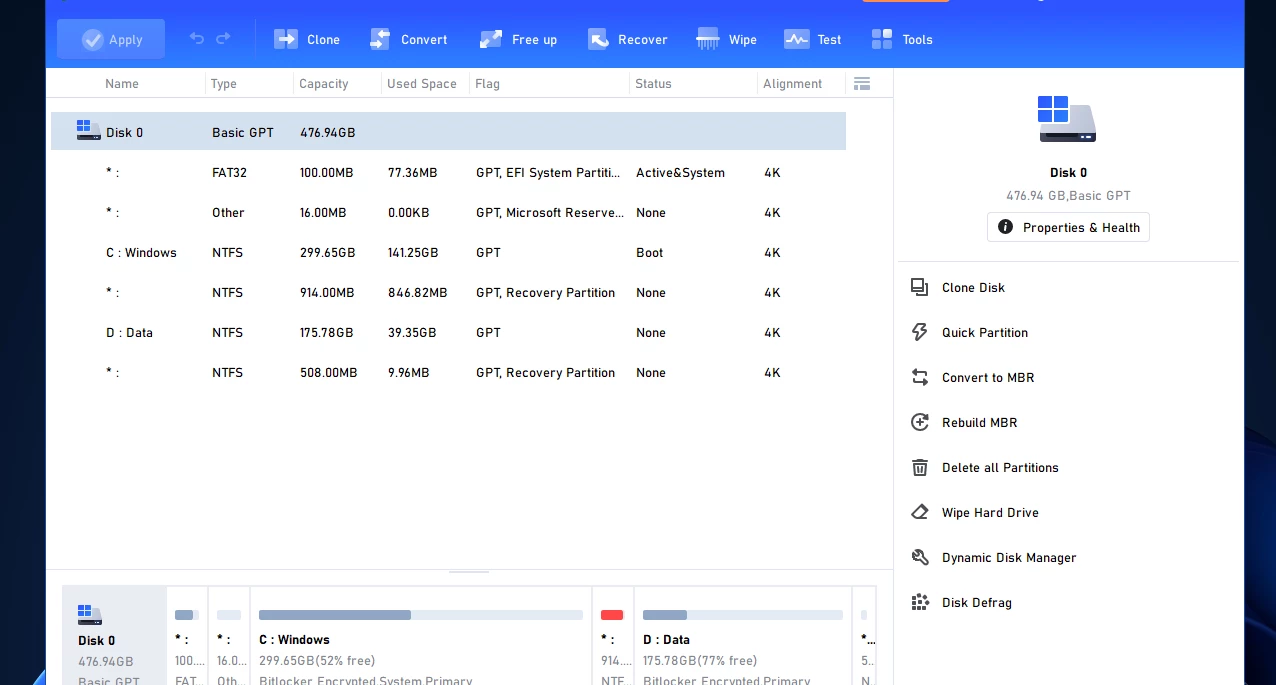
AOMEI Partition Assistant serves as a dedicated desktop disk management utility that goes far beyond the native storage tools provided by the Windows operating system. While the built-in Windows Disk Management utility can perform basic formatting and volume deletion, it heavily restricts modifications to existing layouts. For example, native tools cannot extend a system drive unless unallocated space sits immediately to its right, and they cannot convert partition styles without wiping the entire drive. This utility solves those structural problems by allowing users to safely shrink, merge, split, and extend partitions directly on the disk map without formatting or destroying the files already stored inside them. The interface clearly visualizes the physical layout of every connected drive, making it obvious where unallocated space resides and which partitions can be expanded.
Because disk partitioning requires deep, low-level access to local storage hardware and system boot records, a local desktop application is strictly required. Browser-based utilities or cloud storage managers cannot alter physical sector alignments or rebuild Master Boot Records. AOMEI Partition Assistant integrates with the system at the kernel level, utilizing its own drivers to lock the drive during modifications. If a task involves the active system drive, the software handles the changes by rebooting the computer into a specialized PreOS mode, ensuring that background applications or operating system tasks do not interrupt the sector realignment.
This utility is primarily aimed at home users upgrading their mechanical hard drives to solid-state drives, IT administrators managing mixed hardware configurations across an office, and system builders who need to clone layouts or change file systems on the fly. Whether preparing an older machine for a modern operating system upgrade, rescuing space from a crowded local disk, or building portable workspaces on external USB drives, it provides a visual, practical dashboard to manage hardware storage without requiring command-line expertise.
Key Features
- Feature Name: Non-Destructive Partition Resizing. Users can shrink, extend, or move partitions directly from the main console without losing existing files. By right-clicking a drive and selecting the resize option, a graphical slider appears, allowing users to visually drag the partition boundaries to reclaim unallocated space.
- Feature Name: OS Migration Wizard. This tool specifically moves the active Windows installation from an old drive to a new solid-state drive or larger hard disk. Unlike a full disk clone, the migration wizard identifies the necessary boot records, system partitions, and core operating system files, allowing users to transfer the core system while leaving heavy personal media folders behind if the target drive is smaller.
- Feature Name: Dynamic Disk Conversion. The software safely switches drives between the older MBR (Master Boot Record) format and the modern GPT (GUID Partition Table) format without requiring a destructive format. This is heavily utilized by users who are upgrading their motherboards, switching to UEFI boot modes, or preparing an older system layout to meet the strict requirements of modern Windows installations.
- Feature Name: Windows To Go Creator. This utility builds a fully portable, bootable Windows environment on an external USB flash drive or portable hard drive. Users can supply a standard Windows ISO file or instruct the software to copy their currently running system, creating a persistent workspace that can be plugged into and booted from any compatible computer.
- Feature Name: App Mover Utility. When a primary disk runs out of space, the App Mover transfers fully installed software applications from the crowded drive to a secondary disk. Instead of forcing the user to uninstall and reinstall large programs, the utility automatically moves the directory and rewrites the necessary registry paths and desktop shortcuts so the application functions normally from its new location.
- Feature Name: Bootable PE Media Builder. Users can generate a Windows PE (Preinstallation Environment) rescue drive on a USB stick or CD. This bootable environment loads a lightweight version of the partition manager outside of the main operating system, which is critical for rebuilding corrupted boot records, fixing partition errors, or retrieving files when the main operating system completely fails to start. The PE builder includes an option to inject specific storage controller drivers directly into the bootable media.
How to Install AOMEI Partition Assistant on Windows
- Download the official Windows installer executable from the vendor's website to your local storage drive. The file is a standalone package that does not require an active internet connection to complete the basic installation.
- Locate the downloaded setup file, typically named
PartAssistSetup.exe, and double-click it to begin the installation process. - When the Windows User Account Control prompt appears, click "Yes" to grant the installer the administrative privileges required to register low-level storage drivers.
- Select your preferred interface language from the initial drop-down menu and read through the End User License Agreement before accepting it to proceed.
- Review the default destination folder, which is usually set to
C:Program Files (x86)AOMEI Partition Assistant, or click the "Browse" button to select a different local directory for the application files. - Choose whether to generate a desktop shortcut for quick access and decide if you want to opt into the automated Customer Experience Improvement Program.
- Click "Install" to extract the core application files; during this crucial step, the installer will register the
ampa.sysdriver with the Windows kernel, which is necessary for the software to lock drives and alter partition tables. - Click "Finish" to close the setup wizard and launch the program directly into the main disk management dashboard, where it will automatically scan your connected hardware.
AOMEI Partition Assistant Free vs. Paid
The Standard edition of AOMEI Partition Assistant is fully free for personal use and includes a broad set of everyday disk layout tools. Users running the free tier can resize, move, merge, split, and format partitions, as well as assign drive letters and check disks for bad sectors. It also supports cloning smaller data disks that do not contain an operating system, making it highly useful for archiving old files. The free version does not impose artificial watermarks on the interface, but it strictly locks access to advanced operations, such as migrating an operating system to a GPT disk, managing dynamic disks, or utilizing the App Mover tool.
Upgrading to the Professional edition unlocks the complete consumer feature set, targeting home power users and small office environments. Priced around $49.95 for an annual subscription or roughly $59.95 for a lifetime perpetual license that covers two computers, this tier handles complex MBR to GPT system conversions, secure SSD erasing, partition alignment, and command-line execution. Trial versions of the Professional edition are available for download, allowing users to navigate the interface and preview complex disk operations, but the software requires an active license key to actually apply those pending changes to the physical disk.
For enterprise environments and IT management, the vendor offers Server, Unlimited, and Technician editions. The Server edition is built to run on Windows Server operating systems, which consumer tiers block by default. The Technician edition, priced around $599 or more depending on current vendor structures, allows IT service providers to offer billable disk management services to an unlimited number of clients. Crucially, the Technician tier permits the creation of a portable version of the software on a bootable device, enabling engineers to run the application directly from a USB drive without installing any files on the client machine.
AOMEI Partition Assistant vs. EaseUS Partition Master vs. MiniTool Partition Wizard
EaseUS Partition Master heavily prioritizes beginner-friendly navigation and highly automated workflows. Its interface is designed to hide complex technical jargon, guiding users through disk cloning or partition resizing via structured, step-by-step wizards. It requires fewer manual configuration steps, making it an excellent fit for casual home users who simply want to upgrade an aging hard drive to a new solid-state drive without worrying about manual sector alignment, boot record types, or dynamic volume specifications.
MiniTool Partition Wizard provides a practical interface that excels at data recovery and deep disk diagnostics. It includes dedicated modules for performing deep surface tests, recovering accidentally deleted partitions from formatted space, and scanning file systems for structural errors, often completing these diagnostic tasks faster than its direct rivals. Users dealing with failing hardware, questionable sectors, or data loss scenarios often prefer MiniTool due to its specific focus on drive health and retrieval alongside standard layout management.
AOMEI Partition Assistant is the stronger choice for users managing older hardware, mixed Windows environments, or those who need highly specific utilities to control their storage layouts. While its interface exposes slightly more technical detail and configuration options than EaseUS, it offers deeper manual control over dynamic disk conversion, PreOS mode execution, and bootable PE creation. With unique additions like the Windows To Go Creator and the App Mover, AOMEI acts less like a simple cloning tool and more like a complete storage utility belt for system builders and IT administrators.
Common Issues and Fixes
- Problem description. Error Code 2 (Failed to assign a drive letter). This issue occurs when Windows is too slow to update its internal partition table after a resize or split operation, causing the final step to time out. The fix is to simply reboot the computer, or open the native Windows Disk Management tool to manually assign a drive letter (such as D: or E:) to the newly created space, allowing File Explorer to finally display the storage volume.
- Problem description. Error Code 1004 (Partition cannot be locked). Active background applications or aggressive antivirus software are actively using the drive you are attempting to modify. To fix this, close all background programs, or allow the software to restart the computer and perform the operation in PreOS mode before the Windows operating system fully loads into memory. The software relies on strict hardware locks to prevent catastrophic data loss, so any interference will intentionally halt the process.
- Problem description. "Load Driver Failed" warning on startup. The system cannot initialize the required
ampa.sysstorage driver, often because a security program quarantined it or the Windows registry lost the entry. Uninstall the software completely, restart the computer to clear cached memory, and reinstall the application to force a fresh driver registration. Ensure your security software is temporarily disabled during the reinstallation to prevent a repeat of the quarantine. - Problem description. No Disks Found in the main console. The software fails to communicate with your storage controllers, a situation common with newer NVMe drives, custom RAID setups, or poorly connected external USB enclosures. Click the "Reload Disk" button in the top toolbar to refresh the hardware scan, or check your motherboard manufacturer's website to update your primary storage controller drivers.
Version 10.9.2 — December 2025
- Added a new "Disk Temperature Monitor" feature to track real-time drive temperatures and prevent overheating risks.
- Introduced "Disk Health Alerts" to intelligently detect anomalies and warn users of potential issues like bad sectors before data loss occurs.
- Fixed a display issue where pop-up windows would appear incorrectly on high-DPI screens (settings above 100%).
- Resolved a bug where the main application window would occasionally lose focus after closing a pop-up dialog.