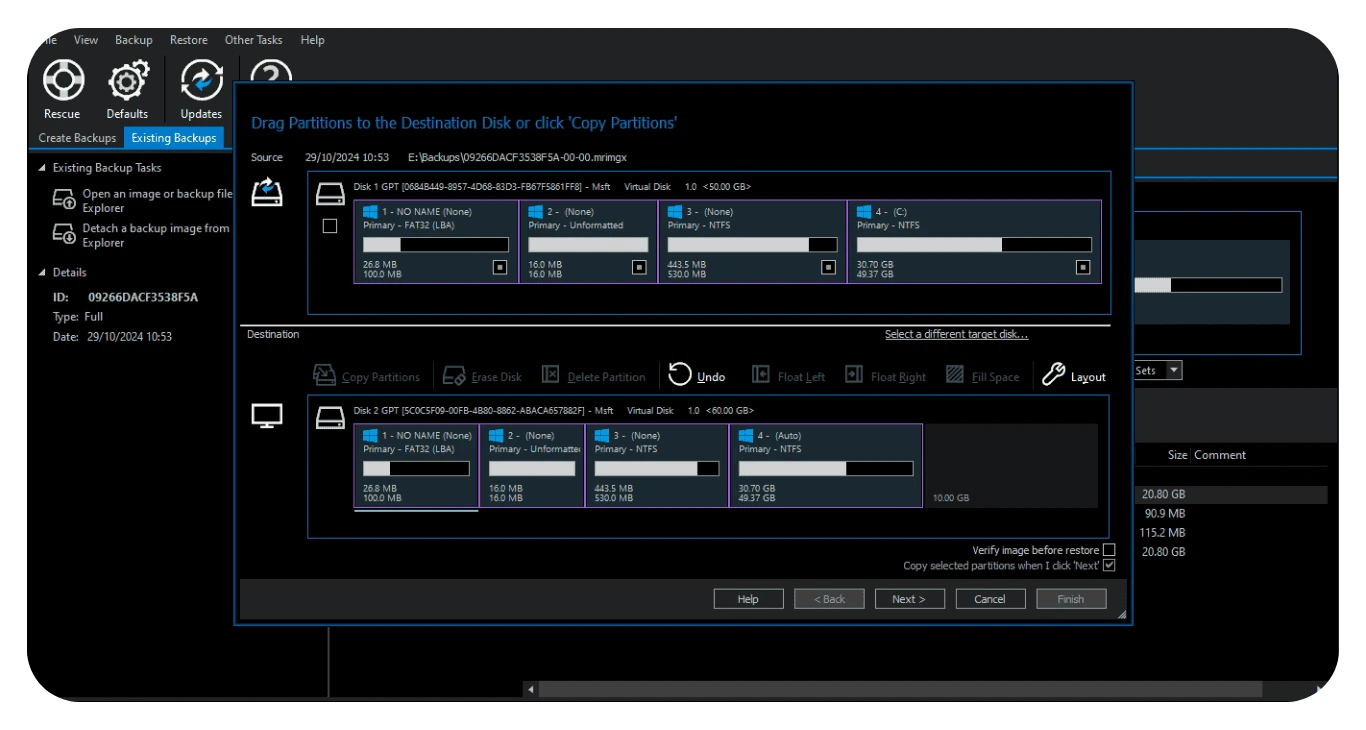
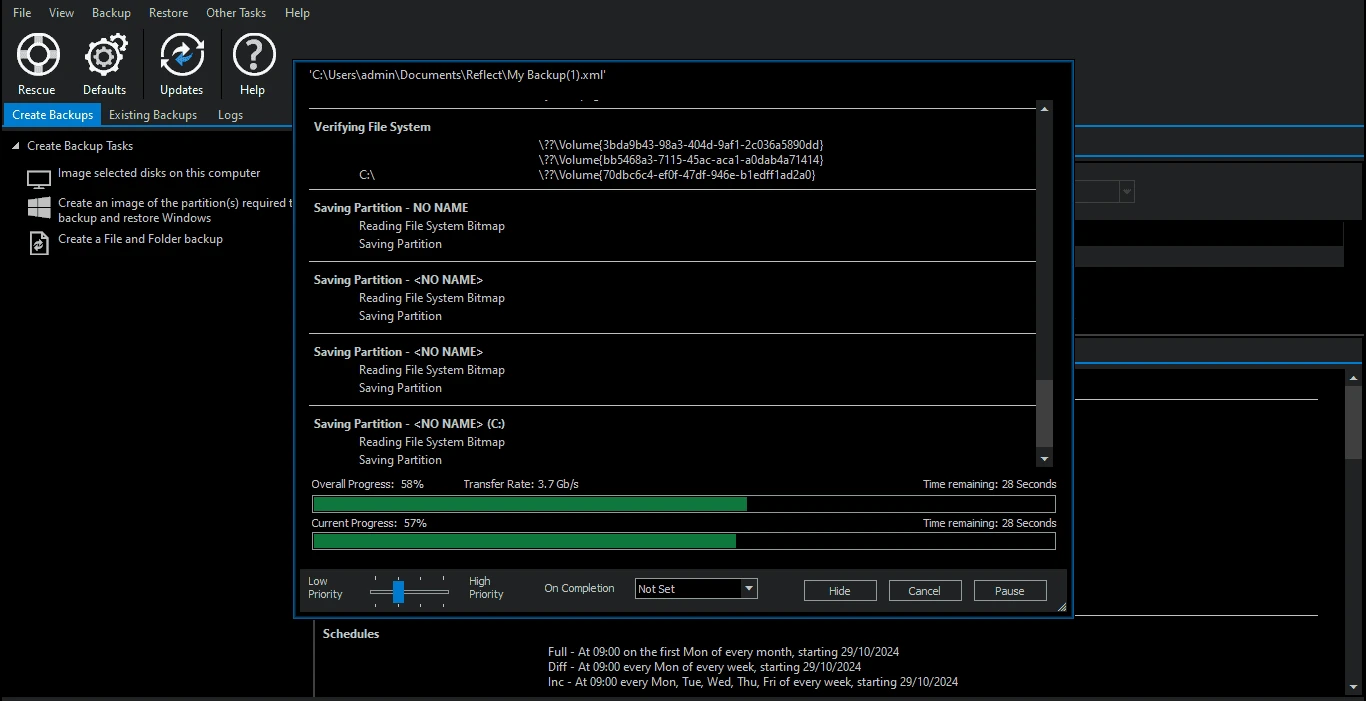
Macrium Reflect X operates as an advanced disk imaging and system cloning application designed to capture exact, bootable replicas of a Windows environment. Instead of merely copying individual documents or photos to a remote server, this utility operates at the sector level to create a full snapshot of the operating system, installed applications, hidden partitions, and personal files. This approach caters directly to IT professionals, content creators, and experienced operators who require strict control over their disaster recovery strategies. When a primary hard drive fails or a sudden system corruption prevents Windows from loading, having a direct 1:1 image ensures that the entire digital workspace can be restored exactly as it was, down to the saved browser tabs and custom software configurations.
Choosing a dedicated desktop utility over lighter, browser-based cloud backup services changes how administrators handle hardware migration and severe system crashes. Cloud tools excel at protecting isolated directories, but they cannot perform a bare-metal recovery on an empty unformatted hard drive. By creating localized image files and dedicated bootable rescue media, operators can bypass a broken operating system entirely. This localized processing allows for rapid transfers from an older SATA SSD to a faster NVMe drive without requiring days of downloading over a constrained internet connection. The application handles the heavy data lifting directly on the host machine, interacting closely with the motherboard and storage controllers to ensure exact data parity.
In practical terms, the software is utilized for hardware upgrades and routine safety nets. A video editor might create a fresh image every night so that a bad driver update does not derail a morning deadline. A system administrator might build a standardized configuration and deploy it across multiple office workstations. Because the software interacts directly with the local file system architecture, it avoids the bandwidth bottlenecks and privacy concerns associated with sending entire system states to external commercial servers.
Key Features
- Resumable Imaging: The software incorporates a write failure retry mechanism that actively monitors the backup progress. If the operation is interrupted by a sudden power loss, an unexpected system reboot, or a disconnected external drive, the application pauses the process and automatically resumes from the exact point of failure once the system stabilizes, eliminating the need to restart massive multi-terabyte transfers.
- Open-Source Backup Formats: Exported disk images use the .mrimgx format, while file-level backups are saved as .mrbakx. The developer has published the source code required to read and extract these files on GitHub, ensuring long-term data independence. Operators are never permanently locked into the proprietary ecosystem to access their historical archives.
- Windows ARM Compatibility: The application supports the modern Windows Copilot+ ecosystem and ARM architectures. Operators running lightweight tablets or portable ARM-based laptops can execute full-system imaging and generate functional Windows RE rescue media, a capability missing from many legacy backup utilities.
- Advanced File Filtering: Utilizing a custom-built VSS writer, the interface allows administrators to aggressively filter out non-essential data from their disk images. By navigating to the default settings, one can apply wildcard configurations to exclude temporary caches, download folders, or specific file extensions, shrinking the final image footprint.
- Macrium Image Guardian: To defend against malicious encryption scripts, this optional background service actively monitors the destination directories holding the backup files. It strictly blocks unauthorized third-party processes from modifying or deleting the local archives, ensuring the safety net remains intact even if the primary OS is compromised.
- Macrium viBoot Integration: Rather than forcing a full restoration to physical hardware, this tool allows operators to mount saved system images directly into Microsoft Hyper-V or Oracle VirtualBox. The backup instantly boots as an isolated virtual machine, allowing testing of updates, verifying the integrity of the archive, or retrieving a specific application state without touching the live environment.
How to Install Macrium Reflect X on Windows
- Download the official Windows installer package directly from the user account dashboard or the authorized 30-day trial registration page.
- Launch the downloaded executable file and grant the requested administrative privileges to open the interactive setup wizard.
- Enter the purchased license code when prompted, or select the option to proceed with the time-limited trial, which unlocks full imaging and cloning capabilities for evaluation.
- Review the custom installation features carefully; here, operators can choose whether to include optional components like Macrium viBoot for virtualization or the Macrium Image Guardian for active ransomware defense.
- Confirm or modify the default installation directory on the local storage drive, noting that the application requires sufficient space for its core libraries and optional Changed Block Tracker drivers.
- Click to finalize the installation, allowing the setup process to extract the program files, register the necessary background services, and write the application shortcuts to the desktop.
- Restart the computer if prompted by the wizard; a full system reboot is often required to correctly initialize the low-level storage drivers and security modules before the first backup can be executed.
Macrium Reflect X Free vs. Paid
The developer has transitioned the application to a subscription-oriented structure for standard home users, retiring the free tier that was popular in older iterations. Home users must now purchase an Annual Plan, which provides ongoing access to technical support, major software updates, and the complete backup toolkit. To allow for proper testing, the vendor offers a 30-day free trial that includes unhindered access to direct disk cloning, bare-metal restoration, and rescue media creation.
One of the most critical aspects of this licensing model is how it handles expired subscriptions. If a consumer chooses not to renew their annual plan, the software does not permanently lock them out of their data. Instead, the application automatically reverts to a restore-only mode. In this state, the application can no longer create new disk images or run scheduled tasks, but it retains the permanent ability to browse existing archives, extract specific files, and perform full system restorations from past backups.
For commercial environments, the pricing structure scales across Workstation, Server, and Technician editions. While these business tiers also rely on recurring annual subscriptions, organizations that operate strict offline or air-gapped networks have alternative options. Companies can request Standalone LTSC (Long-Term Servicing Channel) licenses, which operate as one-time perpetual purchases. These specialized licenses avoid mandatory internet checks and feature dedicated offline activation workflows, ensuring that critical infrastructure remains protected without relying on external licensing servers.
Macrium Reflect X vs. Acronis Cyber Protect Home Office vs. AOMEI Backupper
Acronis Cyber Protect Home Office has evolved from a pure imaging utility into a broad cybersecurity suite, bundling active antivirus scanning and cloud storage directly into the backup client. Users who prefer an all-in-one approach to system security and remote storage often gravitate toward Acronis. However, this broad integration consumes more background system resources. For those who already maintain a dedicated antivirus program and strictly want a localized, fast disk imaging tool without mandatory cloud features, Macrium provides a more focused and lighter footprint.
AOMEI Backupper targets casual consumers by offering a visually simplified, wizard-driven interface with large visual buttons and fewer intimidating technical menus. It remains a common choice for novice operators who simply want to clone an old drive to a new one with minimal friction. While AOMEI handles basic tasks admirably, it hides the deeper technical mechanics. Administrators often find AOMEI lacking when they need to script automated deployments, adjust specific VSS behaviors, or guarantee long-term access via open-source file formats.
Macrium Reflect X stands out as the superior choice for technical operators who prioritize data independence and rigorous performance over simplified aesthetics. Its ability to resume interrupted operations across reboots, native ARM compatibility, and the transparency of the .mrimgx format provide a level of professional reliability that consumer-focused competitors struggle to match. The interface demands a slightly steeper learning curve, but it rewards operators with strict control over their disaster recovery operations.
Common Issues and Fixes
- VSS Snapshot Failures: If the application aborts a backup due to Volume Shadow Copy Service errors, the system cannot lock the drive for imaging. Users can resolve this by opening the "Other Tasks" menu and running the built-in "Fix VSS Problems" utility, which automatically re-registers the necessary Windows DLLs and restarts the background service.
- Rescue Media Fails to Boot: When a freshly created USB recovery drive is ignored during system startup, the motherboard is likely prioritizing the internal Windows drive. Operators must restart the machine, enter the BIOS/UEFI settings, and adjust the boot order to prioritize removable USB media, or temporarily disable Secure Boot if the hardware blocks the WinPE environment.
- Backups Aborted by Non-Standard Sector Sizes: Connecting external USB hard drive enclosures that modify disk geometry to non-standard sector sizes will cause the imaging process to fail instantly. To fix this, one must either format the problematic drive using the manufacturer's specific compatibility software or switch to a standard external drive that reports a native 512-byte or 4K sector size.
- Cloning Stops at Bad Sectors: Attempting to clone a physically failing hard drive often halts the process when the software encounters unreadable data blocks. It is advised to first run a local disk check command to mark the bad sectors, then navigate to the advanced cloning settings and check the option to "Ignore bad sectors" to force the operation to complete.
Version 10.0.8750 — December 2025
- Fixed a calculation error from a prior build that could corrupt uncompressed backup images, adding an automatic full image recreation trigger if corruption is detected.
- Resolved an issue where drive icons would remain visible in the system even after the virtual drive was successfully unmounted.
- Addressed a crashing problem that occurred right after the creation of rescue media for users with non-English language environments.
- Fixed a bug where the Reflect X installer would sometimes fail to launch automatically when upgrading directly from version 8.1.
- Eliminated an error message stating "This file is not associated with an application" that could incorrectly pop up during the uninstallation process.
- Corrected an issue where backups sent to network destinations ignored the user-configured maximum image file size limits.