ATLAS.ti functions as a dedicated Qualitative Data Analysis (QDA) workbench engineered specifically for academic researchers, user experience designers, and corporate analysts who need to extract verifiable insights from massive volumes of unstructured information. Rather than relying on rigid spreadsheets or physical highlighters, researchers utilize this focused desktop environment to process interview transcripts, field notes, audio recordings, video files, and survey responses into highly organized thematic networks. The desktop architecture provides a highly stable, offline-capable workspace that is strictly necessary for handling heavy multimedia files and complex, multi-layered coding trees without experiencing the interface lag or upload timeouts that are frequently encountered in generic browser-only alternatives.
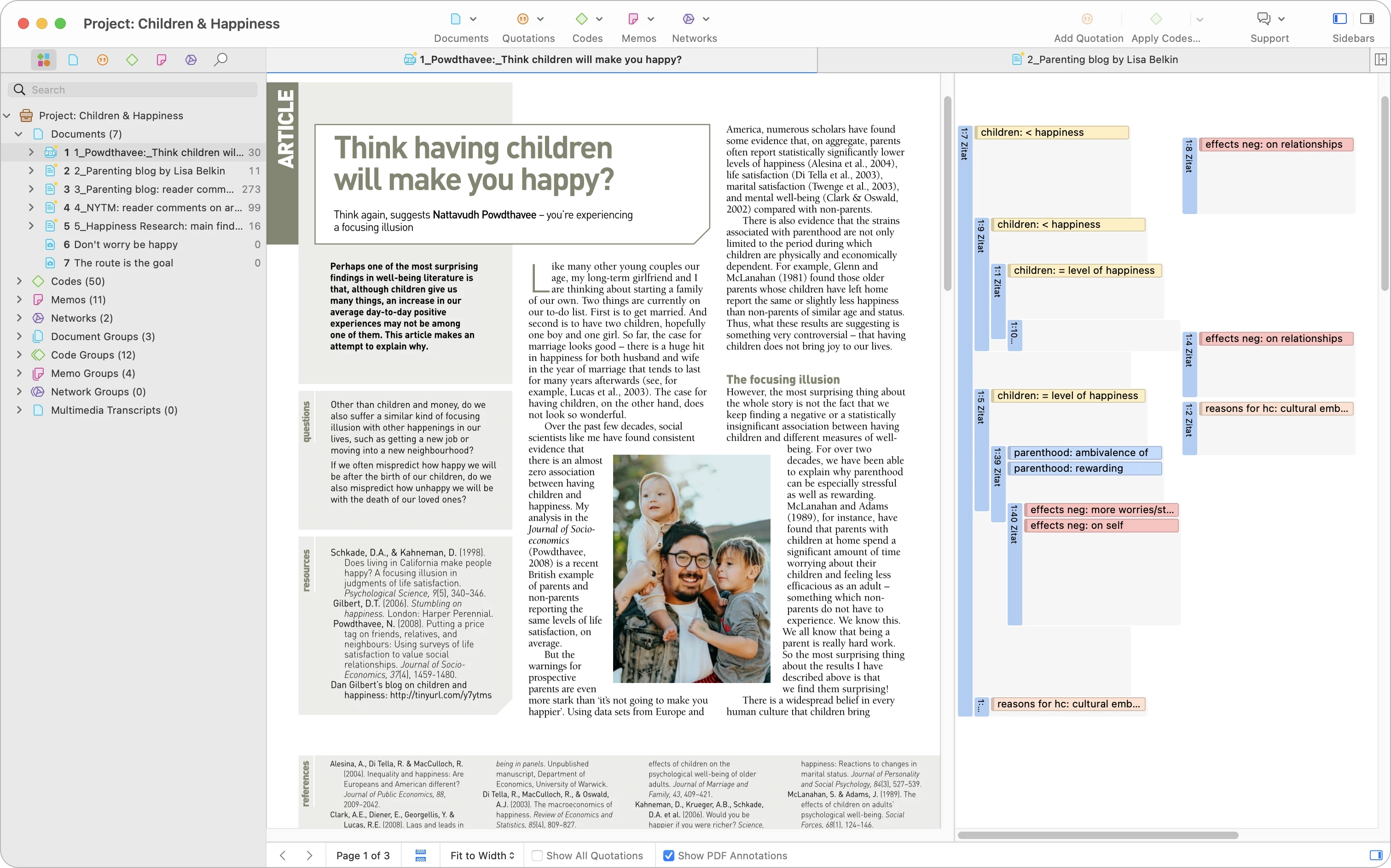
The core analytical workflow revolves around dissecting raw source data and assigning precise conceptual tags, allowing researchers to accurately track recurring themes across hundreds of independent documents. By combining traditional manual qualitative coding tools with advanced machine learning capabilities, ATLAS.ti actively accelerates the often tedious initial phases of thematic analysis. Users can manually highlight specific text segments to apply their own custom codes, or they can directly deploy the integrated AI Lab features to automatically identify broad themes, detect emotional sentiment, and generate preliminary summaries for extensive text documents.
Beyond simply applying tags to text, the software maps these conceptual relationships visually, transforming isolated data points into interactive graphical models. This specific feature allows research teams to build grounded theories, generate detailed output reports, track evolving analytical ideas through attached textual memos, and ultimately defend their final research findings with direct, traceable evidence pulled straight from the original source material. Because the application manages everything in a single centralized file structure, teams can maintain strict oversight over their coding framework as their project expands over time.
Key Features
- Multimedia Document Manager: Import and organize diverse file formats including DOCX, PDF, RTF, audio recordings, and video files within a single project library. The manager processes heavy media files locally on the Windows file system, preventing the upload bottlenecks and server timeouts common to web-based research tools.
- AI-Assisted Coding Lab: Utilize the integrated machine learning tools to scan lengthy transcripts and automatically generate initial code suggestions or sentiment tags. This accelerates the first pass of thematic analysis, allowing researchers to spend more time refining and interpreting the codes manually rather than reading every line from scratch.
- Interactive Network Views: Build dynamic visual maps that connect applied codes, specific quotations, and analytical memos in a graphical interface. This spatial representation helps researchers model complex theories and visually demonstrate the underlying relationships between different emerging themes in their collected data.
- Margin Area Interface: Work alongside a dedicated right-hand margin that displays all active codes, memos, and annotations directly next to the source text or media. This provides immediate visual feedback regarding how a document is coded and allows users to drag and drop elements to adjust links on the fly.
- Smart Search and Auto-Coding: Define specific keywords, phrases, or complex regular expressions to automatically tag data segments across the entire document library. This feature ensures strict coding consistency for recurring industry terms, personal names, or specific locations across massive, multi-year datasets.
- Independent Quotation Objects: Treat highlighted text or specific video timestamps as independent, manageable objects rather than just underlying text. Users can write detailed analytical memos directly attached to a single video timestamp to capture immediate analytical thoughts without altering the original source file.
- Project Export and Reporting: Generate highly detailed output reports in Word or Excel formats to share findings with stakeholders who do not use qualitative analysis software. Projects can also be exported using the universal QDPX exchange format to maintain strict data compatibility with other industry-standard qualitative research tools.
How to Install ATLAS.ti on Windows
- Download the official Windows installer executable directly from the vendor's primary download portal to ensure you receive the most secure and completely unmodified package.
- Locate the downloaded file in your local downloads directory and run the setup, granting standard User Account Control permissions when Windows prompts you to allow the software installation.
- Review the end-user license agreement presented in the initial wizard screen and formally accept the terms to proceed with the system configuration.
- Select the destination folder for the application, typically leaving it at the default C:Program Files path to ensure proper integration with the Windows operating system architecture.
- Wait for the setup wizard to extract the necessary program files, register the background application components, and create standard Start menu shortcuts for easy daily access.
- Launch the qualitative analysis application from the newly created Start menu shortcut or desktop icon once the final setup screen confirms a successful Windows installation.
- On the initial startup screen, sign in with a registered ATLAS.ti account credential, which is strictly required by the vendor to authenticate your software license or to initiate the active trial period.
ATLAS.ti Free vs. Paid
ATLAS.ti operates primarily on a paid subscription model, but it provides a highly specific free trial structure designed to let new users evaluate the application in realistic analytical scenarios. The trial grants five days of active, unrestricted use within a fixed twenty-calendar-day window. This means a user can launch and utilize the application on five separate, non-consecutive days to test all tools, including the machine learning functions. However, automated analysis during this trial phase is strictly capped at a specific word limit, requiring users to test these functions on shorter interview segments to avoid hitting the ceiling too quickly.
Once the five active days are completely exhausted or the twenty-day calendar window expires, the software automatically transitions into a restricted viewer mode rather than locking the user out of their research data entirely. In this limited state, users can still open, read, and export existing projects, but the application mechanically prevents saving any new changes if the project exceeds ten documents, fifty quotations, twenty-five codes, or two memos. To lift these hard restrictions and continue expanding a research project, users must purchase a paid subscription.
The paid licensing tiers are strictly segmented based on the user's professional status and organizational affiliation. The vendor offers distinct price points for active students, academic institutions, non-commercial researchers, and corporate business users. Student licenses offer a significantly reduced financial rate but require current university verification, while commercial licenses cover corporate usage without any institutional restriction. These licenses are typically sold as recurring annual subscriptions, which grant access to both the Windows desktop application and the companion web-based version, ensuring researchers can access their data remotely when away from their primary local workstation.
ATLAS.ti vs. NVivo vs. MAXQDA
NVivo serves as the default standard in many academic institutions, offering an extremely deep, enterprise-grade toolset for qualitative analysis. It features complex querying capabilities and deep statistical integrations, but it carries a notoriously steep learning curve and relies on a rigid check-in and check-out system for team collaboration. Researchers typically choose NVivo when their university strictly mandates it for a specific department, or when they need highly granular matrix coding queries for massive, text-heavy datasets, provided they have the extended timeline necessary to master the interface.
MAXQDA distinguishes itself by specifically bridging the gap between qualitative coding and quantitative statistical analysis. It offers a moderate learning curve and a highly structured, hierarchical interface that excels at mixed-methods research where numerical data meets written text. Teams often prefer MAXQDA when they need to combine interview transcripts with numerical survey data in a single dashboard, utilizing its built-in statistical tools without feeling overwhelmed by the software's underlying architecture.
ATLAS.ti is the better fit for researchers who prioritize visual mapping and highly intuitive manual coding workflows over purely statistical tools. Its graphical network mapping tools allow users to connect themes and concepts much more fluidly than its competitors, making the theoretical modeling process highly interactive. Additionally, the software provides a much smoother handling of integrated multimedia files, making it the superior choice for projects that rely heavily on directly coding audio and video segments alongside traditional text transcripts.
Common Issues and Fixes
- Project merging duplicates documents. When team members merge their individual project files, documents may duplicate instead of unifying into a single file. This usually happens if users imported different file formats (such as one using DOCX and another using RTF) for the exact same interview transcript. To fix this, teams must ensure all members use the exact same source files with identical file extensions before beginning the collaborative coding process.
- AI Coding limit error during trial. Users testing the automated analysis features may receive a warning error stating the processing limit has been reached. The trial version restricts artificial intelligence analysis to a strict word count limit to prevent server abuse. To bypass this error during evaluation, test the automated tools on a much smaller subset of text, preferably keeping sample documents under five hundred words each.
- Application stuck in read-only mode. The software may suddenly prevent saving any new changes or applying new thematic codes to a project. This occurs when a subscription expires or the trial ends, and the current project mathematically exceeds ten documents or fifty quotations. To fix this and restore write access, log into the vendor account portal to renew the subscription or apply a valid purchased license to your profile.
- Offline license check failure. Users traveling without internet access may find themselves unexpectedly locked out of the application interface. Because the software periodically pings the authentication server to verify the active subscription, it requires prior notice for disconnected use. To fix this, users must manually set their license to "Off-line use" in the Welcome Screen options while still connected to the internet before traveling.
Version Latest — 2025
- Added a new AI-powered Auto Transcription tool that automatically converts audio and video files into text, featuring speaker detection and support for over 30 languages.
- Improved the Co-occurrence Analysis feature to allow overlapping themes to be directly converted into codes for deeper integration into the research workflow.
- Added a playback speed control button to the transcript view, allowing users to adjust the tempo of audio and video recordings during review.
- Improved the overall application performance and user interface, delivering faster response times and smoother visual navigation.
- Fixed an issue where the "Redo" function was not operating correctly.
- Fixed a bug that caused the feedback prompt to appear more frequently than intended.