PassMark PerformanceTest evaluates the speed and stability of PC hardware through a series of objective, synthetic benchmarks, yielding a standardized score that makes component comparisons straightforward. Rather than relying on subjective guesswork to determine if a new graphics card or processor actually improved a computer, system builders, IT technicians, and hardware enthusiasts use this diagnostic tool to gather precise, quantifiable data. By isolating each core component—the processor, memory, storage drive, and graphics processor—the software identifies specific bottlenecks and validates that new hardware performs exactly as advertised by the manufacturer.
A desktop application is strictly necessary for this level of hardware interaction because a browser-based tool simply cannot communicate with motherboard sensors, allocate raw memory buffers, or execute low-level compute operations. When running natively on the operating system, the program loads its own specialized testing threads and low-level drivers to read physical temperatures, clock speeds, and memory timings in real time under heavy load. For professionals managing multiple workstations or diagnosing hardware faults in a repair environment, the ability to run the entire diagnostic suite directly from a portable USB drive without an active internet connection or local registry changes provides an operational advantage over cloud-dependent alternatives.
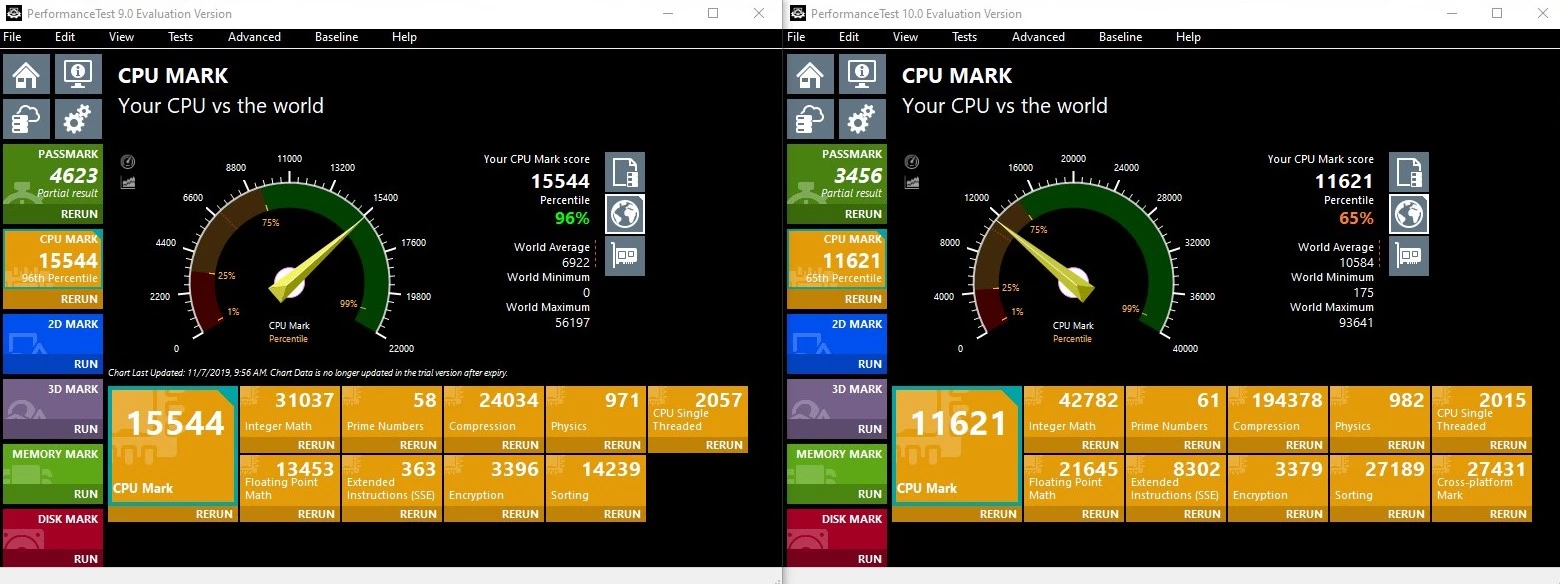
Furthermore, analyzing raw hardware performance requires context. Running an isolated math calculation means very little without knowing how other identical systems handle the exact same workload. The tool addresses this by connecting to a large global baseline database, allowing users to immediately compare their local hardware results against millions of other submitted benchmarks from around the world. This comparative approach turns abstract numbers into practical purchasing advice, helping users verify if their current setup is underperforming due to thermal throttling, suboptimal system board configurations, or aging components that need to be replaced.
Key Features
- PassMark Rating System: Following the completion of the standard benchmark suite, the software calculates an aggregate overall score for the machine. This single metric simplifies hardware comparisons by distilling processor, graphics, memory, and disk performance into one easily readable number, which can then be compared against baseline submissions from millions of other computers worldwide. This allows users to immediately see if their specific combination of parts is performing at, above, or below average for that exact hardware tier.
- Advanced CPU Testing: The processor diagnostic suite runs multiple complex mathematical workloads, including encryption algorithms, data compression tasks, and physics simulations. It natively supports multi-processor configurations and hyper-threading, ensuring that multi-core processors are fully utilized and accurately measured for both single-thread and multi-thread capabilities. It forces the processor to handle sustained heavy loads, which is essential for verifying thermal stability and ensuring that the cooling solution can keep up with the hardware demands over extended processing periods.
- 3D Graphics Benchmarks: The application evaluates the compute performance of the installed video card using various rendering techniques. It executes tests utilizing modern DirectX implementations at 4K resolutions, and it measures raw computational throughput via DirectCompute and OpenCL operations to verify the capability of the graphics hardware. The visual tests draw complex scenes with dynamic lighting, alpha blending, and object displacement, giving gamers and hardware reviewers a realistic measure of how the card handles intensive visual calculations before launching a game.
- Comprehensive Disk Diagnostics: Users can measure the sequential read and write speeds, random seek times, and input/output operations per second of their storage devices. The advanced disk testing module allows users to adjust block sizes and caching options to see exactly how their solid-state drives or mechanical hard drives respond under specific, heavy workloads.
- Memory Subsystem Analysis: The RAM benchmark suite tests the speed at which data can be read from and written to the system memory. It includes tests for database operations, cached versus uncached reads, and memory latency, helping overclockers and system builders ensure that their memory timings and frequencies are stable and delivering expected bandwidth.
- Portable USB Execution: IT professionals can configure the software to run entirely from a portable USB flash drive without requiring a local installation on the target host. This portable deployment method leaves no files behind, requires no active internet connection for the base tests, and speeds up the workflow when diagnosing multiple machines in an office or repair shop environment.
- Advanced Networking Test: Beyond internal components, the tool includes a module for measuring network communication speeds between two computers. By setting up a server and client connection across a local area network, network administrators can determine the point-to-point throughput and identify infrastructure bottlenecks independent of outside internet provider variables.
How to Install PassMark PerformanceTest on Windows
- Download the executable Windows installer package directly from the official PassMark website to ensure you receive the unmodified, secure application file.
- Launch the downloaded setup file from your local downloads folder and carefully review the End User License Agreement presented in the initial wizard screen.
- Accept the terms and proceed to select the installation destination directory; the wizard defaults to the standard Program Files directory on the primary system drive, which is recommended for most desktop configurations.
- Choose whether to create a desktop shortcut and a Start menu entry, then click the install button to begin copying the necessary files to the local disk.
- Allow the installer to extract the core application files and the associated hardware reading drivers required for monitoring system sensors.
- Click finish to close the setup wizard and launch the application for the first time.
- Upon the initial launch, a prompt will appear asking for a valid license code; users can enter their purchased credentials or select the option to continue the 30-day evaluation.
- To start testing immediately, click the main Run Benchmark button on the dashboard, keeping in mind to leave the mouse and keyboard alone so external inputs do not interrupt the active visual tests.
PassMark PerformanceTest Free vs. Paid
The core standard benchmarking features operate on a very permissive model, allowing users to run the basic system tests and receive their overall hardware rating entirely for free. This means casual users who simply want to test their new PC build and compare their overall score against the global database do not need to purchase a license. The standard results generation and database comparison remain active indefinitely.
For more granular control, the application offers an Advanced Tests suite, which allows users to set custom parameters for disk, memory, network, and processor workloads. These advanced modules, along with script-based automation and the ability to export detailed reports, are fully unlocked during a 30-day evaluation period. Once the trial window concludes, access to these custom diagnostic windows, command-line execution, and the baseline export functions requires a paid license, though the basic aggregate testing remains functional for casual usage.
Purchasing a personal single-user license costs approximately $29 and provides a perpetual right to use the software. The vendor employs a very straightforward licensing approach: there is no hardware locking that punishes users for upgrading their motherboard, no mandatory online activation checks that break offline functionality in secure enterprise environments, and no recurring annual subscription fees for the baseline product. A single license allows a user to move the software between their own personal computers as needed, and it includes a window of technical support and minor software updates directly from the developer.
PassMark PerformanceTest vs. PCMark 10 vs. Cinebench
PCMark 10 takes a practical approach to benchmarking by simulating everyday office tasks, such as video conferencing, spreadsheet editing, and heavy web browsing. It is designed to tell businesses exactly how a machine will handle standard productivity workloads, rather than exposing the raw math capabilities of the silicon underneath. Users managing corporate fleets or buying laptops for general administrative work should use PCMark 10 to ensure the hardware meets daily office demands without worrying about individual component bottlenecks.
Cinebench is a specialized, isolated benchmark that exclusively measures a processor's ability to render complex three-dimensional scenes using the Cinema 4D rendering engine. It is an industry standard for video editors, digital artists, and heavy multitaskers who need to know precisely how fast a central processing unit can chew through rendering tasks, but it offers zero insight into storage speeds, memory bandwidth, or network throughput. For creative professionals evaluating processor rendering output alone, Cinebench is a highly respected standard choice.
PassMark PerformanceTest is the better choice for users who need a granular, component-by-component breakdown of their entire system. Instead of abstracting performance into office simulations or focusing entirely on rendering, it measures the exact read and write speeds of the local disk, the latency of the system memory, and the compute power of the graphics card. IT technicians, system builders, and hardware reviewers diagnosing specific faults or validating overclocks rely on this tool because it identifies exactly which component is bottlenecking the system and offers a large historical database for direct, apples-to-apples comparisons.
Common Issues and Fixes
- Test interrupted by window size changes. The visual graphics benchmark will automatically halt and throw an error message if the testing window is resized, minimized, or covered by an external process. To prevent this interruption, disable background applications that generate pop-up notifications, turn off messaging overlays from gaming clients, and refrain from moving the mouse or using the keyboard while the active visual rendering tests are running on the screen.
- No Free Memory for Buffer errors. This warning message appears when the operating system lacks enough available RAM to allocate the temporary storage blocks required for the heavy testing process. Close memory-intensive background processes, heavy web browsers with multiple tabs, and background database applications before running the benchmark suite to free up sufficient space for the test buffer to allocate properly.
- Hardware temperatures are not displaying. The application relies on a low-level driver to read motherboard thermal sensors, which can sometimes be blocked by aggressive security software or Windows Core Isolation settings. Verify that your security suite is not preventing the driver file from loading into memory, and ensure you are launching the application executable with administrator privileges so it has the necessary rights to poll the physical hardware sensors.
- System freezes on the initial hardware scan. Corrupt motherboard basic input/output system configurations can cause the software to hang or force a reboot when it attempts to read hardware identification data. You can bypass this aggressive hardware polling step entirely by launching the application executable from the command prompt and adding the SAFEMODE parameter to the target path, which allows the program to load without checking the low-level hardware identifiers.
Version 11.1 Build 1008 — November 2025
- Added support for gathering temperature data from Nvidia GPUs operating in TCC (Tesla Compute Cluster) mode.
- Fixed a bug that caused an "evaluation has expired" warning to appear erroneously after completing the full test suite.