Microsoft Xbox Game Bar operates as a native system overlay for Windows 10 and Windows 11, providing immediate access to screen capture, audio mixing, and hardware monitoring tools without requiring users to minimize their active applications. Originally designed strictly for players to record gameplay clips, the utility has evolved into a practical desktop tool for anyone needing to quickly capture windowed applications, adjust individual program volumes, or track system resource usage. Because it runs as a core component of the operating system, it bypasses the heavy resource overhead often associated with third-party background recording suites.
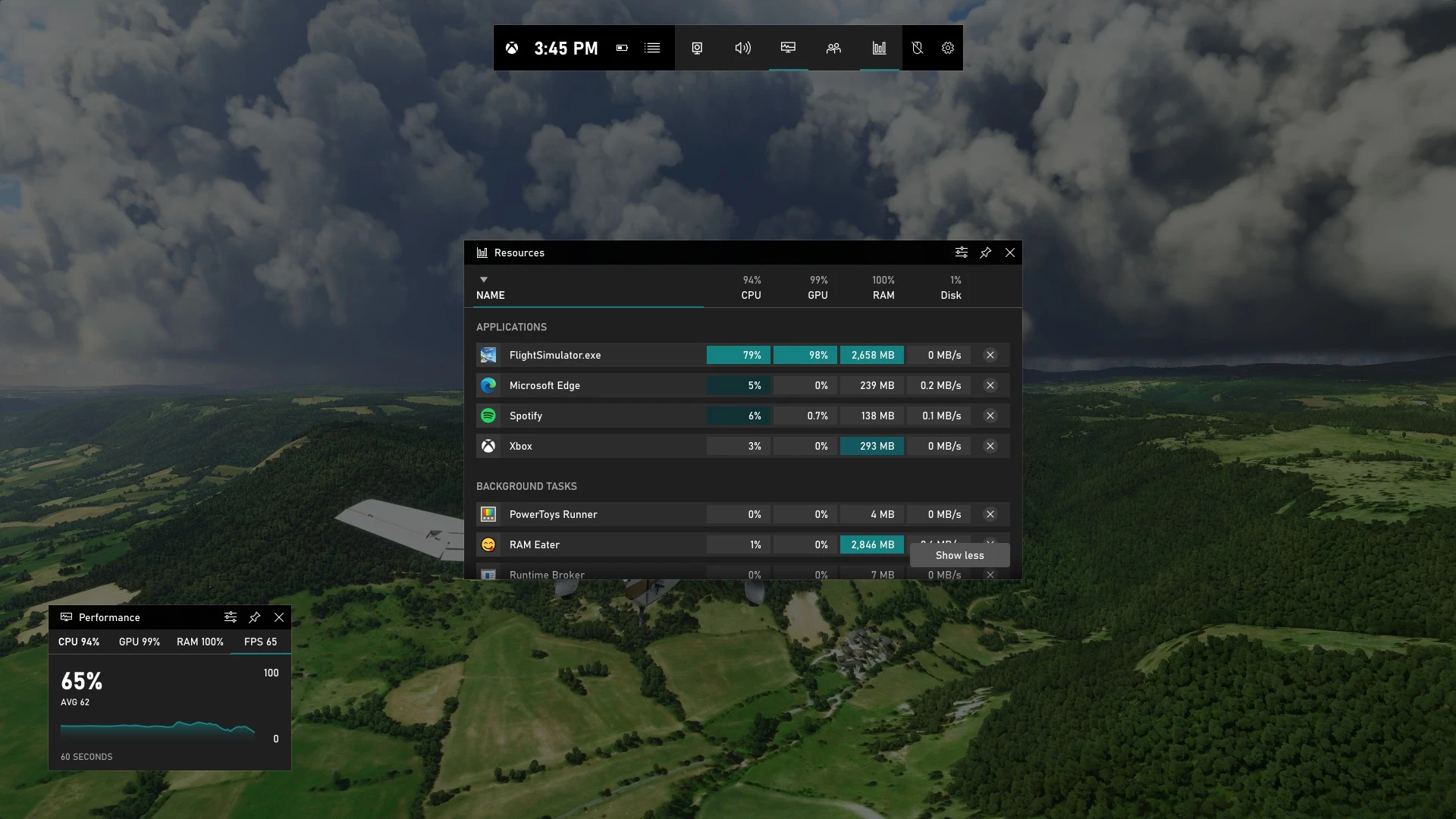
For users running full-screen applications, switching context to adjust a microphone level or start a screen recording interrupts the workflow. By pressing a single keyboard shortcut, this overlay dims the active screen and summons customizable widget panels. Users can drag, pin, and resize these widgets, creating a tailored dashboard that tracks exactly what they need, from framerates to incoming chat messages. The application draws these panels directly over Direct3D surfaces as well as standard desktop windows, ensuring the interface remains visible regardless of the rendering engine the active application uses. Recent interface updates have introduced Compact Mode, a layout adjustment specifically optimized for small touchscreens and handheld gaming PCs. This mode consolidates the widget spread into a unified, controller-friendly interface, allowing navigation via thumbsticks and bumper buttons instead of a mouse cursor.
Instead of installing a dedicated screen recorder for basic tasks, users often rely on this built-in utility to generate standard MP4 video files of browser windows, presentation software, or active games. It solves the concrete problem of capturing high-quality video and audio on the fly with zero configuration. Whether you are a developer recording a bug reproduction, a player saving a multiplayer highlight, or a presenter capturing a slide deck, the tool handles the capture locally and saves the output directly to the local storage drive without requiring an external account or a subscription plan.
Key Features
- Instant Screen Capture: Pressing the designated keyboard shortcut immediately starts recording the currently active window, saving the resulting file directly to the local video captures folder as an MP4. The recording engine captures both system audio and microphone input, making it highly effective for creating quick software tutorials or saving application error states. Users can adjust the target video quality and frame rate settings within the overlay menu to balance visual clarity against final file sizes.
- Compact Mode Interface: Designed for handheld Windows PCs and controller navigation, this mode simplifies the standard floating widgets into a single, cohesive sidebar. Users can navigate through different tabs using a controller's bumper buttons, preventing the interface from cluttering smaller screens and eliminating the need for a physical mouse. This layout adjustment significantly improves accessibility for devices that rely primarily on touch inputs or analog sticks rather than traditional keyboard layouts.
- Granular Audio Mixer: The audio widget provides individual volume sliders for every running application that is currently outputting sound. Users can mute a specific browser tab, lower the volume of a background music player, or increase their main application volume without ever opening the standard Windows control panel. The widget also allows quick toggling between different output devices, such as switching from external speakers to a connected headset.
- Hardware Performance Monitor: A dedicated performance widget displays real-time statistics for CPU utilization, GPU load, allocated VRAM, and system RAM usage, alongside a live framerate counter. This panel can be pinned to remain visible even after the main overlay is closed, complete with adjustable transparency settings so it does not block active work. It provides immediate hardware feedback without requiring external monitoring software.
- Background Retrospective Recording: By enabling background capture in the settings, the utility continuously buffers the last few minutes of screen activity into temporary memory. If something important happens on screen, users can press a specific shortcut to retroactively save that buffered footage as a permanent video file without having to record full sessions manually. The buffer duration is customizable, allowing users to balance recording length against constant disk write activity.
- Quick Launcher and Home View: The Home widget tracks recently played titles and active applications, providing direct shortcuts to launch them. It also integrates with local client installations like Steam, Battle.net, and EA Play, allowing users to start software directly from the overlay without hunting for shortcuts on the desktop. This centralizes the launching process, keeping the desktop environment clean and allowing users to transition between different tasks quickly.
How to Install Microsoft Xbox Game Bar on Windows
- Open the Windows Settings application and navigate to the Gaming category.
- Select the tab specifically labeled for the overlay and toggle the main switch to enable it for recording clips and opening panels.
- If the application was previously uninstalled from the system, open the Microsoft Store application.
- Search for the software by its full name and click the Install button to download the official AppX package directly from Microsoft.
- Wait for the download and background installation process to complete, which typically takes only a few moments depending on the network connection.
- Press the Windows key plus the G key simultaneously to summon the overlay for the first time.
- Review the initial prompt asking for microphone and local folder access, granting these permissions so the utility can save video files and record voice audio.
- Click the settings gear icon within the overlay to configure preferred audio bitrates, video framerates, and default save locations before starting your first capture.
Microsoft Xbox Game Bar Free vs. Paid
Microsoft Xbox Game Bar is entirely free and comes pre-installed as a core component of both Windows 10 and Windows 11. The developer does not lock any features behind a premium tier, and there are no subscription requirements to use the capture, audio, or performance monitoring tools. Users can record unlimited hours of video, restricted only by the available physical storage space on their local hard drives.
Unlike many freemium screen recording utilities, this software does not apply watermarks to exported MP4 files, nor does it restrict video output resolutions. The encoding quality, framerate caps, and audio bitrates are fully accessible in the base installation. The application relies entirely on the local hardware for video encoding, meaning there are no cloud processing fees or artificial restrictions on how many clips you can save per day. Users retain complete ownership of their exported media, and the application does not upload files to external servers without direct user action.
While the local features require no sign-in, utilizing the social widgets—such as looking for groups or chatting with contacts—does require signing in with a standard free Microsoft account. However, users who only want to utilize the volume mixer, performance monitor, or screen recorder can do so on a local Windows account without ever authenticating online. The business model is simply to add value to the base operating system rather than monetizing the overlay directly.
Microsoft Xbox Game Bar vs. OBS Studio vs. NVIDIA App
OBS Studio is a complex, open-source broadcast utility designed for users who need to composite multiple video and audio sources simultaneously. While it excels at live streaming to external platforms and offers intricate scene transitions, green screen filters, and multi-track audio routing, it requires significant manual configuration. Users must manually set up canvas resolutions, configure encoder settings, and manage visual layers. It is the better choice for professional broadcasters or tutorial creators who need to capture the entire desktop environment, including the Windows File Explorer, which built-in overlays intentionally ignore.
The NVIDIA App provides a proprietary overlay dedicated exclusively to systems equipped with NVIDIA graphics cards. It offers a very similar feature set to the Windows native utility, including background recording and quick screen capture, but it also includes deep driver management, game optimization profiles, and specific hardware-level filters. It is an excellent choice for users heavily invested in the NVIDIA hardware ecosystem who want the absolute lowest performance penalty during high-resolution captures, but it offers zero functionality for computers running AMD or Intel graphics.
Microsoft Xbox Game Bar is the better fit for users who need a universally accessible, zero-configuration tool that works immediately on any modern Windows machine, regardless of the internal hardware brand. It requires no separate installation, does not demand account registration for basic recording, and handles routine tasks like capturing a single application window or muting a specific background program much faster than launching a heavy broadcast suite. When the goal is simply to press a shortcut and instantly record a bug or a brief video clip, the native overlay is the most practical choice.
Common Issues and Fixes
- Shortcut key combination fails to open the overlay. Ensure the global toggle is switched on by navigating to Windows Settings, clicking Gaming, and verifying the feature is active. If it is already on, open the Installed Apps menu, locate the software, click Advanced Options, and run the Repair tool.
- The screen recording button is grayed out and unclickable. The utility restricts recording to single, recognized applications and blocks capturing the raw Windows desktop or File Explorer for privacy reasons. Click into a supported application window, such as a web browser or a full-screen game, to activate the recording functionality.
- Microphone audio is missing from exported video files. Open Windows Settings, navigate to Privacy & Security, and select Microphone. Verify that microphone access is globally enabled and that the specific permission toggle for the overlay application is switched to the on position.
- Video captures fail to save or display an error code regarding storage. This typically occurs when the designated save drive is full or the default capture folder has been moved incorrectly. Open the overlay settings, navigate to the Capturing tab, check the current save directory, and clear space on the local drive.
- Widget panels appear corrupted or freeze on the screen. Close the active window, right-click the Windows Start button, and open Terminal or PowerShell as an administrator. Run the command to reset the AppX package cache, or navigate to the Advanced Options in the Windows App settings and click the Reset button to clear temporary files.
Version Latest — 2025
- Added a new "Compact Mode" optimized for handhelds and controllers, allowing easier widget navigation and the ability to force-quit running games directly from the Home interface.
- Introduced "Gaming Copilot" features (preview), enabling AI-assisted interactions and background audio support during gameplay.
- Improved the visual design of core widgets including Capture, Performance, and Resources for a cleaner, more lightweight overlay experience.
- Enhanced Xbox Cloud Gaming integration to allow seamless switching between supported titles without returning to the main menu.
- Updated the Settings widget with quicker access to display brightness, audio levels, and Bluetooth device management.
- Fixed various navigation bugs and optimized performance to reduce resource overhead when the overlay is active.