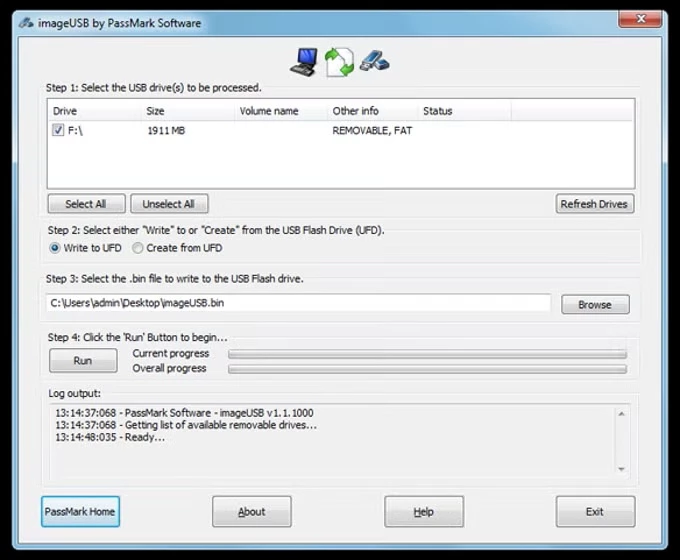
ImageUSB is a dedicated mass duplication and disk imaging utility that allows IT administrators, system builders, and forensic investigators to write a single image file to multiple USB flash drives concurrently. Instead of relying on standard file-copy commands that only move visible data through the operating system, this tool performs exact, sector-by-sector physical copying. This ensures that every bit of the source drive, including slack space, unused partitions, hidden files, and the Master Boot Record, is replicated across the target devices. By operating at the hardware block level, the application guarantees that the clone is structurally identical to the original, which is a strict requirement for digital evidence preservation and specialized hardware deployment.
For users tasked with provisioning dozens of identical portable drives, distributing custom software, or creating standardized recovery media, standard formatting tools fall short. ImageUSB handles raw drive cloning with strict predictability, bypassing the Windows file system layer to copy data precisely as it exists on the physical hardware. This means that complex multi-partition setups or custom boot configurations remain entirely intact. When dealing with specialized deployment environments, knowing that the structural layout of the disk will not be altered by the host machine provides necessary peace of mind for system engineers.
While many consumer-grade tools only write single files to individual drives, this desktop utility is built from the ground up for concurrent batch processing. It scales its output across all available USB ports, pushing the exact same data stream to multiple endpoints simultaneously. The application logs each operation and verifies the integrity of the written data upon completion. This local, offline approach ensures reliable mass production of bootable media without requiring cloud processing, mandatory account logins, or external network dependencies, keeping the entire duplication workflow secure and self-contained.
Key Features
- Concurrent Mass Imaging: Select multiple target drives from the main interface list and write a single .bin or .img file to all of them at the exact same time. This concurrent writing capability cuts down provisioning times for administrators who need to prepare large batches of promotional flash drives or standardized diagnostic tools. The software automatically scales the write operation to match the bandwidth of your USB controllers.
- Exact Bit-Level Cloning: Create a physical backup of any USB drive by capturing every sector, preserving hidden files, unused space, and partition tables exactly as they reside on the physical medium. This forensic-grade copying method ensures that deleted data fragments residing in the slack space are carried over to the backup image. Investigators rely on this strict sector duplication to preserve digital evidence without altering the original hardware.
- Drive Capacity Recovery: Use the dedicated Reformat USB drive option to wipe partitioned drives that appear smaller than their actual hardware capacity after a previous imaging process. When a smaller image is written to a larger drive, the operating system often hides the remaining space. This recovery function resets the partition tables and reformats the volume, making the full gigabyte capacity accessible again.
- Complete Drive Zeroing: Select the Zero USB drive action to overwrite the entire contents of the storage device with zero bytes. This secure wiping method effectively destroys lingering data fragments, making it ideal for clearing sensitive files before repurposing or discarding a portable drive. Alternatively, users can choose to only zero the MBR and GPT entries to quickly wipe the partition map without formatting the whole disk.
- Post-Image Verification: Enable the post-image verification checkbox to read back the copied data and compare it against the source file. Once the write process finishes, the software scans the destination drive to confirm that no data corruption occurred during the transfer. Any read or write errors encountered during this phase are immediately highlighted in the application's status window.
- Experimental ISO Extraction: Utilize the built-in option to extract the contents of standard ISO files directly to a FAT32-formatted USB drive. Because direct byte-by-byte writing of CD-based ISOs often breaks USB bootability, this extraction method places the files into a standard directory structure. This helps create functional bootable media for modern UEFI systems without relying on raw block writing.
- Detailed Operation Logging: Monitor the exact status of your duplication tasks through the dedicated log window located within the main interface. The software records hardware detection events, exact byte counts transferred, sector read errors, and formatting outcomes in real time. This text log can be saved and reviewed later to verify that a large batch of drives was provisioned without any hardware faults.
How to Install ImageUSB Build on Windows
- Download the official compressed ZIP archive containing the application executable and required documentation from the vendor's distribution server.
- Open your standard Windows file explorer and navigate to your default download directory to locate the compressed package.
- Extract the contents of the ZIP archive into a dedicated folder on your local drive, ensuring that the executable file and its associated configuration documents remain in the same directory.
- Locate the imageUSB.exe file inside the newly created folder, checking that the extraction process completed without triggering any archive corruption errors.
- Right-click the executable file and select the option to run it as an administrator, as the utility requires elevated system privileges to perform raw, low-level disk access.
- Review the standard Windows User Account Control prompt and grant permission for the application to modify your removable storage devices.
- Read and accept the end-user license agreement presented upon the very first launch, which confirms your understanding of the software's data overwriting capabilities.
- Keep the extracted folder intact for future use, as the utility operates entirely from this location without installing background services or adding uninstaller entries to your Windows registry.
ImageUSB Build Free vs. Paid
ImageUSB is distributed as entirely freeware by PassMark Software. There are no paid tiers, subscription requirements, or premium enterprise licenses necessary to unlock its full functionality. Users have unrestricted access to concurrent writing, bit-level cloning, forensic imaging, and drive zeroing without navigating any hidden costs. The interface contains no advertisements, and the vendor does not restrict the software behind arbitrary usage paywalls.
The software does not place artificial limits on the number of concurrent USB drives you can process simultaneously, nor does it restrict the size of the image files you create or restore. It is fully functional out of the box for personal, commercial, and forensic use, provided the software is distributed in an unmodified form and proper credit is given to the original developer. Many IT departments integrate it freely into their hardware provisioning pipelines because it demands no recurring licensing fees or activated product keys.
Because it relies on a free distribution model without paid enterprise service agreements, the utility does not include prioritized technical support. Users must rely on community forums, official developer documentation, and release notes to troubleshoot specific hardware incompatibilities. Despite the lack of premium support, there are no promotional watermarks embedded in the software, no arbitrary save limits, and no forced online account registrations required to operate the tool in secure, offline environments.
ImageUSB Build vs. Rufus vs. balenaEtcher
Rufus focuses heavily on transforming standard ISO files into bootable Windows or alternative operating system installation drives. It excels at injecting necessary bootloaders, modifying installation parameters to bypass certain hardware checks during Windows 11 setup, and automatically formatting drives with the exact file system required for the host machine. Users who only need to create a single bootable installation drive from a standard downloaded operating system file usually prefer Rufus for its automated boot-sector configurations and detailed formatting logic.
balenaEtcher provides a straightforward, three-step graphical interface designed strictly for flashing operating system images to SD cards and USB drives. It intentionally hides complex formatting options, partition structures, and raw block settings to prevent novice users from making destructive mistakes. Built on web technologies, it requires a larger storage footprint but is best suited for individuals flashing basic single-board computer images who want visual confirmation of the flashing process without dealing with raw sector terminology.
ImageUSB is the better fit when the workload involves capturing an exact replica of an existing, fully configured USB drive and duplicating it across multiple flash drives simultaneously. While the other tools are optimized for single-drive operating system deployment from downloaded files, this utility is engineered for mass hardware duplication, forensic preservation of slack space, and securely resetting drives that have been incorrectly partitioned. It is a technical tool built for volume processing and exact byte-level accuracy rather than simple desktop installation media creation.
Common Issues and Fixes
- Drive capacity appears drastically reduced after a cloning operation. If you write a 2-gigabyte image file to an 8-gigabyte flash drive, the remaining storage space becomes completely inaccessible to the host operating system. To fix this limitation, open the application, select the affected drive from the main list, and choose the Reformat USB drive or Zero USB drive action to restore its original factory capacity.
- The utility fails to recognize a connected USB storage device. Certain portable drives identify themselves to the operating system as fixed local disks rather than removable media, causing the software to ignore them by default. If the drive does not appear in the interface list, verify its status in Windows Disk Management, and ensure you are connecting it to a direct motherboard port rather than an unpowered front-panel hub.
- The imaging process stops abruptly with a write error. Background security software or aggressive USB power management settings can interrupt the continuous data streams required during mass duplication. Open the Windows Device Manager, navigate to your USB Root Hub properties, and disable the option that allows the computer to turn off the device to save power.
- A direct ISO write results in an unbootable drive. Raw block-level writing of CD-based ISO files often results in file system structures that standard computer firmware simply cannot boot from. Instead of using the direct write option for standard operating system ISOs, utilize the Extract ISO contents feature or switch to a dedicated bootloader utility built for basic installers.
- The target drive cannot accommodate the source image. Because bit-level copies require the destination drive to have the exact same or greater byte count, drives with identical stated gigabyte capacities may still fail if the manufacturer provisioned them differently. To resolve this, always ensure your target hardware has a physical byte count that exceeds the exact size of the image file being written.
Version 1.5.1007 — April 2025
- Improved device detection logic to correctly identify certain USB drives that were previously misclassified as fixed disks.
- Fixed a specific bug that prevented ISO files from being successfully written to Kingston Type-C drives (256GB capacities and larger).
- Resolved an issue where removable storage devices could be incorrectly flagged, ensuring smoother ISO writing operations.