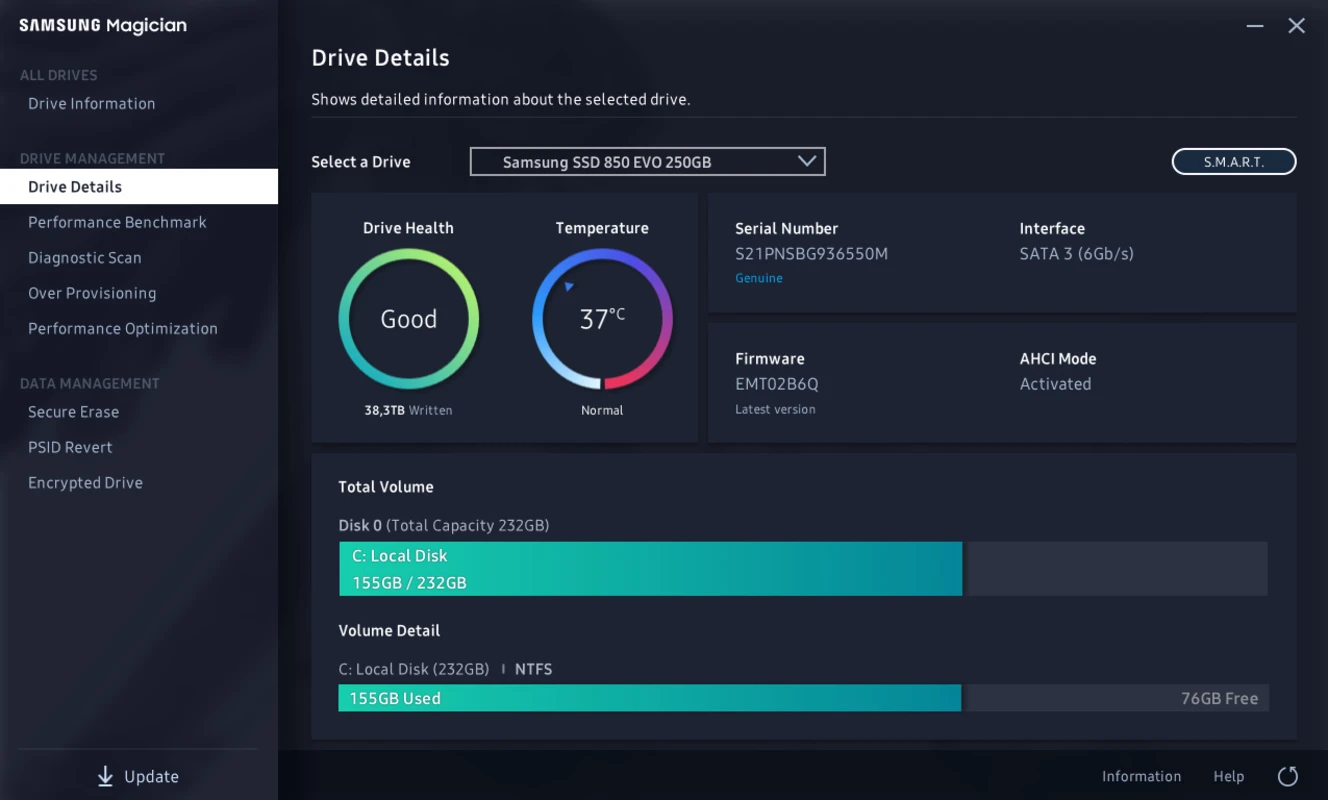
Samsung SSD Software acts as the primary hardware management interface for users operating Samsung solid-state drives on a Windows desktop. Instead of relying on the basic disk management utilities built into the operating system, this dedicated desktop application directly interfaces with the drive's controller. It handles low-level storage maintenance tasks, firmware deployment, and hardware diagnostics that generic disk tools cannot safely execute. For PC builders, video editors, and system administrators who push their storage hardware to its thermal and write-cycle limits, having direct access to the controller data prevents silent drive degradation and unexpected failures.
The utility is built specifically for local desktop environments because operations like firmware flashing and secure erasing require uninterrupted hardware-level access. Browser-based diagnostics or lightweight generic monitors only read surface-level S.M.A.R.T. metrics. In contrast, this utility reads proprietary telemetry from the manufacturer's storage controller, translating raw NAND flash wear and thermal sensor data into concrete health indicators. It allows users to actively manipulate how the drive handles garbage collection and block allocation, directly affecting how the hardware sustains write speeds during heavy file transfers.
By keeping the application installed locally, users gain continuous background monitoring of drive temperatures and write volume. If a drive approaches its maximum terabytes written threshold or experiences thermal throttling due to poor case airflow, the software alerts the user before data corruption occurs. It shifts storage management from a reactive recovery process to a proactive hardware maintenance routine, ensuring the storage hardware maintains its factory-rated read and write speeds over years of daily operation.
Key Features
- Genuine Authentication: Hardware counterfeiting is a known issue in the storage market, with third-party sellers frequently placing fake labels on slower, lower-capacity drives. This feature verifies the internal hardware signature of the connected drive against the manufacturer's official database. By validating the hardware directly through the controller, users confirm they are receiving the exact NAND flash memory and cache performance they paid for, preventing data loss from unstable counterfeit controllers.
- Diagnostic Scan: Instead of waiting for the operating system to report read errors, this tool scans the logical block addressing map across the entire disk. Users can trigger a quick partial scan for immediate feedback or a full surface scan that checks every individual sector for read latency and hardware faults. This early detection mechanism isolates failing NAND cells before they compromise file integrity, giving the user time to migrate critical files.
- Over Provisioning Allocation: Solid-state drives require empty blocks to perform garbage collection and execute write operations efficiently. This menu allows users to manually reserve a specific percentage of total drive capacity that the operating system cannot access. By dedicating this hidden space strictly to the controller's background maintenance routines, the drive maintains steady write speeds during heavy workloads and extends its overall lifespan.
- Performance Benchmark: Verifying actual drive speeds against advertised specifications requires controlled testing conditions. The built-in benchmark utility measures sequential read and write speeds alongside random input/output operations per second with a single click. The tool saves previous test results in a historical graph, making it easy to spot performance degradation over time or confirm that a newly installed motherboard heatsink has resolved thermal throttling issues.
- Secure Erase Utility: Formatting a drive through the Windows interface does not permanently destroy the underlying data, leaving sensitive files vulnerable to recovery software. This utility creates a bootable USB environment that issues a low-level voltage spike to the NAND flash cells, wiping all stored data simultaneously in seconds. It restores the drive to its factory default performance state while ensuring that personal data cannot be recovered if the drive is sold or repurposed.
- Firmware Management: Storage controllers require microcode updates to patch security vulnerabilities, improve motherboard compatibility, and resolve sleep-state bugs. The software queries the manufacturer servers, compares the local firmware against the latest release, and safely flashes the update directly from the Windows desktop. The application manages the entire flashing sequence, ensuring the new microcode is written to the controller without requiring the user to navigate complex command-line flashing tools.
- Data Migration Tool: Moving an existing Windows installation from an old mechanical hard drive or a smaller solid-state drive can be an intricate process involving boot partitions and hidden recovery sectors. This integrated utility clones the exact sector layout of the source drive onto the new target drive while the system is running. It automatically scales partition sizes to fit the new hardware capacity, allowing the user to shut down, swap the drives, and boot immediately.
How to Install Samsung SSD Software on Windows
- Download the executable setup package directly from the official manufacturer support domain, avoiding third-party driver aggregation sites that often bundle outdated versions.
- Launch the installer with administrator privileges, which triggers the setup wizard to unpack the core application files into the temporary directory.
- Review and accept the end-user license agreement, then specify the target installation directory on the primary system drive.
- Choose whether to create desktop and start menu shortcuts, and confirm if the application should launch automatically when Windows boots.
- Wait as the setup wizard copies the executable files, registers the background monitoring services, and installs the proprietary storage controller drivers required for low-level hardware access.
- Click finish to close the installer and authorize a system restart if prompted, which ensures the new storage drivers load correctly into the Windows kernel.
- Launch the application for the first time, allowing it to scan the PCIe and SATA buses to identify all connected storage devices.
- Navigate to the drive dashboard to verify that the software correctly recognizes the exact model and current firmware state of your primary storage hardware.
Samsung SSD Software Free vs. Paid
Samsung SSD Software operates under a strictly free licensing model, provided directly by the hardware manufacturer as a companion utility for their storage products. There are no premium tiers, hidden subscription fees, or trial periods associated with the application. The development and maintenance of the software are fully subsidized by the hardware sales, meaning users never have to purchase an activation code or navigate a freemium feature paywall to access the advanced diagnostic tools.
While the software itself costs nothing to download and install, its functionality is gated by the hardware connected to the system. The most advanced features, including firmware updates, secure erase environment creation, and over-provisioning management, remain locked unless the software detects a genuine, supported solid-state drive from the manufacturer. Users cannot bypass these hardware checks, as the tools rely on proprietary commands specific to the manufacturer's custom storage controllers.
For systems running third-party storage devices alongside the primary supported hardware, the utility will display the unsupported drives in its dashboard but restrict interaction to basic volume information and generic S.M.A.R.T. readouts. The data migration utility also enforces a strict requirement: the target drive receiving the cloned data must be a genuine supported unit, though the source drive can be any brand of mechanical hard drive or solid-state storage.
Samsung SSD Software vs. Crucial Storage Executive vs. Western Digital Dashboard
Crucial Storage Executive serves a similar purpose for its specific hardware ecosystem, heavily focusing on its Momentum Cache feature, which utilizes system RAM to temporarily boost burst read and write speeds. It operates as a local web server displaying its interface within the user's default browser, which can feel less responsive and cohesive than a dedicated native desktop application. Users operating Crucial hardware must use Storage Executive to manage their firmware, but the browser-based interface lacks the polished, instantaneous feedback found in native Windows utilities.
Western Digital Dashboard provides a visually aggressive, gaming-focused interface designed to monitor drive health and toggle specialized modes that disable low-power states for reduced latency. It excels at integrating lighting control for supported heatsinks and provides clear performance graphs, appealing directly to PC builders focusing on system aesthetics. However, its layout can feel cluttered with promotional banners for other hardware, and its diagnostic scans do not always provide the granular sector-by-sector breakdown expected by highly technical users.
Samsung SSD Software proves to be the better fit for users who prioritize a clean, native desktop application with deep diagnostic capabilities and zero promotional clutter. It delivers more precise telemetry regarding thermal throttling and wear leveling, making it superior for diagnosing complex hardware issues or preparing drives for secondary use. When a user requires absolute certainty about hardware authenticity and expects a straightforward, highly responsive interface for firmware management, this utility offers the most professional experience.
Common Issues and Fixes
- Drive not recognized in the dashboard. This typically occurs when the motherboard BIOS is set to RAID or Intel VMD mode rather than standard AHCI mode, blocking direct software communication with the drive. Restart the computer, enter the BIOS settings, and switch the storage controller mode to AHCI, though this may require booting Windows into safe mode first to install the correct standard drivers.
- Firmware update fails to initialize. Windows security features like Core Isolation or Memory Integrity can block the application from loading the low-level drivers required to flash the storage controller. Navigate to the Windows Security center, temporarily disable Memory Integrity under the Device Security menu, complete the firmware flash, and then re-enable the security feature.
- Secure erase USB creation fails. The utility will refuse to format a USB flash drive if it contains hidden partitions or if it is formatted with an incompatible file system. Open the Windows Disk Management tool, delete all existing volumes on the USB drive, create a single basic FAT32 partition, and attempt the creation process again.
- Over-provisioning setup returns an error. If the primary partition on the drive extends to the absolute end of the available storage space and contains unmovable system files, the software cannot shrink the volume to reserve space. Run the built-in Windows disk defragmenter and optimization tool to consolidate files, or manually shrink the partition in Disk Management before applying the over-provisioning setting.
- Application interface fails to scale correctly. On high-resolution displays running custom Windows scaling percentages, the text and buttons within the utility may appear overlapping or cut off. Right-click the application executable, select Properties, navigate to the Compatibility tab, and check the box to override high DPI scaling behavior, setting the dropdown to the application level.
Version 9.0.0 — November 2025
- Added support for the new Samsung 9100 Pro SSD series.
- Introduced a fully redesigned, user-friendly interface with customizable dashboard widgets.
- Implemented an integrated Help Center featuring an AI-powered chatbot for instant troubleshooting.
- Enhanced visual clarity by removing banner advertisements from the main home screen.
- Updated system requirements to support Windows 10 and macOS Catalina or newer.