While cloud storage and flash drives dominate modern file sharing, optical media remains a critical format for data archiving, retro gaming, and bootable system recovery. ImgBurn provides a strictly specialized environment for reading, building, and writing disc images to CD, DVD, and Blu-ray formats. Instead of treating disc burning as a basic drag-and-drop afterthought, this desktop application exposes the granular mechanics of optical authoring. Users can define specific layer breaks for dual-layer media, manipulate file systems, and manually control write speeds to ensure data integrity.
This utility is built for users who need exact 1:1 disc clones, bootable OS media, or verified archival backups rather than fast media compilation. Operating strictly as a native desktop application, it communicates directly with optical drives to manage the physical laser operations. The interface is heavily technical, built around specific operational modes rather than guided wizards. By avoiding unnecessary multimedia conversion tools or playback modules, the software keeps the footprint minimal and the system resource usage low.
Choosing a dedicated desktop application for optical media tasks is necessary because web browsers and cloud-native tools cannot interface with local hardware at the sector level. The program handles complex image formats, including BIN, CUE, MDS, and standard ISO files, allowing users to mount, extract, or duplicate retro software and console games accurately. It bridges the gap between basic operating system disc utilities—which hide advanced settings—and heavy commercial multimedia suites.
Key Features
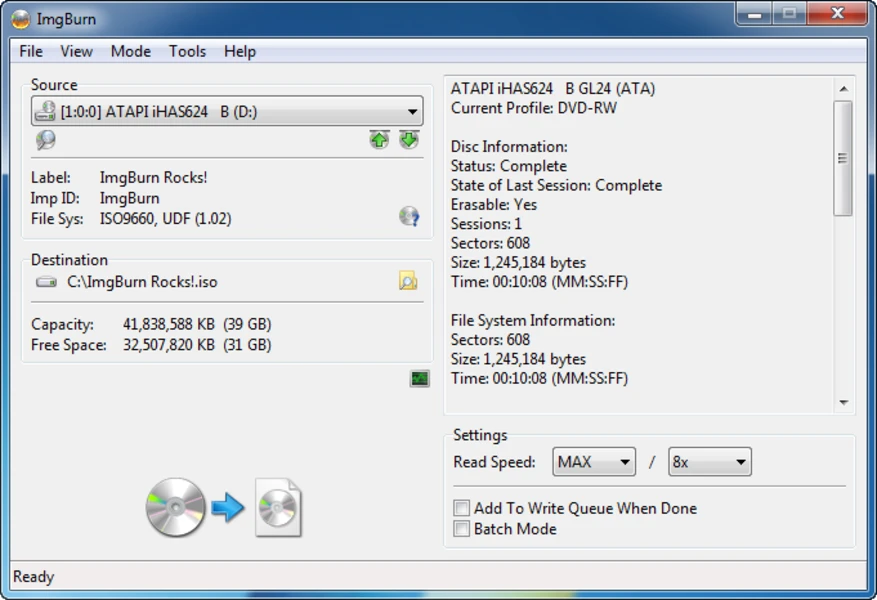
- Feature Name: Read Mode: This function allows users to insert a physical CD, DVD, or Blu-ray into their optical drive and extract the contents into a direct 1:1 digital image file. The software reads the disc sector by sector, bypassing the standard Windows file explorer to capture boot sectors and exact track layouts. The resulting file is typically saved in the ISO or BIN format, making it ideal for creating digital backups of aging physical media.
- Feature Name: Build Mode: Users can compile an assortment of loose files and folders stored on their hard drive to construct a new disc image. This mode offers extensive configuration over the underlying file system structure, allowing selections between ISO9660, Joliet, and UDF formats. It also provides tools to edit volume labels, define bootable extraction points, and manage hidden files before the final image is generated.
- Feature Name: Write Mode: The core burning engine takes an existing image file and writes the data to blank optical media. It supports advanced layer break positioning for dual-layer DVD+R media, ensuring uninterrupted transitions during video playback. Users can manually dictate the write speed, overriding the default drive settings to prevent buffer underruns and reduce physical burning errors on cheaper blank discs.
- Feature Name: Verify Mode: To guarantee strict data retention, this mode compares the physical burned disc against the original source image file. The software reads the freshly written data bit-by-bit and matches it against the digital source block to detect microscopic burn defects. If the hashes match, users can confidently delete the original files knowing their physical archive is mathematically identical.
- Feature Name: Discovery Mode: Designed for hardware diagnostics, this tool pushes an optical drive and blank media to their physical limits. It writes dummy data across the entire surface of a disc to test the laser's consistency and error correction capabilities. When paired with external analysis tools like DVDInfoPro, the resulting graph shows read speeds, spin-down times, and exact error rates.
- Feature Name: Audio CD Authoring: The application can generate Red Book standard audio CDs directly from compressed and uncompressed digital audio formats. Relying on DirectShow and ACM codecs, it decodes FLAC, WAV, AAC, and MP3 files on the fly during the burn process. Users can manipulate the CUE sheet to define exact track gaps, CD-Text metadata, and pregap silence before writing to a CD-R.
- Feature Name: Native Video Structure Support: For home theater environments, the software correctly authors playable movie discs without altering the source video files. If the user provides a standard VIDEO_TS folder for a DVD, or a BDMV folder for a Blu-ray, the application automatically applies the correct UDF file system rules. It prompts the user to adjust settings to meet consumer electronic player standards, preventing unreadable discs.
How to Install ImgBurn on Windows
- Download the official Windows installer executable from the developer's website, avoiding third-party software portals that might repackage the application.
- Disconnect the computer from the internet temporarily by unplugging the Ethernet cable or disabling Wi-Fi, which prevents the installer's bundled adware module from fetching third-party offers.
- Launch the setup file and review the End User License Agreement before clicking next to proceed into the component selection screen.
- When prompted with the installation type, explicitly choose the "Custom Installation" method rather than any "Express" or "Recommended" defaults.
- Carefully inspect the subsequent screens for pre-ticked checkboxes offering browser toolbars, search engine changes, or optimization utilities, and uncheck them to prevent unwanted modifications.
- Select the preferred installation directory path and decide whether to associate the program with specific image file extensions like ISO or MDS in the Windows registry.
- Click finish to complete the setup process, then reconnect the machine to the internet before launching the application for the first time.
ImgBurn Free vs. Paid
ImgBurn operates entirely as a freeware application under a donationware business model. There is no commercial tier, no premium version to unlock, and no enterprise licensing required for the software to function. Users immediately gain access to the complete feature set, including Blu-ray authoring, layer break configuration, and discovery mode, without encountering save limits or trial expiration dates. The developer does not mandate user accounts, online activation, or subscription fees to utilize the disc burning engine.
The software is funded through optional user donations hosted on the official website. The developer openly states that these contributions are used to purchase new optical drive hardware and blank media for compatibility testing, ensuring the burning engine remains functional across different hardware setups. Because the application is fully unrestricted, the interface does not contain aggressive paywalls, locked menus, or watermark injections on burned media.
While the program itself costs no money to download or run, the installer historically incorporated bundled third-party offers to generate revenue. This monetization strategy relies entirely on user interaction during the initial setup phase. Once the application is successfully installed onto the local hard drive, there are no further advertisements or premium upgrade prompts within the main workspace. The daily workflow remains strictly focused on optical authoring without financial interruptions.
ImgBurn vs. Nero Burning ROM vs. CDBurnerXP
Nero Burning ROM is a commercial application that requires an upfront purchase and focuses on a broad multimedia approach. It includes features that go far beyond optical writing, such as built-in audio ripping, format conversion, and guided project wizards. Users who want an all-in-one suite to convert video files into a DVD movie format natively will find Nero helpful, but it consumes significantly more system resources and disk space. Its graphical interface is built to hide the technical complexities of sector writing from the user.
CDBurnerXP is a free alternative that prioritizes ease of use through a traditional drag-and-drop file explorer interface. It allows users to compile data discs or audio CDs by pulling files from a split-pane window, making it very accessible for casual archiving. However, it lacks the deep diagnostic tools, precise dual-layer break controls, and extensive image format support found in more technical applications. It focuses entirely on getting files onto a disc with minimal friction rather than manipulating the microscopic layout of the burn.
ImgBurn is the strictly superior choice for technical users, retro gaming archivists, and IT professionals who need exact control over the disc writing process. It drops the friendly wizards and multimedia converters in favor of direct 1:1 image cloning, bit-by-bit verification, and drive quality testing. When authoring complex bootable media, configuring specific UDF file system variations, or dealing with obscure formats like MDS and BIN/CUE, this application provides the necessary granular settings that both Nero and CDBurnerXP obscure or omit entirely.
Common Issues and Fixes
- Problem description. The software reports an "I/O Error" during the middle of a write operation, ruining the blank disc. This error points to low-quality blank media or an optical drive struggling to write at high speeds. To fix this, manually reduce the write speed in the software interface to 4x or 8x, and switch to well-regarded blank discs from brands like Verbatim or Taiyo Yuden.
- Problem description. Burned video discs play correctly on the computer but fail to load in standalone DVD or Blu-ray hardware players. This occurs when users drag raw video files into the standard data compilation mode. Instead, use the Build mode and select a properly structured VIDEO_TS or BDMV folder so the software can generate the strict UDF file system required by consumer electronics.
- Problem description. The application displays an "Invalid field in CDB" or "Head Select Fault" hardware error. These messages indicate a physical communication breakdown between the desktop software and the optical drive's firmware. Resolve this by checking the data cable connections, updating the drive's firmware directly from the manufacturer's support page, or cleaning the drive's internal laser lens.
- Problem description. The installer forces third-party search toolbars or adware onto the Windows system during setup. This happens if the user rapidly clicks through the express installation prompts without reading. To prevent this, either select the Custom Installation option and manually uncheck the bundled offers, or temporarily disable the computer's internet connection before running the setup executable.
Version 2.5.8.0 — June 2013
- Added support for creating UEFI bootable discs by allowing the "Platform ID" to be customized in Build mode.
- Integrated "BurnerMax Payload" functionality to enable overburning on supported DVD+R DL media (primarily for Lite-On drives).
- Introduced support for the Opus and TAK audio compression formats, including embedded CUE sheets for TAK.
- Enhanced the Disc Layout Editor with incremental search capabilities in the Explorer pane.
- Added a new feature to reset sort order in the Disc Layout Editor by holding the ALT key while clicking column headers.
- Expanded log details to include effective USB connection speeds (1.1, 2.0, 3.0) during initial device scans.
- Improved the build process to log the effective layer break position when burning.
- Increased the maximum I/O buffer size to 1GB for better data handling on high-memory systems.
- Fixed a memory leak that occurred when burning Audio CDs using DirectShow or pre-formatted files.
- Updated the Windows 7+ taskbar progress bar to turn red when an I/O error occurs during operations.