Scooter Software's data comparison utility is a dedicated desktop application designed to visualize, merge, and synchronize differences between files, directories, and archives. Engineered for developers, system administrators, and data analysts, the software transforms the tedious task of hunting for modified source code or missing backup files into a highly visual, automated workflow. Instead of manually cross-referencing text documents or relying on basic operating system copy commands, users can load massive directory trees and immediately see exactly which files have been altered, added, or removed.
The practical value of this application lies in its ability to handle extremely diverse data types across complex scenarios. Whether you need to reconcile a complicated version control merge conflict, audit Windows registry modifications after an unpredictable software installation, or push updated files to a live web server via secure FTP, the software provides a unified workspace for all these tasks. It eliminates the need to maintain separate hex editors, standalone folder synchronizers, and basic code diffing utilities by consolidating them into a single interface that color-codes discrepancies for immediate action.
In a software landscape increasingly dominated by browser-based tools and lightweight text editors, a dedicated desktop application remains critical for serious file management. Web-based diff utilities struggle to handle multi-gigabyte server log files, and they cannot securely process proprietary source code without transmitting it over the internet. This software runs entirely locally on Windows, utilizing system resources efficiently to scan thousands of files in seconds. Furthermore, it embeds directly into the Windows File Explorer right-click context menu, allowing users to select two files on their desktop and launch a side-by-side comparison instantly without opening the main application first.
Key Features
- Intelligent Text Comparison: The software goes beyond simple side-by-side text viewing by applying rules-based logic to specific formats, including C++, Java, Python, and HTML. Users can configure the rules engine to ignore trivial differences such as trailing whitespace, varying line terminators, or inline comments, ensuring that the interface only highlights actual functional code changes.
- Folder Synchronization: Managing backups or deploying web updates is handled through a dedicated directory synchronization interface. Users can define parameters to compare folders based on file size and modified timestamps, or force a rigorous byte-by-byte content check while executing one-way updates or two-way mirrors.
- 3-Way Text Merge: Resolving version control conflicts is streamlined through the three-way merge viewer. When two developers modify the same file, the software displays both independent modifications alongside the original base file, allowing users to visually map out conflicting lines and output a clean, finalized document directly back into their repository.
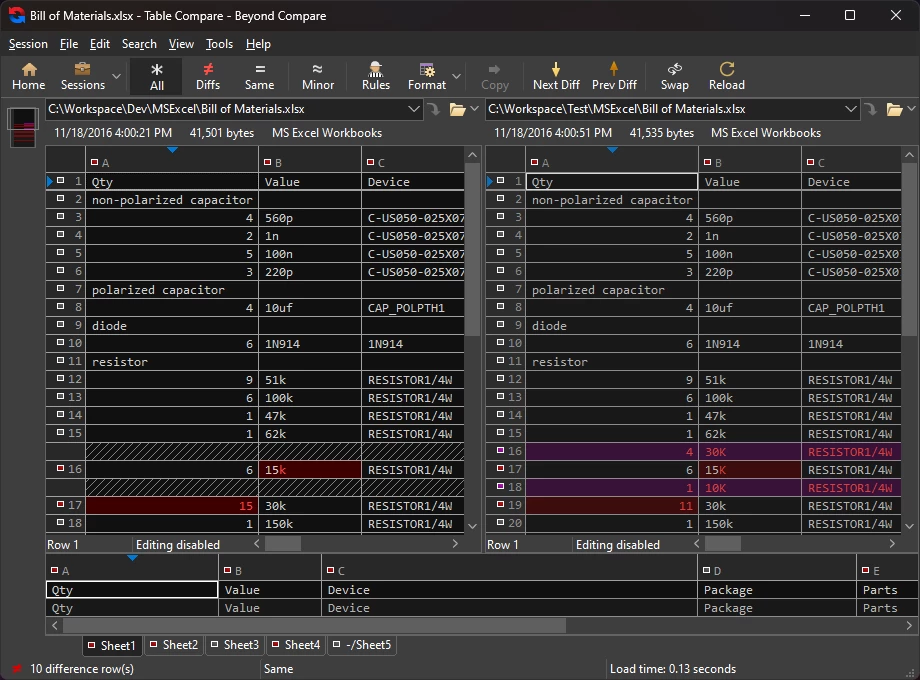
- Specialized Data Viewers: Unlike standard diff tools that only read plain text, this application includes built-in viewers for structured and binary data. Users can compare CSV files and Excel workbooks in a grid layout that aligns columns dynamically, while dedicated modes exist for identifying changed metadata in MP3 tags, comparing pixel differences in images, and inspecting binary executables via a hex viewer.
- Windows Registry Compare: System administrators troubleshooting configuration issues can compare live Windows registry hives against exported .reg backup files. This feature maps the hierarchical structure of registry keys, highlighting modified values, deleted entries, or new string additions to analyze system behavior after a software deployment.
- Automated Session Management: Repetitive tasks do not need to be reconfigured manually every time. Users can save their specific folder paths, comparison rules, and display filters into named sessions. These sessions can be organized into folders within the home screen, allowing an administrator to launch a complex backup verification across multiple network drives with a single click.
How to Install Scooter Beyond Compare on Windows
- Download the installer archive directly from this page and save it to your local hard drive.
- Extract the downloaded archive into a new folder on your desktop or designated downloads directory.
- Open the extracted folder and read the included readme.txt file to check for any specific system notes or setup prerequisites.
- Run the main executable setup file from the extracted folder to launch the Windows installation wizard.
- Accept the end-user license agreement and choose your destination directory, which typically defaults to the standard C:Program Files folder.
- On the integration screen, ensure the option to add the application to your Windows File Explorer context menu is checked, which enables the essential "Select Left File for Compare" shortcut.
- Complete the installation process and launch the application. The software opens immediately to the home workspace without requiring you to create an online account or sign in to a cloud service.
Scooter Beyond Compare Free vs. Paid
Scooter Software utilizes a straightforward commercial licensing model rather than a recurring subscription. New users can evaluate the software using a fully functional 30-day trial. Uniquely, this trial period is based on actual days of use rather than calendar days. If you open the application once and do not touch it for a week, you still have 29 days remaining on your evaluation, giving you ample time to test complex folder synchronizations or registry comparisons in real-world scenarios.
For individuals and teams ready to purchase, the Standard Edition costs $35 per user. This tier covers all the core functionality required by most users, including the intelligent text comparison, folder synchronization, and the specialized data viewers for images, CSV files, and hex data. It is a highly capable tier for general file management and basic code diffing.
The Pro Edition costs $70 per user and unlocks features strictly necessary for advanced development and enterprise administration. Upgrading to Pro provides access to the 3-way text merge capabilities, the Windows registry compare tool, direct SFTP support for secure server updates, and text replacement features. Both editions represent a one-time perpetual license purchase for that specific generation of the software, making it a highly predictable expense for IT budgets.
Scooter Beyond Compare vs. WinMerge vs. Araxis Merge
WinMerge is a free, open-source alternative that excels at basic text and folder differencing on Windows. Users should choose WinMerge if they only need straightforward text comparison and prefer not to pay for a commercial license. However, WinMerge lacks advanced administrative features like direct SFTP synchronization, intelligent 3-way merging maturity, and specialized viewers for MP3 metadata or Windows registry hives.
Araxis Merge is a premium enterprise tool heavily utilized in large corporate software environments, known for its highly polished interface and precise in-place editing capabilities. While Araxis provides an excellent editing experience, its high price tag, which frequently exceeds $160 per user, makes it difficult to justify for independent developers or small teams who only need everyday directory synchronization rather than constant three-way branch merges.
Scooter Beyond Compare operates in the optimal middle ground between these two extremes. It is the better fit for the majority of users because it provides enterprise-grade folder synchronization, highly versatile specialized data viewers, and a deeply customizable rules engine at a fraction of the cost of Araxis Merge, while remaining vastly more capable for complex directory and server management than WinMerge.
Common Issues and Fixes
- Folder compare shows identical files as different. This usually occurs because different operating systems write files with different line endings (CRLF versus LF). To fix this, change the default comparison from "Timestamp and Size" to a Rules-based comparison in the Session Settings, and configure the rules to ignore differing line terminators.
- Cannot easily spot text changes in large source code files. When comparing massive files, minor spacing or formatting alterations can overwhelm the display. To fix this, click the View menu and enable the "Ignore Unimportant Differences" toggle, which hides whitespace and comment changes so you can focus exclusively on actual syntax modifications.
- The application only cycles through differences in the current subfolder. By default, the next difference shortcut stays within the active directory level. To search globally across the entire directory tree, go to the Options menu, navigate to the Next Difference section, and uncheck the setting labeled "Limit Next Difference Files to current folder."
- Context menu options do not appear in File Explorer. Sometimes the right-click integration fails to register correctly during an installation or Windows update. Resolve this by opening the application Options, navigating to the Explorer Integration tab, unchecking the integration box, applying the change, and then re-checking the box to force the Windows registry to update the shortcut.
Version 5.1.7 build 31736 — December 2025
- Archives: Updated UnRAR library to correct a path extraction security vulnerability (CVE-2025-6218).
- Windows: Enhanced security by removing SHA-1 signatures; the installer and executables are now exclusively signed with SHA-256.
- macOS: Fixed an issue where the application would hang when opening the Settings dialog or using the "Install Command Line Tools" option on newer macOS versions.
- Linux: Improved stability on Wayland systems by updating the launcher script to explicitly set the QT_QPA_PLATFORM environment variable to xcb.
- Linux: Added a configuration option to prevent the RPM installer from automatically adding the software repository by creating an empty
/etc/default/bcomparefile.