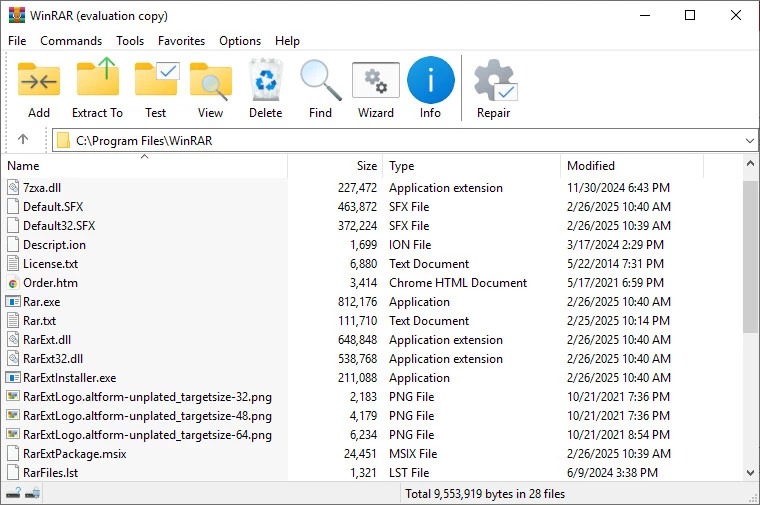
WinRAR Professional functions as an advanced archiving utility that handles file compression, encryption, and data organization tasks directly on Windows desktop environments. Instead of relying on web-based file compressors that struggle with gigabyte-sized folders or require uploading sensitive internal documents to external servers, this desktop client processes files locally utilizing the host machine's hardware for maximum throughput. It targets system administrators, software distributors, and everyday desktop users who need to bundle massive datasets into manageable packages for email transmission, local network transfers, or cold storage backup drives. By operating strictly at the local system level, it avoids the bandwidth bottlenecks and privacy risks associated with cloud-only conversion tools.
While the built-in operating system extraction tool manages standard unencrypted directories, WinRAR Professional provides the proprietary RAR formatting architecture, which consistently yields higher compression ratios for multimedia directories, raw server logs, and unstructured document folders. The software integrates directly into the local File Explorer shell, allowing users to highlight a group of spreadsheets, execute a right-click command, and instantly compile them into a password-protected archive without ever navigating through the main application window. This direct shell integration minimizes repetitive clicks during daily data management routines.
Beyond basic packing and unpacking workflows, the utility acts as an aggressive recovery tool for damaged digital assets. By generating redundant recovery records and parity volumes during the initial compression phase, it allows users to rebuild corrupted archives transmitted over unstable internet protocols or salvaged from failing magnetic hard drives. This strict focus on data integrity, combined with advanced volume splitting for chunking monolithic files across strict physical media limits, makes the desktop client an essential structural tool for managing complex local directories.
Key Features
- RAR and ZIP Archiving: Compresses large directories into the proprietary RAR format for reduced storage footprints, or standard ZIP formats for universal recipient compatibility. The application interface includes a Compression Method dropdown ranging from Store to Best, allowing users to actively balance CPU processing time against the final file size.
- AES-256 Encryption Protocols: Secures sensitive digital archives using AES-256 encryption applied to both the internal file data and the external metadata. Users can check the Encrypt file names box within the password dialog menu so unauthorized individuals cannot read the directory tree without first entering the correct passphrase.
- Physical Archive Splitting: Divides massive files into smaller, sequentially numbered volumes utilizing the Split to volumes, size field in the main settings configuration. This prevents file size limit errors when transferring data to older FAT32 flash drives, strict email attachment gateways, or cloud storage providers that cap individual file uploads.
- Data Parity Recovery Records: Injects redundant parity data into the archive header by configuring the Put recovery record option before initiating compression. If a file becomes partially corrupted during a volatile network transfer or a disk sector failure, the built-in Repair command utilizes this parity data to reconstruct the missing information.
- Self-Extracting Archives (SFX): Compiles compressed data into an executable file that unpacks itself upon launch without requiring external software. The SFX module includes advanced dialog settings where creators can add custom logos, dictate the default extraction path, and force the recipient to accept a software license text before the unpacking begins.
- Advanced Command-Line Interface: Offers operational control over archiving tasks through the dedicated rar.exe command-line tool. System administrators can script automated nightly backup routines in batch files or scripts utilizing specific parameters like a for adding items, -p for applying passwords, and -m5 for enforcing the maximum compression ratio.
- Path Name Optimization: Manages deep folder structures that otherwise trigger the standard 260-character path limit inherent to older Windows operating systems. By handling the file paths within its own internal directory interface, the software allows users to compress, move, and extract files buried dozens of folders deep without triggering the standard operating system error prompts.
How to Install WinRAR Professional on Windows
- Download the official executable installer package designed for the Windows operating system environment directly to a local download directory.
- Launch the downloaded setup executable and review the End User License Agreement text displayed on the initial screen before clicking the Install button to authorize the unpacking of core application files to the Program Files directory.
- Wait for the initial file copying process to complete, which takes only a few seconds, until the specific WinRAR Setup configuration dialog box appears on the screen.
- Review the Associate WinRAR with checklist and select the specific file extensions that the operating system should route directly to this application upon a double-click action.
- Configure the Interface section by checking or unchecking Add WinRAR to Desktop and Add WinRAR to Start Menu to establish your preferred quick-launch shortcuts.
- Adjust the critical Shell integration settings to dictate whether the application's commands appear in legacy context menus or modern cascaded sub-menus to keep the File Explorer right-click menu organized.
- Complete the final setup by clicking the Done confirmation button, at which point the utility fully integrates into the Windows File Explorer shell and is immediately ready for local file archiving operations without requiring a system reboot.
WinRAR Professional Free vs. Paid
WinRAR Professional operates on a traditional try-before-you-buy shareware distribution model rather than a strict recurring subscription or ad-supported freeware basis. Users can install the software package and access the complete internal feature set without entering billing details, creating user accounts, or connecting to an external activation server during an initial 40-day evaluation period. Throughout this specific testing window, all advanced compression algorithms, AES encryption tools, and data recovery modules function at full capacity without enforcing artificial speed limits, file size caps, or output watermarks on the finalized archives.
Once the evaluation period officially concludes, the software triggers a recurring notification window prompting the user to purchase a commercial license every time the main graphical interface launches. Unlike rigid commercial software models that permanently lock files, restrict export capabilities, or disable core menu functions after a trial expires, the local utility technically continues to compress and extract files locally. However, adhering to the legal requirements of the end-user license agreement dictates that the user must purchase a commercial key for continued use, a mandate that is heavily enforced in corporate, academic, and enterprise environments during software audits.
Paid commercial licenses are distributed as perpetual, one-time purchases tied directly to the number of individual users or specific physical machines. A standard single-user license grants the buyer lifetime access to use the specific release generation they purchased, alongside access to minor point updates moving forward. Volume licensing tiers significantly lower the per-machine cost for IT departments deploying the tool across large corporate networks. Furthermore, the vendor offers an optional Premium Support and Maintenance add-on package during checkout, which guarantees priority technical assistance and complimentary access to major future version upgrades for a specified timeline.
WinRAR Professional vs. 7-Zip vs. WinZip
7-Zip functions as a completely open-source archiver that excels in outright compression efficiency utilizing its native LZMA and LZMA2 algorithms within the specialized .7z format. Because it operates under an open-source license requiring zero financial fees for commercial deployment, IT administrators frequently deploy it across massive enterprise organizations to strictly minimize software licensing budgets. However, its graphical interface remains notably sparse and utilitarian, it completely lacks the technical ability to create proprietary .rar archives, and its recovery record implementation is less forgiving than commercial alternatives when attempting to salvage severely corrupted data sets.
WinZip positions itself as a heavily expanded file management suite tailored heavily toward corporate office workflows and active cloud storage integration. It includes direct connectors to external services like Dropbox and Google Drive, built-in PDF document conversion utilities, and automated image resizing tools directly accessible within the active archive workflow. This expanded application scope makes it ideal for office personnel who require an all-in-one document preparation tool, but it feels distinctly heavier on local system resources and its pricing structure heavily favors recurring annual subscription models rather than permanent one-time purchases.
WinRAR Professional strikes a specific, highly technical balance between 7-Zip's raw, utilitarian processing and WinZip's heavy commercial suite. It remains the only desktop client capable of authoring proprietary .rar files, a format that remains highly standardized across digital distribution channels, independent media sharing networks, and professional file transfers. System builders, data archivists, and system administrators who prioritize reliable archive splitting, built-in parity recovery volumes for damaged disks, and a straightforward perpetual licensing model consistently choose this utility over the other two desktop market options.
Common Issues and Fixes
- Corrupted archive error during extraction. This specific error occurs when network packet drops or physical bad disk sectors damage the internal file headers during transit. To fix this, open the main application window, navigate to the damaged file via the internal file browser, select the item, and click the Repair button on the top toolbar to attempt a manual reconstruction using the embedded parity data.
- Missing right-click context menu options in Windows 11. The Windows 11 operating system introduced a condensed context menu that frequently hides legacy shell extensions behind a secondary Show more options layer. To force the commands back to the primary layer, open the software's top menu bar, navigate to Settings, click the Integration tab, select Context menu items, and ensure the primary extraction commands are set to display within the modern shell configuration.
- Cannot unpack multi-part split volumes. Users frequently encounter unexpected extraction errors when trying to unpack a .part1.rar file if the subsequent numbered volumes are missing, incomplete, or renamed by the download manager. Ensure all numbered parts reside in the exact same local directory, check that the filenames match perfectly except for the numbering syntax, and initiate the extraction command exclusively from the first volume in the sequence.
- Triggering deep file path limit errors. Older Windows environments restrict standard file paths to 260 total characters, causing extractions of deeply nested folders to fail through standard File Explorer methods. To bypass this restriction, drag and drop the target archive directly into the root directory of a secondary drive, open the archive strictly through the application's internal graphical interface, and extract the contents directly to that abbreviated root path.
- Forgot the encryption password for a secured archive. The software utilizes strict AES-256 encryption without relying on backdoor access channels or master key overrides for developer retrieval. If the user loses the password, the data cannot be recovered by the vendor's technical support teams; the user must utilize independent local password management tools, locate the original source password, or deploy specialized brute-force recovery software to attempt a manual decryption process.
Version 7.13 — July 2025
- Improved security by patching a critical directory traversal vulnerability in the Windows version that could allow specially crafted archives to write files to unauthorized locations.
- Fixed a regression where the "Import settings from file" command failed to correctly restore configuration settings saved by WinRAR versions older than 7.12.
- Resolved an issue with compression profiles created in version 5.21 or earlier, which previously caused the recovery record size to be set larger than specified.