EaseUS Partition Master operates as a dedicated disk management utility designed to manipulate local storage structures without destroying the underlying data. While native Windows tools limit users to shrinking or extending basic volumes under strict contiguous space rules, this application physically moves data blocks across the disk to bypass those restrictions. This allows users to reorganize drive layouts, absorb unallocated space from anywhere on the physical drive, and split large directories into logical segments for better organization. It serves home PC builders upgrading their hardware, IT technicians diagnosing storage bottlenecks, and system administrators deploying new drive arrays.
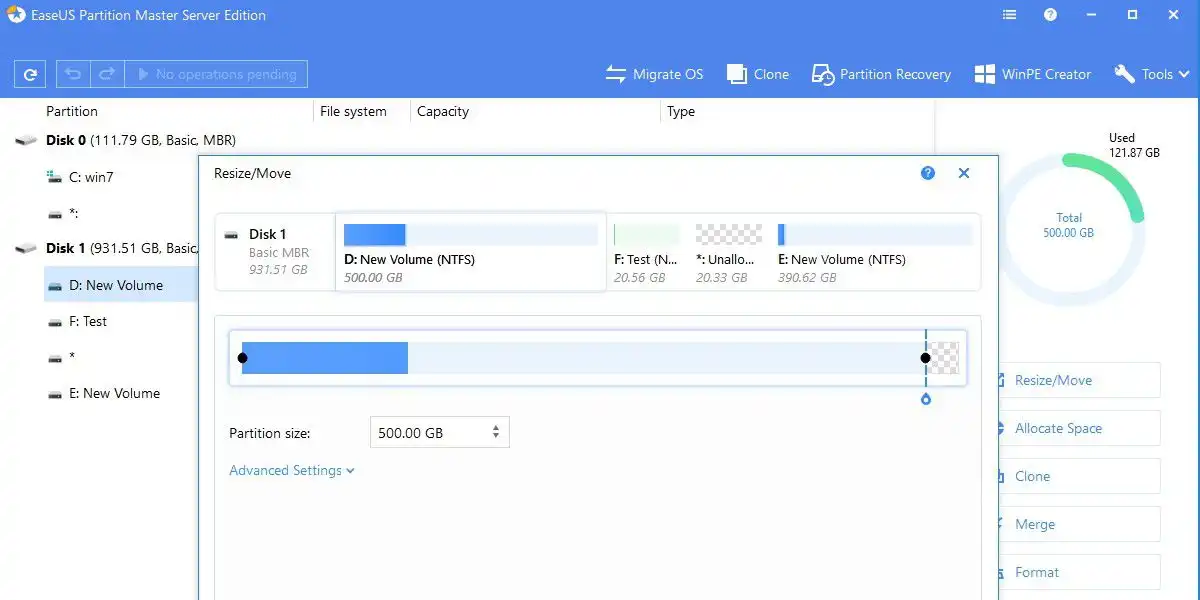
Users specifically choose this utility to solve the exact problem of a full system drive. Instead of formatting the operating system and reinstalling everything from scratch, users can drag a visual slider to shrink a secondary data partition and assign the newly freed space directly to the main C: drive. The software automatically handles the complex file table adjustments in the background, minimizing the risk of a corrupted operating system. It also provides exact sector alignment for flash memory, ensuring that data written to a new solid-state drive operates at the correct speed.
Handling raw disk partitions via command-line tools requires exact syntax and a thorough understanding of byte offsets. A single typographical error can wipe an entire partition table, rendering terabytes of data completely inaccessible. EaseUS Partition Master replaces that command-line risk with a graphical map that clearly labels system reserved blocks, active boot partitions, and standard data volumes. By color-coding the storage blocks and requiring users to hit an execution button before applying pending changes, the application prevents accidental formatting and ensures users understand exactly how their physical drive will change.
Because modifying active file systems requires low-level access to the drive hardware, this work mandates a local desktop application. Browser-based tools or lightweight web scripts cannot interact with the Windows Volume Shadow Copy service or modify the active Master Boot Record. A native desktop executable ensures the system can lock the drive or reboot into a secure pre-OS environment to safely move critical system files that remain locked while the desktop interface is running.
Key Features
- Feature Name: Dynamic Volume Resizing. The software provides a visual map of all connected physical drives and their logical divisions. Users drag a slider left or right to increase or decrease the size of a specific volume. If the unallocated space sits on the opposite end of the disk, the software physically shifts the intervening data blocks so the free space merges directly into the target volume.
- Feature Name: Operating System Migration. A dedicated wizard extracts the active Windows installation and copies it to a newly installed drive. The tool automatically adjusts the boot sector records and configures the correct active flags so the new drive is ready to boot immediately. Users can exclude large personal folders from the migration if the target SSD has a smaller capacity than the original mechanical drive.
- Feature Name: Disk Format Conversion. Users can convert drives between the legacy Master Boot Record format and the modern GUID Partition Table structure without formatting the drive. This conversion is strictly required when installing hard drives larger than two terabytes or when configuring a system to pass the UEFI boot requirements for Windows 11.
- Feature Name: Partition Recovery Scanning. The recovery module scans the raw surface of a hard drive to locate the header files of deleted or lost partitions. If a user accidentally deletes a volume in the Windows Disk Management console, this tool reconstructs the partition table references, restoring access to the intact files and folder hierarchies before they are permanently overwritten.
- Feature Name: Sector-Level Drive Cloning. For exact hardware duplication, the cloning module copies a drive sector by sector rather than file by file. This creates an identical 1:1 hardware copy of the source drive, copying empty space, hidden recovery partitions, and OEM diagnostic tools that standard file-copy operations ignore.
- Feature Name: WinPE Emergency Environment. The application includes a bootable media creator that writes a miniature operating system to a standard USB flash drive. Booting the computer from this USB drive loads the partition manager entirely outside of the main Windows installation, allowing users to safely format the primary system drive or fix boot errors without triggering file-in-use restrictions.
- Feature Name: SSD 4K Sector Alignment. Solid-state drives write data in physical 4K blocks. If a partition transfers from an older mechanical drive without proper alignment, the SSD must perform two physical operations for every single data write, drastically slowing down the drive. The alignment tool scans the SSD and shifts the partition boundaries so the logical clusters perfectly match the physical memory cells, restoring the drive to its maximum read and write speeds.
How to Install EaseUS Partition Master on Windows
- Download the Windows installer package directly from the official EaseUS vendor website to ensure you receive the unmodified setup files.
- Execute the downloaded setup file from your local disk to initiate the installation wizard.
- Review the End User License Agreement and accept the terms to proceed to the directory selection screen.
- Select your desired installation path; the installer defaults to the primary system drive inside the standard Program Files directory.
- Uncheck any optional telemetry tracking checkboxes or promotional software offers that may appear during the prompt sequence.
- Click the install button to extract the core application files, write the necessary registry keys, and install the background disk management drivers.
- Finish the setup process and choose to launch the application. Upon the first run, the software will automatically scan your SATA, NVMe, and USB buses to populate the visual disk map.
- Depending on the scale of the disk operations you plan to execute, save all open documents and close background applications before applying changes, as low-level disk modifications require exclusive access to the hardware.
EaseUS Partition Master Free vs. Paid
EaseUS Partition Master Free covers the basic requirements for organizing local storage. In this tier, users can resize, move, and merge adjacent partitions. The free version also handles drive formatting, allowing users to format volumes in NTFS, FAT32, or exFAT. However, the free tier restricts operations to basic disks, caps the maximum supported drive capacity at 8TB, and excludes the system migration tools.
The Professional edition targets users performing hardware upgrades or complex repairs. This paid tier unlocks the automated OS migration wizard, unlimited drive capacity support, dynamic disk management, and the ability to convert disk formats between MBR and GPT without losing data. The Professional tier also activates the WinPE bootable media creator. Pricing for the Professional edition typically costs $19.95 for a monthly subscription, $49.95 for an annual license, or $69.95 for a perpetual lifetime license that includes minor version updates.
Business environments require the Server or Unlimited editions. The Server edition permits installation on Windows Server operating systems and costs approximately $159 annually or $259 for a lifetime license. The Unlimited edition targets managed IT service providers. For a $599 lifetime fee, technicians secure the legal rights to run the software on multiple machines and client networks, ensuring they can deploy the tool across an entire corporate infrastructure.
EaseUS Partition Master vs. AOMEI Partition Assistant vs. MiniTool Partition Wizard
AOMEI Partition Assistant targets a similar user base but leans heavier into specialized tools for legacy hardware and mixed administrative environments. It excels at complex tasks like creating Windows To Go USB drives or managing intricate dynamic disk arrays across older systems. AOMEI handles advanced deployment scripts effectively, though its interface requires a slightly deeper understanding of storage mechanics compared to EaseUS Partition Master.
MiniTool Partition Wizard focuses heavily on drive health diagnostics and file recovery alongside standard volume management. It includes built-in disk surface tests to identify physical bad sectors and offers a highly capable free tier for troubleshooting degraded drives. Users diagnosing failing hard drives often prefer MiniTool Partition Wizard for its diagnostic focus and deep partition surface scanning capabilities.
EaseUS Partition Master provides the most direct path for users focused strictly on upgrading hardware and reorganizing disk space. Its visual sliders and step-by-step OS migration wizard reduce the risk of accidental data deletion during SSD upgrades. When you need a clear, guided workflow for moving an active operating system to a new NVMe drive without configuring manual boot flags, EaseUS Partition Master requires the least technical configuration.
Common Issues and Fixes
- Problem description. The progress bar appears frozen when resizing a partition during a pre-boot operation. To fix this, do not force a computer restart. Moving gigabytes of data across physical disk sectors takes significant time, and the interface may not update immediately. Monitor the hard drive activity LED on your computer case to confirm the drive is still writing data.
- Problem description. The computer fails to boot after migrating the operating system to a new solid-state drive. To fix this, enter your motherboard BIOS or UEFI settings during startup. The motherboard is likely still attempting to boot from the original mechanical drive. Change the boot priority order so the new SSD is listed first, and ensure UEFI boot mode is active if you migrated to a GPT format.
- Problem description. The software displays a missing unins000.dat error when attempting to uninstall the application. To fix this, download the original setup executable from the vendor page and run it to reinstall over the existing directory. This restores the missing uninstaller files, allowing you to remove the program normally through the Windows Control Panel.
- Problem description. Pending disk operations fail to apply and disappear after the software prompts for a system reboot. To fix this, build a WinPE bootable USB drive using the media creator tool within the application. Background Windows processes are likely blocking low-level drive access during the standard startup sequence. Booting the PC directly from the USB allows you to execute the partition changes entirely offline.
Version 19.23 — December 2025
- Added the Disk Converter function directly to the main toolbar for faster access.
- Improved performance and interactivity of the Disk Copy, Partition Recovery, and Bootable Media workflows.
- Updated the main interface with unified interactive elements for a more consistent user experience.
- Optimized the ISO Burner functionality for better reliability.
- Reorganized various utility widgets into the Toolbox section for easier management.
- Fixed known product functionality issues and bugs to enhance stability.