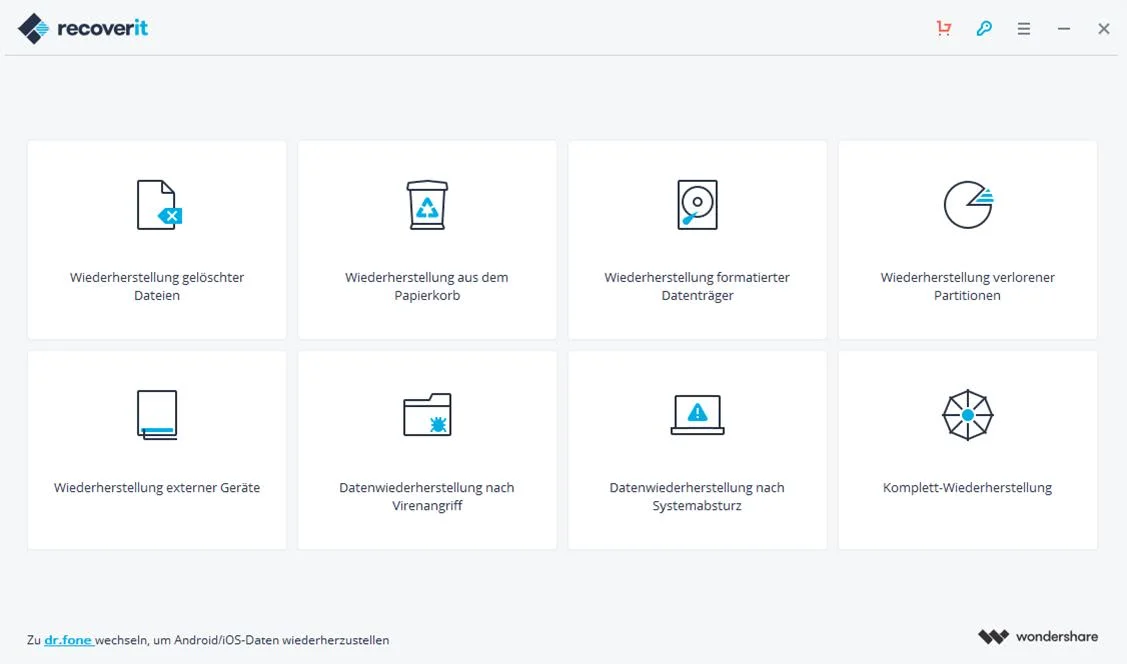
When a storage device suffers logical failure, a user empties the system recycle bin by mistake, or a digital camera formats an SD card prematurely, the raw data often remains physically etched into the hardware. Until new data overwrites those specific blocks, specialized recovery software can bypass the operating system's standard file explorer and rebuild the lost architecture. Wondershare Recoverit operates directly at this block level, scanning the physical sectors of hard drives, solid-state drives, and portable flash media to locate file signatures that no longer appear in normal directories.
When an operating system writes data to a hard drive, it rarely places every piece of a large file in perfectly sequential blocks. Instead, it scatters data clusters across the disk based on available free space. The file allocation table keeps a map of where these clusters live. When a format command wipes that map, standard tools can no longer locate the scattered pieces. A dedicated retrieval tool solves this by reading the hexadecimal signatures at the start and end of every block, analyzing the patterns, and rebuilding the file without needing the original map. This is particularly crucial for media professionals and IT staff handling time-sensitive recovery tasks where missing a single cluster corrupts an entire document.
The application serves professional media creators dealing with corrupted camera storage, IT administrators retrieving documents from unbootable desktop environments, and general users facing unexpected drive errors. While basic undelete utilities handle simple file restoration, this software focuses heavily on complex retrieval tasks. It actively pieces together fragmented media, specifically targeting large, high-bitrate video formats and uncompressed image files that often break apart across storage clusters when a device loses power or experiences a format command.
Handling data retrieval requires a native desktop application rather than browser-based utilities. Web applications operate within strict security sandboxes and cannot access low-level disk hardware or bypass a damaged file allocation table. Installing this software locally ensures the machine can communicate directly with the storage controller. Furthermore, keeping the process entirely offline prevents sensitive business documents or personal media from being uploaded to remote servers during the recovery phase, ensuring strict privacy and faster processing speeds.
Key Features
- Quick and Deep Scanning Modes: The software provides two distinct parsing methods. The initial quick scan reads the remnants of the master file table to rapidly list recently deleted directories. If the file allocation table is completely destroyed, the deep scan drops down to the sector level, reading the raw storage media block by block to identify known file headers and rebuild the data without relying on the original folder structure.
- Advanced Video Retrieval: Large media formats from action cameras, drones, and dashboard cameras are rarely saved in contiguous blocks. The advanced video module specifically scans for scattered MP4 and MOV fragments across the disk, matching metadata and timecodes to reconstruct the scattered clusters into a single, playable video file rather than returning unplayable partial fragments.
- Corrupted File Repair: Sometimes a file is successfully retrieved but suffers from a damaged header, preventing media players from opening it. The dedicated repair interface allows users to import a known working reference file shot on the exact same camera. The software analyzes the healthy metadata and applies that structure to the corrupted file, fixing the broken headers to restore playback.
- Pre-Recovery Preview Engine: Before committing to a lengthy export process or spending money on a license, users can inspect the scan results. The right-hand preview panel displays thumbnails for raw images, plain text for documents, and partial playback for video files. This confirms the physical integrity of the file before the user saves it to a new location. The preview window supports hundreds of native formats, allowing users to verify everything from standard PDF documents and Excel spreadsheets to specialized RAW camera files before spending time on the final extraction.
- Bootable Rescue Environment: When a primary desktop operating system suffers a catastrophic crash and refuses to boot, users cannot simply install a recovery tool. The software includes a bootable media creator that formats a USB flash drive with a lightweight, standalone preinstallation environment. Users can boot the dead machine from this USB stick to access the internal drives and extract critical files before attempting a fresh operating system installation.
- Broad File System Parsing: Beyond standard NTFS and exFAT formats used on typical desktop setups, the engine can read complex storage arrays. It can parse damaged network-attached storage architectures and reconstruct enterprise storage environments, allowing technicians to pull data from formatted external drives and server partitions without requiring the original host hardware.
- Selective File Restoration: Instead of forcing the user to dump an entire storage drive to a backup location, the interface allows for granular control. Users can apply search filters, sort results by modification date, and use file size sliders to isolate specific lost documents. Checkboxes next to each folder or file let operators restore only the exact data they need, significantly reducing the storage overhead required for the recovery process.
How to Install Wondershare Recoverit on Windows
- Download the executable setup installer from the official Wondershare web property.
- Double-click the downloaded setup file and accept the User Account Control prompt, granting the administrative privileges required for the software to perform low-level disk operations.
- Review the end-user licensing agreement and carefully select an installation directory. You must select a path on a completely different physical drive than the one suffering from data loss to ensure the installation files do not overwrite your deleted data.
- Click the install button to begin unpacking the core application binaries, the scanning engine, and the required interface assets to the local disk.
- Wait for the progress bar to complete. If the machine is connected to the internet, the installer will automatically ping the vendor servers to pull down the latest hardware profiles and signature databases.
- Launch the application from the Start menu shortcut to open the main dashboard and initialize the background storage detection services.
- Configure the background preferences by accessing the settings menu. Here, users can define the temporary file storage location, adjust the software update frequency, and disable anonymous usage statistics if they are operating in a strict corporate environment.
- On the first run, click the profile icon in the upper right corner to sign into a Wondershare account. This step authenticates any purchased subscription and unlocks the export restrictions tied to the free tier.
Wondershare Recoverit Free vs. Paid
The software follows a freemium model with strict limitations on the entry-level tier. The free version functions primarily as a diagnostic and evaluation tool. It allows users to run complete deep scans across any connected drive and use the preview engine to verify if deleted images, documents, or videos are intact. However, the free tier enforces a strict 100 MB total export limit. This cap is sufficient to test the software's effectiveness by recovering a few critical Word documents or a small compressed archive, but it is fundamentally inadequate for restoring entire hard drives, moving large raw photographs, or recovering full video files. If the scan reveals gigabytes of necessary data, the free tier will prevent the export until a transaction is completed.
To remove the export cap, users must purchase a subscription. The Essential plan covers the core retrieval needs for a single desktop PC, unlocking unlimited data export for standard internal and external drives. This tier is typically priced around $70 annually and targets users dealing with a one-off accidental deletion or a single formatted flash drive.
For more severe technical failures, the Standard plan, priced closer to $80 per year, introduces the bootable USB media creator, allowing operators to bypass a crashed operating system and scan unbootable internal storage. The highest tier, the Premium plan, costs roughly $100 annually and unlocks the advanced video repair module and specialized support for network-attached storage architectures. Users should strictly run the free scan to confirm their files are previewable before purchasing any paid tier; paying for a license will not reconstruct files that have already been physically overwritten by new data.
Wondershare Recoverit vs. EaseUS Data Recovery Wizard vs. Recuva
EaseUS Data Recovery Wizard competes closely in the premium retrieval market, focusing on an exceptionally clean interface and rapid parsing of formatted NTFS partitions. It offers a more generous free tier, allowing users to save up to 2 GB of data without paying, provided they click a social media share button. This makes EaseUS the better choice for home users who need to rescue a moderate batch of vacation photos or Word documents without buying a license. The software also provides a straightforward folder tree view that closely mimics the native Windows file explorer. However, its video reconstruction tools are not as specialized as Wondershare's, making it slightly less effective for heavily fragmented action camera footage where header files are completely missing.
Recuva serves an entirely different segment of the market, functioning as a lightweight, completely free utility for basic file restoration. If a user simply empties the Recycle Bin and realizes their mistake moments later, Recuva will undelete the file in seconds without paywalls or export limits. Despite this advantage, Recuva's scanning engine is outdated. It struggles significantly with raw, unformatted drives, complex folder hierarchies, and fragmented gigabyte-sized media, making it unsuitable for professional recovery tasks.
Wondershare Recoverit is the superior option when the lost data consists of high-value, large-format media or when dealing with severe logical drive corruption. Its dedicated algorithms for hunting down scattered video chunks and its built-in repair tools for broken file headers justify the high subscription cost for videographers and enterprise users. If the storage device has suffered extensive formatting and a simple free tool fails to produce playable files, the deep scanning engine in Wondershare provides the necessary technical depth.
Common Issues and Fixes
- Deep scans take multiple days to finish. Scanning high-capacity drives over an older interface creates severe bottlenecks. Cancel the current scan, connect the external drive directly to a motherboard USB 3.0 or 3.1 port rather than a peripheral hub, disable the system's sleep mode in the power settings, and restart the process.
- Recovered video files show a black screen or refuse to play. Standard scanning methods often retrieve only the first fragment of a large media file. Navigate to the "Advanced Video Recovery" tab to force the engine to hunt for the remaining scattered metadata and cluster chunks, merging them into a complete file.
- The operating system prompts to format the drive upon connection. When a file system is corrupted, Windows cannot read it and will ask to format the disk. Do not accept this prompt, as formatting will complicate the retrieval process. Instead, open the software and select the "Unrecognized" or "RAW" drive directly from the external devices list.
- Files are retrieved but lose their original folder names. If the master file table is completely wiped, the software cannot reconstruct the original directory tree. Check the "Raw Files" or "Extra Files" folder in the scan results, where the engine automatically sorts recovered data by file extension based on their internal signature headers.
- The software does not detect an external drive. If the drive does not appear in the dashboard list, the connection might be failing at the hardware level, or the disk controller has died. Open the Windows Disk Management utility to see if the operating system registers the physical disk. If it does not appear in Disk Management at all, no software can scan it, and the drive may require professional cleanroom hardware repair.
Version 14.0.8 — December 2025
- Added new AI-driven device recognition technology to automatically identify hardware models and apply the most effective recovery strategy for over 10,000 scenarios.
- Improved performance of external device recovery, ensuring greater stability and faster scanning speeds for SD cards, USB drives, and hard disks.
- Introduced AI-powered restoration capabilities to enhance and repair corrupted photos and video files after recovery.
- Added support for consecutive scanning from a breakpoint, allowing users to pause and resume scans without losing progress.
- Expanded device compatibility to support over one million devices, including premium digital cameras from brands like Sony, Canon, and Nikon.
- Fixed minor bugs related to specific file type previews and optimized the user interface for smoother navigation.