Daemon Tools Ultra operates as an advanced disk imaging and hardware emulation environment designed for system administrators, IT professionals, and software testers who need exact control over virtual storage behavior. At its core, the application replaces physical optical media by mounting disk images directly into the local file system. Instead of maintaining physical stacks of CDs, DVDs, or Blu-ray discs, users store their software installers, games, and archival backups as ISO, MDX, or MDS files. When a user mounts one of these digital archives, the operating system treats it exactly like a physical hardware insert, granting immediate read access without the mechanical spin-up latency or physical wear associated with traditional optical drives.
Beyond standard archive mounting, the desktop application serves specific administrative workflows that lightweight browser tools or basic file extractors simply cannot perform. Because it operates at the hardware virtualization level, it can create bootable USB flash drives for system recovery, initialize high-speed RAM disks to accelerate localized caching, and manage VHD files heavily used in virtual machine deployments. It also includes an iSCSI Initiator, allowing network administrators to connect to remote optical drives or storage targets as if they were physically plugged into the local workstation. The application organizes all these external formats into a unified image catalog, allowing users to locate and execute specific disk images across multiple local hard drives.
Users typically deploy this specific tier of the software family when they hit the limitations of built-in operating system tools. While modern Windows installations can handle a standard ISO by default, they lack the capacity to emulate SCSI or IDE interfaces. These low-level hardware interfaces are often required for legacy software operations, encrypted archives, or executing 1:1 disc backups that preserve original physical disk structures. The desktop client integrates directly into Windows Explorer, allowing users to right-click files and instantiate virtual drives immediately without interrupting their current folder navigation tasks. Because it manages hardware-level drivers and validates licensing through an account system, the software requires active administrative privileges and relies on internet connectivity for initial activation and subscription checks.
Key Features
- Advanced Virtual Drive Emulation: The core engine allows users to create and manage DT, SCSI, IDE, and HDD virtual drives simultaneously. By emulating these specific hardware interfaces, the software tricks legacy applications and diagnostic utilities into recognizing the mounted disk as a physical optical drive, which is necessary for installation routines that fail under basic Windows ISO mounting.
- RAM Disk Creation: Users can allocate a dedicated block of their system memory to act as a virtual storage drive. Because system RAM operates significantly faster than traditional solid-state storage, routing browser cache data, temporary rendering scratch files, or active project assets through a RAM disk speeds up processing times and reduces read/write degradation on physical drives.
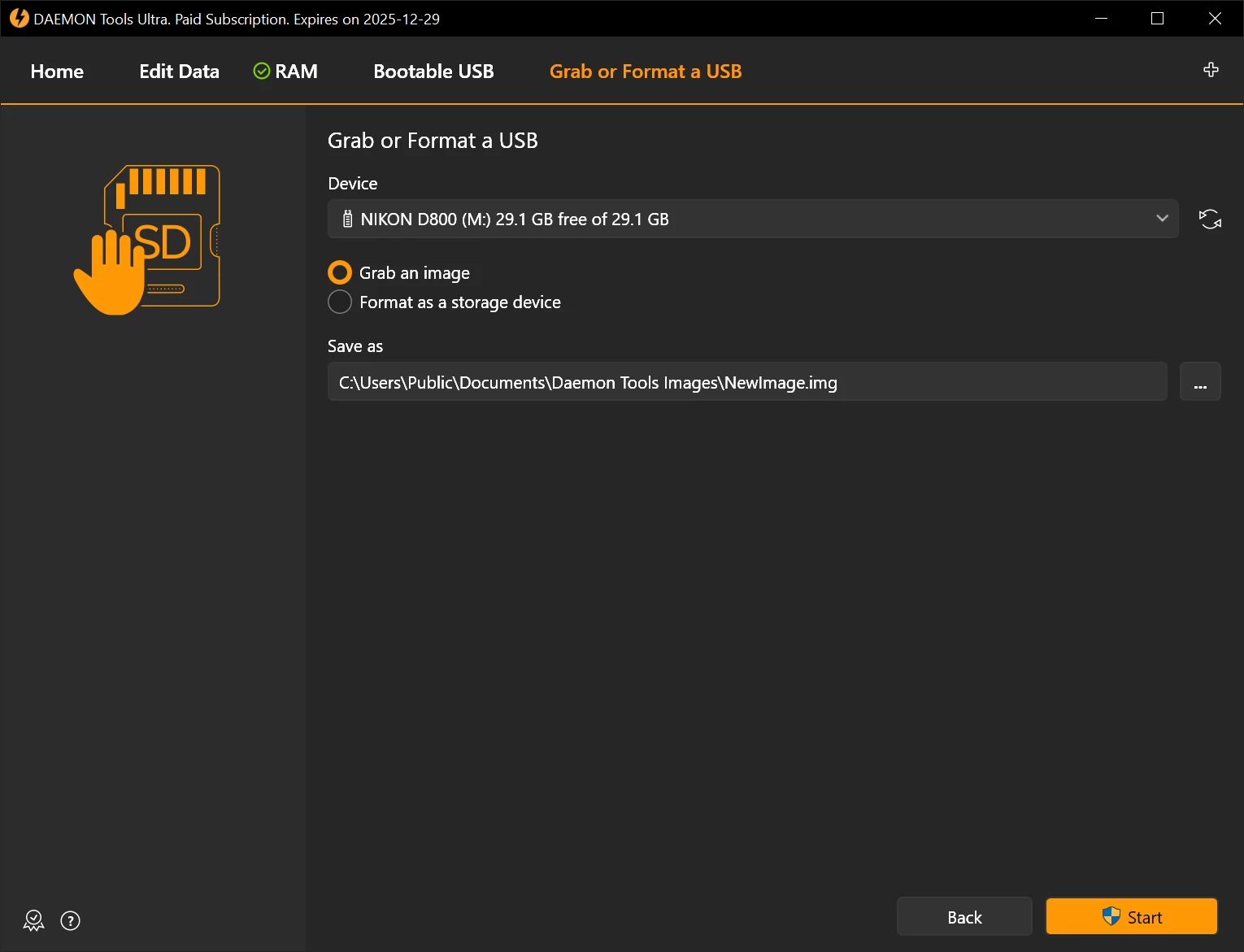
- Bootable USB Media Generator: The application features a dedicated wizard for writing bootable disk images directly to USB flash media. This tool formats the USB stick with the correct MBR or GPT partition schemes and boot records, preparing the drive for UEFI or BIOS motherboard environments, which is highly practical for deploying operating systems or running recovery environments.
- Virtual Burner Module: Instead of writing data to physical optical discs, the Virtual Burner intercepts the burn command from other media applications and redirects the output into an image file. This allows audio producers or software developers to test their disc-authoring projects locally, verifying menus and file structures without wasting blank physical media.
- TrueCrypt and VHD Support: The interface manages secure storage formats, including VHDs and TrueCrypt encrypted containers. Users can mount a TrueCrypt file to interact with secured files through a designated drive letter, then unmount the container to instantly lock the contents away from network access or local system indexing.
- iSCSI Target Connection: Network administrators can utilize the built-in iSCSI Initiator to access remote storage devices operating across a local network. If another workstation or local server hosts a physical optical drive or a large virtual hard disk, this feature connects to that target and presents it to the local machine as a natively attached hardware drive.
- Quick Mount Workflow: The interface reduces friction by bypassing manual drive configuration menus. Users simply drag and drop a supported archive format, such as an MDX, MDS, ISO, or B5T file, into the application window or use the Explorer context menu, and the software automatically instantiates the correct device type and mounts the file.
How to Install Daemon Tools Ultra on Windows
- Download the official executable setup package from the vendor's main website or an authorized software directory to ensure you receive an unmodified installer.
- Double-click the executable file to launch the setup wizard, which will immediately prompt for administrative privileges through the standard Windows User Account Control dialog.
- Select your preferred license type on the initial setup screen, choosing either to initiate the 14-day trial evaluation or to activate a previously purchased license using your vendor account credentials.
- Review the component selection menu carefully, as the installer provides specific checkboxes to configure Windows Explorer integration, desktop shortcuts, and file associations for extensions like ISO, MDS, VHD, and ZIP.
- Leave the default installation directory pointing to the standard Program Files folder unless your administrative deployment policies specifically require installing third-party applications to a secondary storage partition.
- Click the install button to begin writing the local application files; during this phase, the setup may briefly interrupt network connectivity or prompt for permission to install specialized storage controller drivers necessary for SCSI and IDE hardware emulation.
- Reboot the Windows operating system if the installer specifically requests it, as the low-level virtual drive drivers often require a complete system restart to initialize within the operating system kernel correctly.
- Launch the application from the Start Menu, where the initial run will present the main catalog interface and allow you to configure basic preferences, such as the default dark or light theme, before you mount your first archive file.
Daemon Tools Ultra Free vs. Paid
Daemon Tools Ultra operates purely as premium, paid software. Unlike the entry-level Lite edition of the software, which offers a permanently free tier supported by integrated advertisements and promotional offers, this specific edition targets professional users and requires a purchased license after the initial evaluation phase. Users who download the software can access all technical capabilities unrestrictedly during a 14-day trial period, allowing full testing of RAM disks, iSCSI network connections, and unlimited virtual drive emulation.
Once the 14-day evaluation expires, the software locks its mounting capabilities and requires an active subscription or a lifetime license to restore functionality. The vendor typically offers flexible purchasing models managed through their official website, including monthly, semi-annual, or annual subscriptions, alongside a perpetual lifetime license. A lifetime subscription typically costs around $25.99 depending on regional pricing and active vendor promotions, granting the user permanent access to the current software capabilities and future updates for up to three personal computers.
Because this edition does not rely on bundled adware or third-party sponsor offers during the installation process, the paid model strictly supports the ongoing development of the emulation engine and technical infrastructure. Customers who purchase the software also receive priority access to the 24/7 technical support queue. Users who only need to mount basic ISO files and do not want to manage a software subscription often drop down to the Lite edition, but administrators who require secure VHD mounting, Virtual Burner functionality, or bootable USB creation tools generally maintain an active paid license.
Daemon Tools Ultra vs. PowerISO vs. UltraISO
PowerISO operates as a dedicated disk image processing tool that excels in modifying, extracting, and compressing archive files directly. It provides a highly capable virtual drive engine, but its primary focus remains on manipulating the internal contents of an archive file, encrypting archives with custom passwords, and splitting large images into smaller storage volumes. Users who spend most of their time extracting specific folders from an ISO or converting physical media into highly compressed DAA files generally favor PowerISO for its specialized file-handling utilities rather than its hardware emulation.
UltraISO targets similar archiving workflows with a strong emphasis on creating bootable media and extracting boot sectors from existing storage images. It allows system administrators to directly edit the internal file structure of a CD or DVD image without having to extract and repack the entire archive manually. It is highly optimized for older file formats and remains a staple utility for IT professionals who frequently reconstruct OS installer discs or need a very small application footprint when operating on older hardware environments.
Daemon Tools Ultra shifts the focus away from internal file editing and heavily prioritizes advanced system-level emulation and external device virtualization. While PowerISO and UltraISO function primarily as file managers that happen to mount drives, this application acts as a complete hardware storage management hub. It is the better choice for users who need to connect to remote iSCSI targets across a network, build persistent RAM disks to accelerate localized rendering, or securely mount encrypted TrueCrypt containers. When a specific workflow requires tricking a legacy application into interacting with a virtual drive as an exact physical SCSI or IDE device, the deep system integration of Daemon Tools Ultra handles the task correctly.
Common Issues and Fixes
- Virtual drive disappears after a Windows restart. Sometimes, major Windows updates disrupt the background services responsible for maintaining virtual hardware paths. To resolve this, open the application with administrator privileges, unmount any active files, remove the virtual drive from the main interface, and then recreate it. If the issue persists, reinstalling the application often repairs the broken registry entries.
- Unable to create SCSI or IDE virtual devices. The software relies on the SPTD (SCSI Pass-Through Direct) driver to emulate specific hardware interfaces, which strict Windows memory integrity settings sometimes block. Users must navigate to the application settings, manually prompt the SPTD driver installation, and then fully reboot the computer to allow the kernel-level driver to initialize correctly.
- Access Denied error when mounting an image file. This typically occurs if the file associations lack the correct system permissions or if the image resides in a restricted Windows directory. Move the target file to a neutral location like the public Documents folder, ensure you are running the software as an administrator, and use the internal application catalog to mount the file rather than double-clicking it in Explorer.
- Mounted disc image does not open automatically. If an ISO is successfully mounted but nothing appears on the screen, the system-wide Windows Autoplay feature is likely disabled. Open the main Windows Explorer window, locate the newly assigned virtual drive letter under "This PC", and double-click the drive to manually explore the contents or launch the internal setup file.
- Error in command line when using Open With context menu. The application does not support mounting via the standard Windows "Open with..." dialog box. Users must open the application preferences, navigate to the Integration section, and explicitly check the file extensions they wish to handle. Once associated correctly, users can simply double-click the archive instead of using the right-click Open With menu.
Version 7.1.0 — December 2025
- Added a comprehensive shutdown option in General Settings to resolve software conflicts without requiring a system reboot.
- Improved the core driver architecture to deliver greater stability and optimized application performance.
- Updated system requirements to exclusively support 64-bit versions of Windows 10 and later.
- Optimized the installer structure, resulting in a significantly lighter and more efficient setup file.
- Refreshed the user interface with updated visual designs for key elements.
- Fixed various minor internal bugs and stability issues.