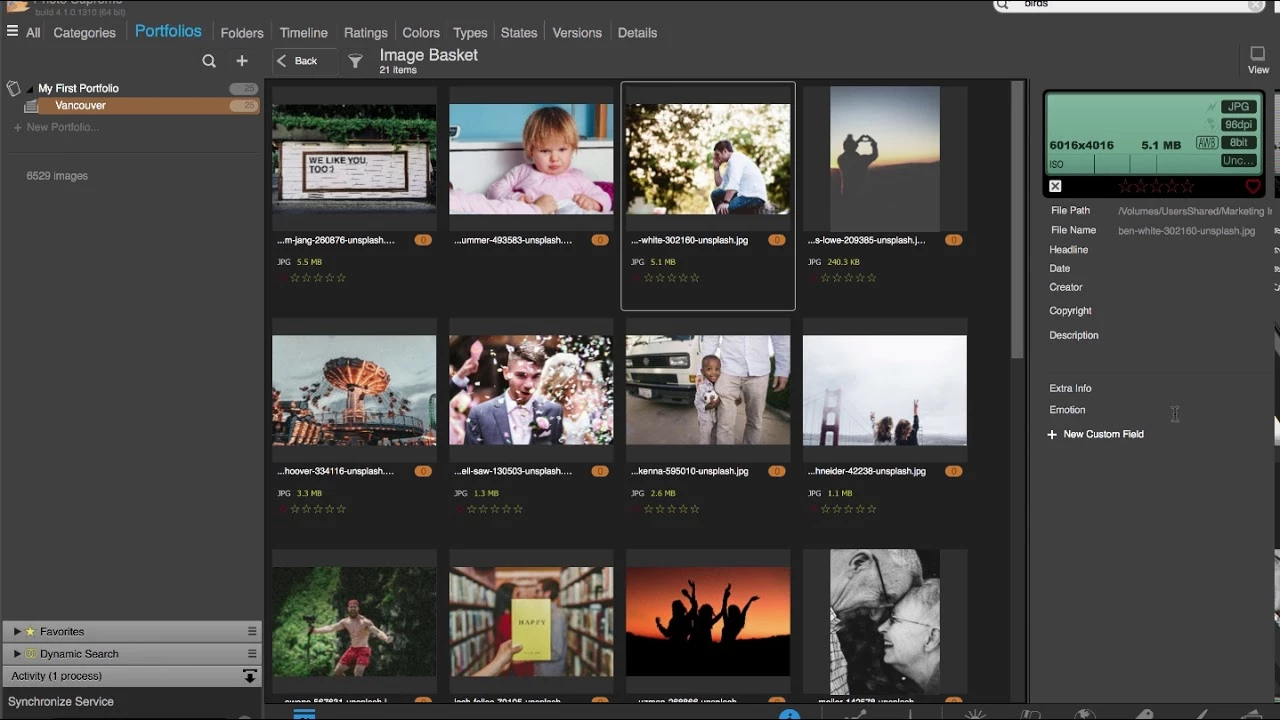
IDimager Photo Supreme functions as a dedicated Digital Asset Management (DAM) hub built to impose strict organization on massive media libraries. Photographers, archivists, and media managers often accumulate hundreds of thousands of raw files, JPEGs, and video clips across multiple hard drives. Relying on basic operating system file explorers quickly becomes unmanageable when trying to locate a specific photo from a past shoot. This application replaces chaotic folder digging with a strictly structured, database-driven catalog. It reads and writes industry-standard metadata protocols—including EXIF, IPTC, XMP, and MWG—ensuring that every tag, caption, and rating remains permanently attached to the specific visual asset.
Unlike browser-based cloud portals that force users into relying on remote servers, this desktop software operates locally on your hardware. It scans direct-attached storage and network drives to build a fast internal index. Because the interface is specifically built for asset organization rather than photo manipulation, it serves as a central traffic cop for your media. Users locate the exact files they need using complex search queries, then send those specific files to their preferred external image editors.
Choosing a dedicated, locally hosted application protects the user from proprietary cloud lock-in. When a photographer adds hierarchical keywords or geographic coordinates within the interface, those details travel with the file itself or sit safely in a standard sidecar document. This strict adherence to open metadata standards means that the catalog can interact safely with other media tools in a professional production environment without trapping the user’s organizational work inside a closed ecosystem.
Key Features
- Advanced Metadata Tagging: The software reads and writes standard IPTC, EXIF, and XMP data blocks directly to files or sidecars. Users can apply hierarchical keywords, custom data fields, color labels, and star ratings that remain visible across different photography tools.
- Multi-Tab Browsing: The interface adopts a web-browser-style layout, allowing users to open multiple folders, portfolios, or search results in separate tabs. This design makes it simple to cross-reference images from completely different storage drives simultaneously.
- Side-by-Side Comparison: A dedicated light table mode lets users view up to six images concurrently. This function is critical for culling a burst sequence of photos, allowing photographers to zoom in and check focus on specific details like a subject's eyes.
- AI-Assisted Cataloging: The application includes integration with visual recognition engines to analyze image contents. It can automatically detect faces, recognize landmarks, and apply object labels, which significantly reduces the time spent manually typing keywords after an import.
- Duplicate Detection: A built-in scanning tool analyzes both visual similarities and file data hashes to locate duplicate media across the entire database. Identifying these redundant files helps administrators clean up wasted storage space on local disks or network servers.
- Dynamic Collections: Users can build virtual folders driven by logical search rules. A dynamic collection can automatically gather all files tagged with a specific client name that also hold a five-star rating, updating in real time as new files receive those tags.
- Version Control and Stacking: The interface reduces visual clutter by grouping different iterations of the same image. A raw capture, its developed JPEG, and a resized web export are collapsed under a single thumbnail, keeping the grid view clean and organized.
How to Install IDimager Photo Supreme on Windows
- Download the official Windows installer executable from the developer's website.
- Launch the setup package and grant administrator permissions when prompted by the User Account Control dialogue.
- Advance through the welcome screen and accept the end-user license agreement.
- Select the destination directory for the application files, keeping the default program path unless a custom drive is required.
- Finish the installation wizard and opt to launch the software immediately.
- On the first run, the software will ask for a location to store the main catalog database; choosing an internal solid-state drive is strongly advised for optimal search speeds.
- Begin the initial ingestion phase by pointing the application to a primary folder of images, allowing the background engine to generate thumbnail previews and index existing tags.
IDimager Photo Supreme Free vs. Paid
IDimager Photo Supreme operates on a strict paid licensing model and does not force users into an ongoing monthly subscription. Individuals purchase a perpetual license for the Single-User Edition. This upfront payment grants full access to the software indefinitely, though transitioning to major future numerical releases usually requires a paid upgrade fee. A Lite Edition has also been offered at a lower cost, which restricts the total catalog size to 5,000 assets, making it suitable only for very small personal libraries.
For studios, agencies, and collaborative teams, the developer offers a Server Edition. This tier is priced significantly higher per concurrent user and requires a centralized database architecture, such as PostgreSQL or SQLServer. The Server Edition includes role-based access controls, allowing administrators to restrict which team members can edit specific catalog tags or delete assets while multiple people browse the archive simultaneously.
New users can download a fully functional 30-day trial version before committing to a purchase. This trial period allows photographers to test the software against their specific hardware setup, verifying how well the database handles their network drives, raw file formats, and AI ingestion speeds. If the trial expires without a license purchase, the software will lock access to the database, though any metadata properly written to external sidecar files remains safe and accessible.
IDimager Photo Supreme vs. Adobe Lightroom Classic vs. ACDSee Photo Studio Ultimate
Adobe Lightroom Classic blends heavy-duty digital asset management with an extensive non-destructive raw development suite. However, it requires an ongoing Creative Cloud subscription, and its catalog architecture often traps organizational work inside the Adobe ecosystem. Users who refuse to pay monthly fees, or who prefer to keep their file management strictly separated from their photo editing software, find IDimager Photo Supreme to be a much safer, subscription-free alternative.
ACDSee Photo Studio Ultimate offers a hybrid approach by combining a hierarchical database with layer-based photo manipulation and raw conversion inside a single perpetual license. While heavily equipped, its interface is dense, forcing users to navigate a steep learning curve to access basic organizational tools. For users who already own a dedicated raw editor and only need a fast, specialized tool for tagging and sorting, ACDSee often feels overloaded compared to a pure database application.
IDimager Photo Supreme is the better fit for professionals and hobbyists who treat their raw editor and their asset manager as two distinct pieces of software. It focuses entirely on cataloging, metadata writing, and rapid search queries, acting strictly as an organizational hub. If you want a fast, independent database that writes tags securely to standard sidecars and plays nicely with any external editing program, this application provides the strongest workflow.
Common Issues and Fixes
- Import freezes on massive catalogs. When ingesting collections containing hundreds of thousands of files, the background thumbnail generation can consume all system resources. Fix this by importing large archives in smaller batches and ensuring the database file sits on an internal SSD rather than a slower network drive.
- Batch metadata writes failing. Users occasionally see errors when attempting to apply tags to thousands of files simultaneously. To resolve this, pause any active cloud backup tools that might be locking the files, and apply the metadata updates in smaller groups.
- Interface stuttering during initial use. The application might feel unresponsive if the user executes complex search queries while the AI facial recognition engine is actively scanning a new import. The fix is to let the background indexing complete entirely before heavily querying the database.
- Tags missing in external editors. If keywords applied in the application do not appear in external software, the metadata is likely only sitting in the internal database. Ensure that the synchronization settings are configured to automatically write metadata to the files or standard XMP sidecars.
Version 2025.3.3.8139 — December 2025
- Added advanced Generative AI integration, enabling the use of OpenAI or locally installed Ollama models to automatically describe and keyword images.
- Improved "Smart Cataloging" capabilities, enhancing content analysis for more efficient organization of large photo libraries.
- Enhanced face detection algorithms and similarity search precision for better identification of people and duplicate files.
- Fixed various minor stability issues and optimized performance for smoother navigation and batch metadata operations.