WinZip Driver Updater operates as an automated hardware maintenance utility designed to identify and replace outdated, missing, or damaged device drivers on Windows systems. Rather than forcing users to manually check Device Manager and navigate various hardware manufacturer websites for individual component updates, the application runs a localized system scan that cross-references installed hardware against a vendor-maintained database. By pulling manufacturer-specific driver packages directly to the desktop environment, the software centralizes the entire driver management workflow into a single dashboard. This approach addresses the specific practical task of maintaining system stability and peripheral compatibility without requiring deep technical knowledge of hardware IDs or manual driver installations.
A dedicated desktop application provides advantages for driver management compared to built-in system update processes, which frequently rely on generic or older driver iterations. The software focuses specifically on original equipment manufacturer packages for discrete hardware components, including dedicated graphics processors, audio interfaces, specialized network controllers, and motherboard chipsets. Users who frequently connect new peripherals, experience unexpected hardware disconnects, or suffer from micro-stutters during computational tasks often trace the root cause back to conflicting or obsolete driver files. By running directly on the local machine with elevated privileges, the tool interacts deeply with the local driver store, replacing corrupt files and creating restore points before any system-level modifications occur.
System administrators, IT technicians, and standard desktop users utilize this tool to streamline troubleshooting when specific hardware fails to respond or underperforms. If a desktop computer suddenly loses Bluetooth connectivity, drops wireless networking signals, or displays distorted screen resolutions after a major operating system update, running a targeted scan identifies the exact missing communication layer between the hardware component and the OS kernel. By delivering precise driver payloads and managing the installation protocol directly through its interface, the application bypasses the typical trial-and-error approach of guessing which manufacturer site has the correct executable for a given motherboard revision.
Key Features
- Hardware Scanning Engine: The application initiates an immediate system-wide analysis by clicking the Start Scan Now button from the Home tab. It reads all active and hidden hardware components, cross-checking their current driver dates and digital signatures against a remote database to generate a concrete list of out-of-date components.
- Driver Backup and Restore: Located under the Backup menu tab, this function allows users to save current working drivers before applying any new updates. If a newly installed display or audio driver causes system instability, users can navigate to the backup repository and revert to the exact previous working state, ensuring a safe rollback without relying entirely on Windows System Restore.
- Update Exclusion List: Users can right-click specific hardware entries in the scan results and choose to exclude them from current and future update cycles. This is highly beneficial for legacy peripherals, custom-flashed graphics cards, or specific audio interfaces that require an older, highly specific driver package to function correctly with older production software.
- Automated Scheduling: Through the Options menu, the utility can be configured to run background scans on a daily, weekly, or monthly basis, or triggered specifically when the computer boots up. This scheduling ensures that the driver database is continually monitored without requiring the user to manually launch the application and initiate a scan every time they plug in a new device.
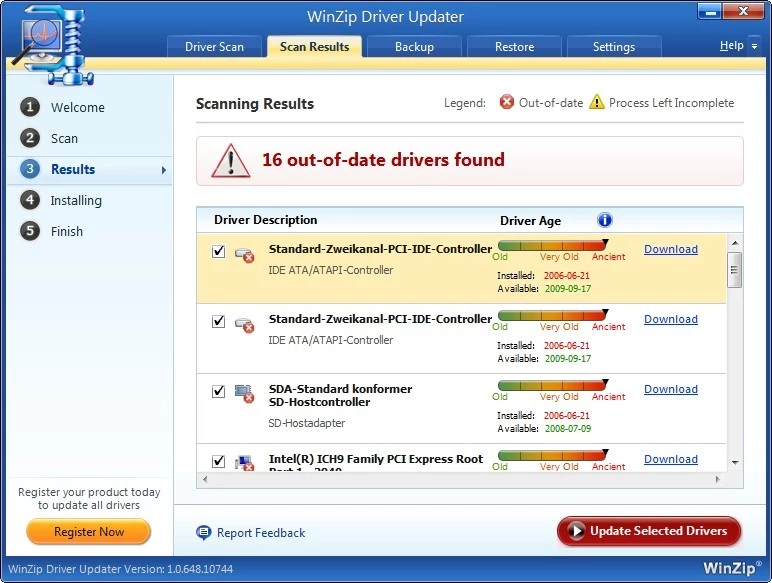
- Detailed Hardware Information: The scan results screen provides granular technical data about the proposed updates, displaying the currently installed driver version, the available new driver version, the release date, and the specific device category. This allows users to make informed decisions about whether an update is strictly necessary for their workflow or if it can be skipped.
- Parallel Downloading Process: For registered users, the interface supports fetching multiple driver packages simultaneously rather than forcing a sequential, one-by-one download queue. This significantly reduces the total time required to update a newly formatted computer or a system that has been disconnected from the internet for an extended period.
How to Install WinZip Driver Updater on Windows
- Download the official Windows installer package from the official vendor website to your local storage drive.
- Navigate to your default downloads folder and double-click the executable to launch the setup wizard; click Yes when the Windows User Account Control prompt appears asking for administrative privileges.
- Review the End User License Agreement on the initial setup screen and click the Agree and Install button to proceed with the standard installation routine.
- The installer will unpack the necessary application files into the default Program Files directory and write the required registry keys to allow the application to interface with the Windows driver store.
- Wait for the progress bar to complete; during this phase, the installer may also place a shortcut on your desktop and add a startup entry so the application can run background schedules.
- Once the installation finalizes, the application will launch automatically for its first run and immediately execute a preliminary scan of your system hardware to map out the current driver landscape.
- Review the initial scan results displayed on the Home tab, at which point you can navigate to the Register tab if you need to input a purchased license key to unlock automated update functionality.
WinZip Driver Updater Free vs. Paid
The business model operates on a freemium structure, heavily relying on a restricted free trial to demonstrate its scanning capabilities before requiring a financial commitment. When operating under the free tier, users can download the application, install it, and run unrestricted system scans to identify exactly which hardware components have outdated or missing drivers. The free version effectively functions as a diagnostic tool, providing detailed information about available driver updates and release dates. However, the trial strictly limits the implementation phase. Users operating the unregistered software are typically forced to update drivers manually, meaning they must initiate each download individually and wait for it to finish before moving to the next, or they are blocked from downloading the drivers through the interface entirely.
To unlock the core automation of the software, users must purchase a paid subscription, which is currently billed as an annual recurring charge of $29.95. The registered Pro tier activates the Update All functionality, allowing the application to download and install every flagged driver in a single queued operation without manual intervention. The paid license also unlocks the parallel downloading engine, priority email support directly from the vendor, and the ability to schedule fully automated background updates that apply fixes without prompting the user.
Because the software does not offer a perpetual license, users must maintain the active annual subscription to retain access to the one-click update automation and the premium driver database pipeline. If the subscription lapses, the software reverts to the limited trial state, resuming the manual update restrictions. This pricing approach is standard within the commercial driver utility market, but users must evaluate whether their hardware environment changes frequently enough to justify a yearly fee, or if they only require a one-time scan to fix a specific peripheral issue.
WinZip Driver Updater vs. Driver Booster vs. Snappy Driver Installer
Driver Booster operates on a similar freemium model but distinguishes itself by offering a more functional free tier that allows users to actually download and install updates without strictly requiring a paid upgrade, albeit at artificially capped download speeds. Driver Booster also includes specific modules for updating game-related components like DirectX and Visual C++ redistributables, making it highly targeted toward the PC gaming demographic. Users should choose Driver Booster if they want a broader system utility that handles gaming frameworks and are willing to navigate a gamified interface, whereas WinZip Driver Updater presents a cleaner, more traditional utility layout focused strictly on hardware drivers.
Snappy Driver Installer takes a radically different approach as a completely free, open-source application designed heavily for IT professionals and system builders. It allows users to download massive offline driver packs, enabling them to update network-isolated machines via a USB flash drive without an active internet connection. The interface is highly technical, sparse, and intimidating for novice users, lacking the polished wizards found in commercial software. Snappy Driver Installer is the correct choice for technicians managing multiple offline computers or setting up fresh operating systems in enterprise environments.
WinZip Driver Updater remains the better fit for standard home or office users who want a straightforward, localized interface from an established corporate brand. Its workflow is highly linear: scan, review the list, and click update. It does not bombard the user with open-source configuration files or offline pack selections, nor does it crowd the interface with game optimization toggles. When the priority is simply fixing a broken webcam or a stuttering audio interface with minimal technical friction and automated restore point generation, the WinZip utility provides a highly predictable experience.
Common Issues and Fixes
- Application launches constantly on startup. By default, the software adds itself to the startup sequence to run scheduled scans. To stop this behavior, open the application, navigate to the Options menu, select the Settings tab, and uncheck the box labeled Run at Windows startup.
- Uninstallation fails with a missing unins000.msg error. Users sometimes encounter errors when trying to remove the software via the standard Windows Control Panel because the uninstaller file becomes corrupted or quarantined by security software. The fix is to reinstall the application over the existing directory to restore the missing uninstaller files, then immediately run the uninstallation process again from the Windows Settings menu.
- System blue screens after a specific driver update. Occasionally, a newly downloaded OEM driver will conflict with a specific motherboard revision, causing a system crash. Boot Windows into Safe Mode, launch the application, navigate to the Backup tab, select the specific driver that caused the issue, and click Restore to revert to the previous stable version.
- Scans report outdated drivers that Windows Update ignores. This is a normal discrepancy because Windows Update primarily pushes generic drivers that prioritize basic functionality over the newest manufacturer releases. No fix is required; you can choose to apply the OEM driver for maximum hardware performance or exclude the device if the generic driver is working perfectly.
- Registration key is not accepted after purchase. If the application remains in the trial state after inputting a purchased license, the software might be blocked from communicating with the validation server. Ensure that your Windows Firewall or third-party security suite is not blocking outgoing connections for the application executable, then copy and paste the license key directly from the purchase email to avoid typographical errors.
Version 5.43.2.2 — February 2024
- Expanded the internal driver database to include support for the latest hardware devices and peripherals.
- Optimized the scanning engine to reduce system resource usage during driver checks.
- Fixed minor stability issues reported in the previous release to ensure smoother performance on Windows 10 and 11.