Over time, computers running Microsoft operating systems accumulate scattered fragments of uninstalled software, broken file associations, and missing font paths within the Windows Registry. SysTweak RegClean Pro targets this specific database by scanning for obsolete entries that no longer point to active applications or hardware. It acts as a dedicated maintenance utility for administrative users and IT technicians who need to tidy up a cluttered operating system without manually navigating the default Registry Editor interface. Instead of acting as a broad disk cleanup utility that empties recycle bins or clears browser caches, it focuses exclusively on the internal hierarchical database to remove leftover keys that bulk up system directories. This granular focus ensures that specific database bloat is addressed directly.
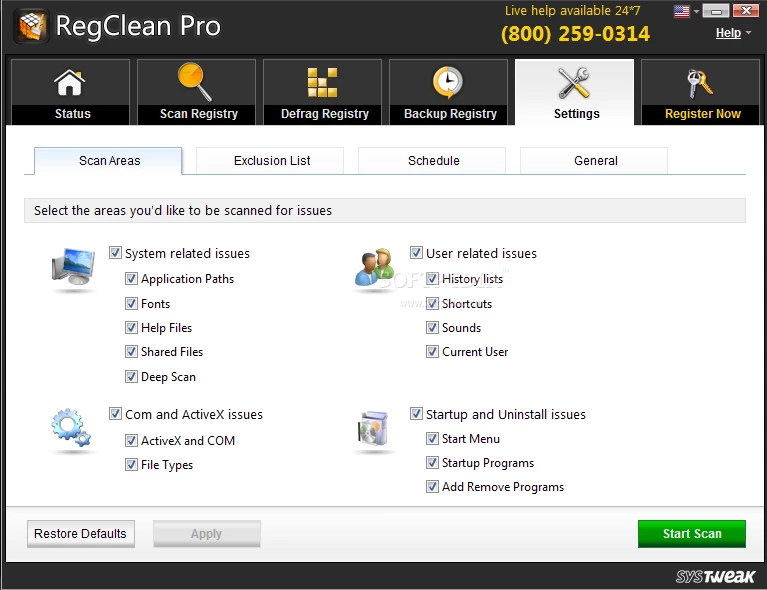
When users frequently install, update, and remove desktop programs, video games, or specialized drivers, the operating system does not always delete the corresponding registry instructions. Over many months of heavy usage, these broken links can cause software conflicts, missing file warnings, or delayed application startup times as the system attempts to load instructions for resources that no longer exist. SysTweak RegClean Pro scans categorized areas—such as shared DLLs, application paths, uninstaller references, and user-specific settings—to isolate and prune these dead ends. By clearing out these abandoned keys, it aims to reduce the time the operating system spends querying the database during everyday computing tasks, keeping the directory tree physically smaller and more organized.
While modern operating systems handle routine background maintenance better than older builds, a dedicated desktop utility provides visual control over exactly what gets removed. Users choose a localized desktop application over built-in command-line tools because it provides a clear graphic interface to review flagged entries, sort them by severity, and exclude specific paths before deletion. The utility also bundles specific functions like registry defragmentation and backup modules, keeping all database maintenance tasks in a single interface rather than requiring multiple scripts. This makes it a specialized administrative tool rather than a general-purpose cleaner, appealing to those who want explicit, documented control over registry modifications without risking manual text-editing errors.
Key Features
- Invalid Entry Detection: The software scans specific registry hives to identify broken file associations, missing shared DLLs, and abandoned application paths left behind by improperly uninstalled programs. Users can review the scan results categorized by severity, export the list as a text file for documentation, and manually uncheck specific keys if they prefer to leave them intact for legacy software compatibility.
- Registry Defragmentation: Beyond simple deletion, the application includes an optimization module that compacts the physical size of the registry database on the local hard drive. By rewriting the database without the blank spaces left by deleted keys, it reduces fragmentation and shortens the time required for the operating system to read stored instructions during the boot sequence or when launching heavy applications.
- Automatic Backup and Restore: Because altering system databases carries inherent risks of software corruption, the program automatically generates a complete backup of the registry before executing any clean-up commands. If a newly cleaned system experiences unexpected software behavior or missing dependencies, users can access the Rescue Center tab to select a timestamped backup and revert all changes to their exact previous state.
- Scheduled Maintenance Scans: Administrators can configure the utility to run automated background checks on a daily, weekly, or monthly basis without manual intervention. This scheduler allows the program to quietly monitor for new obsolete entries, log the findings, and prompt the user for a clean-up only when the error count reaches a specific threshold, minimizing daily workflow interruptions.
- Multi-User Account Cleaning: Instead of requiring administrators to log into every individual profile on a shared computer to perform maintenance, the software can scan the registry hives of all local accounts simultaneously. This centralizes maintenance tasks for IT staff managing family computers or shared office workstations, allowing a single admin account to clear out obsolete entries across the entire machine.
- Ignore List Management: For advanced users who intentionally keep legacy software, modified game files, or custom registry modifications, the application provides a dedicated exclusion list. Adding specific program paths or exact registry keys to this list ensures the scan engine will completely bypass them during all future clean-up operations, preventing accidental breakage of specialized internal tools or custom configurations.
How to Install SysTweak Regclean Pro on Windows
- Download the executable Windows installer package from the official vendor website to your local storage drive, ensuring you have administrative privileges on your current user account.
- Locate the downloaded setup file in your default downloads folder and double-click it to initiate the installation wizard interface.
- Accept the user account control prompt that appears on your screen to grant the installer the necessary administrative permissions required to write files to the system directory.
- Read through the end-user license agreement presented on the first screen and click the acceptance button to proceed to the destination folder selection phase.
- Review the optional installation screens carefully, as the setup wizard often includes pre-checked boxes offering companion software or browser toolbars; decline these by selecting the Custom installation method and unchecking the relevant boxes.
- Choose your preferred installation directory, or leave the default path pointed to your primary system drive, and click the install button to begin unpacking and copying the application files.
- Wait for the green progress bar to complete, then decide whether you want the program to place a shortcut on your desktop and in your start menu before closing the wizard.
- Upon the first launch, the application will automatically begin an initial diagnostic scan of your registry database, which you can manually cancel by clicking the stop button if you prefer to configure your application settings first.
SysTweak Regclean Pro Free vs. Paid
SysTweak RegClean Pro operates on a freemium business model, offering a restricted trial edition alongside a premium paid tier designed for long-term usage. When users first install the application without purchasing a license, they enter a limited evaluation period that typically lasts for 24 hours. During this brief window, the software allows users to perform full system scans to identify obsolete registry keys, but it imposes a strict cap on the number of actual repairs it will execute—often limiting the user to fixing a maximum of 15 entries at a time. This makes the free tier function primarily as a diagnostic scanner to show you what is wrong, rather than a practical maintenance tool for heavily cluttered systems.
To unlock the full cleaning capabilities and remove the repair cap, users must purchase an annual subscription license, which typically costs $39.95 for a single computer installation. Upgrading to the paid tier instantly removes the repair limits, allowing the software to clear thousands of accumulated invalid entries with a single click. The paid tier also unlocks ongoing access to the registry defragmentation module, enables the automated background scheduling tools, and grants users priority access to technical customer support for troubleshooting.
The vendor does not offer a perpetual, one-time purchase option; maintaining the full feature set requires renewing the software subscription each year. However, the purchase generally includes a 60-day money-back guarantee, giving users a comfortable window to request a full refund if the utility fails to resolve their specific system stability issues or if they are unsatisfied with the results. For users who only need a one-time clean-up to fix a specific software conflict, the trial limitations often prove frustrating, making the transition to the paid tier mandatory for ongoing, unrestricted maintenance and defragmentation tasks.
SysTweak Regclean Pro vs. CCleaner vs. Wise Registry Cleaner
CCleaner provides a much broader approach to system maintenance, extending far beyond the registry to clear browser caches, temporary files, memory dumps, and tracking cookies. While its built-in registry scanner is less aggressive and generally finds fewer deep-level obsolete keys, its free tier does not artificially cap the number of items you can delete, making it more practical for users who refuse to pay for optimization tools. SysTweak Regclean Pro is the better choice only if you need dedicated registry defragmentation capabilities and multi-user registry scanning, provided you are willing to pay for the annual subscription to unlock those specialized database tools.
Wise Registry Cleaner focuses heavily on the exact same database optimization tasks but delivers a fully functional free tier that allows unrestricted cleaning and compacting without a strict 24-hour expiration timer. It categorizes safe and unsafe registry fixes clearly using color-coded badges, which helps beginners avoid deleting critical system files, whereas the SysTweak application tends to emphasize a single large fix button that can feel less transparent to novice users. Users should opt for SysTweak Regclean Pro if they prefer its automated scheduling tools and centralized rescue center interface, but Wise Registry Cleaner remains the superior choice for anyone who wants thorough database compacting on a strict budget.
Ultimately, SysTweak Regclean Pro justifies its place on a professional workstation when an administrator wants a focused, premium utility with aggressive scanning algorithms and automatic backups baked into a simple interface. However, for general consumers simply trying to free up space or fix a minor software conflict after uninstalling a program, the broader toolset of CCleaner or the generous free tier of Wise Registry Cleaner will solve the job with significantly less friction and no mandatory annual fees.
Common Issues and Fixes
- The scan results show hundreds of critical errors on a healthy computer. This happens because the software flags every empty key, broken shortcut, and abandoned file path as an error, even though most of these orphaned entries have zero physical impact on system performance. You can safely ignore low-impact alerts by reviewing the scan categories, expanding the drop-down menus, and unchecking minor issues before clicking the clean button.
- The application refuses to fix all found items during the trial period. The vendor intentionally restricts the unregistered trial edition to resolving only a tiny handful of entries, usually capping out at exactly 15 fixes per scan. To clean the remaining items, you must either purchase the annual subscription to unlock the full software capabilities or manually delete the flagged keys using the default Windows Registry Editor.
- A recently used application stops working after running a registry cleanup. Overly aggressive scanning can sometimes delete a shared DLL path or custom registry key that a poorly coded or older application still relies on to function. To reverse this damage, open the software, navigate to the Rescue Center or Backup tab, select the most recent backup file created before your last scan, and click restore to revert the database to its previous working state.
- Unwanted companion toolbars appear in the browser after installation. The setup wizard often bundles optional promotional software or secondary optimization tools from the same developer, which install automatically if you click through the setup screens too quickly. To prevent this, always select the Custom or Advanced installation method during setup and explicitly uncheck all boxes related to additional software before allowing the installation to proceed.
- The software continuously displays popup alerts from the system tray. By default, the program configures itself to run in the background at startup and regularly prompts you to perform maintenance scans or purchase the premium license. You can stop these persistent notifications by opening the application settings menu, disabling the automatic startup option, and turning off scheduled background scans so the program only runs when you manually launch it from your desktop.
Version Latest — 2025
- Added expanded registry detection definitions to identify and remove newer types of obsolete application traces.
- Improved the scanning engine algorithms to significantly reduce the time required for complete system analysis.
- Fixed a minor compatibility issue where the application would occasionally freeze during the "System Cleaning" phase on certain Windows configurations.
- Enhanced the backup and restore functionality to ensure greater data safety before applying registry fixes.
- Optimized user interface responsiveness for a smoother navigation experience during deep scans.