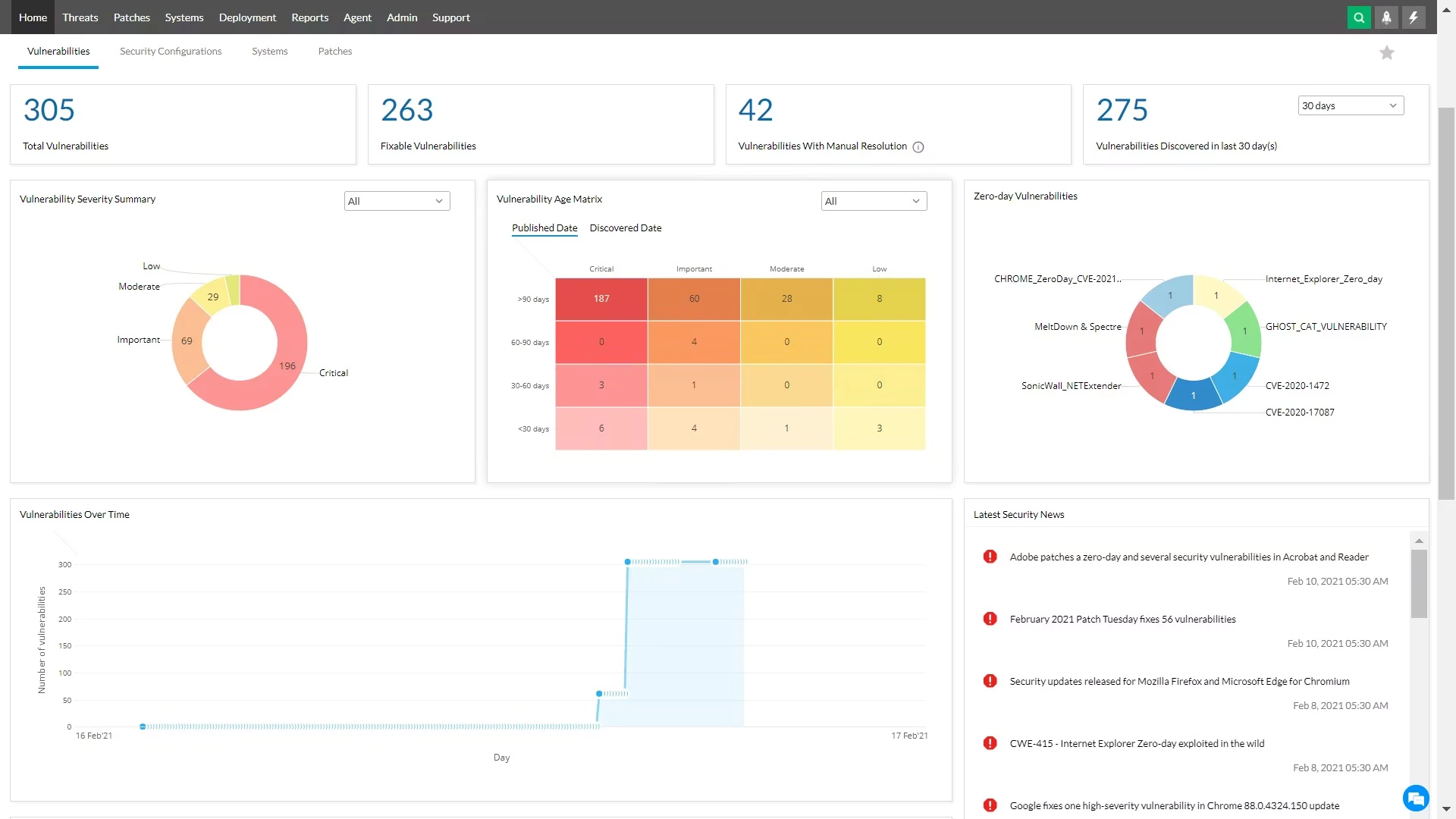
ManageEngine Manager Plus functions as a centralized command center for IT administrators tasked with orchestrating user identities, access permissions, and infrastructure settings across Active Directory, Microsoft 365, and Exchange Server. Rather than relying on scattered Microsoft Management Console snap-ins or maintaining a sprawling library of PowerShell scripts, infrastructure teams deploy this platform to handle routine identity lifecycles from a single dashboard. The software bridges the gap between on-premises domain controllers and cloud-based directories, allowing system administrators to execute bulk modifications, generate compliance audits, and safely delegate tasks to non-technical help desk staff. By unifying administrative interfaces, the application eliminates the friction of switching between local server tools and external web portals to onboard a single employee.
While the application hosts its web server and embedded database on a local Windows 10 or Windows 11 machine, the primary interaction for the IT staff happens entirely through a standard web browser. Deploying the software on a dedicated host provides direct, low-latency communication with domain controllers and local network resources. Administrators prefer this centralized architecture because it removes the need to install active management clients or remote server administration tools on individual help desk workstations. By confining API calls, directory queries, and PowerShell script executions to a single host machine, IT departments maintain a strict security boundary. This approach grants authorized staff the exact tools needed to reset passwords, create mailboxes, or modify group memberships without risking accidental damage to the broader domain architecture.
The platform addresses the daily friction points of IT operations. When a new batch of employees joins a company, manually creating their accounts, assigning them to the correct distribution lists, setting up their home folders, and applying the software licenses takes hours of repetitive clicking. ManageEngine Manager Plus replaces this manual effort with template-driven automation. An administrator or HR liaison can simply select a predefined template, fill in the employee's name and department, and the software handles the backend routing. This consistency ensures that no user receives excess privileges by mistake and no required compliance attribute is left blank.
Key Features
- Bulk Object Provisioning: Administrators can create or modify hundreds of user accounts, security groups, and computer objects simultaneously by importing standard CSV files. The application maps CSV columns directly to directory attributes, allowing the automatic generation of user principal names, department fields, manager assignments, and proxy addresses. This bypasses the repetitive manual entry required in standard interfaces and significantly reduces transcription errors during large-scale onboarding events.
- Help Desk Delegation: The software includes a granular role-based access control system that lets IT managers assign specific organizational units and tasks to non-admin staff. A tier-one support technician can be granted the exact permission to unlock accounts or reset passwords in a specific branch office without ever receiving native domain administrator credentials. All actions performed by delegated technicians are logged for security auditing.
- M365 and Exchange Integration: Rather than toggling between on-premises domain tools and cloud portals, administrators can provision a user account, assign a Microsoft 365 license, and generate an Exchange mailbox in a single operation. The console synchronizes these actions so that local directory changes immediately reflect in connected tenant environments. This unified workflow prevents licensing discrepancies and ensures new hires have immediate access to their email.
- Stale Account Cleanup: IT departments can configure automated schedules to identify inactive user accounts and computer objects based on the last logon timestamp. The system can automatically execute a sequence of actions, such as disabling the account, moving it to a quarantined organizational unit, removing its group memberships, and finally deleting it after a specified retention period. This maintains directory hygiene and reduces the attack surface.
- Multi-Level Approval Workflows: To maintain strict change control, the platform allows administrators to mandate approval chains for specific directory actions. If a manager requests a new security group or elevated access for an employee, the request enters a holding state until authorized personnel review and approve the action directly within the console. This prevents unauthorized privilege escalation and keeps an exact record of who approved the change.
- Built-in Compliance Reporting: The application ships with pre-configured reporting templates designed to meet compliance standards like SOX, HIPAA, and PCI. Administrators can generate detailed lists of recently modified security groups, locked-out users, unused computer accounts, or expiring passwords. Users can schedule these reports to run during off-hours and automatically export the results as PDF, CSV, or Excel files directly to management mailboxes.
How to Install ManageEngine Manager Plus on Windows
- Download the primary Windows installer executable from the official ManageEngine website to your chosen host machine, ensuring the hardware has sufficient RAM and storage for database operations.
- Launch the downloaded executable as an administrator to bypass local user access control restrictions and initiate the extraction process.
- Accept the vendor license agreement and specify a local destination folder. It is recommended to choose a drive with high read and write speeds to accommodate the embedded PostgreSQL database operations that the software relies on.
- Configure the default web server ports when prompted by the setup wizard. The installation typically defaults to port 8080 for standard HTTP and 8443 for HTTPS traffic, but you must change these values if another application on the host machine already occupies them.
- Review the installation directory and disk space requirements, then click the install button to allow the wizard to copy all required binaries, scripts, and web server files to the local disk.
- Complete the installation wizard and opt to initialize the application in console mode for the first run. This initial launch allows the backend database schema to build its structures and verify domain connectivity.
- Navigate to the Windows Start menu, locate the ManageEngine application folder, and select the shortcut to install the application as a Windows Service. Running the software as a service ensures the management web server automatically starts when the host boots.
- Open a supported web browser on the local machine and navigate to the localhost address using the port specified during installation to access the main administrative dashboard. Log in using the default administrative credentials provided in the official documentation, and proceed to the domain configuration page.
ManageEngine Manager Plus Free vs. Paid
ManageEngine offers this software through a tiered licensing model that separates capabilities based on organizational size, required automation depth, and compliance needs. The Standard tier focuses primarily on directory reporting, bulk object creation, and basic help desk delegation. This tier requires an annual subscription calculated by combining the total number of managed domains with the number of help desk technicians requiring access to the console. The base subscription handles an unrestricted number of directory objects, making the cost predictable for growing companies that hire frequently but maintain a static IT support staff.
Organizations requiring advanced orchestration, such as policies for automated inactive account cleanup, group policy object management, and multi-level approval workflows, must opt for the Professional tier. The Professional license also introduces support for managing external contacts and organizational units directly from the web dashboard. Additional modules, such as specialized backup and recovery tools or dedicated governance risk and compliance packages, are sold as separate add-ons outside of the base Standard or Professional subscriptions. This modular approach allows companies to pay only for the exact auditing and management tools they utilize.
For smaller environments, educational test labs, or temporary migration projects, the vendor provides a Free edition. When users download the initial software, it operates as a fully unlocked trial of the Professional tier for a limited number of days. Once the trial period expires without a purchased license, the installation automatically downgrades to the Free edition. This free version retains the core functionality of the Standard tier but strictly caps management capabilities at a maximum of 100 domain objects. This limit makes the free tier suitable only for very small offices or controlled laboratory testing, meaning production environments will necessitate a paid upgrade.
ManageEngine Manager Plus vs. Quest ActiveRoles vs. SolarWinds Access Rights Manager
Quest ActiveRoles targets massive enterprise environments with complex, policy-driven directory requirements. It excels at enforcing strict business rules across distributed directories, ensuring that every object creation or modification adheres to exact corporate standards before it writes to the backend database. However, Quest ActiveRoles typically carries a higher total cost of ownership, requires specialized training to configure its rule sets, and licenses its product based on the total number of managed objects rather than the number of administrators. Organizations with a massive user base but a small IT team will find Quest significantly more expensive to deploy and maintain.
SolarWinds Access Rights Manager focuses heavily on the auditing, analysis, and visualization of file server permissions and directory access rights. It is built specifically to map out exactly who has access to specific network shares, identify high-risk access configurations, and generate compliance evidence regarding those file permissions. While it offers basic user provisioning features, its primary strength is forensic visibility into file structures rather than serving as an everyday bulk creation and help desk delegation dashboard. IT security teams prefer SolarWinds for audit trails, but help desk teams find it less optimized for rapid onboarding tasks.
ManageEngine Manager Plus is the better fit for organizations that want a straightforward, centralized web interface for day-to-day bulk directory operations and help desk delegation without a massive deployment curve. It bridges the gap between basic directory tools and heavy enterprise identity platforms by offering affordable, technician-based pricing that scales logically. If an IT department spends hours writing individual PowerShell scripts to create users, assign Microsoft 365 licenses, and configure Exchange mailboxes simultaneously, the ManageEngine interface reduces that manual workload to a few clicks through a standardized template.
Common Issues and Fixes
- Port conflicts block the web server from starting. If another service like a local Apache instance, Tomcat server, or alternative database already binds to port 8080 or 8443, the ManageEngine console will fail to load on startup. Administrators must open the configuration files located in the installation directory and assign an unused port to the embedded web server, then restart the application.
- Access Denied (Error 80070005) when deleting or modifying accounts. This error occurs when the specific service account running the ManageEngine application lacks the necessary native permissions in the target directory. Verify that the configured service account has been granted explicit read and write rights to modify the specific organizational units where the failure happens.
- The Windows Service stops immediately after starting. This failure often points to a Java heap memory exhaustion issue or an ungraceful previous shutdown that corrupted a temporary lock file. Running the provided troubleshooting batch files in the application's binary folder usually clears the stale process locks and allocates sufficient memory for the service to stay active.
- Microsoft 365 and Exchange remote actions fail to execute. The application relies on background PowerShell sessions to communicate with cloud tenants and local mail servers. Administrators must ensure that the host machine's execution policy allows remote signed scripts and that all required Exchange or Microsoft 365 management modules are properly installed and updated on the local system.
- Database connection errors during large report generation. When pulling complex compliance reports spanning tens of thousands of users, the embedded database may time out before rendering the data. Increasing the query timeout limits in the administrator settings and ensuring the disk drive hosting the software is a high-speed solid-state drive will resolve the data retrieval bottleneck.
Version 11.5.2600.09 — January 2026
Based on the release notes for version 11.5.2600.09 released in January 2026 (specifically for the Unified Endpoint Management platform, often associated with Endpoint Central which shares this versioning scheme):
Version 11.5.2600.09 — January 2026
- Added a new alert notification to proactively inform administrators about the approaching End of Support (EOS) dates for legacy macOS versions.
- Improved the stability of the Endpoint DLP module by resolving a crash that occurred when printing from the application.
- Fixed an issue where keyword-based data classification in the Endpoint DLP module failed to recognize specific text patterns.
- Fixed a bug that prevented the "All Users" group from appearing within the Temporary Access policy settings in Device Control.
- Resolved an issue affecting file scanning and restriction enforcement on remote drives within the Endpoint DLP module.
- Fixed a problem related to user group exclusions not functioning correctly in Device Control policies.